Knowing how to check the oil level on your BMW is one of the simplest yet most important steps to keep your car running smoothly. You might think it’s a task only mechanics can handle, but it’s easier than you expect—and doing it yourself can save you time and money.
If you want to avoid costly repairs and keep your engine in top shape, this guide will show you exactly how to do it, step by step. Keep reading, and you’ll gain the confidence to check your BMW’s oil like a pro.
Locate The Oil Dipstick
Locating the oil dipstick is the first step to check your BMW’s oil level. The dipstick helps you see how much oil is inside the engine. Knowing the dipstick’s location saves time and avoids confusion.
Dipsticks are usually brightly colored. They stand out in the engine bay for easy spotting. Most BMW models have the dipstick near the engine block.
Open The Hood Of Your Bmw
Start by opening the hood safely. Pull the hood release lever inside the car. Then, lift the hood and secure it with the prop rod. This gives clear access to the engine area.
Identify The Dipstick Handle
Look for a small loop or handle on the dipstick. It is often yellow, orange, or red. These colors help you find it quickly. The handle is easy to pull out by hand.
Check The Dipstick Location In Different Bmw Models
- Older BMWs have a traditional dipstick near the front of the engine.
- Some newer BMWs may not have a dipstick; they use electronic sensors instead.
- Refer to your owner’s manual if you cannot find the dipstick.
Clean Around The Dipstick Area
Remove any dust or dirt near the dipstick. Use a clean cloth to wipe the area. This prevents debris from entering the engine when you pull the dipstick out.

Credit: www.samleman.com
Prepare Your Bmw
Preparing your BMW before checking the oil level helps get an accurate reading. Taking the right steps ensures safety and prevents mistakes. A few simple actions make the process smooth and effective.
Park On A Level Surface
Find a flat and even spot to park your BMW. This stops the oil from pooling unevenly. A level surface gives a true oil level measurement. Avoid slopes or uneven ground to prevent errors.
Turn Off The Engine
Switch off the engine completely before checking oil. Let the car rest for a moment after turning off. This stops oil from circulating and settling. Checking with the engine on gives false readings.
Wait For Engine To Cool
Allow the engine to cool down before opening the hood. Hot engine parts can cause burns or injuries. Cooling also lets oil settle at the bottom of the pan. Waiting 10 to 15 minutes is usually enough.
Check The Oil Level
Checking the oil level in your BMW is a simple yet vital task that helps keep your engine running smoothly. Neglecting this can lead to engine damage and costly repairs. Taking a few minutes to check the oil regularly ensures your car stays in top shape and gives you peace of mind on the road.
Remove The Dipstick
Start by opening the hood of your BMW and locating the dipstick. It usually has a brightly colored handle, making it easy to spot. Pull the dipstick out slowly and carefully to avoid dripping oil on the engine.
Clean The Dipstick
Use a clean rag or paper towel to wipe off the oil from the dipstick completely. This step is crucial to get an accurate reading. Have you noticed how often people skip this and get misleading results?
Reinsert And Remove Dipstick
Push the cleaned dipstick back into its tube all the way. Then pull it out again to check the oil level. This process resets the reading so you can see the current oil level clearly.
Read The Oil Level
Look at the end of the dipstick to find the oil marks. The oil should be between the minimum and maximum indicators. If it’s too low, you’ll need to add oil—don’t let the level drop below the minimum.
Interpret Oil Level Indicators
Understanding how to interpret your BMW’s oil level indicators is crucial for maintaining engine health. These indicators give you a clear picture of whether your engine oil is at the right level or needs attention. Ignoring them can lead to engine damage or poor performance.
Minimum And Maximum Marks
Your BMW’s oil dipstick or electronic display will show two key marks: the minimum and maximum oil levels. The oil level should always stay between these marks to ensure proper lubrication.
If the oil level is below the minimum mark, your engine is at risk of running dry, which can cause serious damage. On the other hand, oil levels above the maximum mark can lead to increased pressure and leaks.
Check the oil when the engine is cool and on a level surface to get an accurate reading. If you see the oil close to the minimum mark, it’s time to add oil before it drops further.
What To Do If Oil Is Low
Finding your oil level low can be stressful, but acting quickly makes all the difference. First, identify the correct oil type specified in your BMW’s owner manual.
Use a clean funnel to add oil slowly, checking the level frequently to avoid overfilling. Overfilling can cause foaming and reduce the oil’s ability to protect your engine.
If your oil level drops frequently, consider scheduling a service to check for leaks or oil consumption issues. Have you noticed your oil level dropping faster than expected? That’s a clear sign to get your BMW inspected.
Using Bmw’s Digital Oil Level Check
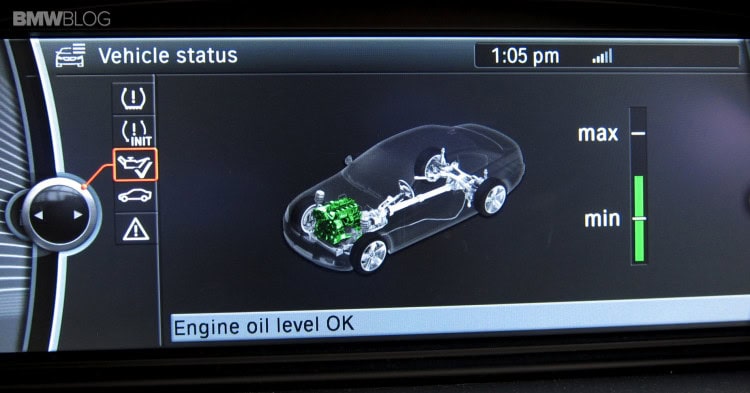
Using BMW’s digital oil level check is a modern way to monitor engine oil. This feature lets drivers check oil levels quickly without lifting the hood. It uses sensors and the onboard computer to provide accurate readings. This method is safe and easy for anyone to use.
Accessing The Onboard Computer
Start by turning on your BMW’s ignition without starting the engine. Use the iDrive controller or steering wheel buttons to access the main menu. Look for the “Vehicle Info” or “Car” option on the display screen. Select this option to open the vehicle settings menu.
Navigating To Oil Level Menu
Within the vehicle settings, find the “Oil Level” or “Engine Oil” menu. Scroll through the options using the iDrive controller or buttons. The menu may be under “Service” or “Maintenance” sections. Select the oil level option to proceed.
Reading Digital Oil Level
The screen will show the current oil level in the engine. This reading is usually displayed as a bar or numerical value. Ensure the car is on a flat surface for an accurate result. If the oil level is low, plan to add oil soon.
Credit: www.babybmw.net
Tips For Accurate Oil Checks
Checking your BMW’s oil level accurately is crucial for keeping the engine running smoothly. Small mistakes during the process can lead to incorrect readings and potential engine damage. The following tips will help you get the most precise measurement every time you check your oil.
Check Oil When Engine Is Cold
Always check the oil level when your engine is cold or has been off for at least 15 minutes. Hot oil can give a false reading because it expands and flows differently. If you check right after driving, the oil may not have settled back into the pan, leading to an inaccurate level.
Avoid Overfilling
Adding too much oil can be just as harmful as having too little. Overfilling puts extra pressure on seals and can cause leaks or damage. Pour oil slowly and stop frequently to recheck the level. Have you ever wondered why your engine runs rough after an oil change? Overfilling might be the hidden culprit.
Regular Oil Monitoring
Don’t wait for warning lights to appear before checking your oil. Make it a habit to check the level regularly, such as once a month or before long trips. This simple routine helps catch leaks or oil consumption issues early, saving you from costly repairs.

Credit: bmwtuning.co
Frequently Asked Questions
How Do I Check The Oil Level On A Bmw?
To check your BMW’s oil level, park on a flat surface and turn off the engine. Use the car’s onboard computer or dipstick to read the oil level. Follow your model’s manual for specific instructions to ensure accurate measurement.
When Is The Best Time To Check Bmw Oil Level?
Check your BMW’s oil level when the engine is cold or has been off for at least 10 minutes. This allows the oil to settle for an accurate reading. Avoid checking right after driving to prevent false low or high readings.
Can I Check Bmw Oil Level Without A Dipstick?
Yes, many newer BMW models use an electronic oil level sensor. You can check oil levels through the iDrive system or dashboard display. Refer to your owner’s manual for the exact menu path to access oil level information.
How Often Should I Check Oil Level In My Bmw?
Check your BMW’s oil level at least once a month or before long trips. Regular checks help prevent engine damage and maintain optimal performance. Always follow the maintenance schedule recommended in your BMW owner’s manual.
Conclusion
Checking your BMW’s oil level is crucial for engine health. Regular checks help prevent damage and ensure smooth operation. Always park on a level surface before checking. Use the dipstick for accurate readings. Add oil if the level is low, following the manual’s guidelines.
Clean tools ensure better results. Regular maintenance extends your vehicle’s life and performance. Consistent oil checks save you from costly repairs. Stay proactive and keep your BMW running smoothly. Your car will thank you with better performance. Safe driving ensures a longer-lasting vehicle.
Remember, a little care goes a long way!