Have you ever noticed the term “DCM” on your Toyota and wondered what it means? If so, you’re not alone.
Understanding what DCM stands for and how it affects your car can save you from confusion and unexpected issues down the road. You’ll discover exactly what DCM is, why it matters for your Toyota, and how it helps keep your vehicle running smoothly.
Keep reading, because knowing this simple piece of your car can make a big difference in your driving experience.
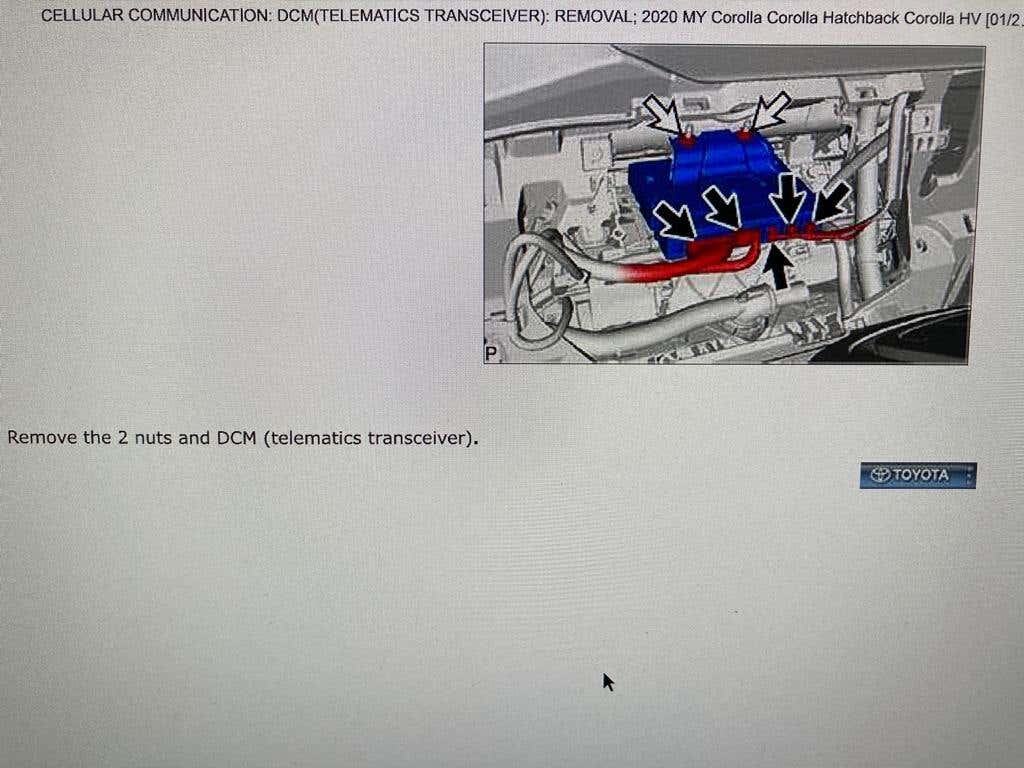
Credit: www.toyotanation.com
Role Of Dcm In Toyota Vehicles
The DCM, or Data Communication Module, plays a vital role in your Toyota vehicle’s connectivity and overall performance. It acts as the bridge between your car and the digital world, managing communication with external networks and services. Understanding its role helps you appreciate how modern technology enhances your driving experience and safety.
What Dcm Does
The DCM connects your Toyota to various online services, including emergency response, navigation updates, and remote vehicle diagnostics.
It sends and receives data through cellular networks, enabling features like automatic crash notification and stolen vehicle tracking.
Think of the DCM as your car’s way to talk to the cloud, keeping you informed and connected without needing your phone.
How Dcm Affects Your Car
The presence of a DCM can improve your car’s safety by automatically alerting emergency services if you’re in an accident.
It also helps maintain your vehicle’s health by sending diagnostic information to Toyota, which can notify you about needed maintenance before problems grow.
Without a functioning DCM, you might lose access to these helpful features, potentially missing out on timely alerts or assistance.
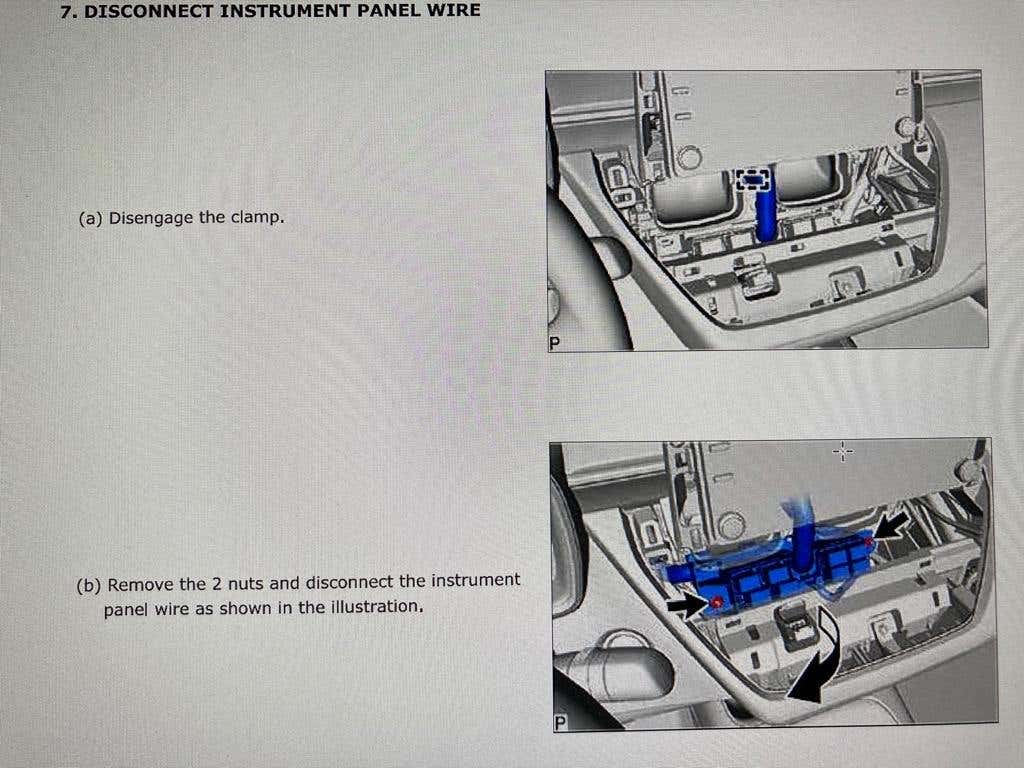
Credit: www.toyotanation.com
Common Signs Of Dcm Issues
Detecting issues with the DCM (Data Communication Module) in your Toyota is crucial. The DCM controls many electronic functions in your vehicle. Recognizing common signs helps avoid bigger problems and costly repairs. Below are some clear signs that your DCM might have issues.
Warning Lights And Messages
Warning lights often appear on the dashboard when the DCM malfunctions. The check engine light is the most common indicator. You might also see messages like “Service Required” or “System Malfunction.” These alerts show that the vehicle’s communication system has trouble.
Sometimes, the warning lights blink or stay on longer than usual. This irregular behavior signals a possible DCM fault. Ignoring these signs can lead to more serious electrical problems.
Performance Problems Linked To Dcm
Engine performance may drop due to DCM issues. Your Toyota might stall or hesitate during acceleration. Rough idling and poor fuel efficiency are also common symptoms.
Other performance problems include difficulty starting the engine or sudden loss of power. The DCM controls signals between different parts, so a fault disrupts normal function.
Sometimes, the vehicle’s systems like ABS or traction control may not work properly. This happens because the DCM manages communication between these systems and the engine control unit.
Diagnosing Dcm Problems
Diagnosing issues with the DCM (Data Communication Module) in your Toyota can feel confusing at first. Yet, understanding how to identify problems early can save you time and money. You don’t need to be a mechanic to grasp the basics of what to look for and when to seek professional help.
Tools Used For Diagnosis
To check your Toyota’s DCM, technicians use specialized tools designed to read communication signals and error codes. An OBD-II scanner is one of the most common devices, allowing you to access fault codes stored in the vehicle’s computer.
Some advanced diagnostic tools can monitor real-time data, helping pinpoint if the DCM is sending or receiving signals correctly. These tools often connect via Bluetooth or USB to a smartphone or laptop for easier analysis.
- OBD-II scanner for basic error code reading
- Advanced diagnostic software for real-time data
- Multimeter to check electrical connections and power supply
When To Visit A Mechanic
If your Toyota is showing warning lights related to communication errors or if you notice inconsistent behavior with connected systems like remote start or telematics, it’s time to get professional help. Simple code readers may not fully diagnose complex DCM issues.
Trying to fix DCM problems without the right experience might cause more harm than good. Mechanics have access to manufacturer-specific diagnostic tools and can perform firmware updates, which are often necessary to resolve DCM faults.
Ask yourself: has your vehicle started behaving unusually after a recent software update or accident? This can be a strong sign that the DCM needs expert attention.
Credit: www.toyotanation.com
Fixing And Maintaining The Dcm
Fixing and maintaining the DCM (Data Communication Module) in your Toyota is essential for keeping your vehicle’s connectivity features running smoothly. The DCM controls critical functions like remote start, emergency assistance, and vehicle tracking. Ignoring its issues can disrupt these conveniences and even affect safety systems.
Repair Options
If your DCM starts showing errors or stops working, you have several repair options to consider. Sometimes, a simple software update from your Toyota dealer can fix glitches without replacing parts.
In more serious cases, the entire DCM unit might need replacement. This can be done at a dealership or by a certified auto electrician who has experience with Toyota’s systems.
Have you noticed your Toyota’s connected services acting up after a software update? It’s worth asking your service provider if a DCM reset or reprogramming is available before jumping to replacement.
Preventive Maintenance Tips
- Keep your vehicle’s software updated.Regular updates often include fixes for DCM-related bugs.
- Protect your car’s electrical system.Avoid water damage and ensure battery health to prevent DCM malfunctions.
- Check for recall notices.Toyota occasionally issues recalls related to electronic modules like the DCM.
- Use authorized service centers.They have the right tools and knowledge to maintain your DCM properly.
Have you ever wondered how a small module can affect so many features? By taking simple steps to maintain your DCM, you can avoid unexpected breakdowns and costly repairs. Your attention to these details keeps your Toyota connected and safe on the road.
Impact Of Dcm On Vehicle Safety
The Data Communication Module (DCM) plays a vital role in your Toyota’s safety system. It connects different electronic parts to ensure smooth and safe vehicle operation. Any malfunction in the DCM can directly affect your car’s safety features.
Maintaining the DCM is essential to keep your Toyota running safely and reliably. Ignoring DCM problems may lead to serious safety risks on the road.
Safety Features Controlled By Dcm
The DCM manages many safety functions, including:
- Airbag deployment coordination
- Anti-lock braking system (ABS) control
- Traction and stability control
- Emergency call systems (eCall)
- Vehicle crash detection and alert
These features depend on accurate data from the DCM. A faulty DCM may delay or stop these safety systems from working properly.
Risks Of Ignoring Dcm Issues
Ignoring DCM faults can cause:
- Failure of airbags to deploy in a crash
- Loss of control due to faulty ABS or stability systems
- Delayed emergency response notification
- Unexpected vehicle shutdowns or errors
Small DCM problems can become costly and dangerous quickly. Early diagnosis and repair protect you and your passengers.
Upgrading Or Replacing The Dcm
The Data Communication Module (DCM) in your Toyota plays a crucial role in connecting your vehicle to various services like emergency assistance and remote diagnostics. Knowing when to upgrade or replace this component can save you from unexpected disruptions. Understanding the signs and costs involved helps you make an informed decision that keeps your car’s communication systems running smoothly.
When Replacement Is Needed
Not every issue with your DCM requires a full replacement. If you notice persistent connectivity problems, such as loss of OnStar or Toyota Safety Connect services, it could indicate a failing DCM.
Physical damage to the module or repeated error codes during diagnostics also signal replacement time. Sometimes, software updates fix minor glitches, but hardware failure demands swapping out the module.
Ask yourself: Has your vehicle lost connection during critical moments? This experience can highlight the need for a reliable DCM replacement.
Cost Considerations
Replacing a DCM is an investment that varies based on your Toyota model and location. Parts alone can range from $200 to $600, while labor might add another $100 to $300 depending on the shop.
Keep in mind that some repairs might be covered under warranty or recall programs. Checking with your dealer can sometimes save you money or even get the replacement done for free.
Considering these costs upfront helps you avoid surprises and plan your budget better. Would you rather pay now or risk bigger expenses later due to faulty communication features?
Frequently Asked Questions
What Does Dcm Mean On A Toyota?
DCM stands for Data Communication Module in Toyota vehicles. It is a component that facilitates connectivity features. It allows the car to communicate with external networks for various functions. These include navigation, remote diagnostics, and emergency services. This enhances the driving experience by keeping you connected.
How Does Dcm Work In My Toyota?
The DCM in your Toyota uses cellular networks for communication. It sends and receives data to provide services like real-time traffic updates. It also enables remote vehicle monitoring and control via smartphone apps. This connectivity enhances vehicle safety and convenience for the driver.
Is Dcm Necessary For Toyota Vehicles?
DCM is not mandatory, but it offers numerous benefits. It provides enhanced safety features, like automatic emergency calls. It also offers convenience through real-time navigation and remote vehicle management. These features improve your driving experience and offer peace of mind.
Can I Disable Dcm In My Toyota?
Yes, you can disable the DCM in your Toyota. However, doing so might limit certain features. These include remote services, real-time traffic updates, and emergency assistance. Consult your vehicle’s manual or a Toyota dealer for guidance on disabling it safely.
Conclusion
The DCM in your Toyota helps keep you connected and safe. It sends important data to assist with emergencies and updates. Knowing its role can ease worries about your car’s tech. Regular checks ensure the system works well every day.
Stay aware of this device for a smoother driving experience. Your Toyota’s DCM is a small part with big benefits. Simple but important. Understanding it makes you a smarter car owner.