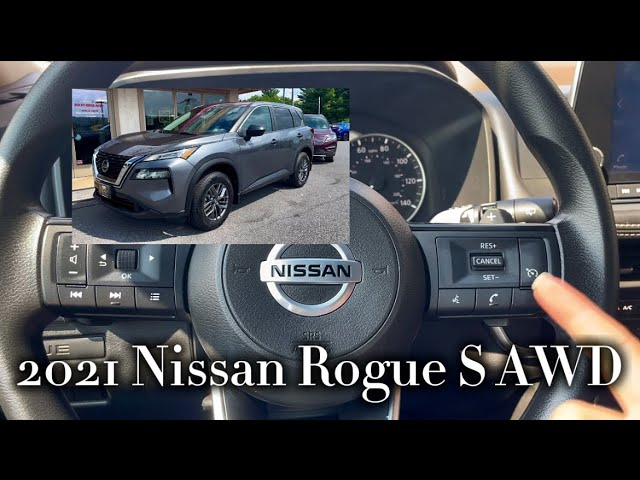
If you want to make your drives in the Nissan Rogue smoother and less tiring, learning how to set cruise control is a game-changer. Imagine keeping your speed steady without constantly pressing the gas pedal—giving your foot a well-deserved break.
Whether you’re on a long highway trip or just want to maintain a safe speed, knowing how to use cruise control can save you stress and improve your driving experience. Keep reading, and you’ll master this simple feature in no time.
Locate The Cruise Control Buttons
Knowing where the cruise control buttons are is key to using this feature in your Nissan Rogue. These buttons let you set and adjust your speed without touching the gas pedal. They are designed to be easy to reach and use while driving. Finding them quickly helps you drive more comfortably and safely on long trips.
Location On The Steering Wheel
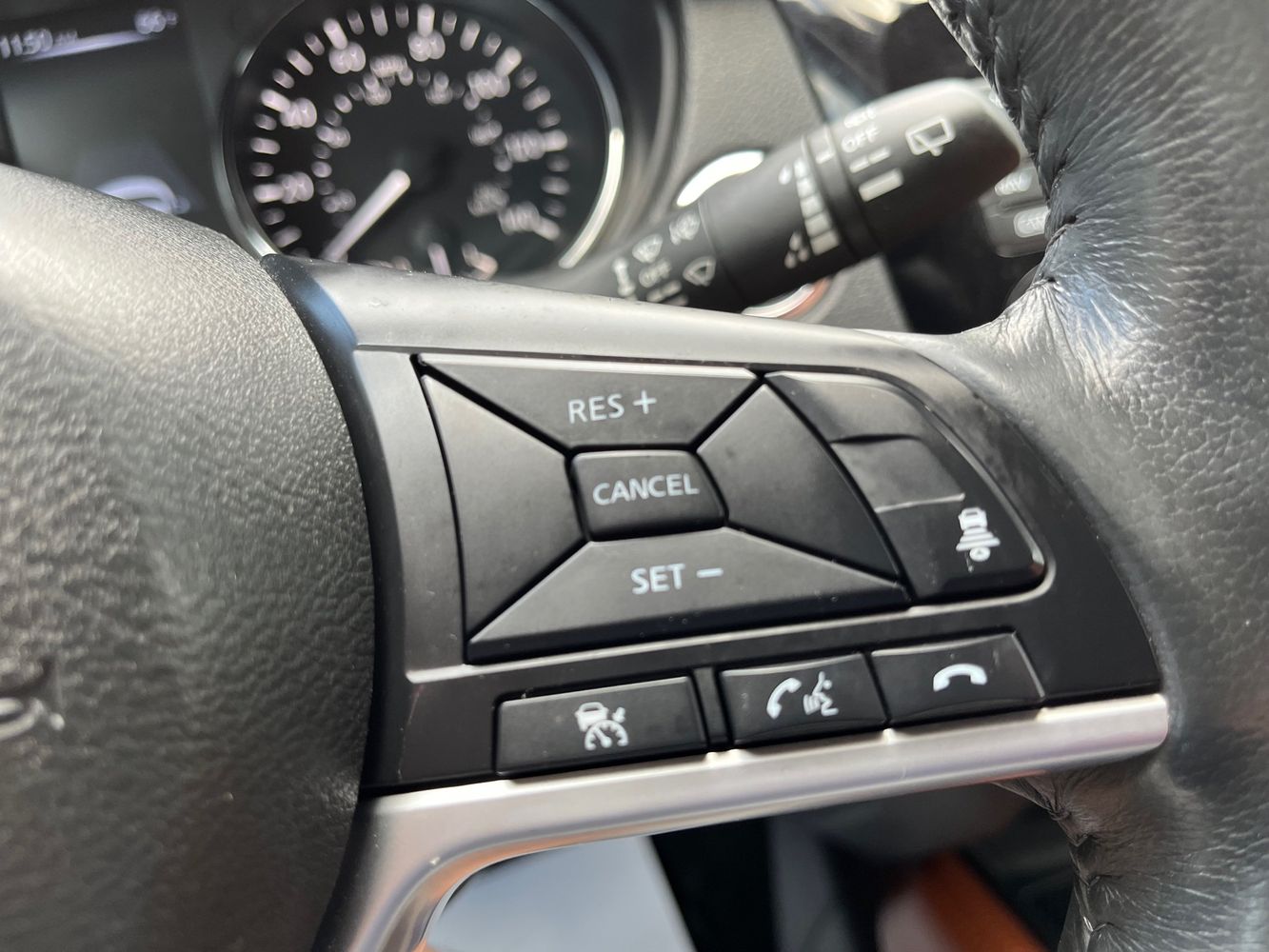
The cruise control buttons are usually on the right side of the steering wheel. This placement lets you operate them with your thumb while keeping both hands on the wheel. The buttons are grouped together for easy access.
Identifying The Buttons
- ON/OFF:Turns the cruise control system on or off.
- SET:Sets your current speed as the cruising speed.
- + / -:Increases or decreases the set speed in small steps.
- CANCEL:Temporarily stops cruise control without turning it off.
- RES (Resume):Reactivates the previously set speed after cancellation.
Visual Features To Help Identify
The buttons often have clear symbols or text labels. For example, “SET” and “CANCEL” are written in simple letters. The plus and minus signs stand for speed adjustments. These clear markings reduce confusion while driving.
Turn On The Cruise Control System
Turning on the cruise control system in your Nissan Rogue is the first step toward a more relaxed driving experience on highways and long stretches of road. It helps maintain a steady speed, reducing the need to constantly press the accelerator. Understanding exactly how to activate this system ensures you use it safely and effectively.
Start by finding the cruise control buttons on your steering wheel. In the Nissan Rogue, these are usually on the right side, marked clearly with symbols like a speedometer or the word “CRUISE.” Familiarize yourself with these controls before driving so you can activate cruise control without distraction.
Press The On/off Button
Once you identify the cruise control buttons, press the On/Off button to activate the system. You’ll often see a small light or icon appear on your dashboard, indicating that cruise control is ready to use. This visual cue confirms the system is engaged but not yet controlling your speed.
Check Your Speed And Environment
Before setting cruise control, ensure you are driving at a safe and legal speed. Cruise control works best on open roads with minimal traffic and good weather. Ask yourself: Is the traffic steady enough for cruise control, or will constant braking be necessary?
Prepare To Set Your Desired Speed
After turning the system on, you’re ready to set your cruising speed. Make sure your foot is off the accelerator pedal, and keep your hands on the steering wheel. This readiness helps you respond quickly if you need to override the system.
Set Your Desired Speed
Setting your desired speed in the Nissan Rogue’s cruise control helps maintain a steady pace. This feature reduces the need to keep your foot on the gas pedal. It makes long drives more comfortable and less tiring. Understanding how to set the speed properly ensures safe and efficient driving.
Accelerate To Your Preferred Speed
Drive your Nissan Rogue until you reach the speed you want to maintain. Use the gas pedal to adjust your pace smoothly. Make sure the speed is safe and legal for the road you are on. Avoid sudden speed changes before activating cruise control.
Activate The Cruise Control System
Press the cruise control button on the steering wheel to turn the system on. A light will appear on the dashboard showing the system is active. Do this only after reaching your chosen speed. This step prepares the car to hold your speed steady.
Set The Speed With The “set” Button
Press the “Set” button on the steering wheel once your desired speed is reached. The Nissan Rogue will keep this speed without needing to press the gas pedal. Check the dashboard to confirm the speed is set. You can now relax your foot from the accelerator.
Adjust Speed As Needed
- To increase speed, press the “+” button gently.
- To decrease speed, press the “-” button carefully.
- Adjustments happen in small steps for smooth control.
This feature lets you fine-tune your speed without turning off cruise control. Always pay attention to traffic conditions while adjusting.

Credit: www.peltiersubaru.com
Adjust The Speed While Driving
Adjusting the cruise control speed while driving in your Nissan Rogue helps keep your ride smooth and safe. The controls are easy to use and allow quick speed changes without touching the brake or accelerator. This way, you stay focused on the road and maintain a comfortable pace.
Increase Speed
To raise the speed, press the cruise control lever or button labeled “+” or “RES.” Each press usually increases the speed by 1 mph or 1 km/h. Hold the button to increase speed faster until you reach the desired pace. The new speed will set automatically once you release the button.
Decrease Speed
Lower the speed by pressing the lever or button marked “–” or “SET.” Every press drops the speed by 1 mph or 1 km/h. Hold the button down to slow down quickly to a safer or more comfortable speed. The cruise control adjusts smoothly without jerking the car.
Cancel And Resume Cruise Control
The cancel and resume functions of cruise control in the Nissan Rogue help drivers maintain control and convenience. Canceling cruise control lets you quickly stop the system without turning it off. Resuming lets you return to your previous speed easily. These features make driving smoother and safer.
How To Cancel Cruise Control
Press the cancel button on the steering wheel to stop cruise control. You can also tap the brake pedal. Either action pauses the system without erasing your set speed. This lets you take control anytime.
How To Resume Cruise Control
After canceling, press the resume button on the steering wheel. The Nissan Rogue will accelerate back to the last set speed. This avoids the need to reset your desired speed manually.
Tips For Using Cancel And Resume Safely
- Cancel cruise control when approaching traffic or curves.
- Use resume only when road conditions are safe.
- Stay alert and ready to brake at all times.
- Remember canceling does not turn off the system fully.
Credit: www.goodguysautohouse.com
Safety Tips For Using Cruise Control
Using cruise control in your Nissan Rogue can make long drives more comfortable, but safety should always come first. Understanding how to use this feature responsibly helps prevent accidents and keeps you in control. Here are some practical safety tips to consider every time you set your cruise control.
Keep Your Focus On The Road
Even though cruise control handles speed, your attention must remain sharp. Avoid distractions like texting or adjusting the radio while cruise control is active. Your hands should stay on the wheel, ready to react instantly if traffic conditions change.
Avoid Using Cruise Control In Bad Weather
Rain, snow, fog, or icy roads can make cruise control dangerous. The system can’t respond to slippery conditions like a human driver can. Turn off cruise control when visibility is low or the road is slick to maintain full control of your Nissan Rogue.
Adjust Your Following Distance
Set a safe gap between your car and the vehicle ahead when using cruise control. Nissan Rogue models often have adaptive cruise control options—use them wisely to keep extra space. This reduces the risk of sudden braking and rear-end collisions.
Know How To Cancel Or Override Cruise Control Quickly
Familiarize yourself with how to deactivate cruise control instantly. Your foot on the brake or pressing the cancel button should stop the system immediately. Practicing this can save you in unexpected traffic situations.
Use Cruise Control Only On Highways And Open Roads
This feature works best on highways with steady traffic flow. Avoid using it in city driving or on winding roads where speed changes are frequent. Think about whether cruise control truly benefits your current driving environment before activating it.
Troubleshooting Common Issues
Setting cruise control in your Nissan Rogue should be a smooth experience, but sometimes things don’t work as expected. Troubleshooting common issues can save you time and frustration on the road. Understanding what might cause problems helps you fix them quickly and keep your drive comfortable.
Why Won't My Cruise Control Activate?If your cruise control doesn’t turn on, check if your vehicle is moving at the minimum speed required—usually above 25 mph. Another common issue is that the brake pedal might be slightly pressed, which disables cruise control for safety. Have you noticed if the brake light stays on or if the brake pedal feels stuck? These small details often cause activation problems.
What To Do When Cruise Control Disengages UnexpectedlyCruise control can turn off suddenly if you tap the brake, press the clutch (for manual transmissions), or hit the cancel button. Sometimes, rough road conditions or steep hills cause the system to disengage as a safety feature. If this happens often, check your brake lights and sensors—dirty or faulty sensors can send wrong signals to the cruise control system.
How To Fix Cruise Control Speed FluctuationsSpeed fluctuations during cruise control may indicate a problem with the throttle or the vehicle’s speed sensors. Dust or debris on the throttle body can cause uneven acceleration. Cleaning the throttle body or having a mechanic inspect the speed sensors can improve performance. Have you experienced your speed dropping unexpectedly? It’s a sign to check these components.
When Cruise Control Warning Light Stays OnA persistent warning light related to cruise control often signals an underlying system issue. It could be an electrical fault, a blown fuse, or a malfunctioning sensor. Checking your vehicle’s manual for fuse locations or running a diagnostic scan can pinpoint the exact problem. Don’t ignore the warning light—it’s your car’s way of asking for attention.
Simple Checks Before Visiting a Mechanic- Ensure the cruise control switch is fully turned on.
- Verify your foot is off the brake and clutch pedals.
- Look for any loose or damaged wiring under the steering column.
- Inspect the brake lights—sometimes a faulty bulb can disable cruise control.
Have you tried these quick checks already? They often resolve the issue without a trip to the mechanic.

Credit: www.capitalone.com
Frequently Asked Questions
How Do You Activate Cruise Control In A Nissan Rogue?
To activate cruise control in a Nissan Rogue, press the “ON” button on the steering wheel. Then, accelerate to your desired speed and press the “SET” button. The system will maintain this speed until you press the brake pedal or turn off the cruise control.
Can You Set Cruise Control At Any Speed?
No, you cannot set cruise control at any speed. In a Nissan Rogue, cruise control can typically be set at speeds above 25 mph. This ensures that the system functions safely and efficiently, especially on highways and open roads.
How Do You Adjust Cruise Control Speed?
To adjust the cruise control speed in a Nissan Rogue, use the “+” or “-” buttons on the steering wheel. Press “+” to increase speed and “-” to decrease it. The system will adjust the speed accordingly while maintaining safe driving conditions.
Does Nissan Rogue Have Adaptive Cruise Control?
Yes, newer Nissan Rogue models come equipped with adaptive cruise control. This feature adjusts your speed based on the traffic ahead. It uses sensors to maintain a safe distance from vehicles in front, enhancing your driving experience and safety.
Conclusion
Setting cruise control in your Nissan Rogue is simple and helpful. It makes long drives easier and saves fuel. Just follow the steps carefully and stay safe on the road. Practice using cruise control in a quiet area first. Always pay attention to traffic and road conditions.
Enjoy a smoother, more relaxed drive every time you use it.