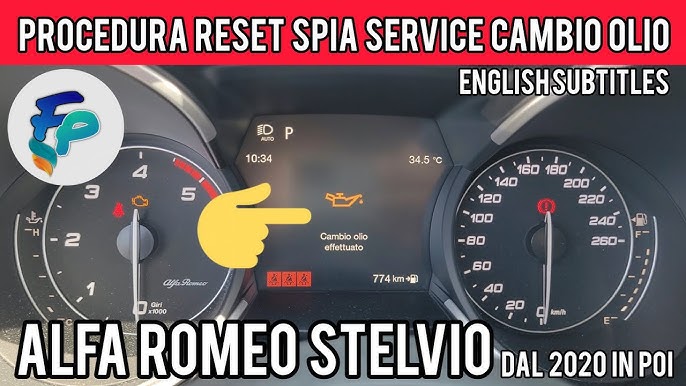
Your Alfa Romeo just had an oil change, but the oil change light is still on. That flashing warning can be annoying and confusing.
You might wonder if something’s wrong or if the light just needs a reset. The good news is, you can easily reset the oil change light yourself without a trip to the mechanic. You’ll learn simple, step-by-step instructions to turn that light off quickly and safely.
Keep reading to take full control of your car’s maintenance and avoid unnecessary stress.
Oil Change Light Purpose
The oil change light on your Alfa Romeo plays a key role in vehicle maintenance. It alerts you when it is time to change the engine oil. Keeping track of this helps protect your engine. It prevents damage and keeps your car running smoothly. Understanding the purpose of this light makes maintenance easier. It also helps you avoid costly repairs later.
What The Light Indicates
The oil change light signals the need for an oil change. It comes on after a set number of miles or driving hours. This number varies by model and driving conditions. The light means the oil quality is low or dirty. Engine oil lubricates moving parts and reduces wear. When oil degrades, it cannot protect the engine well. The light warns you to replace the oil soon.
Why Resetting Matters
Resetting the oil change light after an oil change is important. It turns off the warning and tracks the new oil’s usage. Without resetting, the light might stay on incorrectly. This can cause confusion about the car’s real condition. A reset also helps the car’s computer know when the next change is due. Proper resetting keeps your maintenance schedule accurate. It ensures the oil change light works correctly next time.
Tools Needed
Resetting the oil change light on your Alfa Romeo is a straightforward task, but having the right tools ready makes the process smoother and more efficient. Before you dive into the reset, it’s essential to gather everything you need to avoid interruptions or mistakes. This preparation saves time and prevents frustration during the reset procedure.
Items Required For Reset
- Owner’s Manual:Your Alfa Romeo’s manual often includes specific instructions tailored to your model.
- Ignition Key:You’ll need this to power on the vehicle without starting the engine.
- Dashboard Controls:Familiarity with your steering wheel buttons or dash interface is crucial, as most resets involve navigating menus.
- Basic Tools (Optional):Sometimes, you might want a small flashlight to see dashboard icons clearly or a cloth to clean the display.
Not much is required, but knowing exactly what you need helps you stay confident while resetting the light.
Precautions Before Reset
Before you reset the oil change light, ask yourself—have you actually changed the oil or is it just a false alert? Resetting the light without an oil change can lead to missed maintenance and engine damage.
Always ensure the vehicle is parked on a flat surface and the engine is off before starting the reset. This avoids any accidental movements or errors during the process.
Also, double-check that your dashboard is clear of any other warning lights. Ignoring those could hide more serious issues that need attention before resetting the oil change light.
Resetting Steps For Alfa Romeo
Resetting the oil change light on your Alfa Romeo is an essential step after performing an oil change. This light serves as a reminder to maintain your vehicle’s engine health, and resetting it ensures you get accurate notifications for future oil changes. Here are clear and easy steps to reset this light using different methods tailored to your Alfa Romeo model.
Using The Dashboard Controls
Start by turning on your Alfa Romeo’s ignition without starting the engine. Use the buttons on your steering wheel or dashboard to navigate to the “Service” or “Settings” menu on your instrument cluster display.
Look for the oil change or maintenance reset option. Once found, press and hold the reset button until the oil change light blinks or disappears. This process usually takes around 10 seconds.
Have you noticed how straightforward this method is? It’s convenient because you don’t need any extra tools or devices.
Reset Via Infotainment System
Your Alfa Romeo’s infotainment system allows you to reset the oil change light through its touchscreen interface. Access the “Vehicle” or “Car” menu from the main screen.
Navigate to “Maintenance” or “Service” settings, then select the oil change reset option. Confirm your choice when prompted, and the system will clear the oil change alert.
This method is especially handy if you prefer using your car’s digital interface instead of buttons. It also provides additional maintenance info that you might find useful.
Manual Reset Method
If your Alfa Romeo doesn’t support digital resets or you want to try a hands-on approach, the manual reset is an option. Turn the ignition to the ON position without starting the engine.
Press and hold the trip reset button on the dashboard for about 10 seconds until the oil change light starts to blink or turns off. Release the button once the light resets.
This method can feel a bit old-school but works reliably on older Alfa Romeo models. Have you ever been surprised by how such a simple button press can solve a maintenance reminder?
Credit: www.stelvioforum.com
Troubleshooting Tips
Resetting the oil change light on your Alfa Romeo can sometimes be straightforward, but there are moments when the light just won’t turn off. Troubleshooting these issues helps you avoid unnecessary visits to the mechanic and ensures your car’s maintenance system works properly. Let’s look at what to do if the reset doesn’t work and common errors you might encounter.
When Reset Doesn’t Work
If your oil change light stays on after a reset attempt, don’t panic. This usually means the system hasn’t registered the reset command or there’s a deeper issue at play.
- Check if you followed the reset procedure exactly. Sometimes holding the button too briefly or releasing it too early can prevent the reset.
- Look at your car’s battery health. A weak battery might not allow the system to update properly.
- Inspect the oil level and quality. Low or dirty oil can keep the warning light active regardless of reset attempts.
Have you ever tried resetting a warning light only to find it back on the next day? This often signals a sensor malfunction or a software glitch, which may require professional diagnostic tools.
Common Errors And Fixes
| Error | Cause | Fix |
|---|---|---|
| Reset button unresponsive | Faulty or stuck button | Try pressing several times or check for debris blocking the button |
| Light returns immediately after reset | Oil change interval not reached or sensor error | Verify oil change was completed; if yes, consider sensor inspection |
| Dashboard displays error codes | Electrical or sensor faults | Use an OBD-II scanner to read codes or visit a mechanic |
Sometimes, the simplest fix is to double-check the oil change itself. Did you use the right oil grade? Did the mechanic reset the system after service? These small details can save you time and frustration.
Maintenance Tips
Keeping your Alfa Romeo in top shape needs regular care. Proper maintenance helps the engine run smoothly and lasts longer. One important part is managing your oil change light. Understanding maintenance tips ensures your car stays healthy and safe on the road.
Regular Oil Change Schedule
Follow the manufacturer’s recommended oil change intervals. Usually, this is every 7,500 to 10,000 miles or every 12 months. Using high-quality oil improves engine performance and protects parts. Mark your calendar or set reminders to never miss an oil change.
Signs To Change Oil Early
Some signs mean it’s time to change oil before the scheduled date:
- Engine sounds louder or rougher than usual.
- Oil looks dark or dirty on the dipstick.
- Warning lights appear on the dashboard.
- Car feels less powerful or sluggish.
- Oil level drops quickly between checks.
Pay attention to these signs to avoid engine damage. Early oil change can save costly repairs later.

Credit: www.youtube.com
Credit: www.giuliaforums.com
Frequently Asked Questions
How Do You Reset The Oil Change Light?
To reset the oil change light on an Alfa Romeo, turn the ignition to “On. ” Then, press the accelerator pedal three times within 10 seconds. Finally, turn the ignition off, and then start the engine to verify the reset.
Why Does The Oil Change Light Stay On?
The oil change light stays on if the system hasn’t been reset post oil change. It’s a reminder for routine maintenance. If it stays on, it might indicate a sensor issue or other problem. Always consult your vehicle’s manual or a professional if unsure.
Can I Reset The Oil Change Light Myself?
Yes, you can reset the oil change light on your Alfa Romeo yourself. Follow the steps in your vehicle’s manual or use the method mentioned above. If unsure, consult a professional to avoid potential issues.
What Tools Are Needed To Reset The Light?
No special tools are required to reset the oil change light on an Alfa Romeo. It involves using the ignition and accelerator pedal. Follow the steps in your vehicle’s manual for precise instructions.
Conclusion
Resetting the oil change light on your Alfa Romeo is simple and quick. Follow the steps carefully to avoid confusion. This small task helps keep your car in good shape. Remember to reset the light after every oil change. It ensures the car’s system tracks maintenance correctly.
Taking care of your vehicle this way saves money and time. Stay on top of your car’s needs easily and confidently.