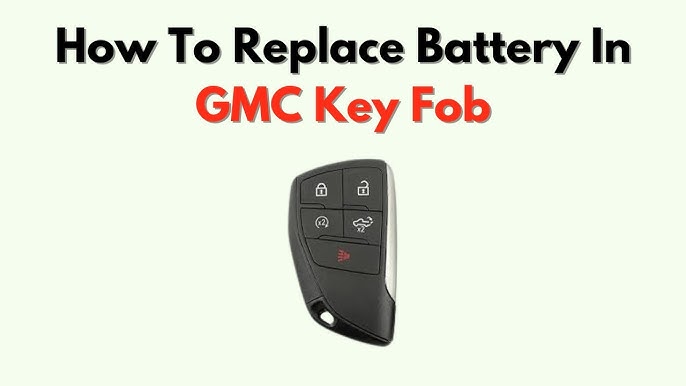
Is your GMC key fob acting up or not working at all? Changing the battery might be the simple fix you need.
You don’t have to visit a dealer or spend money on a replacement just yet. In this guide, you’ll learn exactly how to change the battery in your GMC key fob quickly and easily. Keep reading, and you’ll be back to unlocking your car with confidence in no time.

Credit: www.youtube.com
Identify Your Gmc Key Fob Model
Before you change the battery in your GMC key fob, it’s crucial to identify the exact model you own. Different GMC key fobs have distinct designs and battery types, so knowing your model ensures you buy the right replacement battery and avoid unnecessary hassle.
Many people overlook this step and end up with the wrong battery, causing frustration and extra trips to the store. Have you ever grabbed a battery only to realize it didn’t fit your key fob? Avoid that by taking a moment to identify your key fob first.
Check The Back Of Your Key Fob
Start by looking at the back of your key fob. Most GMC key fobs have a model number or part number printed or engraved there.
This number often looks like “13508483” or “22879720.” Write it down or take a clear photo for easy reference. This simple step saves time and prevents buying the wrong battery.
Compare Your Key Fob’s Shape And Buttons
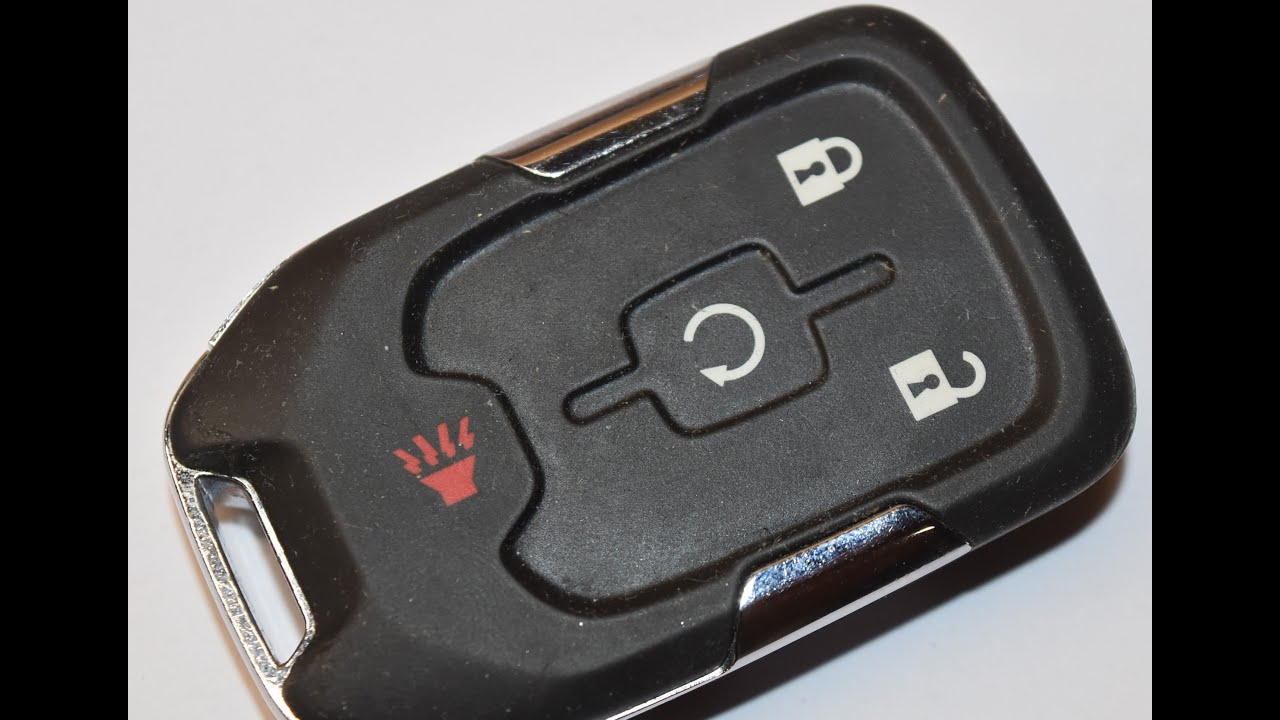
GMC key fobs come in various shapes—some are rectangular, others have a more rounded design. The number and layout of buttons also differ between models.
For example, some key fobs have lock, unlock, remote start, and panic buttons, while others might have fewer or additional features like a tailgate release. Matching your key fob’s physical features to images online can help confirm the model.
Consult Your Vehicle’s Owner Manual
Your GMC owner’s manual is a handy resource. It usually includes detailed information about your key fob, including the model and battery type.
If you don’t have a physical copy, most manuals are available online on GMC’s official website. This ensures you get information straight from the source, which is always reliable.
Look Inside The Key Fob
If you’re comfortable opening the key fob, carefully pry it apart to check the battery inside. The battery itself often has a model number printed on it, such as CR2032 or CR2025.
Make sure to use a gentle tool, like a flathead screwdriver or a coin, to avoid damaging the plastic. Knowing the battery type directly helps you purchase the exact replacement without guessing.

Credit: www.montrosechevrolet.com
Gather Necessary Tools
Before you start changing the battery in your GMC key fob, it’s important to have all the right tools ready. Having these items on hand will make the process smooth and prevent any unnecessary frustration. Missing one small tool can turn a simple task into a complicated one.
Essential Tools For Opening The Key Fob
Most GMC key fobs require a small flathead screwdriver or a coin to pry open the casing. A flat, thin object helps you gently separate the two halves without damaging the plastic. Avoid using sharp knives or anything too thick, as that can break the fob.
Battery Type And Replacement
Knowing the exact battery type your key fob needs saves you a trip back to the store. Usually, GMC key fobs use a CR2032 battery, but it’s smart to check the old battery or your owner’s manual first. Having the replacement battery ready ensures you don’t get stuck halfway through.
Cleaning Supplies For Maintenance
While you have the key fob open, it’s a great chance to clean any dirt or debris inside. Gather a soft cloth or cotton swabs and some rubbing alcohol to gently wipe the contacts. Clean contacts improve battery performance and extend the life of your key fob.
Optional: Small Tweezers Or Plastic Pry Tools
Tweezers or plastic pry tools can be very helpful for lifting out the old battery without touching the contacts. If you’ve ever struggled trying to grab a tiny battery with your fingers, you’ll appreciate having these tools. They reduce the risk of accidental damage and make the swap easier.
Locate The Battery Compartment
Finding the battery compartment in your GMC key fob is the first task. It is usually small and easy to miss. Knowing its location saves time and prevents damage to the fob.
Most GMC key fobs have a specific spot designed for the battery. This spot is often hidden inside a small cover or slot. The battery compartment keeps the battery secure and connected.
Understanding how to locate this compartment helps in changing the battery smoothly. It also ensures your key fob works properly after replacement.
Check The Back Of The Key Fob
Look at the back side of your GMC key fob. The battery compartment is often a small, rectangular cover. It may have a small notch or groove to open it.
Use your fingernail or a flat tool to gently pry the cover open. Do not force it to avoid breaking the plastic.
Inspect For A Sliding Panel
Some GMC key fobs feature a sliding panel instead of a removable cover. This panel slides sideways or upwards. Push it gently in the direction of the arrow or groove.
The battery will be visible once the panel moves. This design helps keep the battery secure while allowing easy access.
Look For A Small Screw
Certain GMC key fob models have a tiny screw securing the battery compartment. Use a small screwdriver to remove it. Keep the screw safe for reassembly.
This screw prevents accidental opening and protects the battery inside.
Refer To Your Vehicle’s Manual
The owner’s manual provides exact details about the key fob’s battery compartment. It often includes pictures and instructions. This is helpful if the compartment is hard to find.
Keep the manual handy for quick reference during battery replacement.
Open The Key Fob
Opening your GMC key fob is the first and most important step to changing its battery. It might seem tricky at first, but with the right approach, you can do it smoothly without damaging the fob. Knowing how to open it correctly saves you time and avoids unnecessary trips to the dealership.
Locate The Seam Or Slot
Start by examining your key fob carefully. Look for a small seam or slot running along the edge where the two halves of the fob meet.
This is usually where the fob splits open. Sometimes, it might feel like there’s no visible gap, but a gentle press or inspection under good light can reveal it.
Use The Right Tool
A flat tool like a small flathead screwdriver or a coin works best for opening the key fob. Avoid using sharp objects that can scratch or damage the plastic.
Insert the tool gently into the slot. If you feel resistance, don’t force it—wiggle the tool slightly to help ease the two halves apart.
Apply Gentle Pressure To Pry Open
Once the tool is in the seam, apply gentle and even pressure to pry the fob open. It should start to separate without much effort.
Keep your fingers steady to avoid slipping and damaging the internal components. If the fob doesn’t open easily, check for any hidden screws or clips that might be holding it together.
Separate The Two Halves Carefully
After loosening the seam, carefully pull the two halves apart. Take your time to avoid snapping any plastic clips inside.
Notice how the battery sits inside. This helps you understand how to position the new one when you replace it.
What If You Can’t Open The Fob?
If you find the fob stubborn or complicated, pause and reassess. Forcing it can cause permanent damage, which might cost more to fix than a new fob.
Sometimes, searching for your specific GMC model’s key fob opening guide or watching a quick video can give you the confidence you need.
Remove The Old Battery
Removing the old battery from a GMC key fob is a simple task that helps keep your key working properly. The battery inside powers the remote functions, so changing it ensures your car responds to commands. Careful removal protects the key fob from damage and keeps the internal parts safe.
Before starting, prepare a small flat tool like a screwdriver or coin. This will help open the key fob’s casing without scratching it. Work on a clean surface to avoid losing small parts.
Find the seam where the two halves of the key fob join. This is usually along the edge of the fob. Some models have a small notch or slot for prying open the case.
Open The Key Fob Case
- Insert the flat tool into the notch or seam.
- Gently twist or pry to separate the two halves.
- Work slowly to avoid cracking the plastic.
- Identify the round battery inside the fob.
- Use your fingers or the tool to lift the battery out.
- Note the battery’s orientation for correct placement of the new one.
- Dispose of the old battery according to local rules.
Insert The New Battery
Inserting the new battery into your GMC key fob is a simple task. It restores the remote’s power and helps your car respond quickly to commands. Take care to place the battery the right way to avoid damage.
Handle the battery gently. Avoid touching the flat sides too much to keep it clean and functional. Align the positive (+) side of the battery facing up unless otherwise noted.
Check Battery Orientation
Look inside the battery compartment. You will see a small diagram showing how to position the battery. Match the new battery’s positive and negative sides with this guide.
Place The Battery Carefully
Hold the battery by the edges. Slide it into the compartment smoothly. Do not force it. The battery should fit snugly without bending or moving.
Secure The Key Fob Cover
After inserting the battery, align the cover with the key fob. Press it firmly until you hear a click or feel it lock in place. This keeps the battery safe inside.
Reassemble The Key Fob
Reassembling your GMC key fob is the final and crucial part of the battery replacement process. It ensures your key fob works perfectly and avoids any damage from improper assembly. Taking your time here can save you from a frustrating trip back to the store or dealer.
Aligning The Key Fob Halves Correctly
Start by lining up the two halves of your key fob carefully. The buttons and battery should sit flush inside without any gaps. Misalignment can cause the buttons to stick or the case not to close properly.
Check that the battery is still seated correctly before snapping the halves together. Does the key blade fit into its slot without forcing? This simple check can prevent damage to internal parts.
Pressing The Key Fob Shell Firmly Together
Hold the two halves and press firmly along the edges until you hear a click. This sound means the clips inside have locked the shell in place. If you don’t hear a click, gently check for any misaligned clips or debris.
Be patient—applying too much force can crack the plastic. If it feels stuck, try pressing along different sections instead of one spot.
Testing Your Key Fob After Assembly
Once reassembled, test every button to make sure they respond correctly. Stand near your vehicle and try locking, unlocking, and activating the panic alarm. If any button feels unresponsive, open the fob again to check the battery placement and button alignment.
Have you ever assumed the battery was dead when the issue was just a loose connection? Testing now saves time and frustration.
Credit: www.youtube.com
Test The Key Fob Functionality
Testing the key fob functionality ensures the battery change was successful. It confirms the remote controls your GMC vehicle as expected. This step helps avoid surprises later, like a non-responsive key fob.
After replacing the battery, check the key fob’s buttons. Make sure each button responds correctly. This includes locking, unlocking, and any other programmed functions.
Check The Lock And Unlock Buttons
Press the lock button and listen for a click or horn beep. Then press the unlock button and watch for door lights or sounds. These signals show the key fob works properly.
Test The Remote Start Function
If your GMC key fob has remote start, test it next. Press the start button following your vehicle’s instructions. The engine should start remotely, confirming the battery is good.
Observe The Key Fob Led Light
Look for a small LED light on your key fob when pressing buttons. A blinking light means the fob sends signals. No light may indicate battery or internal issues.
Try Using The Key Fob From Different Distances
Stand at various distances from your vehicle. Press the lock or unlock buttons each time. The key fob should work within the usual range without delay.
Reset The Key Fob If Needed
Sometimes the key fob needs a reset after battery replacement. Check your GMC manual for reset steps. Resetting can restore full function if problems appear.
Tips For Battery Maintenance
Maintaining the battery in your GMC key fob ensures it works reliably every time. Small habits can extend the battery life and prevent sudden failures. Proper care saves time and avoids frustration when unlocking or starting your vehicle.
Regular maintenance helps you spot battery issues early. Simple checks and handling can keep your key fob functioning smoothly. Follow these easy tips to keep the battery healthy and avoid frequent replacements.
Store Your Key Fob Properly
Keep your key fob away from extreme temperatures. Avoid leaving it in direct sunlight or very cold places. Store it in a dry spot to prevent moisture damage.
Clean The Key Fob Contacts
Use a soft cloth to clean battery contacts regularly. Dirt or corrosion can reduce battery performance. Avoid using water or harsh chemicals on the contacts.
Replace Battery Before It Dies Completely
Change the battery as soon as the key fob shows signs of weakness. Delaying replacement can cause the device to stop working suddenly. Keep spare batteries handy for quick swaps.
Avoid Pressing Buttons Unnecessarily
Press buttons only when needed to save battery power. Constant pressing drains the battery faster. Teach family members to handle the key fob carefully.
Check Battery Type Before Replacement
Use the correct battery model for your GMC key fob. Using the wrong battery can damage the fob or reduce its lifespan. Refer to your car manual for the exact battery type.
Frequently Asked Questions
How Do I Know If My Gmc Key Fob Battery Is Low?
A low battery in your GMC key fob often results in a weaker signal. You may notice that the fob’s response is delayed or requires multiple presses. Additionally, if the range of operation decreases significantly, it’s a clear sign that the battery needs replacement.
What Type Of Battery Does A Gmc Key Fob Use?
Most GMC key fobs use a CR2032 battery. This is a common, coin-cell battery readily available in stores. Always check your vehicle’s manual or the current battery for confirmation. Replacing it with the correct type ensures proper functionality and longevity.
How Often Should You Change The Key Fob Battery?
Typically, a GMC key fob battery lasts between two to three years. However, frequent use may require earlier replacement. If you notice reduced signal strength or delayed response, it’s time for a new battery. Regularly checking the battery condition helps maintain optimal performance.
Can I Replace A Gmc Key Fob Battery Myself?
Yes, you can replace the battery yourself. It’s a simple process requiring minimal tools. Refer to your vehicle’s manual for specific instructions. Ensure you have the correct battery type and follow the steps carefully. DIY replacement can save time and cost compared to dealership services.
Conclusion
Changing the battery in your GMC key fob is quick and simple. You only need a small tool and a new battery. Follow the steps carefully to avoid damage. A fresh battery keeps your key fob working well. This saves time and money by avoiding trips to the dealer.
Now, your key fob should work like new. Keep a spare battery at home for easy replacement next time. Simple care helps your key fob last longer. You can handle this task with confidence.