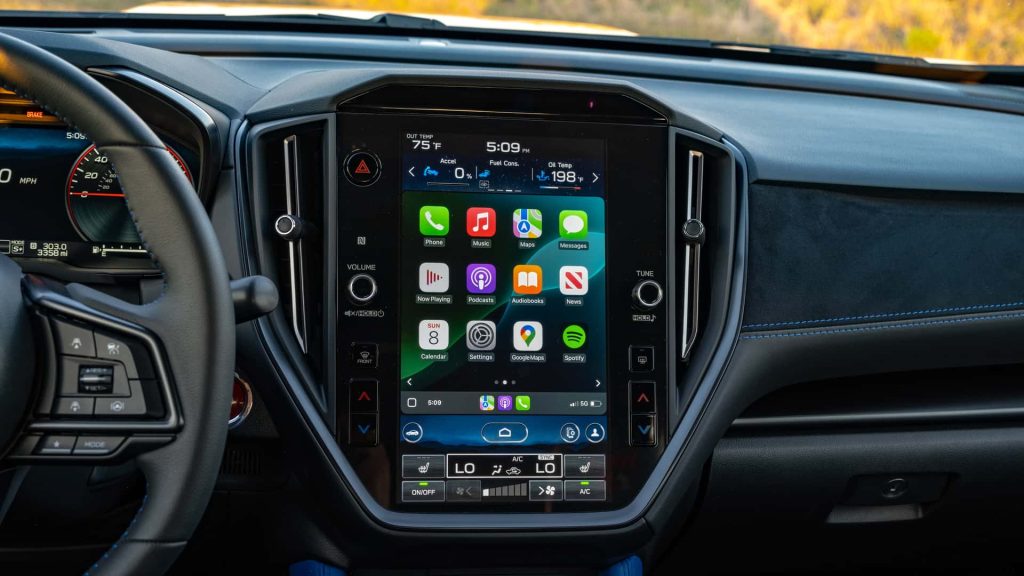
Are you wondering if you need Subaru Starlink to use Apple CarPlay in your car? You might be confused about whether these two systems are connected or if one depends on the other.
Understanding this can save you time, money, and frustration. Keep reading, and you’ll get clear answers that help you make the most of your Subaru’s technology without any hassle.
Credit: www.ascentforums.com
Subaru Starlink Basics
Understanding Subaru Starlink basics helps clarify its role in your car’s tech setup. Starlink is Subaru’s own infotainment system. It offers a mix of entertainment, safety, and connectivity features. Knowing what Starlink does makes it easier to see if you need it for Apple CarPlay.
What Is Subaru Starlink
Subaru Starlink is a multimedia system built into many Subaru vehicles. It combines apps, music, navigation, and vehicle information. Starlink connects your car to your smartphone and the internet. It can also provide safety alerts and emergency services.
Starlink works through a touchscreen in the car’s dashboard. It is designed to be easy to use while driving. The system updates with new features over time.
Key Features Of Starlink
- Access to music apps like Pandora and Spotify
- Built-in navigation with real-time traffic updates
- Hands-free phone calls and messaging
- Safety features like automatic collision notification
- Remote vehicle controls via smartphone app
- Integration with smartphone apps for added convenience
Starlink offers a range of tools for comfort and safety. It keeps drivers connected without distraction. The system enhances the driving experience in many Subaru models.
Apple Carplay Overview
Apple CarPlay is a smart and simple way to use your iPhone while driving. It mirrors your phone’s screen onto your car’s infotainment display, letting you access apps safely without distractions. Understanding how it works and what benefits it offers can help you decide if you want to use it in your Subaru or any other vehicle.
How Apple Carplay Works
Apple CarPlay connects your iPhone to your car either through a USB cable or wirelessly, depending on your car model. Once connected, your car’s touchscreen shows a simplified version of your iPhone interface with easy-to-use icons.
It supports apps like Phone, Messages, Maps, Music, and even some third-party apps like Spotify and Audible. You control CarPlay using your car’s touchscreen, knobs, or voice commands through Siri, so your eyes stay on the road and hands stay mostly off your phone.
Benefits Of Using Apple Carplay
- Safety:CarPlay minimizes distractions by letting you operate your phone with voice commands or simple taps.
- Convenience:You get access to familiar apps and navigation tools without fumbling with your phone while driving.
- Integration:It works seamlessly with your car’s audio system and controls, giving you clear directions and calls through the car speakers.
- Updates:Since CarPlay runs through your iPhone, it automatically gets updated with new features and app support as Apple rolls them out.
Have you ever struggled to check a message or change music while driving? Apple CarPlay can make those moments safer and easier. It’s designed to keep you connected without pulling your focus away from the road.
Compatibility Between Starlink And Carplay
Understanding the compatibility between Subaru Starlink and Apple CarPlay helps drivers choose the right features. Starlink is Subaru’s infotainment system offering various connected services. Apple CarPlay connects your iPhone to the car’s display, allowing easy access to apps and functions. Both systems can work together, but their relationship can be confusing.
Knowing which Subaru models support Apple CarPlay and whether Starlink is needed can clear up doubts. This section explains the compatibility and what you need to use Apple CarPlay in Subaru vehicles.
Which Subaru Models Support Apple Carplay
Most newer Subaru models come with Apple CarPlay support. It started appearing in Subaru vehicles around 2018. Here is a list of common models that support Apple CarPlay:
- Subaru Outback (2018 and newer)
- Subaru Forester (2019 and newer)
- Subaru Crosstrek (2018 and newer)
- Subaru Impreza (2019 and newer)
- Subaru Legacy (2018 and newer)
- Subaru Ascent (all models)
Check your car’s model year and trim for exact compatibility. CarPlay usually comes with the infotainment system on these models.
Is Starlink Required For Apple Carplay
You do not need Subaru Starlink to use Apple CarPlay. Starlink and CarPlay are separate systems. Starlink offers apps, navigation, and connected features. CarPlay mirrors your iPhone’s interface on the car screen.
Apple CarPlay works through the car’s infotainment hardware, not Starlink subscription. You can connect your iPhone via USB or wireless, depending on the vehicle. Starlink subscription may add value but is not necessary for CarPlay functions.
Simply ensure your Subaru model supports CarPlay and has the right infotainment system. Then connect your iPhone to enjoy Apple CarPlay features without Starlink activation.
Credit: www.subaruoutback.org
Setting Up Apple Carplay In Subaru
Setting up Apple CarPlay in your Subaru is a straightforward process that enhances your driving experience by bringing your iPhone’s features directly to your car’s display. You don’t necessarily need Subaru Starlink to use Apple CarPlay, but having the right setup ensures seamless connectivity. Understanding the setup steps and common issues helps you get started quickly and avoid frustration on the road.
Step-by-step Connection Guide
First, make sure your iPhone is running iOS 13 or later for the best compatibility. Connect your iPhone to your Subaru’s USB port using a Lightning cable. Some Subaru models support wireless CarPlay, so check your owner’s manual to see if that applies to you.
- Unlock your iPhone and allow CarPlay access if prompted.
- On your Subaru’s touchscreen, select the Apple CarPlay icon.
- Follow any on-screen instructions to complete the setup.
Once connected, your iPhone apps like Maps, Messages, and Music will appear on the car’s display. It’s that simple to start using Apple CarPlay in your Subaru.
Troubleshooting Common Issues
If Apple CarPlay doesn’t launch automatically, check that your USB cable is Apple-certified and free from damage. Sometimes, switching the USB port can solve connection problems. Also, verify that CarPlay is enabled on your iPhone under Settings > General > CarPlay.
- If the screen remains blank, restart both your iPhone and your Subaru’s infotainment system.
- Ensure your iPhone isn’t locked; CarPlay won’t activate if the phone is locked or on the lock screen.
- Reset network settings on your iPhone if wireless CarPlay keeps disconnecting.
Have you ever been stuck trying to connect your phone in the middle of a trip? Knowing these troubleshooting steps can save you time and stress. What’s the one CarPlay feature you find most useful when driving?
Alternatives To Subaru Starlink For Carplay
Many Subaru owners wonder if Subaru Starlink is necessary to use Apple CarPlay. The good news is that Apple CarPlay works independently of Starlink. There are other ways to enjoy CarPlay features without subscribing to Subaru’s services.
This section explores alternatives to Subaru Starlink for using Apple CarPlay. It also highlights other infotainment options available in Subaru vehicles.
Using Carplay Without Starlink
Apple CarPlay connects directly through your iPhone. It does not require Subaru Starlink for basic functions. Just plug your iPhone into the USB port or connect wirelessly if your Subaru supports it. CarPlay will launch automatically on the vehicle’s screen.
This connection lets you use apps like Maps, Messages, Phone, and Music. The system mirrors your iPhone interface in a driver-friendly way. Starlink subscription only adds extra services like remote start or safety alerts, not CarPlay access.
Other Infotainment Options In Subaru
Subaru vehicles come with various infotainment features aside from Starlink. These include:
- Built-in navigation systems
- Bluetooth audio streaming
- AM/FM and satellite radio
- Voice control for hands-free operation
- Touchscreen displays of different sizes
Some Subaru models support Android Auto alongside Apple CarPlay. This offers flexibility for different smartphone users. You can enjoy a connected driving experience without Starlink.
Credit: www.subaruoutback.org
Cost And Subscription Considerations
Understanding the costs and subscriptions linked to Subaru Starlink helps you decide its value. Knowing these details clarifies if you need Starlink to use Apple CarPlay. Starlink’s fees and subscription plans impact the overall expense of your in-car technology.
Starlink Subscription Fees
Subaru Starlink offers different subscription tiers. Each tier provides distinct features and services.
- Basic plan: Free for a trial period, includes limited features.
- Standard plan: Monthly fee required, adds more apps and safety services.
- Premium plan: Higher monthly fee, full access to advanced features and updates.
Subscription costs vary by model and year. Some Starlink features might come pre-installed but need activation.
Is Paying For Starlink Worth It
Apple CarPlay works without Starlink. Starlink enhances the experience but is not mandatory.
Starlink adds value with remote services, navigation, and safety alerts. Consider your daily driving needs.
If you want basic Apple CarPlay use, Starlink subscription is unnecessary. For extra connected features, the fee might be justified.
Frequently Asked Questions
Do I Need Subaru Starlink For Apple Carplay?
No, Subaru Starlink is not required to use Apple CarPlay. Apple CarPlay works independently on compatible Subaru models. You only need a compatible iPhone and a vehicle with Apple CarPlay support. Starlink is a separate infotainment system service.
How Does Apple Carplay Work With Subaru Vehicles?
Apple CarPlay connects your iPhone to Subaru’s infotainment system via USB or wireless connection. It mirrors your iPhone apps on the vehicle’s display. This lets you use navigation, calls, messages, and music safely while driving.
Can I Use Apple Carplay Without Subaru Starlink Subscription?
Yes, Apple CarPlay does not require a Subaru Starlink subscription. It comes free with Subaru models that support CarPlay. Starlink offers additional connected services but is unrelated to CarPlay functionality.
Which Subaru Models Support Apple Carplay Without Starlink?
Most recent Subaru models from 2018 onward support Apple CarPlay without Starlink. Popular models include Outback, Forester, Crosstrek, and Legacy. Check your vehicle’s manual or Subaru’s website for exact compatibility.
Conclusion
Subaru Starlink is not required to use Apple CarPlay. Apple CarPlay works through your phone and car’s USB or Bluetooth connection. Starlink offers extra apps and services but does not control CarPlay access. You can enjoy Apple CarPlay features without subscribing to Starlink.
This means easy access to maps, music, and calls on your car screen. Keep your setup simple and enjoy driving with Apple CarPlay today.