
Have you ever wondered what happens to your phone’s location when you switch on airplane mode? Does it freeze your location, or does your device keep tracking you without your knowledge?
If you’re concerned about privacy or just curious about how your phone behaves, understanding this can help you take control of your data. Keep reading to uncover the truth about airplane mode and your location—what it really does and why it matters to you.
How Airplane Mode Works
Understanding how airplane mode works can be crucial, especially when you’re trying to manage your device’s connectivity and battery life. Airplane mode is a feature on smartphones and other electronic devices that disables all wireless signals. But what exactly does this mean for your device’s location services and other functionalities? Let’s take a closer look.
Disabling Wireless Signals
When you activate airplane mode, your device immediately cuts off all wireless signals. This means no cellular connection, Wi-Fi, or Bluetooth. This is why your phone doesn’t buzz with notifications or calls when you’re mid-flight. However, some devices allow you to manually turn Wi-Fi and Bluetooth back on while still in airplane mode, offering a bit more flexibility.
Imagine you’re on a long flight and want to listen to music via Bluetooth headphones. You can easily switch on Bluetooth without affecting the airplane mode setting. This shows that while airplane mode cuts off connectivity by default, you still have some control over which signals you want to enable.
Impact On Device Functions
Activating airplane mode has a notable impact on how your device functions. Besides cutting off wireless signals, it significantly reduces battery consumption. With no cellular signals to search for, your device enters a low-power state, conserving energy. This can be a game-changer when you’re trying to stretch your battery life on a long trip.
But what about location services? Airplane mode doesn’t inherently freeze your location. GPS, which doesn’t rely on cellular networks, can still function if you manually enable it. Picture this: you’re using an offline map app while traveling. By keeping GPS active, you can still navigate without cellular data, ensuring you don’t get lost in an unfamiliar city.
Have you ever wondered if airplane mode is enough to ensure privacy? While it limits connectivity, it’s not a foolproof method to go off the grid. Always consider additional privacy settings and options on your device for complete peace of mind.
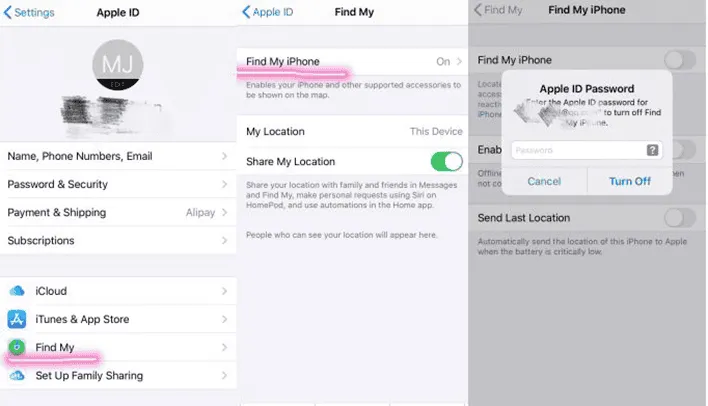
Credit: www.gizchina.com
Location Services And Airplane Mode
Airplane mode affects many phone functions. Location services behave differently when airplane mode is on. Understanding how location tracking works helps explain what happens.
Gps Functionality
GPS uses satellites to find your exact position. Airplane mode does not turn off GPS by default. Your phone can still receive GPS signals even in airplane mode. This means apps using GPS may still show your location. However, without internet, some map features might not work fully.
Wi-fi And Cell Tower Location
Wi-Fi and cell towers help locate your phone too. Airplane mode disables cellular signals. It also usually turns off Wi-Fi and Bluetooth, unless turned on manually. Without Wi-Fi or cell signals, location accuracy drops. Your phone cannot use these signals to improve location data.
Does Airplane Mode Freeze Location?
Airplane mode is designed to stop all wireless signals on your device. It turns off cellular, Wi-Fi, and Bluetooth connections. Many wonder if this setting also freezes their location on maps or apps. Understanding how airplane mode affects location services helps clarify this question.
Effect On Gps Tracking
GPS works through satellites, not cellular networks. Airplane mode disables wireless signals but usually leaves the GPS chip active. This means your device can still receive satellite signals. GPS tracking may continue, but without internet, apps cannot update location in real time. Some devices may pause location updates until connectivity returns.
Influence On Location Accuracy
Location accuracy depends on multiple factors. GPS alone can give a rough position, but Wi-Fi and cellular data improve precision. With airplane mode on, your device loses Wi-Fi and cellular help. This often leads to less accurate location readings. Apps relying on data connections might show outdated or approximate locations.
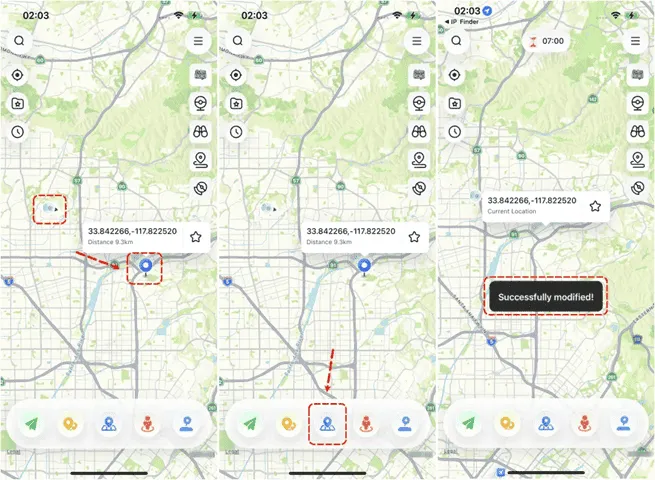
Credit: www.gizchina.com
Exceptions And Variations
Airplane mode usually stops location tracking by cutting off wireless signals. Still, certain exceptions and variations can affect how it works. These depend on the device and the apps in use. Understanding these differences helps explain why location may sometimes update even in airplane mode.
Device-specific Behaviors
Some devices keep GPS active even in airplane mode. This happens because GPS does not need cellular or Wi-Fi signals. Devices with newer operating systems may allow location services to work in limited ways. Others turn off GPS completely to save battery. Settings vary between brands and models. Checking your device manual can clarify what happens when airplane mode is on.
App Permissions And Settings
Apps have different rules for accessing location data. Some apps use cached location info stored before airplane mode was activated. Others request location updates only when connected to the internet. Apps with permission to use GPS may still get location data in airplane mode. You can change app permissions in settings to control this. This makes location tracking more predictable while offline.
Practical Scenarios
Understanding how airplane mode affects your device’s location services is crucial when you rely on navigation or sharing your whereabouts. In practical scenarios, knowing whether your location freezes or updates can save you from frustration and keep you connected, even without cellular signals. Let’s dive into situations where airplane mode interacts with your device’s location features and what that means for you.
Using Maps Offline
When you switch your phone to airplane mode, it turns off cellular, Wi-Fi, and Bluetooth connections. However, your device’s GPS chip remains active. This means you can still access location data and use offline maps to navigate.
Before your flight or trip, download maps for the area you’ll be in. This way, your device can pinpoint your location on the saved maps without needing an internet connection.
Have you ever tried walking around a new city with no signal but still found your way? That’s GPS doing its job in airplane mode. Your location doesn’t freeze; it updates based on satellite data, even if your phone can’t connect to the internet.
Location Sharing While Flying
Location sharing apps usually need an internet connection to update your location in real time. In airplane mode, with all wireless connections off, your phone can’t send location updates to friends or family.
If you turn on Wi-Fi during a flight and connect to the plane’s network, some apps might update your location, but accuracy can be limited. Without Wi-Fi or cellular data, your shared location will freeze at the last known point.
Think about this: if you want loved ones to track your flight or arrival, relying solely on location sharing in airplane mode won’t work. Instead, consider sharing your flight number or arrival time. Have you prepared alternative ways to keep others informed when your location can’t update?

Credit: roamless.com
Tips To Manage Location In Airplane Mode
Managing your location while your device is in airplane mode can seem tricky at first. However, with a few simple adjustments, you can keep your location services active and accurate. These tips will help you stay connected and ensure your apps work properly, even without cellular data.
Enabling Wi-fi For Location Access
Airplane mode turns off cellular signals, but you can usually turn Wi-Fi back on separately. Enabling Wi-Fi allows your device to use nearby networks to estimate your location, which is especially useful indoors or in urban areas.
Try turning Wi-Fi on after activating airplane mode. You’ll notice location-based apps like maps or ride-sharing services still work well because they use Wi-Fi signals to pinpoint your position.
Have you ever been on a plane and needed to check your location? Enabling Wi-Fi in airplane mode might surprise you with how accurate it remains.
Adjusting Settings For Better Accuracy
Your device uses a mix of GPS, Wi-Fi, and Bluetooth to determine your location. When in airplane mode, GPS might still work, but Wi-Fi and Bluetooth can enhance accuracy if enabled.
Go to your location settings and make sure options like “Wi-Fi scanning” and “Bluetooth scanning” are allowed, even when these features are off. This helps your device use available signals to improve location precision.
Small tweaks here can make a big difference in how well your phone tracks where you are. Do you rely on location services for navigation or finding nearby spots? Adjusting these settings could save you time and frustration.
Frequently Asked Questions
Does Airplane Mode Stop Gps Tracking?
Airplane mode disables cellular and Wi-Fi signals but usually keeps GPS active. Your device can still track location using GPS satellites even in airplane mode.
Can Location Freeze While Airplane Mode Is On?
Location may appear frozen because your device stops updating via cellular or Wi-Fi. However, GPS can still provide location data, so it’s not truly frozen.
Why Does My Location Not Update In Airplane Mode?
Without cellular or Wi-Fi, your device can’t use assisted location services. GPS alone may update location slower or less accurately, causing delayed or static location info.
Is Airplane Mode Reliable For Privacy Protection?
Airplane mode limits wireless signals, reducing tracking risks. But GPS can still function, so some location info might be accessible unless GPS is also disabled.
Conclusion
Airplane mode stops your phone’s wireless signals. This pause can make location tracking slow or stop. GPS might still work but less accurately. Apps needing internet won’t update location in real time. Remember, airplane mode mainly cuts off calls, texts, and Wi-Fi.
It does not freeze location fully but limits updates. Knowing this helps you manage your phone better while traveling. Keep airplane mode on to save battery and avoid interruptions. Yet, expect some limits on location services during this time.