Is your ice maker button causing trouble or you simply want to save energy? Knowing how to turn off the ice maker button can make your life easier and prevent unwanted ice buildup.
You don’t have to struggle with complicated instructions or risk damaging your fridge. You’ll discover simple, step-by-step tips to switch off your ice maker quickly and safely. Keep reading to take control of your appliance and avoid common mistakes that many people make.

Credit: www.vevor.ca
Locate The Ice Maker Button
The ice maker button is usually found on the refrigerator’s control panel or inside the freezer. Check near the water dispenser or on the front panel for easy access. Pressing this button can stop or start the ice-making process quickly.
Finding the ice maker button is crucial for turning it off. Many refrigerators have an ice maker, but each is different. Knowing where to look saves time and effort. Let’s explore the common places where the ice maker button might be located.Common Button Locations
The ice maker button is often inside the fridge. Look near the top shelves or on the inner side walls. Some models have it near the ice compartment. Others place it on the freezer door. Check the user manual for specific guidance. The manual often highlights the exact spot.Identifying The Ice Maker Control
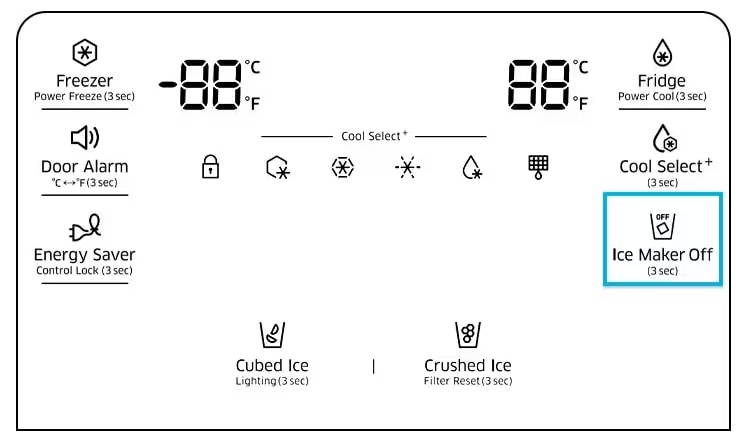
Identifying the control button is easy if you know what to look for. It may be labeled as “Ice Maker” or “Ice On/Off.” Some buttons have a simple symbol like a snowflake. If the button has a light, it might glow when the ice maker is active. Push the button or switch to turn it off. Make sure the light is off if present.Prepare The Ice Maker For Shutdown
Preparing your ice maker for shutdown helps avoid mess and damage. Proper steps keep the ice maker clean and ready for future use. Follow simple actions to clear ice and stop production safely.
Emptying The Ice Bin
Remove all ice cubes from the ice bin. Use a clean container to store the ice if needed. This prevents old ice from melting and causing water buildup. Wipe the bin dry with a soft cloth to remove moisture. Clean bins reduce odors and mold growth during shutdown.
Stopping Ice Production
Locate the ice maker’s power or control button. Press or switch it to the “off” position. This stops the ice maker from making more ice. Some models may have a manual shutoff arm to lift. Check your ice maker’s manual for exact instructions. Turning off ice production prevents overflow and mechanical issues.
Step-by-step Button Shutdown
Turning off the ice maker button can seem tricky at first, but with clear steps, you’ll find it straightforward. Whether you want to pause ice production temporarily or stop it for a longer time, the button shutdown process is your go-to solution. Let’s break down the ways to do this efficiently, so you can manage your ice maker with confidence.
Press And Hold Method
Many refrigerators use a simple press and hold technique to disable the ice maker. Locate the ice maker button on your fridge’s control panel or inside the freezer compartment.
Press and hold this button for about 3 to 5 seconds until you hear a beep or see a light indicator change. This confirms the ice maker is turned off.
Have you noticed how quickly this works compared to fiddling with complicated settings? It’s a fast way to pause ice production without unplugging or shutting down the entire appliance.
Using The Control Panel
If your refrigerator has a digital control panel, turning off the ice maker may involve navigating through the menu. Look for an option labeled “Ice Maker,” “Ice Off,” or something similar.
- Press the control panel to open the settings.
- Scroll or touch to find the ice maker controls.
- Select the option to turn off or disable the ice maker.
This method gives you precise control and sometimes allows you to schedule when the ice maker turns back on. Have you tried this on your model? It’s a neat feature that keeps your freezer organized and efficient.
Alternative Methods For Different Models
Not all refrigerators follow the same rules. Some models require you to remove the ice maker’s power arm—usually a small lever inside the ice bin—to stop ice production.
Others may need you to unplug the ice maker module or switch off a dedicated breaker if you want a more permanent shutdown.
Consult your fridge’s manual or look for a sticker inside the freezer for model-specific instructions. Ever been frustrated by a button that just won’t respond? Knowing your exact model’s quirks saves time and frustration.
Confirming Ice Maker Is Off
Confirming that your ice maker is off is an important step. It helps avoid wasting water and energy. This process also stops unwanted ice buildup in the freezer. Simple checks can quickly tell you if the ice maker is off.
Visual Indicators
Look at the ice maker itself. Most models have a light or switch that shows its status. A glowing light often means the ice maker is active. No light or a switched-off button usually means it is off. Check for any moving parts too. Ice makers often have a small arm or paddle that moves during ice making. If this arm is still, the machine might be off.
Checking Ice Production
Open the freezer and check the ice bin. No new ice means the ice maker is off. You might see old ice cubes, but no fresh ones forming. Watch for about an hour to be sure. If no ice forms, the ice maker is off. This simple test confirms the machine is not running.
Energy Saving Benefits
Turning off the ice maker button can have surprising benefits beyond just convenience. It directly impacts your energy use and the health of your appliance. You might not realize how much power an ice maker consumes or how it affects your fridge’s overall performance.
Reducing Power Consumption
When you switch off the ice maker, your refrigerator uses less electricity. Ice makers run motors and cooling systems that require extra energy. Cutting off this function means the fridge works more efficiently, lowering your electricity bill.
Think about how often you really need ice. If you rarely use it, why pay for power to make it constantly? Even a small reduction in power use adds up over time, saving you money and reducing your home’s carbon footprint.
Extending Appliance Lifespan
Stopping the ice maker reduces wear and tear on your refrigerator’s components. Ice makers involve moving parts and water lines that can wear out or leak over time. By turning it off, you give these parts a break, which can delay expensive repairs or replacements.
Have you noticed your fridge running harder during hot months? Ice makers add extra load, making the compressor work longer. Less strain means your fridge stays in better shape, lasting longer and performing better overall.

Credit: www.amazon.ca
Troubleshooting Common Issues
Troubleshooting your ice maker button can save you time and frustration. Sometimes the button won’t respond, or the ice maker keeps running even after you try to turn it off. Understanding these common problems helps you fix the issue quickly without calling a technician.
Button Not Responding
If your ice maker button doesn’t respond, first check if the freezer is cold enough. The button might be disabled if the temperature is too high. Adjust the freezer temperature to around 0°F (-18°C) and try again after a few minutes.
Sometimes, dirt or residue can block the button’s sensor. Gently clean around the button with a soft cloth and a mild cleaner. If the button still doesn’t work, try unplugging the refrigerator for a minute, then plug it back in to reset the system.
Have you checked if the control lock is on? Some models have a control lock feature that disables buttons to prevent accidental presses. Look for a lock icon or consult your manual to disable this setting.
Ice Maker Keeps Running
If your ice maker won’t stop running, it may be stuck in the “on” position. This can happen if the switch or button is faulty or if the ice maker’s arm is jammed. Check the arm for any ice buildup or obstructions and clear them carefully.
Another cause could be a broken or misaligned sensor that tells the ice maker when the bin is full. If the sensor is dirty or damaged, the machine keeps producing ice. Clean the sensor with a soft cloth, and if the problem persists, the sensor might need replacement.
Sometimes, the wiring inside the ice maker or control panel has an issue. If you feel comfortable, inspect the wiring for loose connections. Otherwise, seek professional help to avoid electrical hazards.

Credit: www.searshomeservices.com
Frequently Asked Questions
How Do I Turn Off The Ice Maker Button?
To turn off the ice maker button, press and hold it for 3-5 seconds. The indicator light will turn off, signaling the ice maker is disabled.
Why Won’t My Ice Maker Button Turn Off?
If the button won’t turn off, check if the ice maker is in use or if power is connected. Resetting the fridge may help.
Can Turning Off The Ice Maker Save Energy?
Yes, turning off the ice maker reduces energy use by stopping ice production and compressor activity, saving electricity.
Is It Safe To Turn Off The Ice Maker Button?
Yes, it is safe. Turning off the ice maker stops ice production without affecting the fridge’s cooling functions.
Conclusion
Turning off the ice maker button is simple and quick. Just follow the steps carefully. This helps save water and energy when ice is not needed. You can easily control ice production anytime. Remember to check your fridge manual for exact instructions.
Doing this keeps your appliance working well. Small actions can make a big difference at home. Now you know how to stop the ice maker with ease. Keep your fridge running smoothly and save resources.