
Have you ever stood in your kitchen, staring at your Whirlpool microwave oven, wondering how to make the most of its features? You’re not alone.
Many people find themselves puzzled by the array of buttons and settings on their microwave. But what if you could easily master it and make your cooking experience smoother and more efficient? Imagine being able to whip up meals quickly and effortlessly, without the guesswork.
This article is your ultimate guide to understanding and operating your Whirlpool microwave oven with ease. Stick around, and you’ll discover simple tips and tricks that can transform your cooking routine and save you time. Ready to unlock the full potential of your kitchen companion? Let’s dive in!
Getting Started
Getting your Whirlpool microwave oven ready for use is easier than you might think. Taking a few minutes to properly set it up and understand the basic controls can save you time and frustration later.
Setting Up Your Microwave
Place your microwave on a flat, stable surface near an electrical outlet. Make sure there’s enough space around it for ventilation—usually about 3 inches on all sides.
Remove all packaging materials from inside and outside the microwave. Check the user manual for any parts you need to install, such as the turntable or roller ring. These parts ensure your food heats evenly.
Have you ever wondered why some microwaves heat food unevenly? Proper setup is often the key. Taking a moment to arrange everything correctly can make a big difference in your cooking results.
Powering On And Off
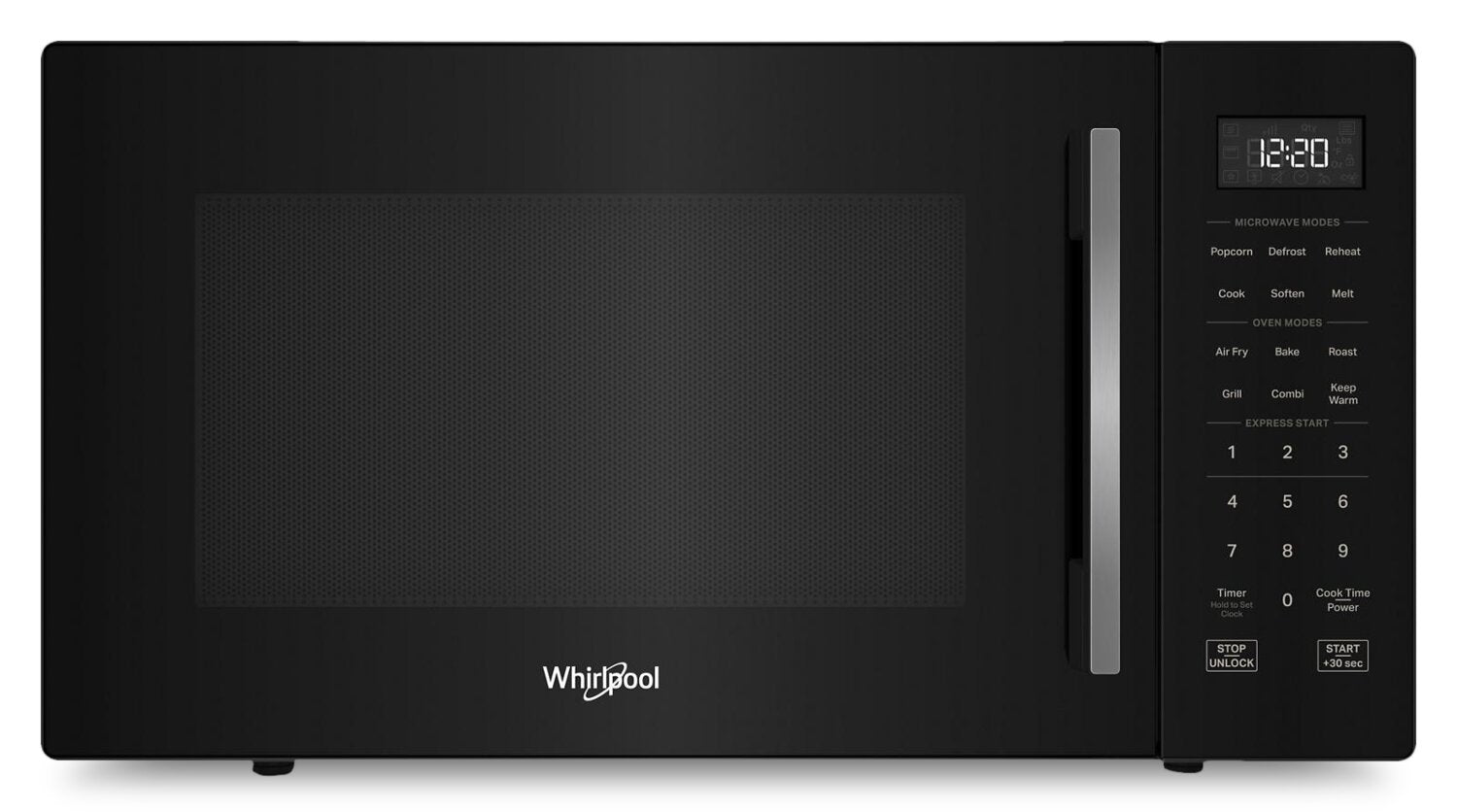
To power on your Whirlpool microwave, simply plug it into a grounded outlet. Press the “Power” or “Start” button to activate the microwave. If your model has a digital display, it will light up immediately, showing the clock or ready status.
Turning off the microwave is just as straightforward. Press the “Stop” or “Cancel” button to halt cooking or to switch the microwave off. Unplugging it is a good practice if you won’t use it for a long time.
Remember, always keep the door closed when the microwave is not in use. This prevents accidental starts and keeps your microwave in good working condition.
Credit: www.thebrick.com
Basic Cooking Functions
Mastering the basic cooking functions of your Whirlpool microwave oven can transform your daily meal prep. These functions are designed to make cooking faster and easier, whether you’re reheating leftovers or preparing a fresh dish. Understanding how to use these features confidently helps you get the most out of your appliance.
Using Auto Cook Settings
Auto cook settings take the guesswork out of cooking times and power levels. Your Whirlpool microwave comes with preset options for common foods like popcorn, vegetables, and beverages. Simply select the appropriate button, and the microwave adjusts itself to cook your food perfectly.
Have you ever struggled to find the right time to heat something evenly? Auto cook settings prevent overcooking and undercooking by using built-in sensors or preset programs. This means you can focus on other tasks while your microwave handles the cooking.
- Press the ‘Auto Cook’ button on the control panel.
- Select the food category (e.g., popcorn, pizza, potatoes).
- Enter the weight if required, then press ‘Start’.
These settings are especially handy when you’re in a rush or cooking the same dish repeatedly. It’s like having a mini chef inside your microwave.
Manual Time And Power Adjustment
Sometimes, you need more control over cooking, especially with unique recipes or leftovers. Your Whirlpool microwave allows you to manually set the cooking time and power level to suit your needs.
To adjust manually, start by entering the cooking time using the number pad. Then, select the power level, usually ranging from 1 (low) to 10 (high). This flexibility lets you gently warm delicate foods or quickly heat denser items.
- Press the ‘Time Cook’ button.
- Input the desired cooking time.
- Press the ‘Power Level’ button and choose the level.
- Hit ‘Start’ to begin cooking.
Have you noticed how reheating a cup of coffee on full power can make it boil over? Adjusting power levels helps avoid such mishaps by heating more evenly. Once you get comfortable with these settings, you’ll find cooking with your microwave becomes much more precise and satisfying.
Using Preset Menus
Using preset menus on your Whirlpool microwave oven can save you time and ensure your food is cooked just right. These menus are designed with specific cooking times and power levels tailored for common items, making your kitchen tasks easier. Let’s look at how you can make the most of these convenient options.
Popcorn And Beverage Options
Popcorn and beverages are among the most popular preset choices on Whirlpool microwaves. Simply press the popcorn button, and the microwave automatically sets the ideal time and power level to pop your kernels perfectly without burning.
For beverages like coffee or tea, the preset menu heats your drink to the right temperature without overheating. Have you ever ended up with scalding hot coffee from a microwave? Using these presets helps avoid that by controlling the heat precisely.
To use these options:
- Place your popcorn bag or beverage cup inside.
- Press the corresponding preset button.
- Let the microwave do the work—you can relax during the countdown.
Defrosting By Weight Or Time
Defrosting food can be tricky, but the Whirlpool microwave offers preset menus to simplify this too. You can choose to defrost by weight or by time, depending on what you find more convenient.
Defrosting by weight requires you to enter the food’s weight, and the microwave calculates the best defrosting time. This method usually gives even results, reducing the risk of partially cooked edges.
If you prefer defrosting by time, just input how long you want the microwave to run. This option is useful if you know exactly how long your item needs or if you’re defrosting something unusual.
Using these presets not only saves guesswork but also helps maintain food texture and flavor. Have you noticed that some defrosted foods come out soggy or uneven? These menus help prevent that by adjusting power levels thoughtfully.
Credit: www.whirlpool.com
Advanced Features
The advanced features of your Whirlpool microwave oven make cooking easier and safer. These features add convenience and precision to your daily kitchen tasks. Understanding these options helps you use the microwave effectively.
Sensor Cooking Technology
Sensor cooking technology adjusts the cooking time automatically. The microwave senses the steam released by food. It then changes the power level to cook food perfectly. This feature prevents overcooking and saves energy. You just select the type of food, and the microwave does the rest. It is great for reheating leftovers or cooking frozen meals.
Child Lock Activation
The child lock feature keeps the microwave safe around children. It stops the microwave from starting accidentally. Activating child lock is simple and quick. Usually, pressing and holding a button locks the controls. This prevents children from changing settings or opening the door. It gives peace of mind while cooking or cleaning.
Cleaning And Maintenance
Keeping your Whirlpool microwave oven clean helps it work well for years. Dirt, food spills, and grease can build up inside and outside the microwave. Regular cleaning stops smells and keeps the oven safe to use. Simple maintenance also prevents damage and costly repairs.
Safe Cleaning Tips
- Unplug the microwave before cleaning to avoid electric shock.
- Use a soft cloth or sponge with mild soap and water.
- Never use harsh chemicals or abrasive scrubbers on the interior.
- Clean spills quickly to avoid stains and odors.
- Remove and wash the turntable with warm, soapy water.
- Wipe the door seal gently to keep it airtight.
- Dry all parts completely before using the microwave again.
Routine Care For Longevity
- Clean the microwave after each use to stop buildup.
- Check the door seal regularly for cracks or damage.
- Use microwave-safe containers to avoid damage inside.
- Avoid running the microwave empty to protect the magnetron.
- Keep vents clear of dust and debris to prevent overheating.
- Schedule deep cleaning once a month for thorough care.

Credit: www.betterhousekeeping.com
Troubleshooting Common Issues
Troubleshooting common issues with your Whirlpool microwave oven can save you time and frustration. Many problems are easy to fix once you know what to look for. Understanding these common hiccups helps you maintain your appliance and keep it running smoothly.
Display And Power Problems
If your microwave’s display is blank or flickering, first check if it’s properly plugged in. A loose or damaged power cord can cause power interruptions. Have you noticed your microwave stops mid-cycle or doesn’t start at all? This might point to a blown fuse or a tripped circuit breaker in your home.
Try resetting the circuit breaker or replacing the fuse if you feel comfortable doing so. Sometimes, a simple power reset—unplugging the microwave for a minute and then plugging it back in—can resolve minor glitches. If the problem persists, the control board might need professional attention.
Uneven Cooking Solutions
Uneven cooking is a frequent complaint with microwaves. If your food is hot in some spots and cold in others, the turntable might not be rotating properly. Check if the turntable is correctly seated on its rollers and free of debris.
Another cause could be the microwave’s wave stirrer, which distributes microwaves evenly. If damaged, it leads to hot and cold spots. Using microwave-safe covers can also help trap steam and promote even heating.
- Try rearranging food midway through cooking to balance heat distribution.
- Avoid overloading the microwave, as crowded dishes block microwaves from penetrating evenly.
- Use containers that allow microwaves to pass through, such as glass or ceramic.
Have you experimented with these tips and noticed a difference? Sometimes small adjustments can dramatically improve cooking results.
Frequently Asked Questions
How Do I Start A Whirlpool Microwave Oven?
To start, plug in the microwave and close the door securely. Press the “Power” button to select the cooking mode. Set the cooking time using the number pad. Finally, press “Start” to begin heating your food.
How To Set The Cooking Time On Whirlpool Microwave?
Press the “Time Cook” button. Enter the desired cooking time using the number pad. Then, press the “Start” button to begin cooking. The microwave will count down automatically and stop when time ends.
What Power Levels Are Available On Whirlpool Microwaves?
Whirlpool microwaves usually offer power levels from 1 (low) to 10 (high). Use lower levels for gentle cooking or defrosting. Higher levels are for quick heating and cooking.
How To Use The Defrost Function On Whirlpool Microwave?
Press the “Defrost” button. Enter the weight of the food. Press “Start” to begin defrosting. The microwave adjusts time and power for safe, even thawing.
Conclusion
Operating your Whirlpool microwave oven becomes simple with the right steps. Follow the instructions carefully for best results. Use the control panel to set time and power levels. Always keep the microwave clean and safe. Practice these tips to cook food evenly and quickly.
Enjoy the convenience it brings to your kitchen daily. Small efforts lead to great cooking experiences. Your Whirlpool microwave is ready for easy use.