Are you wondering if you can laser cut foam board for your next project? Whether you’re crafting, designing, or building a prototype, knowing how foam board reacts to laser cutting can save you time and money.
You might be asking: Will the laser damage the foam? Can it create clean, precise cuts? You’ll get clear answers and practical tips to help you decide if laser cutting foam board is right for you. Keep reading to unlock the secrets to perfect cuts and avoid common mistakes.
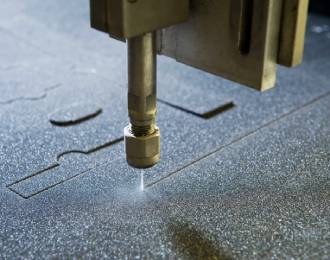
Credit: www.mimowork.com
Laser Cutting Basics
Laser cutting uses a focused beam of light to cut or engrave materials. It works by heating the surface until it melts or vaporizes. This technique allows for precise and clean cuts on many materials.
Foam board is a popular material for laser cutting. It is lightweight and easy to shape. Understanding how laser cutting works and the types of foam board helps get better results.
How Laser Cutting Works
The laser cutter directs a powerful laser beam onto the foam board. The heat from the beam cuts through the material quickly. The process is controlled by a computer for accuracy.
- The laser beam melts or burns the foam board.
- Air or gas removes the melted material from the cut.
- The computer guides the laser path for detailed shapes.
- Settings like speed and power adjust for different foam types.
Types Of Foam Board
Foam boards come in different materials. Each type reacts differently to laser cutting. Knowing these types helps choose the right board for your project.
| Foam Board Type | Material | Laser Cutting Notes |
| Standard Foam Board | Polystyrene Core | Easy to cut, may melt quickly |
| Foam PVC Board | Polyvinyl Chloride | Good for detailed cuts, may release fumes |
| Polyurethane Foam Board | Polyurethane | Soft, can be cut but may char |
| Double-Sided Foam Board | Paper or Plastic Faces | Faces protect core, can affect cutting depth |

Credit: www.torontomu.ca
Choosing The Right Foam Board
Laser cutting foam board needs careful choice of the material. Not all foam boards work well with lasers. Picking the right one helps get clean cuts and good shapes.
Two main things to look at are the material makeup and the thickness of the foam board. These affect how the laser cuts and the final result.
Material Composition
Foam boards have different inner cores and outer layers. Some are safe for laser cutting. Others can cause smoke or damage the machine.
- Polystyrene core: Common and cuts well with lasers.
- Polyurethane core: May release harmful fumes, avoid for laser cutting.
- Polyethylene core: Cuts clean but melts easily, use low power settings.
- Paper or plastic outer layers: Paper layers burn fast, plastic layers melt but give smooth edges.
Thickness Considerations
| Thickness | Laser Cutting Result | Recommended Use |
| 3mm or less | Easy, clean cuts | Fine details and small models |
| 4mm to 6mm | Good cuts with slower speed | Signs and general projects |
| Over 6mm | Hard to cut, may need multiple passes | Thick boards for strong structures |
Laser Cutter Settings For Foam
Laser cutting foam board needs the right settings to get clean cuts. Too much power can burn the foam. Too little power may not cut through.
This guide helps you adjust power, speed, focus, and passes for the best results on foam.
Power And Speed Adjustments
Set the laser power low to avoid melting the foam. Start with around 20% to 30% power. Increase power slowly if it does not cut through.
Speed controls how fast the laser moves. Use slower speeds for thicker foam. Try speeds between 10mm/s and 30mm/s for good cuts.
- Lower power prevents burning
- Higher power cuts thicker foam
- Slower speed gives cleaner edges
- Faster speed avoids melting
Focus And Passes
Keep the laser focused on the foam surface. Proper focus creates a sharp, precise cut. Check focus before starting your job.
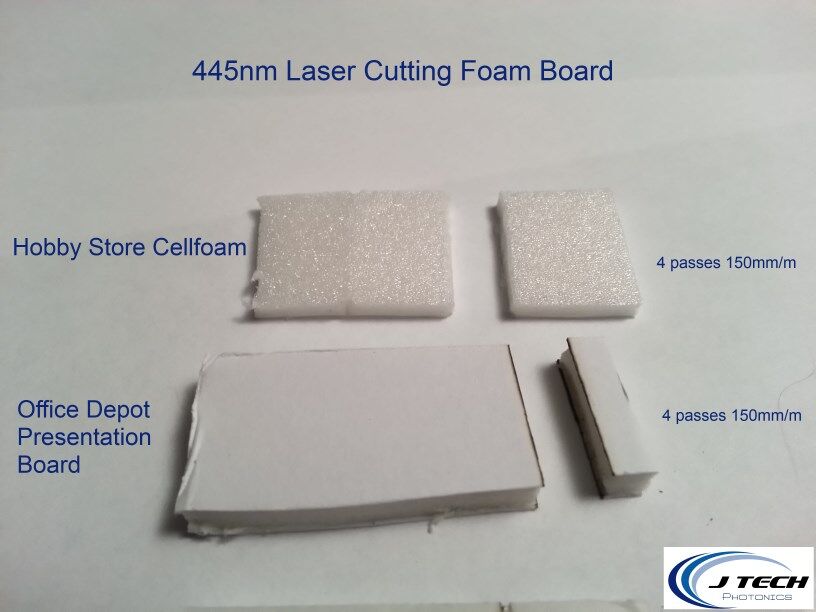
Sometimes one pass is not enough for thick foam. Use multiple passes with low power instead of one high-power pass.
- Adjust focus for clear cutting lines
- Use several passes for thick foam
- Let the laser cool between passes
- Test on scrap foam before final cutting
Preparing Foam Board For Cutting
Preparing foam board correctly helps you get clean, precise cuts. It also protects your laser cutter and material.
This guide covers cleaning and securing the foam board and tips for your design file.
Cleaning And Securing The Material
Make sure the foam board is free from dust and dirt. Clean surfaces help avoid marks and uneven cuts.
- Use a soft cloth to wipe the foam board gently.
- Remove any stickers or tape residue before cutting.
- Secure the foam board flat on the laser bed with low-tack tape or clamps.
- Ensure the board does not move during cutting to keep lines straight.
Design File Tips
Prepare your design file for smooth cutting. Set clear lines and correct dimensions.
| Tip | Reason |
| Use vector paths for cutting lines | Vectors provide clean, precise cuts |
| Set line color to red or as required | Helps laser software detect cut lines |
| Keep line thickness at 0.001 inch | Prevents cutting errors or double cuts |
| Design within foam board size limits | Avoids parts being cut off or wasted material |
Common Challenges And Solutions
Laser cutting foam board can be tricky. Some common problems affect the quality of the cut. Understanding these issues helps you get better results.
This guide covers two main challenges: melting and burning issues, and edge quality problems. Each section explains causes and solutions.
Melting And Burning Issues
Foam board can melt or burn if the laser is too strong or too slow. This damages the material and changes its shape.
- Use lower laser power settings to avoid overheating.
- Increase the cutting speed to reduce heat on the foam.
- Test different settings on scrap pieces before final cuts.
- Use air assist or a fan to blow away heat and smoke.
- Keep the laser focus sharp to make clean cuts quickly.
Edge Quality Problems
Edges may become rough, uneven, or discolored after cutting. This lowers the finished look of the foam board.
| Problem | Cause | Solution |
| Rough edges | Laser speed too slow | Increase cutting speed |
| Uneven edges | Laser focus off | Refocus the laser beam |
| Discoloration | Too much heat | Lower laser power or add air assist |
| Melting at edges | Laser power too high | Reduce power or do multiple passes |

Credit: jtechphotonics.com
Safety Precautions
Laser cutting foam board can release harmful fumes and dust. Taking safety steps is very important to protect your health. Follow these guidelines to work safely with laser cutters.
Always prepare your workspace before starting. Use the right equipment and stay alert to avoid accidents and health risks.
Ventilation And Fume Extraction
Foam boards often contain chemicals that release toxic fumes when cut. Proper ventilation helps remove these fumes from your workspace. Use a well-ventilated room or a fume extraction system. This keeps the air clean and safe to breathe.
- Work near an open window or door to allow fresh air in.
- Use an exhaust fan or fume extractor to pull fumes away.
- Keep the laser cutter area separate from living spaces.
- Check ventilation systems regularly to ensure they work well.
Protective Gear
Wear the right protective gear to guard your eyes, skin, and lungs. Laser cutting foam can create small particles and harmful gases that cause irritation or injury.
| Protective Gear | Purpose |
| Safety glasses | Protect eyes from laser light and debris |
| Respirator mask | Filter out toxic fumes and dust |
| Gloves | Prevent skin contact with chemicals and hot surfaces |
| Long sleeves | Shield skin from irritation and burns |
Finishing Techniques After Cutting
Laser cutting foam board gives clean and precise shapes. After cutting, you need to finish the edges for a better look.
Finishing improves the feel and appearance of the foam board. It also helps protect the edges from damage.
Sanding And Smoothing Edges
Laser cutting can leave rough or slightly burnt edges on foam board. Sanding helps smooth these edges.
Use fine sandpaper to gently rub the edges. This removes any char marks and makes the edges neat.
- Choose 220-grit or finer sandpaper
- Sand lightly to avoid damaging the foam
- Clean dust off with a soft brush or cloth
Painting And Decorating
Painting foam board adds color and protects it from dirt. Use paints that work well with foam.
Acrylic paints are good because they dry fast and stick well. Avoid spray paints with strong solvents that can melt foam.
- Apply a primer to improve paint adhesion
- Use thin paint layers to avoid warping
- Let each layer dry before adding another
- Decorate with markers or stickers after painting
Creative Uses For Laser-cut Foam Board
Foam board is a popular material for laser cutting. It is light and easy to shape. This makes it great for many creative projects.
Laser cutting foam board allows for precise and detailed designs. You can create unique items for art, work, or fun.
Model Making
Foam board is perfect for building models. Architects and hobbyists use it to make small-scale buildings and objects.
Laser cutting helps create clean edges and exact shapes. This saves time compared to cutting by hand.
- Design detailed parts with a computer
- Cut multiple pieces quickly
- Assemble pieces into 3D models
- Paint or decorate finished models
Signage And Displays
Foam board signs are light and easy to move. Laser cutting can create letters, logos, and shapes with sharp detail.
Businesses and artists use foam board for displays. It works well for short-term signs or indoor decorations.
- Cut letters and logos for signs
- Create layered designs for depth
- Make stand-up display pieces
- Use paint to add color and style
Frequently Asked Questions
Can Foam Board Be Laser Cut Safely?
Yes, foam board can be laser cut safely with proper settings. Ensure the laser cutter is set to the correct power and speed to avoid burning. Ventilation is crucial to remove fumes. Always follow manufacturer guidelines and safety protocols for the best results.
What Types Of Foam Board Can Be Laser Cut?
Various foam boards, like polystyrene and polyethylene, can be laser cut. Each type reacts differently to laser cutting. Always test a small piece first. Ensure your laser cutter is compatible with the foam board material for optimal results.
How Thick Can Foam Board Be For Laser Cutting?
Foam board up to 10mm thick is typically suitable for laser cutting. Thicker boards may require multiple passes or higher power settings. Always check your laser cutter’s specifications for thickness compatibility and adjust settings accordingly.
Does Laser Cutting Foam Board Produce Fumes?
Yes, laser cutting foam board produces fumes. Proper ventilation is essential to ensure safety. Use an exhaust system or fume extractor to remove harmful particles. Always work in a well-ventilated area to minimize exposure.
Conclusion
Laser cutting foam board works well with the right settings. It creates clean, precise edges without much effort. Choosing the correct laser power and speed is important. Some foam boards may melt or burn if not careful. Testing a small piece first saves time and material.
This method suits crafts, models, and signs. It offers fast and neat cuts compared to manual tools. Overall, laser cutting foam board is a useful skill to try. It opens up creative possibilities with simple materials.