Are you struggling to get the most out of your Daikin air conditioner remote? You’re not alone.
Many people find the buttons confusing or don’t know which settings will make their room the most comfortable. Imagine having full control at your fingertips—cooling your space quickly, saving energy, and customizing every detail with ease. In this guide, you’ll discover simple steps to master your Daikin remote and enjoy perfect comfort all year round.
Keep reading, and you’ll never have to guess which button to press again.

Credit: www.youtube.com
Basic Functions Of Daikin Remote
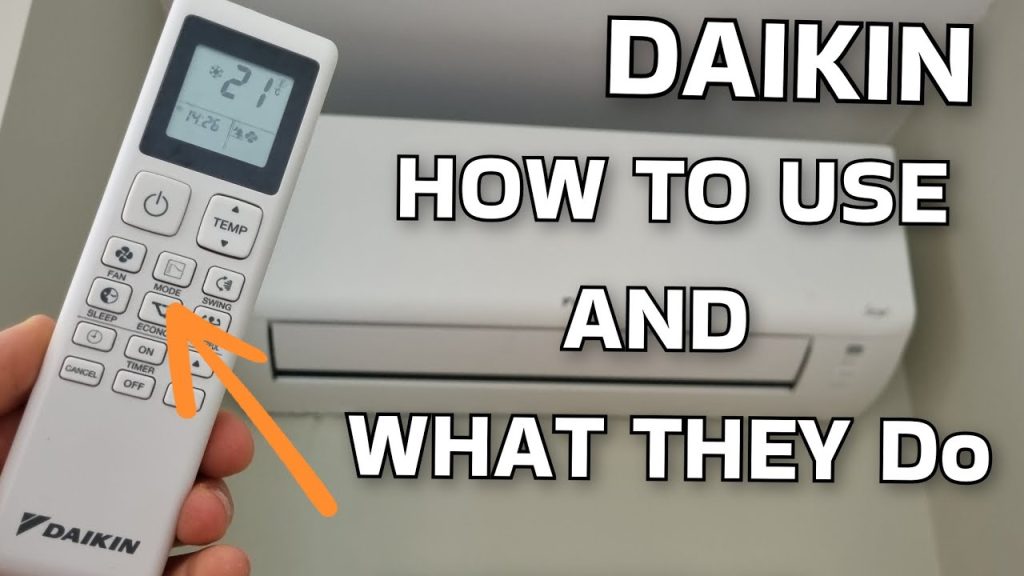
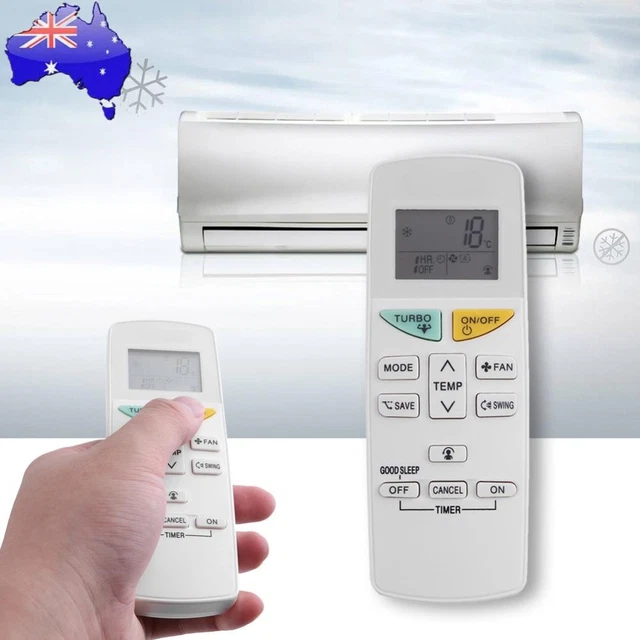
The Daikin air conditioner remote controls cooling, heating, and fan modes. It has buttons to set the temperatureeasily. Use the power buttonto turn the unit on or off.
The mode buttonchanges the air conditioner’s function. The temperature buttonshelp raise or lower the temperature quickly. The fan speed buttonlets you pick how fast the air moves.
The remote also has a timer functionto set start or stop times. The swing buttonmoves the air direction automatically for better air flow.
- Power: Turns AC on/off
- Mode: Switches between cool, heat, fan
- Temp + / –: Adjusts temperature
- Fan Speed: Changes airflow speed
- Swing: Controls air direction
- Timer: Sets start/stop time
Power On/off
Press the Powerbutton on the Daikin remote to turn the air conditioner on or off. The button is usually marked with a circle and linesymbol.
Hold the button for a second if the unit does not respond immediately. The display on the remote will light up, showing the current settings.
Make sure the remote is pointed at the air conditioner unit. Any obstacles can block the signal and prevent the unit from turning on or off.
Check the remote’s batteries if the unit does not respond after pressing the power button. Replace them if needed for proper function.
Temperature Settings
To increase temperature, press the up arrow or “+” button on the remote. Each press raises the temperature by 1 degree. Keep pressing until the desired warmth is shown on the display.
To decrease temperature, press the down arrow or “-” button. Each press lowers the temperature by 1 degree. Stop pressing when you reach a comfortable cool level.
The remote display shows the current set temperature clearly. Use the buttons gently to avoid skipping numbers. Adjust slowly for the best comfort.
Credit: picclick.ca
Mode Selection
The Cool Modelowers the room temperature. It uses the air conditioner to blow cold air. Perfect for hot days. The remote lets you set the temperature easily.
Heat Modewarms the room. It works well on cold days. Use this mode to stay cozy and comfortable.
Fan Modeonly moves air around. It does not cool or heat. Good for fresh air without changing temperature.
Dry Modereduces humidity. It makes the air less wet but does not cool much. Ideal for rainy or humid weather.
Auto Modechooses the best mode automatically. The air conditioner decides whether to cool, heat, or just fan. A simple way to keep comfort without changing settings.
Fan Speed Control
The fan speed controllets you adjust airflow from the remote. Choose the best speed for comfort and energy use.
- Low Speed:Gentle airflow, good for quiet and mild cooling.
- Medium Speed:Balanced airflow, suits normal cooling needs.
- High Speed:Strong airflow, cools the room quickly.
- Auto Speed:The air conditioner changes speed automatically based on room temperature.
Swing Function
The Vertical Swingadjusts the up and down airflow direction. Use it to spread cool or warm air evenly across the room. Press the vertical swing button to start the movement. Press again to stop it at your preferred angle. This helps maintain a comfortable temperature throughout the space.
The Horizontal Swingcontrols the left and right airflow. It moves the air side to side, covering a wider area. This function is useful for rooms where airflow needs to reach corners or different zones. Activate the horizontal swing by pressing its button. Press once more to stop the swing at the desired position.
Timer Settings
To set the timer on your Daikin remote, press the TIMER ONbutton. Use the arrow keys to choose the time you want the air conditioner to start. Confirm by pressing the SETbutton. The unit will turn on automatically at the set time.
To set the timer off, press the TIMER OFFbutton. Select the time when you want the air conditioner to stop running. Press SETto save the time. The unit will switch off at the chosen time.
Canceling the timer is easy. Press the TIMER CANCELbutton on the remote. This will clear any timer settings. The air conditioner will then run normally without timer control.
Energy Saving Features
Econo Modehelps save energy by reducing the air conditioner’s power use. It lowers the compressor speed, which keeps the room cool but uses less electricity. This mode is great for days when you don’t need very cold air. It also helps reduce your electric bill.
Sleep Modeadjusts the temperature slowly during the night. It makes the room warmer or cooler step by step, so you feel comfortable while sleeping. This mode saves energy because the air conditioner does not work too hard all night long. It also helps you sleep better by avoiding sudden temperature changes.
Resetting The Remote
To reset the Daikin air conditioner remote, locate the small reset button. It is usually found on the back or inside the battery compartment. Use a thin object like a paperclip to press the button gently.
Hold the reset button for a few seconds until the display turns off or resets. This clears any errors or settings that may cause issues. After resetting, reinsert the batteries properly to ensure the remote works well.
Resetting helps fix problems like unresponsive buttons or wrong temperature display. If the remote still does not work after reset, check the batteries or try replacing them. This simple step often solves many common remote control issues quickly.
Troubleshooting Common Issues
The remote may stop working if the batteries are dead or inserted wrong. Replace old batteries with new ones. Make sure the batteries are placed correctly, matching the + and – signs.
Sometimes, the remote sensor on the air conditioner or remote itself can be dirty. Clean both sensors gently with a soft cloth. Avoid using water or harsh chemicals.
Check if any objects block the signal path between remote and air conditioner. Remove obstacles like furniture or curtains.
| Issue | Possible Cause | Solution |
|---|---|---|
| Remote Not Responding | Dead or wrongly inserted batteries | Replace or reinsert batteries correctly |
| Remote Not Responding | Dirty sensor on remote or AC | Clean sensors gently |
| Remote Not Responding | Signal blocked by objects | Remove obstacles between remote and AC |
| Incorrect Temperature Display | Remote and AC not synced | Turn off AC and remote, then turn on again |
| Incorrect Temperature Display | Remote malfunction | Reset remote by removing batteries for a minute |
The wrong temperature may show if remote and AC are not synced. Turn both off and back on to fix this.
Reset the remote by taking out batteries for one minute. This can fix display errors.

Credit: www.youtube.com
Frequently Asked Questions
How Do I Turn On A Daikin Air Conditioner Remote?
Press the power button on the remote’s top section. The display will light up, indicating the unit is on. Point the remote at the air conditioner for proper signal reception.
How To Set Temperature On Daikin Air Conditioner Remote?
Use the temperature up and down buttons on the remote. Adjust the temperature to your desired comfort level. The set temperature will display on the remote screen.
What Mode Options Are Available On Daikin Remote?
The remote offers modes like Cool, Heat, Dry, Fan, and Auto. Press the Mode button repeatedly to cycle through options. Choose the mode that suits your current weather and preference.
How To Use The Timer Function On Daikin Remote?
Press the Timer button and set the desired start or stop time. Use the arrow buttons to adjust hours and minutes. The timer helps save energy by automating air conditioner operation.
Conclusion
Using your Daikin air conditioner remote is simple and effective. Adjust the temperature to stay comfortable all day. Switch between modes like cooling, heating, or fan as needed. Remember to replace batteries when the remote stops working well. Keep the remote clean and handle it gently.
These small steps help you enjoy cool air without trouble. Control your room’s climate with ease. Your comfort is just a button away.