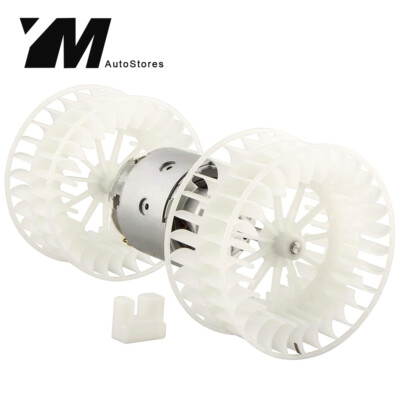
Is your 1999 SL500’s air conditioner fan making strange noises or not working at all? If so, you’re probably feeling the heat—literally.
Fixing this problem yourself might sound tricky, but with the right guidance, you can save time and money. You’ll discover simple steps to replace your air conditioner fan quickly and safely. By the end, you’ll know exactly what to do to keep your SL500 cool and comfortable all year round.
Ready to get started? Let’s dive in.
Tools And Materials Needed
Replacing the air conditioner fan in a 1999 SL500 requires some basic tools and materials. Having everything ready helps make the job easier and faster.
Use the right tools to avoid damage and ensure safety. Gather all items before starting the replacement.
Screwdrivers
You will need screwdrivers to remove screws holding the fan and other parts. Both flathead and Phillips screwdrivers are useful.
- Flathead screwdriver for clips and panels
- Phillips screwdriver for screws
Socket Set
A socket set helps remove bolts securing the fan and related components. Choose sizes that fit your car’s bolts.
- Ratchet wrench
- Different socket sizes (usually 8mm to 14mm)
- Extension bar for hard-to-reach bolts
Replacement Fan
Buy a fan that fits the 1999 SL500 model. Check the part number to match the old fan.
Use a new fan to ensure good performance and avoid future problems.
Work Gloves
Wear gloves to protect your hands from sharp edges and dirt. Gloves also improve grip on tools and parts.
- Durable work gloves
- Comfortable fit for easy movement
Flashlight
A flashlight helps you see in dark or tight spaces under the hood. Good lighting is important for safety and accuracy.
- Handheld flashlight or headlamp
- Bright LED light preferred
Cleaning Cloths
Use cloths to clean dust and dirt from the fan area. A clean workspace helps when installing the new fan.
- Lint-free microfiber cloths
- Rags for tougher dirt
Locate The Air Conditioner Fan
Replacing the air conditioner fan in a 1999 SL500 starts with finding the fan. Knowing its location helps you work safely and efficiently.
This guide explains where to find the air conditioner fan and what to look for before removal.
Check Under The Hood
Open the hood of your 1999 SL500. The air conditioner fan is near the radiator. It usually sits behind the front grille area.
Look for a fan with blades connected to a motor. It is often mounted between the radiator and the engine.
Identify The Fan Type
The air conditioner fan can be electric or belt-driven. Electric fans have wires and a motor. Belt-driven fans connect directly to the engine.
- Electric fan: wires and motor near the radiator.
- Belt-driven fan: connected to the engine by a belt.
- Look for the fan shroud that surrounds the blades.
Locate Fan Wiring And Connectors
Find the wiring harness that powers the air conditioner fan. It usually runs from the engine bay fuse box to the fan motor.
| Component | Location | Notes |
|---|---|---|
| Fan Motor | Behind radiator | Attached to fan blades |
| Wiring Harness | Near fuse box | Connects to fan motor |
| Fan Shroud | Surrounds fan blades | Helps direct airflow |
Prepare For Fan Removal
Before removing the fan, disconnect the battery. This prevents electric shock and accidental fan start.
- Open the hood and locate the fan assembly.
- Inspect the bolts and connectors securing the fan.
- Disconnect electrical connectors carefully.
- Make sure the engine is cool before touching any parts.
Disconnect The Battery
Before replacing the air conditioner fan in your 1999 SL500, disconnect the battery. This prevents electrical shocks and damage.
Disconnecting the battery also stops the car’s electronics from turning on while you work. This keeps you safe and protects the vehicle.
Locate The Battery
The battery in the 1999 SL500 is under the hood on the driver’s side. Open the hood and find the battery box.
Look for a black or grey plastic cover that protects the battery terminals. Remove this cover carefully.
Gather The Needed Tools
You need a wrench or socket set to disconnect the battery cables. Usually, a 10mm wrench fits the battery terminals.
- 10mm wrench or socket
- Safety gloves
- Protective eyewear
Disconnect The Negative Terminal First
Start by loosening the nut on the negative battery terminal. This is usually marked with a minus (-) sign.
Remove the cable and move it away from the battery to avoid contact. This stops electric flow.
Disconnect The Positive Terminal
Next, loosen the nut on the positive terminal, marked with a plus (+) sign. Remove the cable carefully.
Keep the cables away from the battery and metal parts to prevent sparks or shorts.
Secure The Battery Cables
Wrap the ends of the battery cables with electrical tape. This prevents accidental contact during your work.
- Wrap negative cable end
- Wrap positive cable end
- Place cables safely aside
Remove The Fan Assembly
Replacing the air conditioner fan in a 1999 SL500 requires careful removal of the fan assembly. This guide covers the main steps to safely remove the fan unit.
Follow each step to detach the electrical parts, unscrew the bolts, and take out the fan unit without damage.
Detach Electrical Connections
Start by disconnecting the electrical connections linked to the fan. This prevents any power flow and avoids damage.
- Locate the wiring harness connected to the fan motor.
- Press the release tab on the connector to unplug it.
- Gently pull the connector away from the fan motor.
- Inspect the wires for any damage before proceeding.
Unscrew Mounting Bolts
Next, remove the bolts that hold the fan assembly in place. Use the correct tools to avoid stripping the bolts.
| Tool | Use |
| Socket wrench | To loosen and remove bolts |
| Extension bar | For bolts in hard-to-reach places |
| Ratchet | To turn bolts efficiently |
Keep the bolts in a safe place for reinstallation later.
Extract The Fan Unit
After all bolts and wires are free, carefully remove the fan unit from the housing.
- Grip the fan assembly firmly.
- Pull it straight out to avoid bending the blades.
- Check for any remaining clips or connectors.
- Set the fan unit on a clean surface.
Install The New Fan
Installing the new air conditioner fan in your 1999 SL500 is a straightforward process. This guide will help you place, secure, and connect the fan properly.
Follow each step carefully to ensure the fan works well and lasts long.
Position The Replacement Fan
Start by carefully placing the new fan in the same spot as the old one. Make sure it fits snugly and aligns with the mounting points.
Secure With Mounting Bolts
Use the mounting bolts to hold the fan firmly in place. Tighten them evenly to avoid any wobbling or gaps.
- Insert each bolt into its hole.
- Tighten bolts by hand first.
- Use a wrench to fully secure them.
- Check that the fan does not move.
Reconnect Electrical Connectors
Attach the electrical connectors to the new fan. Ensure each connector is clean and fits tightly.
| Connector Type | Check Before Connecting |
|---|---|
| Main Power Connector | No dirt or corrosion |
| Fan Speed Sensor | Secure and clicks in place |
| Ground Wire | Properly grounded |

Credit: www.ebay.com
Test The New Fan
After installing the new fan in your 1999 SL500, testing it is important. This ensures the fan works correctly and keeps your AC system cool.
Follow these steps to safely test the fan and confirm proper operation before finishing the job.
Reconnect The Battery
First, reconnect the car battery to restore power. Make sure the battery terminals are clean and tightly secured. This will allow the electrical system to function properly.
Use a wrench to tighten the battery cables if needed. Avoid touching the terminals together to prevent sparks.
Start The Engine And Ac
Turn on the engine and let it run at idle. Then switch on the air conditioning system. This will send power to the fan motor and start its operation.
Allow the AC to run for a few minutes. This helps the fan reach its normal speed and cool the radiator or condenser effectively.
Check Fan Operation
Look at the fan blades to see if they are spinning smoothly. Listen for any strange noises like grinding or rattling. These signs show if the fan is working well.
- Fan should start quickly after AC is on
- Blades must spin without wobbling
- No unusual sounds should be heard
- Check if the fan stops when the AC is off
If the fan does not run or has issues, turn off the engine and check your installation. Fix any loose connections or damaged parts.
Troubleshooting Tips
Replacing the air conditioner fan in a 1999 SL500 can be tricky. Knowing how to spot problems helps save time and effort.
This guide gives simple tips to find issues before and after changing the fan.
Checking The Fan Motor
First, test if the fan motor works. A bad motor stops the fan from spinning. Listen for strange sounds or no sound at all.
Inspecting Electrical Connections
Loose or corroded wires cause the fan to fail. Check all plugs and wiring near the fan motor.
- Make sure connectors fit tightly.
- Look for broken or burnt wires.
- Clean any corrosion with electrical cleaner.
Testing The Fan Relay And Fuse
The relay and fuse control power to the fan. If either fails, the fan won’t run.
| Component | What to Check | Signs of Trouble |
| Fan Relay | Click sound when turned on | No click, fan won’t start |
| Fuse | Fuse intact and not blown | Fuse melted or broken |
Examining The Fan Blades
Damaged or dirty blades reduce airflow. Check if blades spin freely without hitting anything.
Tips for fan blades:
- Clean dirt and debris off blades.
- Replace bent or cracked blades.
- Make sure blades are firmly attached to the motor.
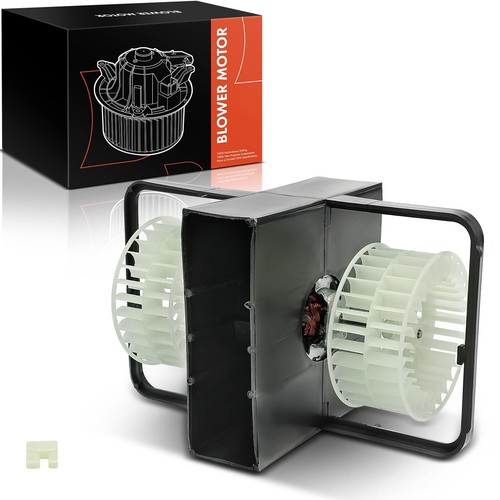
Credit: www.ebay.com

Credit: www.amazon.com
Frequently Asked Questions
How Do I Know If My 1999 Sl500 Fan Needs Replacement?
Check for unusual noises or weak airflow from the AC fan. If the fan doesn’t spin or cool air drops, it likely needs replacement. Inspect for visible damage or wear on the fan blades and motor.
What Tools Are Needed To Replace The Ac Fan In Sl500?
You will need screwdrivers, pliers, a socket set, and possibly a fan clutch removal tool. Having gloves and safety glasses is also recommended for protection during the replacement process.
How Long Does It Take To Replace The Ac Fan In A 1999 Sl500?
Replacing the AC fan typically takes 1 to 2 hours. This depends on your mechanical experience and whether additional parts or repairs are necessary.
Can I Replace The Ac Fan Myself On A 1999 Sl500?
Yes, if you have basic mechanical skills and the right tools. Follow the step-by-step guide carefully and ensure the car is off and cool before starting.
Conclusion
Replacing the fan in your 1999 SL500 is manageable. Basic tools and some patience are needed. Follow the steps carefully to avoid mistakes. Double-check connections before turning on the unit. Ensure everything is secure and tight. This helps prevent future issues.
Regular maintenance extends your air conditioner’s life. Saves money in the long run too. Keep your vehicle cool and comfortable always. Enjoy the benefits of a well-functioning air conditioner. Stay cool and drive safely!