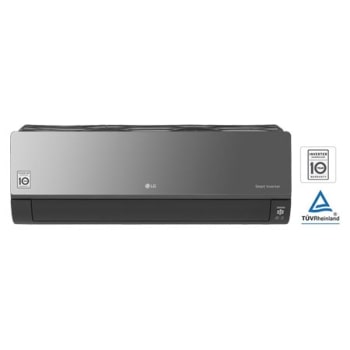
If your LG Air Conditioner Dual Inverter isn’t cooling as well as it used to, the filter might be the reason. Cleaning your filter regularly is the easiest way to keep your AC running smoothly and save on energy bills.
But how exactly do you clean the filter without causing damage? In this guide, you’ll learn simple, step-by-step instructions to refresh your filter quickly and safely. By the end, your AC will feel like new again—and you’ll breathe cleaner air every day.
Keep reading to find out how!

Credit: blossomaircon.com
Tools Needed
Cleaning the filter on your LG Air Conditioner Dual Inverter requires some basic tools. Using the right tools makes the process easier and safer.
This guide lists the tools you need to clean the filter properly and keep your air conditioner working well.
Screwdriver
A screwdriver helps remove the front panel of the air conditioner. Most LG models use a Phillips head screwdriver. Make sure the screwdriver fits the screws to avoid damage.
Soft Brush
A soft brush removes dust and dirt from the filter without damaging it. Avoid hard brushes that can tear the filter mesh.
Vacuum Cleaner
A vacuum cleaner with a brush attachment helps clean the filter quickly. It sucks out loose dust and debris before washing the filter.
Mild Detergent
Use a mild detergent to wash the filter gently. Strong chemicals can damage the filter and reduce its lifespan.
Water Source
Clean water is needed to rinse the filter after brushing or washing. Use lukewarm water for better cleaning results.
Dry Cloth Or Towel
A dry cloth or towel helps to dry the filter before reinstalling it. Avoid direct sunlight to prevent damage.
- Phillips head screwdriver
- Soft brush
- Vacuum cleaner with brush attachment
- Mild detergent
- Clean lukewarm water
- Dry cloth or towel
Credit: www.rent-up.my
Locating The Filter
Cleaning the filter in your LG Air Conditioner Dual Inverter is important. Finding the filter is the first step. This guide will help you locate it easily.
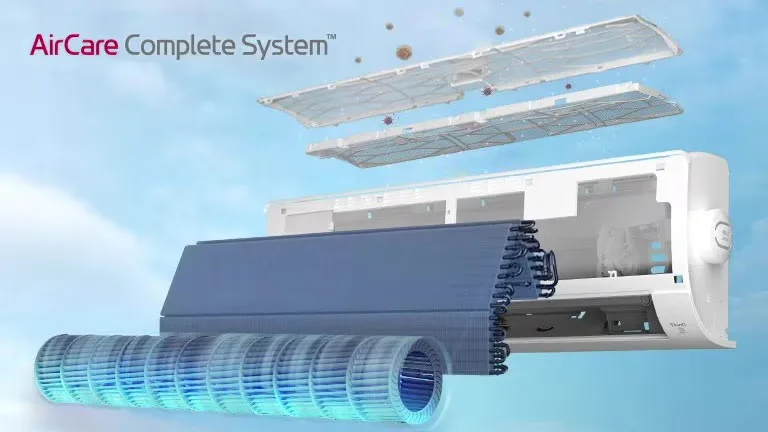
The filter is inside the indoor unit. You need to open the front panel to access it. Let’s explore how to find it quickly.
Check The Front Panel Of The Indoor Unit
The filter is behind the front panel on the indoor unit. The panel covers the air filter and other parts. You must open it gently to avoid damage.
Look For The Air Filter Slots
After opening the panel, you will see the air filter slots. The filter slides out from these slots. It usually has a mesh design to catch dust and particles.
- Turn off the air conditioner before opening the panel.
- Lift or pull the front panel gently to open it.
- Find the mesh filters behind the panel.
- Slide the filters out carefully for cleaning.
Check The User Manual For Filter Location
If you cannot find the filter easily, check the user manual. It shows the exact location and instructions for your model. Manuals often include images for clarity.
| Model | Filter Location | Panel Type |
|---|---|---|
| LG Dual Inverter Standard | Behind front panel | Flip-up |
| LG Dual Inverter Deluxe | Behind front panel | Slide-out |
| LG Dual Inverter Premium | Behind front panel | Lift-up |
Removing The Filter
Cleaning the filter of your LG air conditioner dual inverter keeps the air fresh and the unit efficient.
Removing the filter is easy and does not require tools. Follow these simple steps to take it out safely.
Locate The Air Filter
First, find the filter behind the front panel of the indoor unit. The filter usually sits at the top or front of the unit.
Open The Front Panel
Gently lift or pull the front panel to open it. The panel may have clips or hinges, so be careful not to break them.
Remove The Filter
Slide out the air filter slowly. Hold it firmly so it does not bend or tear. Check for dust or dirt on the filter surface.
- Hold the filter frame carefully.
- Pull the filter straight out from its slot.
- Do not use force if it feels stuck; check for clips.
- Keep the filter flat to avoid damage.
Inspect The Filter Condition
Look for dust buildup, stains, or tears. A dirty filter needs cleaning or replacement to keep your air conditioner working well.
| Filter Condition | Action Needed |
| Light Dust | Clean with a vacuum or wash |
| Heavy Dirt or Stains | Wash thoroughly with water |
| Damaged or Torn | Replace with a new filter |
Cleaning Methods
Cleaning the filter of your LG air conditioner dual inverter keeps it working well. It helps the air stay fresh and clean. Regular cleaning stops dust and dirt build-up.
There are easy ways to clean the filter. You can use water, a vacuum cleaner, and then dry the filter properly. Follow these simple steps to keep your AC filter clean.
Using Water
Remove the filter from the air conditioner carefully. Rinse the filter with clean, lukewarm water. Avoid using hot water as it can damage the filter.
Gently wash the filter to remove dust and dirt. Do not use soap or chemicals, as they can harm the filter fibers.
Using Vacuum Cleaner
Use a vacuum cleaner to clean the filter without water. This method is good for light dust and quick cleaning. Use a soft brush attachment on the vacuum.
Run the vacuum gently over the filter surface. Make sure to clean both sides to remove all dust particles.
Drying The Filter
After cleaning, dry the filter in a cool, shaded area. Avoid direct sunlight as it can weaken the filter material. Do not use a dryer or heater to speed up drying.
Make sure the filter is completely dry before putting it back into the air conditioner. A dry filter helps your AC work well and prevents mold growth.
Reinstalling The Filter
After cleaning the filter on your LG air conditioner Dual Inverter, you need to put it back properly. Correct reinstallation helps your air conditioner work well and keep the air clean.
Follow these steps to reinstall the filter safely and easily. This will keep your unit running smoothly for a long time.
Align The Filter Correctly
Look at the filter and the slot where it fits. The filter has tabs or edges that match the air conditioner’s filter slot. Make sure to line these up before pushing the filter in.
Slide The Filter Gently
Push the filter slowly into the slot. Do not force it. If it does not slide in easily, check the alignment again. The filter should sit flat without bending.
Secure The Filter In Place
Once the filter is in place, press the edges gently to make sure it is secure. Some models have clips or locks that hold the filter. Check if your air conditioner has these and use them.
Test The Air Conditioner
Turn on the air conditioner after reinstalling the filter. Listen for any unusual sounds. If you hear noise or the unit does not work well, turn it off and check the filter again.
- Turn off the air conditioner before reinstalling.
- Align the filter tabs with the slot edges.
- Slide the filter gently into place.
- Secure the filter using clips if available.
- Turn on the unit and check for proper operation.
Maintenance Tips
Keeping your LG Dual Inverter air conditioner clean helps it work well. Cleaning the filter is a simple way to improve air quality and save energy.
Regular maintenance prevents problems and keeps your air conditioner lasting longer. This guide shows you when and how to clean the filter.
Cleaning Frequency
Cleaning the filter often stops dust from building up. This helps your air conditioner cool better and use less power.
Check the filter every month. Clean it at least once every two months. Clean more often if you use the air conditioner daily or if air is dusty.
- Check filter monthly
- Clean every 2 months or more
- Clean more if daily use or dusty air
Signs To Replace Filter
Sometimes cleaning is not enough. The filter may get old or damaged and need a replacement.
Replace the filter if you notice these signs to keep your air conditioner working well.
- Filter has holes or tears
- Filter does not clean well after washing
- Airflow feels weaker even after cleaning
- Filter smells bad or has mold
Troubleshooting Common Issues
Cleaning the filter on your LG Air Conditioner Dual Inverter is key to keeping it working well. Dirty filters cause problems like poor cooling and strange noises.
This guide helps you find and fix common filter problems quickly. Follow these tips to keep your air conditioner running smoothly.
Filter Not Removable
Sometimes the filter feels stuck and will not come out. This can happen if the filter is locked or the unit is not powered off.
- Turn off the air conditioner and unplug it.
- Check if there is a latch or lock holding the filter.
- Gently push or pull the filter as shown in the user manual.
- Do not use force to avoid breaking the filter holder.
Filter Looks Clean But Cooling Is Poor
A filter may look clean but still block air if dust is trapped deep inside. This can reduce airflow and cooling power.
Try washing the filter with water and mild soap. Let it dry completely before putting it back. Do not use harsh chemicals.
Filter Causes Noise
Loose or damaged filters can cause rattling or buzzing sounds during operation. Check the filter and holder for damage or looseness.
| Issue | Cause | Solution |
| Rattling Noise | Loose filter | Secure filter properly |
| Buzzing Noise | Damaged filter frame | Replace the filter |
| Airflow Blocked | Dirty filter | Clean or replace filter |
Filter Does Not Fit Back Properly
If the filter does not fit back, check for dirt or obstructions in the holder. Make sure you align the filter correctly.
- Clean the filter slot inside the unit.
- Align the filter edges with the grooves.
- Push gently until it clicks into place.
Credit: www.lg.com
Frequently Asked Questions
How Often Should I Clean Lg Dual Inverter Filters?
Clean the filter every 2 to 4 weeks during heavy use. This ensures optimal airflow and cooling efficiency. Regular cleaning prevents dust buildup, enhancing air quality and saving energy.
What Tools Are Needed To Clean The Lg Ac Filter?
You only need a soft brush, vacuum cleaner, and mild detergent. Avoid harsh chemicals to prevent filter damage. These tools help remove dust and debris effectively.
Can I Wash The Lg Dual Inverter Filter With Water?
Yes, gently wash the filter with lukewarm water. Avoid hot water as it may deform the filter. Let it dry completely before reinstalling to prevent mold growth.
How Do I Remove The Filter From Lg Dual Inverter Ac?
Open the front panel gently and slide out the filter. Handle the filter carefully to avoid damage. Refer to the user manual for model-specific instructions.
Conclusion
Cleaning your LG Dual Inverter air conditioner’s filter is simple. Regular maintenance boosts efficiency and prolongs the unit’s life. A clean filter ensures healthier air quality in your home. Follow the steps we discussed. Unplug the unit first for safety.
Remove the filter gently. Wash with mild soap and water. Dry it completely before reinserting. Repeat this process monthly for optimal performance. Enjoy fresh, cool air all year. A little effort goes a long way in maintaining comfort. Keep your air conditioner running smoothly with these easy steps.