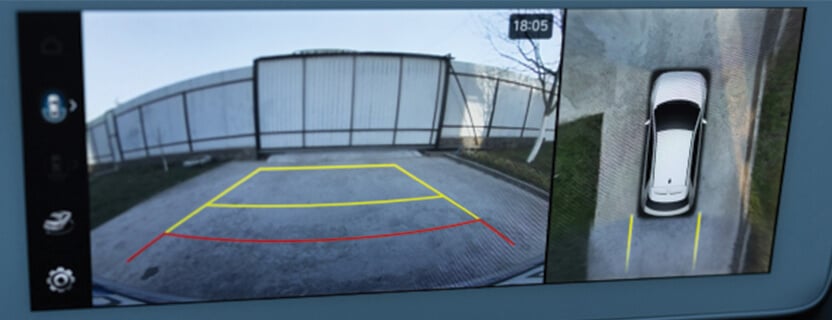
Have you ever wished you could see everything around your car without turning your head or guessing what’s in your blind spots? That’s exactly what a 360 car camera does for you.
It gives you a complete view of your vehicle’s surroundings, making parking, driving, and tight maneuvers much easier and safer. But how does this clever system actually work to give you that full-circle vision? Keep reading, and you’ll discover the simple technology behind it—and why it can change the way you drive forever.

Credit: www.youtube.com
Basics Of 360 Car Cameras
A 360 car camera helps drivers see all around their vehicle. It uses several cameras to create a full view.
This system improves safety by showing blind spots and obstacles. It makes parking and driving easier.
What Is A 360 Car Camera?
A 360 car camera is a set of cameras placed around a car. It captures images from all sides of the vehicle.
The system combines these images into one view. This view looks like a bird’s eye view of the car.
Key Components
The system has several main parts that work together. Each part plays a role in showing the full view.
- Cameras:Usually four cameras are placed on the front, back, and sides.
- Processor:It combines images from all cameras into one picture.
- Display Screen:Shows the combined 360-degree view to the driver.
- Software:Helps stitch images smoothly and adjusts views as the car moves.
Types Of 360 Camera Systems
There are different types of 360 camera systems. They vary by how they display and process images.
- Wired Systems:Cameras connect to the processor using cables. This gives a stable image.
- Wireless Systems:Cameras send images without cables. They are easier to install but may lag.
- Aftermarket Systems:Added to cars that do not have built-in 360 cameras.
- Factory-Installed Systems:Built-in by car makers. Usually work better with the car’s other features.
How 360 Cameras Capture Surroundings
360 car cameras show a full view around the vehicle. They help drivers see blind spots and park safely.
These cameras use special technology to capture and combine images from different angles.
Multiple Camera Setup
A 360 camera system uses several small cameras placed around the car. Usually, cameras are on the front, back, and sides.
- Each camera captures its part of the surroundings.
- They use wide-angle lenses to cover more area.
- This setup ensures no blind spots remain.
Image Stitching Technology
The system combines images from all cameras into one view. This process is called image stitching.
| Step | Purpose |
| Capture | Collect images from all cameras |
| Align | Match edges of images precisely |
| Blend | Smooth transitions between images |
| Correct | Fix colors and angles for natural look |
Real-time Video Processing
The camera system processes all images quickly. It creates a live video feed for the driver to see instantly.
Real-time processing needs:
- Fast processors to handle video data
- Software to merge images smoothly
- Display systems in the car dashboard
Installation And Calibration
A 360 car camera system gives a full view around the vehicle. It uses multiple cameras placed on the car’s sides.
Correct installation and calibration help the system work well. This guide explains these important steps.
Mounting The Cameras
Cameras must be placed in the right spots on the car. Common places include the front, back, and sides.
Make sure cameras are clean and secure. They should not move or shake while driving.
- Front camera usually mounts near the grille or bumper.
- Rear camera fits above the license plate area.
- Side cameras go under side mirrors or on doors.
- Keep lenses free from dirt and obstructions.
Calibration Process
Calibration makes sure cameras work together to show a clear 360 view. It aligns each camera’s image correctly.
The process uses software to adjust camera angles and image overlap. This step is key for accurate display.
- Park the car on a flat surface for accuracy.
- Use calibration targets or patterns if needed.
- Follow the system’s software prompts carefully.
- Check the view after calibration to confirm accuracy.
Common Installation Challenges
Installing 360 cameras can be tricky. Some problems may appear during mounting or calibration.
Knowing common challenges helps avoid mistakes and saves time.
- Cameras placed incorrectly cause blind spots or wrong views.
- Loose mounts make images shaky or blurry.
- Calibration errors cause misaligned or distorted images.
- Wiring issues can lead to power loss or signal problems.
- Dirty lenses reduce image clarity and system effectiveness.

Credit: www.amazon.com
Benefits For Smart Driving
A 360 car camera helps drivers see all around the vehicle. It gives a clear view of obstacles and traffic. This makes driving safer and easier.
Using this system, drivers can avoid accidents and park with confidence. It improves overall awareness on the road.
Enhanced Parking Assistance
The 360 camera shows a bird’s-eye view of the car. It helps drivers park in tight spaces without hitting objects. This reduces scratches and dents.
- Shows all sides of the vehicle
- Helps align car in parking spots
- Alerts about nearby obstacles
- Makes parallel parking easier
Blind Spot Detection
The 360 camera covers blind spots that side mirrors miss. Drivers get a full view when changing lanes or merging. This lowers the chance of collisions.
| Blind Spot Area | Visibility with Camera |
| Left side rear | Clear and wide view |
| Right side rear | Visible for safe lane change |
| Rear corners | Monitored to avoid side impacts |
Improved Safety And Awareness
The camera system shows real-time surroundings. It warns about moving objects or pedestrians. Drivers react faster to avoid accidents.
- 360-degree view around the car
- Alerts for moving objects near the vehicle
- Night vision support in some models
- Clear visuals in bad weather
Integration With Vehicle Systems
A 360 car camera works by linking with many parts of the vehicle. It uses cameras placed around the car to show a full view.
This system connects with the vehicle’s electronics to give real-time images. It helps drivers see all sides while parking or driving.
Connection To Infotainment Displays
The 360 camera system sends video to the car’s infotainment screen. This screen shows the combined views from all cameras around the car.
The connection often uses wired links like HDMI or CAN bus cables. This ensures clear, fast video without delay for the driver.
Compatibility With Advanced Driver Assistance Systems
These cameras work with driver assistance systems like parking sensors and automatic braking. They share data to improve safety and control.
By combining camera images with sensors, the car can warn the driver or take action to avoid collisions or obstacles.
Wireless Vs Wired Systems
Wired 360 camera systems use cables for stable video and power. They are reliable but can be harder to install.
Wireless systems send video signals without cables. They are easier to install but may face interference or delays.
- Wired: stable, no signal loss, needs cable routing
- Wireless: easy setup, possible interference, battery or power needed

Credit: www.ebay.com
Maintenance And Troubleshooting
A 360 car camera helps drivers see all around their vehicle. Keeping it working well needs regular care and some checks.
This guide covers how to clean the camera, update its software, and fix common problems.
Cleaning And Care
Dirty lenses can blur the camera view. Clean the lenses gently and often to keep images clear.
- Use a soft microfiber cloth to wipe the lens.
- Apply a small amount of lens cleaner if needed.
- Do not use harsh chemicals or abrasive materials.
- Check the camera housing for cracks or damage.
- Keep the camera free from snow, mud, and dust.
Software Updates
Software updates improve the camera’s performance and fix bugs. Check for updates regularly.
Most updates install through your car’s main screen or a connected app.
- Connect your car to the internet or Wi-Fi.
- Go to the system settings for the camera.
- Look for software or firmware updates.
- Download and install the latest version.
- Restart the camera system if needed.
Common Issues And Fixes
| Issue | Cause | Fix |
| Blurry image | Dirty lens | Clean lens with microfiber cloth |
| No video feed | Loose connection | Check and secure camera cables |
| Camera not turning on | Power issue | Check fuse and power supply |
| Lagging video | Old software | Update camera firmware |
| Distorted colors | Lens damage | Inspect lens; replace if cracked |
Future Trends In 360 Car Cameras
360 car cameras are changing fast. New technology will make these cameras smarter and clearer. They will help drivers see more around their cars.
Future trends will focus on better images and more useful features. These changes will improve safety and driving comfort.
Ai And Machine Learning Integration
AI helps 360 cameras understand what they see. Machine learning lets cameras learn from data and improve over time. This means better object detection and warnings.
With AI, cameras can spot pedestrians, cyclists, and other vehicles. They can alert drivers to risks faster and more accurately.
- Improved real-time hazard detection
- Automatic adjustment to lighting and weather
- Smart alerts based on driving patterns
Higher Resolution And Wider Coverage
Future 360 cameras will have higher resolution sensors. This means sharper and clearer images for drivers. Wider coverage will reduce blind spots even more.
Better cameras will show more details around the car. This helps in tight parking and tricky traffic situations.
- 4K and higher video quality
- Expanded field of view with extra cameras
- Better night vision and low-light performance
Integration With Autonomous Driving
360 cameras will work closely with self-driving systems. They will provide key views to help the car make safe decisions. This will improve the car’s ability to navigate roads.
These cameras will share data with other sensors. This creates a full picture of the surroundings for the autonomous system.
- Real-time data for path planning
- Collaboration with radar and lidar sensors
- Support for advanced driver assistance systems (ADAS)
Frequently Asked Questions
How Does A 360 Car Camera Capture All Angles?
A 360 car camera uses multiple wide-angle lenses around the vehicle. These lenses capture overlapping views. The system stitches these images together in real-time. This creates a seamless, bird’s-eye view of the car’s surroundings for better safety and parking.
What Technology Enables 360 Car Camera Stitching?
The camera system uses advanced image processing software. It blends overlapping images from each lens. This software corrects distortions and aligns edges perfectly. The result is a continuous, clear 360-degree view displayed on the car’s screen.
Are 360 Car Cameras Useful For Parking?
Yes, 360 car cameras provide a full view around the car. They eliminate blind spots and help drivers park precisely. The system shows nearby obstacles and curb lines. This reduces parking accidents and improves driver confidence.
How Is The 360 Car Camera Image Displayed?
The stitched 360-degree view is shown on the vehicle’s dashboard screen. Drivers can switch views to see different angles. Some systems offer zoom and split-screen options. This interactive display enhances situational awareness while driving or parking.
Conclusion
A 360 car camera offers a clear view all around. It enhances driving safety and confidence. Drivers can see blind spots, reducing accident risks. Parking becomes less stressful with this tool. The technology is simple yet effective. Installation is often straightforward, making it accessible.
Many car models now include this feature. It’s a valuable addition for any driver. Understanding how it works is beneficial. Consider a 360 camera for better road awareness. Overall, it’s a smart investment for peace of mind.