If you’ve noticed the letters “AP” flashing on your Midea air conditioner and wondered what they mean, you’re not alone. Understanding these signals can help you get the most out of your cooling system and avoid unnecessary frustration.
You’ll discover exactly what “AP” stands for and why it appears on your unit. Keep reading to unlock simple tips that could save you time and keep your home comfortable all year round.
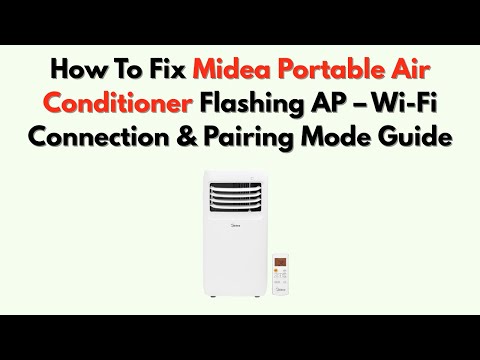
Credit: www.youtube.com
Ap Mode On Midea Ac
Midea air conditioners come with various modes to improve user experience. One of these modes is called AP Mode. It is a special setting that helps with connectivity and control.
This mode is useful for linking your air conditioner to a Wi-Fi network. Knowing what AP Mode means can help you use your Midea AC better.
Meaning Of Ap
AP stands for Access Point. In the case of Midea air conditioners, AP Mode allows the unit to act as a Wi-Fi hotspot. This lets you connect your smartphone or other devices directly to the AC.
When your Midea AC is in AP Mode, it creates its own network. You can connect to this network to control the air conditioner via the Midea app.
Purpose Of Ap Mode
AP Mode has specific uses that make managing your Midea AC easier. It mainly helps with network setup and remote control.
- Allows direct connection between your device and the AC unit
- Makes it easier to set up Wi-Fi on the air conditioner
- Enables control through the Midea app without a home router
- Helps troubleshoot network problems by isolating the connection
Using AP Mode, you can manage your air conditioner even if your home Wi-Fi is down. It is a useful feature for better control and convenience.

Credit: www.youtube.com
How Ap Mode Works
AP Mode on a Midea air conditioner helps connect the unit to your Wi-Fi. It creates a special network for easy setup.
This mode is useful if your home Wi-Fi is hard to connect directly. It lets the air conditioner link with your phone first.
Connection Process
To use AP Mode, follow these steps to connect your air conditioner to the app:
- Turn on AP Mode on the air conditioner remote or app.
- The AC creates a Wi-Fi hotspot named like “Midea_XXXX”.
- On your phone, go to Wi-Fi settings and connect to this hotspot.
- Open the Midea app and follow instructions to link the AC with your home Wi-Fi.
- Once connected, the AC will switch from hotspot to home Wi-Fi automatically.
Benefits Of Using Ap Mode
AP Mode offers several advantages for setting up and using your air conditioner.
| Benefit | Description |
| Easy Setup | Connect your device without complex Wi-Fi steps. |
| Works Anywhere | Can set up the AC even with poor Wi-Fi signal. |
| Secure Connection | Direct link reduces risk of connection errors. |
| Quick Switching | AC moves smoothly from hotspot to home network. |
When To Use Ap Mode
AP mode on a Midea air conditioner helps connect the unit to your Wi-Fi. This mode is useful when the regular connection does not work. It creates a direct link between your phone and the air conditioner.
You use AP mode to set up your air conditioner or fix connection problems. It makes the connection process simple and fast.
Initial Setup
Use AP mode when setting up your Midea air conditioner for the first time. It helps your phone find and connect to the air conditioner easily. This step is important to control the unit remotely.
Turn on AP mode on the air conditioner and connect your phone to its network. Then, use the Midea app to complete the setup. This mode makes sure the device and app can communicate.
- Turn on the air conditioner
- Activate AP mode on the unit
- Connect your phone to the air conditioner’s Wi-Fi
- Open the Midea app and follow instructions
- Complete the setup by adding your home Wi-Fi
Troubleshooting Connectivity
Use AP mode if your air conditioner does not connect to your Wi-Fi. It helps reset the connection between your phone and the device. This mode fixes common problems with remote control.
Activate AP mode to create a direct link. Then reconnect the air conditioner to your home network through the app. This method often solves connection issues quickly.
- Turn on AP mode on the air conditioner
- Connect your phone to the air conditioner’s Wi-Fi
- Open the Midea app and check connection status
- Re-enter your home Wi-Fi details
- Complete the reconnection process
Steps To Activate Ap Mode
AP mode on a Midea air conditioner helps you connect the device to your Wi-Fi network. This mode creates a temporary access point. You can use it to set up your air conditioner for remote control.
Follow the steps below to activate AP mode and connect your air conditioner to Wi-Fi.
Accessing The Settings
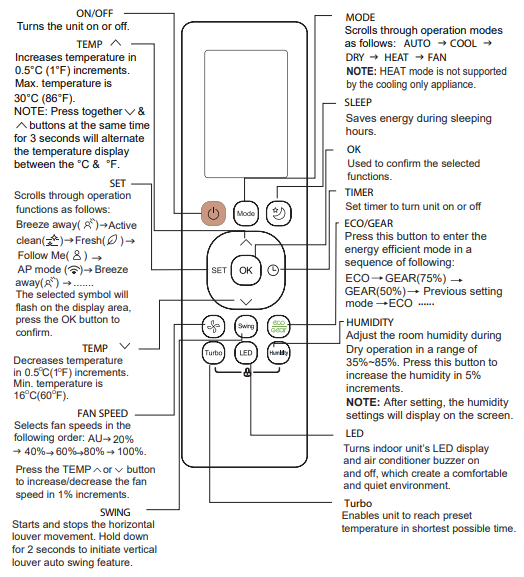
First, turn on your air conditioner remote control. Press the “Wi-Fi” button until the display shows “AP” or the Wi-Fi indicator blinks fast. This means AP mode is active.
- Make sure the air conditioner is powered on.
- Press and hold the Wi-Fi button on the remote for 3 seconds.
- Check if the Wi-Fi light on the unit flashes quickly.
- Confirm the display shows “AP” mode.
Connecting To Wi-fi
Next, connect your smartphone or tablet to the air conditioner’s temporary Wi-Fi network. This network usually starts with “Midea_AC” or similar.
Use these details to connect:
| Item | Details |
|---|---|
| Network Name (SSID) | Midea_AC_XXXX |
| Password | Usually not required or check user manual |
| Next Step | Open the Midea app and follow instructions |
Common Issues With Ap Mode
The AP mode on a Midea air conditioner helps connect the unit to your Wi-Fi. Sometimes, users face problems using this mode.
Below are common issues and tips to fix them for better use of AP mode.
Connection Failures
Connection failures occur when the AC unit cannot link to the Wi-Fi network in AP mode. This stops remote control functions.
- Check if the Wi-Fi signal is strong near the AC unit.
- Make sure the router is working properly and not blocking new devices.
- Verify that the AC unit is in AP mode and not another mode.
- Restart the Wi-Fi router to refresh the network connection.
- Ensure the password entered is correct for the Wi-Fi network.
Resetting The Ac Unit
Resetting the AC unit can fix many AP mode problems. This action clears errors and restores factory settings.
| Reset Method | What It Does |
| Soft Reset | Turns off and on the unit to clear minor bugs |
| Factory Reset | Resets all settings to default, including Wi-Fi and AP mode |
After resetting, try to connect again in AP mode. This often solves connection troubles.
Credit: unfolded.community
Alternatives To Ap Mode
AP Mode on a Midea air conditioner helps connect the device to Wi-Fi. Some users want other ways to control the unit without using this mode. There are easy alternatives to AP Mode for managing your air conditioner.
You can control your air conditioner using apps or remote controls. These options do not need AP Mode and still give you good control over the settings.
Smartphone App Control
You can use a smartphone app to control your Midea air conditioner. The app connects the AC to your home Wi-Fi. This way, you control the unit from anywhere in your house.
The app lets you change temperature, fan speed, and modes. You do not need to use AP Mode each time. The setup uses the app to link your AC to the internet safely.
- Download the official Midea app
- Connect AC to home Wi-Fi through the app
- Control temperature and modes remotely
- Set schedules and timers easily
Using Remote Controls
The remote control is the simplest way to use your Midea air conditioner. It works without any internet connection or AP Mode. Just point the remote at the AC and press buttons to change settings.
This method is quick and works instantly. You can turn the AC on or off, change the temperature, and select modes. No apps or Wi-Fi are needed for remote control use.
- Use the remote to switch the AC on or off
- Adjust temperature and fan speed
- Choose different cooling or heating modes
- No setup or internet needed
Frequently Asked Questions
What Does Ap Stand For On Midea Air Conditioners?
AP stands for Auto Program on Midea air conditioners. It automatically adjusts settings for optimal comfort and energy efficiency based on room conditions.
How Does The Ap Mode Work On Midea Ac?
AP mode detects temperature and humidity, then selects the best fan speed and cooling power. It maintains a balanced, comfortable environment without manual adjustments.
Can I Use Ap Mode To Save Energy?
Yes, AP mode helps save energy by optimizing cooling and fan speed. It reduces power consumption while keeping the room comfortable.
Is Ap Mode Suitable For All Weather Conditions?
AP mode adapts to various indoor climates effectively. It ensures consistent comfort whether it’s hot, humid, or cool outside.
Conclusion
Understanding what “Ap” means on your Midea air conditioner helps you use it better. It shows the air purifier mode is active. This mode cleans the air in your room while cooling. Knowing this lets you enjoy fresher air and a cooler space.
Always check your unit’s display for clear information. Use the air purifier mode when you want cleaner air. Simple settings make your Midea AC easy to use. Now, you can feel more comfortable and breathe easier indoors.