Are you ready to enjoy cool, refreshing air with your Daikin air conditioner but not sure how to get it started? Turning on your Daikin AC might seem simple, but a few key steps can make the process smoother and help you avoid common mistakes.
In this guide, you’ll learn exactly how to power up your unit quickly and easily. By the end, you’ll feel confident controlling your Daikin air conditioner to create the perfect indoor comfort. Keep reading to discover the simple steps that can transform your space instantly.

Credit: www.reddit.com
Locate The Power Source
Find the main power switch or plug for the Daikin air conditioner.
This switch is usually near the unit or on the wall.
Check if the power is connected to the main electrical panel.
Look for a circuit breaker labeled for the air conditioner.
Make sure the switch is turned on or the plug is fully inserted.
Sometimes, a remote control also needs batteries to work.
Without power, the unit will not turn on.
Identify The Remote Control
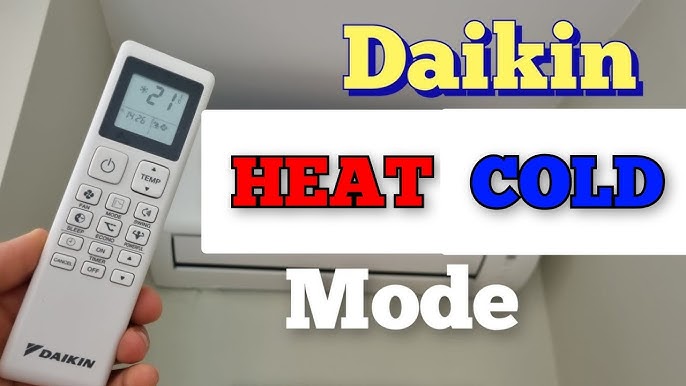
The Daikin air conditioner remoteis small and easy to use. It has a screen showing temperature and modes. The remote has buttons for power, mode, fan speed, and timer.
Look for the power button, usually marked with a circle and line symbol. This button turns the air conditioner on or off. Other important buttons include:
- Mode– switch between cool, heat, dry, or fan.
- Temperature up/down– set your desired room temperature.
- Fan speed– adjust how fast the air blows.
- Timer– set automatic start or stop times.
Check if the remote has fresh batteries. Weak batteries can cause the remote to not work properly. Point the remote directly at the air conditioner sensor to ensure it receives the signal.
Using The Remote To Power On
Press the Power Buttonon the remote to switch on the Daikin air conditioner. The unit will light up, showing it is active.
Select the Operating Modeby pressing the mode button. Choose from options like Cool, Heat, or Fan.
Adjust the Temperature Settingsusing the up and down arrows. Set a comfortable temperature for your room.
Manual Power On Options
The control panelis usually on the front or side of the Daikin unit. It has buttons and sometimes a small screen.
Locate the power button. It often has a circle with a line in the middle symbol.
- Press the power button once to turn the air conditioner on.
- The unit will make a sound or the display will light up.
- If there is no response, check if the unit is plugged in and the power is on.
Some models may have a protective cover over the control panel. Lift it carefully to access the buttons.
Troubleshooting Power Issues
Ensure the air conditioneris properly plugged into a working power outlet. Check the circuit breaker or fuse box for any tripped switches or blown fuses. Sometimes, power issues happen due to a loose connection or power failure.
- Remove the remote control’s back cover.
- Replace old batteries with new ones.
- Test the remote to see if it works.
Resetting the unit can fix minor errors. Turn off the air conditioner and unplug it from the power source. Wait for about 5 minutes to clear the system. Plug it back in and turn it on. This simple reset often restores normal function.

Credit: www.manual.nz
Tips For Efficient Use
Setting the optimal temperaturehelps save energy and keeps the room comfortable. Aim for 24-26°C (75-78°F) in summer to balance coolness and power use.
Use the timer functionsto control when the air conditioner turns on or off. This avoids running the unit all day and lowers electricity bills.
Regular cleaning of the filters and ventsimproves air flow and keeps the unit working well. Clean filters every 2 weeks or as needed to avoid dust buildup.

Credit: www.ecicomfort.com
Frequently Asked Questions
How Do I Turn On A Daikin Air Conditioner?
To turn on a Daikin air conditioner, press the power button on the remote control. Ensure the unit is plugged in and the remote has working batteries. The display on the indoor unit will light up, indicating the system is operational.
Can I Use The Daikin Ac Without A Remote?
Most Daikin air conditioners require the remote to operate. Some models have a manual power button on the indoor unit. Check your unit’s manual to see if this feature is available for manual operation.
What Mode Should I Select To Start Cooling?
Select the “Cool” mode on the remote to start cooling. Use the temperature buttons to set your desired temperature. The AC will automatically adjust fan speed and compressor operation for efficient cooling.
Why Is My Daikin Ac Not Turning On?
If your Daikin AC doesn’t turn on, check the power supply and remote batteries. Ensure the unit’s circuit breaker is not tripped. If issues persist, consult the user manual or contact Daikin customer support.
Conclusion
Turning on a Daikin air conditioner is simple and quick. Just follow the steps carefully to ensure proper use. Keep the remote control handy for easy access. Setting the right temperature helps you stay comfortable all day. Regular use keeps your room cool and fresh.
Remember to check the filter for better airflow. Enjoy a cool space without stress or confusion. Now, you can control your Daikin air conditioner with ease. Stay comfortable no matter the weather outside.