
Have you ever wondered what the fan setting on your air conditioner really does? You might think it’s just about blowing air, but there’s more to it than that.
Understanding this simple feature can help you save energy, stay comfortable, and get the most out of your AC. Keep reading, and you’ll discover how this small setting can make a big difference in your home.
Credit: www.kalosflorida.com
Fan Setting Basics
The fan setting on an air conditioner controls the airflow without cooling. It helps circulate air inside the room.
Understanding the fan mode can improve comfort and save energy during warm days.
Purpose Of The Fan Mode
The fan mode moves air around the room without turning on the cooling system. It can help reduce humidity and keep the air fresh.
Using the fan mode can lower energy use because the compressor does not run. It also helps distribute temperature evenly.
Types Of Fan Settings
Most air conditioners offer different fan speed options to control airflow. Each speed suits different needs.
- Low:Gentle airflow for quiet operation and slight air movement.
- Medium:Balanced airflow for moderate cooling and air circulation.
- High:Strong airflow for quick air movement and faster cooling.
- Auto:The fan speed adjusts automatically based on room temperature.
| Fan Speed | When to Use | Benefits |
|---|---|---|
| Low | At night or quiet times | Less noise, gentle air flow |
| Medium | Normal daily use | Good balance of airflow and noise |
| High | Hot days or quick cooling | Faster air circulation |
| Auto | Variable conditions | Energy saving, adjusts to needs |
Fan Speed Options
The fan setting on an air conditioner controls how fast the fan blows air. You can choose different speeds to match your comfort needs.
Fan speed affects air circulation and noise level. It also changes how quickly your room cools down.
Low Speed
Low speed moves air gently around the room. It is quiet and uses less energy.
This setting is good for mild days or when you want a calm environment.
Medium Speed
Medium speed offers a balance between airflow and noise. It cools the room faster than low speed.
This is a common choice for regular cooling needs.
High Speed
High speed pushes the most air and cools the room quickly. It is louder and uses more power.
Use this when you need fast cooling or on very hot days.
Automatic Fan Speed
Automatic fan speed adjusts based on the room temperature. The AC changes speed to keep the room comfortable.
This setting saves energy and keeps noise low when full power is not needed.
Fan Mode Vs Cooling Mode
Air conditioners have different settings to control airflow and temperature. Two common settings are fan mode and cooling mode. Knowing the difference can help you use your AC better.
Fan mode runs the fan without cooling the air. Cooling mode lowers the room temperature by removing heat.
How Fan Mode Differs
Fan mode moves air around the room without changing the temperature. It uses less energy than cooling mode because the compressor is off. This setting helps with air circulation and ventilation.
| Feature | Fan Mode | Cooling Mode |
| Air Temperature | Unchanged | Cooled |
| Compressor | Off | On |
| Energy Use | Low | High |
| Air Movement | Yes | Yes |
When To Use Fan Only
Fan mode is useful in several situations. It helps when you want air flow without cooling. It can also reduce humidity or improve air circulation.
- On mild days when cooling is not needed
- To circulate air after cooling the room
- To reduce stuffiness in a closed space
- When you want to save energy
Energy Efficiency And Fan Setting
The fan setting on an air conditioner controls how the fan runs. It can work alone or with cooling.
Understanding the fan setting helps save energy and reduce power costs.
Impact On Power Consumption
The fan uses electricity when it runs. Running the fan only uses less power than cooling.
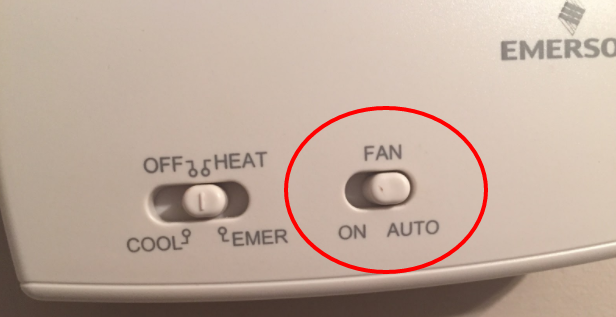
Setting the fan to “auto” means it only runs with cooling. This saves more energy than “on.”
- Fan “auto”: runs only during cooling, saves energy
- Fan “on”: runs all the time, uses more power
- Fan “off”: no air movement, no extra power
Tips To Save Energy
Use the fan setting wisely to lower your electricity bill. Choose the right mode for your needs.
Regular cleaning of the fan keeps it efficient and reduces energy waste.
- Set fan to “auto” for energy savings
- Turn off fan when cooling is not needed
- Clean fan blades and filters regularly
- Use ceiling fans to improve air circulation
- Adjust thermostat to a comfortable, not too low, temperature
Common Fan Setting Features
The fan setting on an air conditioner controls how air moves in the room. It helps keep the air fresh and cool without changing the temperature.
Different fan settings can improve comfort and save energy. Some common features include timers, sleep mode, and air direction control.
Timer And Sleep Mode
The timer lets you set the air conditioner to turn on or off at specific times. This helps save electricity by running only when needed.
Sleep mode adjusts the fan speed and temperature while you sleep. It keeps the room comfortable and uses less power during the night.
- Timer sets start and stop times automatically
- Sleep mode lowers fan speed gradually
- Sleep mode raises temperature slightly for comfort
Air Direction Control
Air direction control lets you change where the fan blows air. You can move the airflow up, down, left, or right.
This feature helps spread cool air evenly in the room. It also allows you to avoid direct airflow if you prefer.
- Manual or automatic swing options
- Adjustable louvers to direct air
- Improves cooling efficiency and comfort
Troubleshooting Fan Issues
The fan setting on an air conditioner helps circulate air inside the room. It can run continuously or only when cooling. Sometimes the fan may stop working or make noise. Knowing how to fix these problems saves time and money.
This guide covers common fan issues and simple ways to troubleshoot them. Follow the tips below to check your air conditioner’s fan and improve its performance.
Fan Not Working Properly
If your air conditioner’s fan does not turn on, it may be due to power, settings, or mechanical problems. Check if the fan is set to “Auto” or “On” in the controls. Sometimes the fan only runs when cooling is active.
- Check the power supply and circuit breaker.
- Make sure the fan setting is not off or on a timer.
- Inspect the fan motor and capacitor for damage.
- Clear any debris blocking the fan blades.
- Reset the thermostat or replace batteries if needed.
Noisy Fan Problems
A noisy fan can signal loose parts or dirt buildup. Strange sounds include rattling, squealing, or grinding. These noises may reduce airflow and damage the unit.
| Noise Type | Possible Cause | Fix |
| Rattling | Loose screws or debris | Tighten screws, clean fan area |
| Squealing | Worn belt or motor bearing | Replace belt or lubricate bearing |
| Grinding | Damaged motor or fan blades | Inspect motor, replace damaged parts |
Optimizing Fan Use For Comfort
The fan setting on an air conditioner helps move air inside the room. It does not cool the air but can change how air flows.
Using the fan correctly can improve comfort and save energy. Learn how to adjust the fan for different seasons and use it with other AC modes.
Adjusting Fan For Different Seasons
Fans work differently in summer and winter. Changing fan speed and settings can make your room feel better all year.
- Summer:Use higher fan speed to spread cool air fast.
- Winter:Use low fan speed to move warm air gently.
- Spring and Fall:Medium fan speed helps keep steady airflow.
- Fan Only Mode:Use without cooling to circulate fresh air.
Combining Fan With Other Ac Modes
The fan setting works best when paired with cooling or heating modes. This helps balance temperature and airflow.
| AC Mode | Fan Role | Benefit |
| Cooling | High speed | Distributes cold air evenly |
| Heating | Low to medium speed | Circulates warm air softly |
| Dehumidify | Low speed | Removes moisture without cooling |
| Fan Only | Adjustable speed | Keeps air moving without temperature change |
Credit: www.aiellohomeservices.com

Credit: www.acostainc.com
Frequently Asked Questions
What Does The Fan Setting On An Air Conditioner Do?
The fan setting circulates air without cooling. It helps maintain airflow and reduce humidity. This saves energy compared to full cooling mode.
When Should I Use The Fan Setting On Ac?
Use the fan setting when you want air circulation without cooling. It’s ideal for mild days or to improve ventilation indoors.
Does The Fan Setting Save Energy On Air Conditioners?
Yes, the fan setting uses less energy than cooling mode. It only powers the fan, not the compressor, reducing electricity consumption.
Can The Fan Setting Reduce Humidity In A Room?
The fan setting alone doesn’t reduce humidity. It circulates air but does not remove moisture like the cooling mode does.
Conclusion
The fan setting on your air conditioner controls air circulation. It helps spread cool air evenly throughout the room. Using the fan alone can save energy and reduce costs. It also helps remove humidity without cooling the air. Knowing how to use this setting improves your comfort.
Try adjusting the fan speed to suit your needs. This simple feature makes your air conditioner more efficient. Keep it in mind for better indoor air quality. Understanding the fan setting is useful for every AC user.