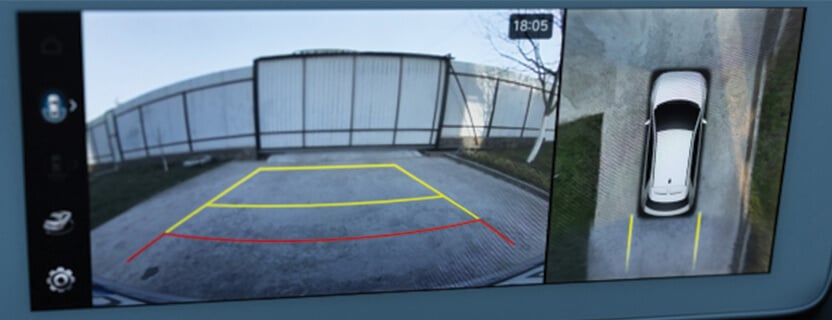
Have you ever wished you had eyes all around your car? Imagine being able to see every angle without turning your head.
That’s exactly what a 360 car camera does for you. It gives you a complete view of your vehicle’s surroundings, making parking, driving, and maneuvering safer and easier. But how does this smart technology actually work? Keep reading, and you’ll discover the simple secrets behind 360 car cameras—and how they can change the way you drive forever.

Credit: www.vantrue.com
360 Car Camera Basics
360 car cameras help drivers see all around their vehicle. They use several cameras to create a full view. This makes parking and driving safer.
These systems show a top-down view of the car on a screen. This view helps avoid obstacles and blind spots.
What Is A 360 Car Camera
A 360 car camera is a set of cameras placed around a car. They work together to give a full view around the vehicle.
The cameras capture images from different angles. The system then combines these images into one wide picture.
Key Components
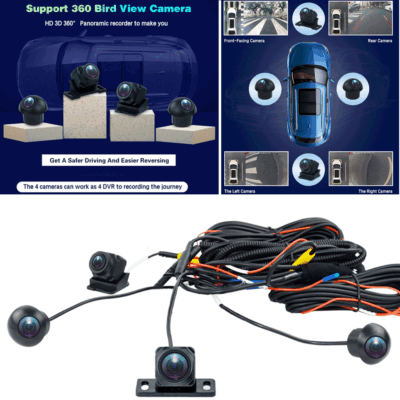
The main parts of a 360 car camera system include cameras, a control unit, and a display screen.
- Cameras:Usually four, placed front, rear, and on each side.
- Control Unit:Processes images and stitches them together.
- Display Screen:Shows the combined 360-degree view to the driver.
Types Of 360 Camera Systems
There are mainly two types of 360 camera systems: wired and wireless. Each type has its own setup and features.
- Wired Systems:Cameras connect to the control unit with cables. They offer stable and clear images.
- Wireless Systems:Cameras send images without cables. They are easier to install but may have slight delays.
How 360 Cameras Capture Images
360 car cameras provide a full view around the vehicle. They help drivers see blind spots and park easily.
These cameras capture images from all sides and combine them into one seamless view. Let’s explore how this is done.
Camera Placement Around The Vehicle
Cameras are placed strategically around the vehicle. They ensure a full 360-degree view.
- Front camera captures the road ahead
- Rear camera focuses on the back area
- Side cameras cover left and right sides
- Under-mirror cameras show blind spots
Image Stitching Technology
After capturing images, the system stitches them together. This process creates a single, continuous view.
| Camera | Function |
| Front | Captures forward view |
| Rear | Captures backward view |
| Side | Captures side views |
| Under-mirror | Captures blind spots |
Real-time Video Processing
Real-time processing is crucial for instant feedback. It helps drivers make quick decisions on the road.
Benefits Of Full Car Coverage
360 car cameras provide a complete view around your vehicle. This full coverage helps drivers avoid blind spots and park with ease. It also improves overall safety while driving.
These cameras record everything happening near your car. This can be very useful for accident claims and legal proof. Let’s explore the main benefits of full car coverage with 360 cameras.
Enhanced Parking Assistance
Full car coverage cameras show all angles around your car during parking. This reduces the risk of hitting objects or other vehicles. Drivers get better control and confidence while parking.
- See obstacles on all sides
- Get guidance for tight spaces
- Avoid scraping walls or curbs
- Park faster and safer
Improved Safety And Accident Prevention
360 cameras help drivers notice pedestrians, cyclists, or other cars nearby. This lowers the chance of accidents. Full coverage allows better awareness in blind spots and tricky traffic areas.
| Benefit | How It Helps |
| Blind Spot Detection | Alerts driver to hidden vehicles |
| Lane Change Safety | Provides clear view of side lanes |
| Night Vision | Improves vision in low light |
Recording And Evidence Collection
The cameras continuously record the surroundings. This footage can be saved for later review. It helps prove what happened during accidents or disputes.
Key uses of recorded video include:
- Insurance claims support
- Police investigations
- Protection against false accusations
- Monitoring parked vehicle safety
Installation And Setup
Installing a 360 car camera system helps drivers see all around their vehicle. Setting it up correctly is key to getting clear views and good safety.
This guide explains how to install and set up the cameras for best results. Follow these steps for easy and accurate installation.
Choosing The Right System
Pick a system that fits your car model and needs. Some systems are made for specific car types. Others work on many models.
Look for systems with good camera quality and easy installation. Check if the system includes all parts you need.
- Match system to your car size and type
- Choose cameras with clear image quality
- Consider if you want wired or wireless setup
- Check if the system supports your car’s display
Mounting The Cameras
Place cameras at key points around your car for full coverage. Common spots include front, rear, and side mirrors.
Make sure cameras are fixed tightly and face the right direction. Avoid places that block the view or get dirty easily.
- Front camera near the grille or bumper
- Rear camera above the license plate
- Side cameras on or under side mirrors
- Keep lenses clean and free from obstruction
Calibration And Alignment
Calibration sets the cameras to work as one system. It helps create the 360-degree view without gaps or overlaps.
Align cameras using the system’s software or instructions. Some systems guide you through calibration step by step.
- Follow software prompts for camera setup
- Adjust camera angles for clear, wide views
- Test the system by checking the 360 view display
- Recalibrate if images do not line up well
Common Features And Functions
360 car cameras help drivers see all around their vehicle. They use several cameras to create a full view.
These cameras come with smart features that make parking and driving safer and easier.
Bird’s-eye View Display
The bird’s-eye view shows a top-down image of the car and its surroundings. It combines images from cameras around the vehicle.
This view helps drivers see obstacles and tight spaces. It makes parking and turning safer.
- Uses four or more cameras placed around the car
- Stitches images into one seamless view
- Displays on the car’s dashboard screen
- Shows the car’s position relative to nearby objects
Obstacle Detection Alerts
360 car cameras often include obstacle detection alerts. They warn drivers about objects close to the car.
These alerts use sensors and cameras to spot obstacles. They can send sounds or visual warnings.
- Detects objects near the car’s sides and rear
- Alerts driver with beeps or flashing lights
- Helps avoid collisions while parking or driving
- Works in low light or tight spaces
Integration With Other Vehicle Systems
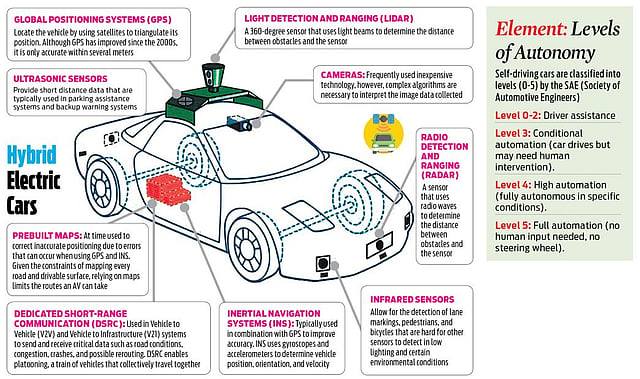
360 cameras connect with other car systems for better safety. They work with parking sensors and braking systems.
This integration helps the car react to dangers. It can slow down or stop the vehicle automatically.
- Links with parking assist technology
- Works with automatic emergency braking
- Syncs with blind spot monitoring systems
- Provides real-time data to the vehicle’s control unit
Credit: www.newindianexpress.com
Troubleshooting And Maintenance
360 car cameras offer a full view around your vehicle. Proper care and fixing small issues keep them working well. This guide helps you troubleshoot and maintain your system.
Learn how to identify common problems, clean the cameras, and update the software. This keeps your 360 camera system clear and reliable.
Common Issues And Fixes
Some common problems with 360 car cameras include blurry images, camera failure, and connection errors. Most issues have simple fixes you can try yourself.
| Issue | Cause | Fix |
| Blurry Image | Dirty lens or moisture | Clean the lens gently with a microfiber cloth |
| Camera Not Showing | Loose wiring or power issue | Check all connections and fuses |
| Image Flickering | Software glitch or interference | Restart the system and update software |
Cleaning And Care Tips
Keeping the camera lenses clean helps maintain a clear view. Dirt, water spots, and dust reduce image quality and can cause errors.
- Use a soft microfiber cloth for cleaning
- Avoid harsh chemicals or abrasive materials
- Check lenses regularly after rain or off-road driving
- Dry lenses gently if wet to prevent water spots
Software Updates
Camera systems rely on software to work correctly. Updates fix bugs and add improvements. Keeping software current avoids many problems.
- Check the manufacturer’s website or app for updates
- Download updates when your car is parked and powered on
- Follow instructions to install updates carefully
- Restart the system after updating to apply changes
Future Trends In 360 Car Cameras
360 car cameras give drivers a full view around their vehicle. These cameras help with parking and safety. New technology will make these cameras better and smarter.
Future trends focus on clearer images, smarter systems, and better night vision. These changes will improve how drivers use 360 cameras every day.
Advancements In Ai And Image Processing
Artificial intelligence (AI) helps 360 cameras understand what they see. AI can spot objects and warn drivers about dangers. It also improves image quality by reducing blur and noise.
Image processing uses AI to combine pictures from many cameras. This creates a smooth and clear 360 view. It also helps in bad weather or low light.
- AI detects pedestrians and other vehicles
- Image processing reduces glare and shadows
- Better object tracking for safety alerts
Integration With Autonomous Driving
360 cameras will work with self-driving cars. They provide important data for the car’s computer. This helps the car make safe decisions on the road.
Future systems will use 360 cameras for real-time monitoring. They will detect obstacles, traffic signs, and lane markings clearly.
- Supports navigation in tight spaces
- Helps avoid collisions automatically
- Improves overall vehicle awareness
Improved Resolution And Night Vision
Higher resolution cameras give sharper images. Drivers can see small details like road signs and curbs more clearly. Night vision lets cameras work better in the dark.
Future 360 cameras will use infrared and other tech to improve night vision. This helps drivers see better in low light and bad weather.
- Ultra-high definition for clear daytime images
- Infrared sensors for night and fog
- Improved contrast and brightness automatically
Credit: www.ebay.ca
Frequently Asked Questions
What Is A 360 Car Camera System?
A 360 car camera system uses multiple cameras around your vehicle. It stitches images together to create a bird’s-eye view. This helps drivers see blind spots and park safely. The system improves awareness and reduces accident risks.
How Do 360 Car Cameras Capture A Full View?
They use four or more wide-angle cameras positioned front, rear, and sides. These cameras record simultaneously. Software then combines the images into a seamless 360-degree view. This real-time view helps drivers maneuver tight spaces easily.
Are 360 Car Cameras Effective For Parking Assistance?
Yes, they provide a comprehensive view of your surroundings. This reduces the chance of hitting obstacles or pedestrians. The system offers clear visuals from all angles, making parking safer and more precise.
Do 360 Car Cameras Work In Low Light?
Most 360 car cameras have night vision or enhanced low-light sensors. They adjust to dim conditions to maintain clear visuals. However, performance may vary depending on the camera quality and ambient lighting.
Conclusion
360 car cameras show a full view around your vehicle. They use multiple lenses to cover all sides. The system stitches images into one clear picture. This helps drivers park safely and avoid obstacles. It also reduces blind spots and improves driving confidence.
These cameras work with sensors for better accuracy. Many cars now include this technology for safety. Understanding how they work helps you appreciate their value. They make driving easier and safer every day. Simple tech with big benefits.