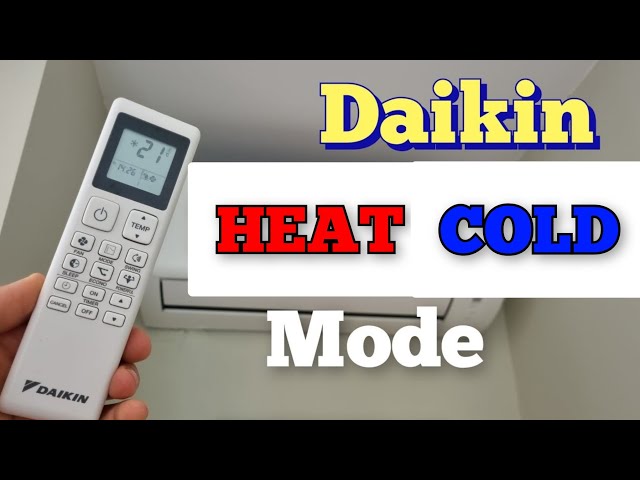
Are you ready to enjoy cool, refreshing air at the touch of a button? Knowing how to turn on your Daikin air conditioner quickly and correctly can make all the difference on a hot day.
Whether it’s your first time using it or you just want to avoid common mistakes, this guide will walk you through simple steps to get your unit up and running in no time. Keep reading, and you’ll be feeling comfortable and cool before you know it.
Locate The Power Button
Turning on your Daikin air conditioner starts with finding the power button. This button controls the main power supply to the unit.
Knowing where this button is helps you switch on the air conditioner quickly and safely.
Check The Remote Control
The most common way to turn on a Daikin air conditioner is using the remote control. The power button is usually the largest button on the remote.
- Look for a button with a power symbol (a circle with a vertical line).
- It is often placed at the top or center of the remote.
- Press this button once to turn on the air conditioner.
Locate The Power Button On The Indoor Unit
If you do not have the remote, the power button is also on the indoor unit itself. This button is small and sometimes hidden behind a panel.
- Look near the front panel or side of the unit.
- Check for a small button labeled “Power” or “On/Off.”
- You may need to open a small cover to see the button.
Use The Power Button On The Outdoor Unit
Some Daikin models include a power button on the outdoor unit. This button is used mainly for maintenance or emergency shut-off.
| Location | Power Button Presence | Use |
| Remote Control | Yes | Turn unit on/off easily |
| Indoor Unit | Yes | Manual power control if remote is missing |
| Outdoor Unit | Sometimes | Emergency or maintenance use only |

Credit: www.amazon.com
Use The Remote Control
Turning on your Daikin air conditioner with the remote is simple. The remote control helps you manage the settings easily.
Learning to use the remote control will make operating your air conditioner more convenient. Follow these steps to get started.
Identify Key Buttons
Find the power button on your remote. It usually has a symbol that looks like a circle with a line through the top.
Other important buttons include mode, temperature up and down, and fan speed. Familiarize yourself with these buttons to operate the air conditioner effectively.
- Power button: Turns the air conditioner on and off
- Mode button: Switches between cool, heat, and fan modes
- Temperature buttons: Adjusts the temperature up or down
- Fan speed button: Changes the fan speed settings
Set The Mode To Cool
Press the mode button until the display shows “Cool”. This setting activates the cooling function of your air conditioner.
Cooling mode is ideal for hot days. It helps lower the room temperature quickly and efficiently.
Adjust Temperature Settings
Use the temperature up and down buttons to set your desired temperature. The display will show the current temperature setting.
For most situations, a temperature between 22°C and 25°C is comfortable. Adjust as needed for your personal comfort.
Turn On Using The Unit Panel
Turning on your Daikin air conditioner using the unit panel is simple. You do not need the remote control for this.
The unit panel has buttons that control the air conditioner directly. You can start the unit by pressing the power button.
Locate The Unit Panel
The unit panel is on the indoor air conditioning unit. It is usually on the front or side of the unit.
Look for a small cover or flap you can open to see the control buttons.
- Check the front center of the unit
- Look for a flap or small door
- Open it gently to see buttons
Press The Power Button
Find the power button on the unit panel. It may be marked with a power symbol or “ON/OFF”.
Press the button once to turn the air conditioner on. The unit will start running after a few seconds.
- Locate the power button
- Press it once firmly
- Wait for the unit to start
Adjust Settings On The Unit Panel
Some Daikin units let you change temperature or mode from the panel. Use the buttons near the power button.
Press the mode button to select cooling, heating, or fan mode. Use the temperature buttons to set your comfort level.
- Press mode button to change operation mode
- Use temperature buttons to raise or lower heat
- Wait a moment for the unit to respond
Optimize Airflow For Quick Cooling
Turning on your Daikin air conditioner is easy. To cool your room fast, you need to adjust the airflow properly.
Good airflow helps the air conditioner work better. It cools the room quicker and saves energy.
Adjust Fan Speed
Fan speed controls how fast the air moves in the room. Higher fan speed means faster cooling.
Use the remote or control panel to change the fan speed. Start with high speed for quick cooling.
- High speed moves air quickly for fast cooling
- Medium speed balances comfort and noise
- Low speed saves energy and reduces noise
Set Air Direction
Air direction controls where the cool air flows. Aim the air vents to spread cool air evenly.
Adjust the louvers up, down, left, or right using the remote or control panel. This helps cool the whole room faster.
- Point vents toward the center of the room
- Avoid pointing air directly at people
- Use swing mode for even air distribution
Troubleshoot Common Issues
Sometimes your Daikin air conditioner might not turn on as expected. Troubleshooting common problems helps you fix it fast.
Check simple causes first before calling for service. This guide covers two main checks to try.
Check Power Supply
Make sure your air conditioner is getting power. Without power, it will not turn on.
- Check if the power plug is fully inserted into the outlet.
- Look for any tripped circuit breakers or blown fuses in your home panel.
- Try plugging another device into the same outlet to confirm it works.
- Ensure any power switches on the unit or remote are turned on.
Reset The Air Conditioner
Resetting can clear minor faults and allow the unit to restart properly.
| Reset Method | Details |
| Power Off | Turn off the main power switch or unplug the unit. |
| Wait Time | Leave it off for at least 5 minutes to clear memory. |
| Power On | Plug in or switch on the power again. |
| Test | Try turning on the air conditioner with the remote or control panel. |

Credit: www.ecicomfort.com

Credit: www.reddit.com
Frequently Asked Questions
How Do I Turn On A Daikin Air Conditioner Remote?
Press the “ON/OFF” button on the Daikin remote control once. The air conditioner will power on and start cooling or heating.
Can I Turn On Daikin Ac Without A Remote?
Yes, use the manual power button on the indoor unit. This button is usually located on the unit’s side or bottom.
What To Do If Daikin Ac Doesn’t Turn On?
Check the power supply, remote batteries, and ensure the unit is plugged in. Reset the unit if needed.
How To Turn On Daikin Ac Using A Smartphone?
Use the Daikin mobile app and connect via Wi-Fi. Control the AC by selecting the power on option in the app.
Conclusion
Turning on your Daikin air conditioner is quick and simple. Just follow the steps carefully. Use the remote or control panel to start cooling. Adjust settings to fit your comfort needs. Keep the unit clean for better performance. Regular checks help avoid problems later.
Enjoy a cool and fresh room anytime. Stay comfortable even on hot days. Now, you are ready to use your Daikin air conditioner with ease.