
If you own a 2022 Honda Civic, you might have noticed the idle stop feature turning off your engine when you’re at a stop. While this can save fuel, it’s not everyone’s favorite.
Maybe you find it annoying or want more control over your drive. Whatever your reason, you’re in the right place. This guide will show you exactly how to turn off idle stop on your Honda Civic 2022, step by step.
Keep reading to take back control of your car’s engine and enjoy a smoother driving experience.
Idle Stop Feature Basics
The Idle Stop feature in the Honda Civic 2022 offers a modern touch. It aims to enhance fuel efficiency and reduce emissions. Understanding its basics helps you decide if it’s right for you.
Purpose Of Idle Stop
The Idle Stop feature automatically turns off the engine during stops. This occurs at traffic signals or in heavy traffic. Once you press the accelerator, the engine restarts. This mechanism conserves fuel and minimizes idle emissions.
Benefits And Drawbacks
The Idle Stop feature offers multiple benefits. It saves fuel by reducing engine idling time. This can lead to noticeable savings, especially in city driving. It also contributes to a lower carbon footprint. Reduced emissions benefit the environment.
Yet, there are drawbacks to consider. Frequent engine starts may cause wear over time. Some drivers find the restarts disruptive. In cold climates, the feature might affect cabin warmth. Weigh these aspects to determine its usefulness.
Credit: www.piloteers.org
Locating Idle Stop Controls
Finding the Idle Stop controls on your 2022 Honda Civic is easier than you might think. Knowing exactly where these controls are can save you time and help you customize your driving experience on the spot. Let’s look at the common places Honda places these controls so you can switch the Idle Stop feature off whenever you want.
Dashboard Button
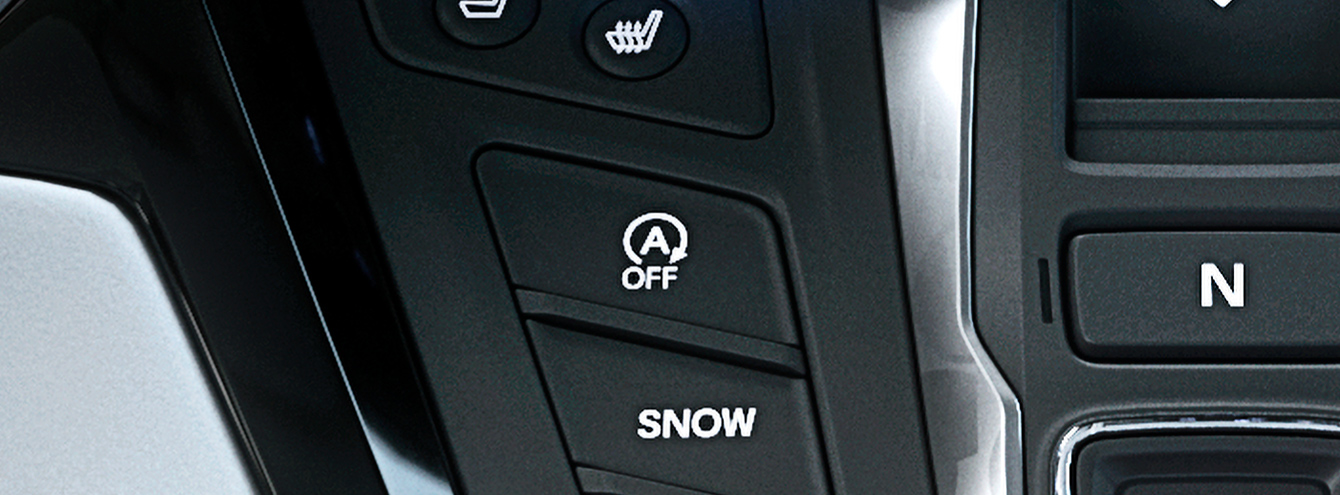
Many Honda Civic models include a dedicated button on the dashboard to control the Idle Stop system. This button is usually marked with an “A” encircled by an arrow or labeled as “Idle Stop” or “ECON.”
Look around the lower left side of your steering wheel or near the gear shift. Pressing this button toggles the Idle Stop feature on or off instantly, giving you quick control without diving into menus.
Have you noticed how convenient it is to access this button while driving? It’s designed for easy reach, so you can turn off Idle Stop without taking your eyes off the road.
Touchscreen Settings
If you don’t find a physical button, the Idle Stop control might be embedded in your Civic’s touchscreen menu. This can be accessed through the main settings menu under the “Vehicle” or “Driving” options.
Once inside, look for a setting related to “Idle Stop,” “Auto Stop,” or “Engine Auto Stop.” Toggling this option off disables the feature until you decide to enable it again.
Using the touchscreen lets you explore additional settings that might impact Idle Stop behavior, such as sensitivity or conditions for activation. Do you prefer physical buttons or touchscreen controls? Either way, Honda makes sure you have options to manage this feature efficiently.
Step-by-step Guide To Disable Idle Stop
Disabling the idle stop feature in the 2022 Honda Civic is simple. This guide shows two easy ways to turn it off. Follow these steps to keep your engine running without interruptions.
Using The Dashboard Button
Locate the idle stop button on the dashboard. It usually has an “A” with a circular arrow around it. Press this button once while the engine is running.
The idle stop system will turn off temporarily. You will see a light on the dashboard indicating it is disabled. This setting resets every time you restart the car.
Adjusting Through Vehicle Settings
Access the vehicle settings through the infotainment screen. Use the menu to find the “Idle Stop” or “Auto Stop” option. Select this to change the setting.
Choose to disable the idle stop feature permanently. Save the settings before exiting the menu. This method keeps idle stop off until you change it again.
Credit: www.civic11forum.com
When To Turn Off Idle Stop
Knowing when to turn off the idle stop feature in your Honda Civic 2022 can improve your driving experience. This feature saves fuel by stopping the engine at idle, but it may not suit every situation. Understanding the right moments to disable it helps maintain comfort and control.
Traffic Conditions
Heavy traffic with frequent stops can make idle stop annoying. Constant engine shutdowns may cause delays in acceleration. On highways or smooth roads, idle stop works well and saves fuel. In stop-and-go traffic, turning it off keeps the engine ready to move. This helps avoid stress during busy commutes.
Personal Preferences
Some drivers dislike the engine turning off at stops. The feeling may seem unsettling or cause hesitation when starting again. Others prefer a smooth ride without interruptions. If you want full control over your car’s engine, turning off idle stop fits your style. It’s easy to switch on or off anytime based on your comfort.
Troubleshooting Idle Stop Issues
If your 2022 Honda Civic’s idle stop system isn’t working the way you expect, troubleshooting it can save you time and frustration. Understanding common problems and knowing how to reset the system helps you regain control quickly. Let’s look at what might be causing issues and how to address them effectively.
Common Problems
One frequent issue with the idle stop system is that it won’t activate even when stopped. This could be due to low battery voltage, as the system needs enough power to restart the engine smoothly. Have you noticed your battery warning light flickering? That’s a clear sign the system might be disabled temporarily to protect your battery.
Another common problem is the engine restarting too slowly or not at all. This might happen if the engine temperature is too low or too high, as the system is designed to work only within certain temperature ranges. Check your dashboard for warning lights or messages that indicate temperature issues.
Sometimes, the idle stop system won’t turn off automatically after restarting the engine. This can be caused by sensor malfunctions or software glitches. If you experience this, it’s worth inspecting your sensors or visiting a dealer for a quick diagnostic.
Resetting The System
If your idle stop system acts up, resetting it can often restore normal function. Start by turning off the engine completely and waiting for a few minutes. This pause allows the car’s electronics to reset, clearing minor glitches.
Next, turn the ignition back on without starting the engine and press the idle stop button to disable and then enable the system again. This manual toggle can refresh the system’s settings and resolve simple errors.
Have you tried disconnecting the negative terminal of your car battery for about 10 minutes? This deeper reset can sometimes fix stubborn problems, but be cautious—it may erase saved settings like radio presets. Always consult your owner’s manual before attempting this.
Alternative Fuel-saving Tips
Turning off the idle stop feature on the 2022 Honda Civic may save some drivers from minor annoyances. Yet, saving fuel can also come from other simple actions. These alternative tips help reduce fuel use without changing your car’s settings. Adopting good habits and maintaining your vehicle properly can boost fuel efficiency. Here are two key areas to focus on.
Efficient Driving Habits
Drive smoothly to use less fuel. Avoid fast acceleration and hard braking. Keep a steady speed on highways. Use cruise control when possible. Idling wastes fuel; turn off the engine if stopped for long. Lighten your load by removing unnecessary items. Close windows at high speeds to reduce drag.
Regular Vehicle Maintenance
Keep the engine tuned and oil changed regularly. Check tire pressure often; low pressure wastes fuel. Replace air filters when dirty. Use the recommended grade of motor oil. Ensure spark plugs are in good condition. Well-maintained cars run more efficiently and save fuel.
Credit: www.hondainfocenter.com
Frequently Asked Questions
How Do I Disable Idle Stop On Honda Civic 2022?
To disable idle stop, press the “ECON” button on the dashboard. This temporarily turns off the auto stop feature until you restart the car.
Can Idle Stop Be Permanently Turned Off On Honda Civic?
No, idle stop cannot be permanently disabled. It resets each time you start the vehicle to maintain fuel efficiency and emissions compliance.
Why Would I Want To Turn Off Idle Stop In My Civic?
You might disable idle stop to avoid engine restarts in heavy traffic or extreme weather conditions for smoother driving experience.
Does Turning Off Idle Stop Affect Fuel Economy?
Yes, turning off idle stop may slightly reduce fuel efficiency, as the engine continues running when the car is stopped.
Conclusion
Turning off the idle stop feature on your 2022 Honda Civic is simple. Just follow the steps carefully for best results. This helps control when your engine stops and starts. You can enjoy smoother driving without unexpected engine pauses. Always check your car manual for specific details.
Adjust settings based on your comfort and driving needs. Stay safe and keep your car running well. Small changes make a big difference in your driving experience. Try it out and see how it feels.