Have you ever wished your car could hold itself still without you having to keep your foot on the brake? If you drive a Kia, there’s a smart feature designed just for that—Auto Hold.
This handy system takes the stress out of stop-and-go traffic and hill starts by keeping your vehicle steady when you pause. Imagine the relief of not worrying about rolling backward or constantly pressing the brake pedal. Curious how Auto Hold works and how it can make your driving experience smoother and safer?
Keep reading to discover everything you need to know about Auto Hold on your Kia.

Credit: ownersmanual.kia.com
Auto Hold Feature Explained
The Auto Hold feature in Kia vehicles helps drivers stay safe and comfortable during stop-and-go traffic. It holds the brake automatically after you stop, so you don’t need to keep your foot on the brake pedal. This reduces fatigue and makes driving easier, especially in heavy traffic or on hills.
How Auto Hold Works
Auto Hold activates when the vehicle comes to a complete stop. The system keeps the brakes applied even after releasing the brake pedal. It prevents the car from rolling forward or backward. When you press the accelerator, the system releases the brakes smoothly. This allows a quick and safe start without extra effort.
Key Components Involved
- Brake Control System: Manages the brake pressure to hold the vehicle steady.
- Wheel Sensors: Detect when the car stops and if it starts moving.
- Control Module: Processes signals and controls the Auto Hold function.
- Dashboard Indicator: Shows when Auto Hold is active for driver awareness.
Activation Process
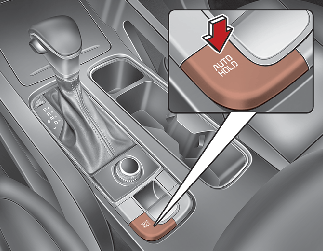
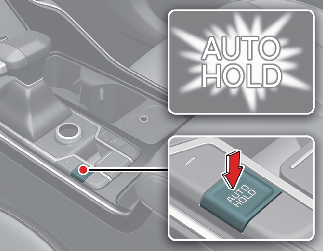
To use Auto Hold, press the Auto Hold button on the center console. The indicator light will turn on. Bring the vehicle to a full stop using the brake pedal. Release the brake pedal and the system will hold the brakes automatically. To move again, press the accelerator pedal. Auto Hold will deactivate when you turn off the engine or manually switch it off.

Credit: ownersmanual.kia.com
Safety Benefits Of Auto Hold
The Auto Hold feature on Kia vehicles adds an important layer of safety. It helps drivers by automatically keeping the car stationary without needing to keep the brake pressed. This system supports safer driving in many everyday situations.
Here are key safety benefits of using Auto Hold in your Kia.
Preventing Unintended Rollback
Auto Hold stops the car from rolling backward on hills. This prevents accidents when starting on a slope. Drivers feel more confident and in control. The system holds the brakes until the accelerator is pressed. It reduces the risk of collisions with cars or objects behind.
Enhanced Control In Traffic
In stop-and-go traffic, Auto Hold keeps the vehicle still at red lights or stop signs. Drivers do not need to keep their foot on the brake pedal constantly. This feature helps maintain smooth and safe driving flow. It also lowers the chance of sudden jerks or slips. The system improves overall control in busy conditions.
Reducing Driver Fatigue
Holding the brake for long periods tires the leg muscles. Auto Hold removes this strain by holding the car for you. Drivers feel less tired during long drives or heavy traffic. This reduces stress and helps maintain focus on the road. The feature contributes to safer and more comfortable driving.
Convenience In Daily Driving
The Auto Hold feature on Kia vehicles offers a significant boost to your daily driving comfort. It takes away the hassle of constantly pressing the brake pedal during stop-and-go traffic or at traffic lights. This means you can focus more on the road and less on footwork, making every drive smoother and less tiring.
Smooth Stop-and-go Experience
Imagine being stuck in heavy traffic where you need to stop frequently. Auto Hold keeps the brakes engaged even after you release the pedal, preventing your car from rolling forward or backward. This allows you to relax your foot without worrying about unintentionally moving the vehicle.
This feature is especially handy in city driving or on busy highways. It reduces fatigue by letting you rest your foot during those constant stops, making your drive feel less stressful and more controlled.
Parking Assistance
Auto Hold also comes in handy when parking on slopes or uneven surfaces. Instead of holding the brake pedal down manually, the system keeps the car steady as you shift gears or prepare to move. This added support gives you confidence during tricky parking situations.
Have you ever struggled with a car rolling back just as you tried to move forward on a hill? Auto Hold eliminates that worry, letting you park and start smoothly without the usual tension.
Integration With Other Systems
Kia’s Auto Hold works seamlessly with other safety features like electronic parking brakes and traction control. This integration ensures that your car remains stable and secure in various conditions. The system automatically adapts, providing consistent support whether you’re in stop-and-go traffic or parking on an incline.
Such coordination between systems enhances your overall driving experience, making each journey safer and more comfortable without any extra effort on your part.
Using Auto Hold In Different Kia Models
Auto Hold is a helpful feature in many Kia models. It keeps the car still without pressing the brake pedal. This feature works well in stop-and-go traffic or at traffic lights. Different Kia models have Auto Hold, but the way it works can vary.
Compatibility Across Models
Many Kia models have Auto Hold. It is common in SUVs, sedans, and hybrids. Some popular models with this feature include:
- Kia Sorento
- Kia Sportage
- Kia Seltos
- Kia Optima
- Kia Carnival
Newer Kia models are more likely to have Auto Hold. Check your car’s manual for exact details. Some older models might not support Auto Hold.
Model-specific Features
Auto Hold works slightly differently in each model. Some models use a button to activate Auto Hold. Others activate it automatically when you stop the car. Certain models show a light on the dashboard to tell you when Auto Hold is active.
In some Kia hybrids, Auto Hold helps save battery power. In SUVs, it may work with hill-start assist. These small differences make each model unique.
User Tips For Optimal Use
- Always activate Auto Hold before stopping the car.
- Keep your foot near the brake pedal when using Auto Hold.
- Turn off Auto Hold on slippery roads to avoid wheel spin.
- Check the dashboard for the Auto Hold light to confirm it’s on.
- Do not rely solely on Auto Hold for parking on slopes.
Using Auto Hold properly makes driving easier and safer. Understanding your specific Kia model helps you get the best use from Auto Hold.
Troubleshooting Common Issues
Troubleshooting common issues with Auto Hold on Kia helps keep your driving smooth. Understanding simple fixes saves time and stress. Knowing warning signs and care tips keeps the system working well.
When Auto Hold Doesn’t Engage
Auto Hold may fail to activate for several reasons. The driver must press the brake pedal firmly before the system works. The system might not engage on steep slopes or uneven ground. Check if the seatbelt is fastened; some models require it. Low brake fluid or a system fault can also stop Auto Hold.
Warning Indicators
Warning lights on the dashboard alert you to Auto Hold issues. A yellow or red brake warning light means the system needs attention. Look for messages on the display screen about Auto Hold status. Ignoring warnings can lead to brake problems or safety risks.
Maintenance Recommendations
- Keep brake fluid at the correct level and change it regularly.
- Have the brake system inspected during routine service visits.
- Clean sensors near the wheels to ensure proper function.
- Update your vehicle’s software to fix bugs affecting Auto Hold.
- Report unusual noises or failures to a certified Kia technician.
Comparing Auto Hold With Similar Technologies
Understanding how Auto Hold compares with other car technologies can help you decide if it fits your driving style. Each system offers unique benefits, but they often overlap in purpose. Let’s break down what sets Auto Hold apart and what it shares with similar features.
Auto Hold Vs. Hill Start Assist
Both Auto Hold and Hill Start Assist prevent your car from rolling backward on a slope. However, Auto Hold activates whenever you stop, not just on hills. It holds the brakes for you, even at traffic lights or stop signs.
Hill Start Assist only kicks in when the car senses an incline, making it less versatile. If you often face stop-and-go traffic on flat roads, Auto Hold can make your drive smoother. Have you ever wished your car could hold still without you keeping your foot on the brake? That’s where Auto Hold shines.
Differences From Electronic Parking Brake
The Electronic Parking Brake (EPB) replaces the traditional handbrake lever with a button. It is mainly designed to keep your car stationary when parked. Auto Hold, on the other hand, temporarily holds the brakes while you’re stopped but ready to move again.
Think of EPB as a parking tool, and Auto Hold as a traffic helper. EPB locks the brakes until you manually release it, while Auto Hold automatically releases when you press the accelerator. This difference makes Auto Hold more convenient during short stops.
Advantages Over Manual Brake Hold
Manual brake hold requires you to keep your foot on the brake pedal or use the handbrake. Auto Hold frees your foot, reducing fatigue during long waits in traffic. It also reacts faster and more precisely than a human can.
With Auto Hold, you avoid the risk of rolling backward or forward unintentionally. It’s especially helpful in stop-and-go traffic or on inclines. Imagine how much easier your daily commute could be with this simple feature handling the brakes for you.
Credit: ownersmanual.kia.com
Frequently Asked Questions
What Does Auto Hold Do In A Kia?
Auto Hold in a Kia keeps the vehicle stationary without holding the brake pedal. Once activated, it maintains the brake pressure automatically. It’s particularly useful in stop-and-go traffic or on hills, enhancing driving comfort and convenience.
How Do I Activate Auto Hold On My Kia?
To activate Auto Hold, press the button on your Kia’s dashboard. Ensure your seatbelt is fastened and the car is in drive mode. Once activated, the system will automatically hold the brakes when the vehicle is stationary.
Is Auto Hold Safe To Use In Traffic?
Yes, Auto Hold is safe for use in traffic. It helps reduce driver fatigue by maintaining brake pressure automatically. This feature ensures the vehicle remains stationary without constant brake pedal pressure, making it ideal for stop-and-go situations.
Can Auto Hold Be Disabled In A Kia?
Yes, Auto Hold can be easily disabled in a Kia. Simply press the Auto Hold button again to deactivate it. This allows the driver to regain full manual control over the vehicle’s braking system whenever desired.
Conclusion
Auto Hold on Kia helps keep your car steady without pressing the brake. It makes stops easier and safer, especially in traffic or on hills. This feature reduces stress and helps you focus on driving. Understanding how Auto Hold works improves your driving experience.
Try it out to feel the difference in control and comfort. Simple, smart, and helpful for daily drives.