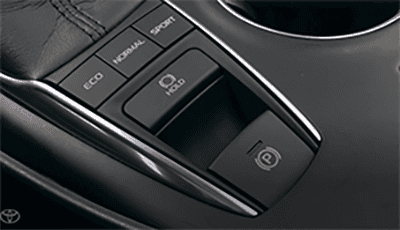
Have you ever noticed a button labeled “Hold” in your Toyota Camry and wondered what it actually does? You’re not alone.
This small feature can make a big difference in how you drive, especially in stop-and-go traffic or on hills. Understanding how the Hold button works can save you time, reduce stress, and even improve safety on the road. Keep reading to discover exactly what this button does and how you can use it to make your driving experience smoother and more comfortable.
Hold Button Basics
The Hold Button on your Toyota Camry might seem like just another feature, but it offers practical benefits that can make your driving experience smoother and safer. Understanding the basics of this button helps you use it effectively, especially in everyday driving situations. Let’s break down what this button does and where you can find it in your car.
Purpose Of The Hold Button
The Hold Button is designed to keep your vehicle stationary without you having to keep your foot on the brake pedal. This feature is especially useful in stop-and-go traffic, at traffic lights, or on hills where you want to avoid rolling backward. It reduces driver fatigue by allowing you to relax your foot while the car stays put.
Imagine being stuck at a long red light during rush hour. Instead of pressing the brake pedal continuously, pressing the Hold Button lets you take a brief rest. It also adds an extra layer of safety by preventing unintended movement when you’re stopped.
Where To Find It In Your Camry
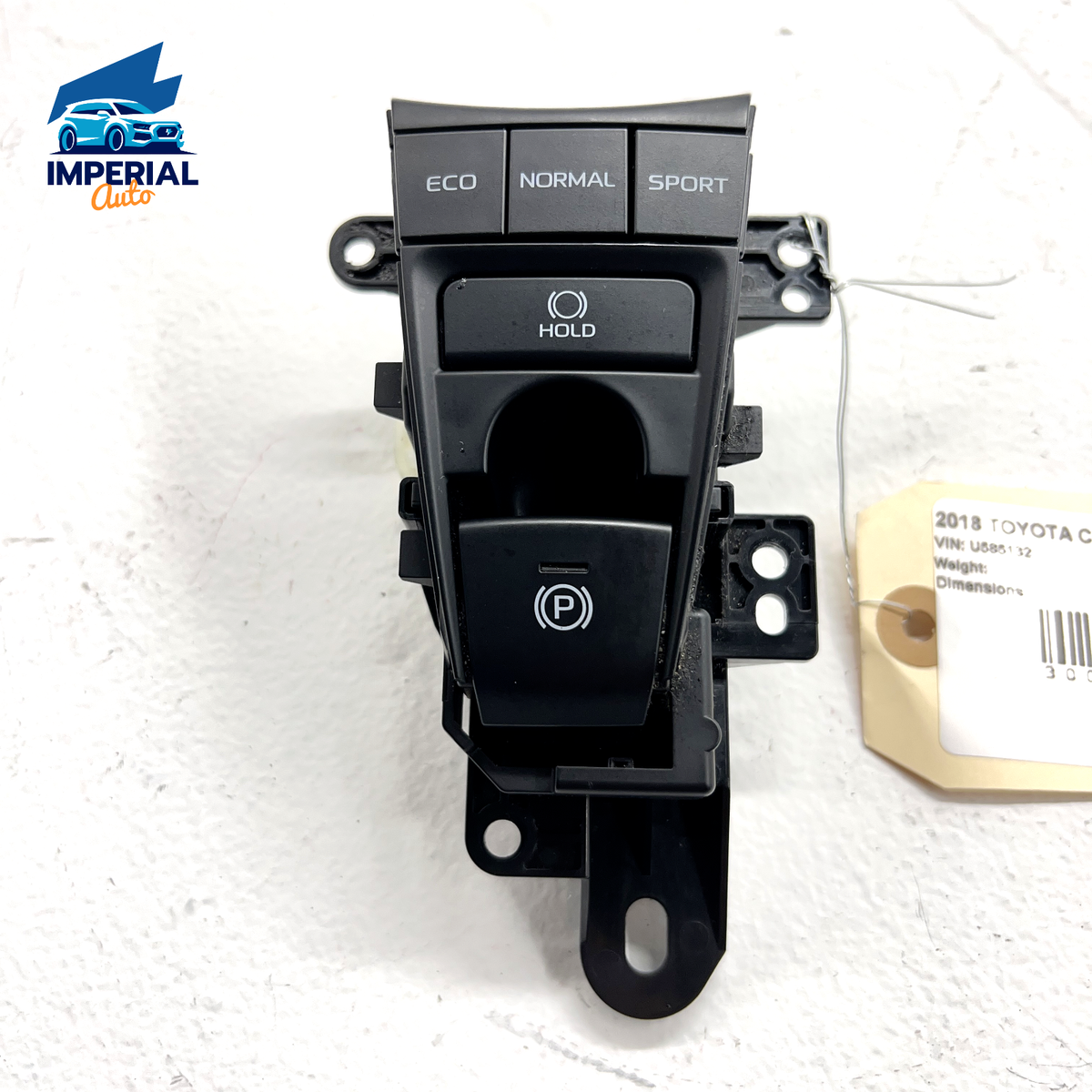
You can typically find the Hold Button near the gear shift lever or on the center console of your Toyota Camry. It is clearly marked, often with the word “HOLD” or a similar icon, making it easy to spot while driving. Its location is designed for quick access so you can activate or deactivate it without distraction.
Depending on the model year and trim level, the button’s position might vary slightly. Checking your vehicle’s owner manual can give you the exact location and operation details. Have you noticed it during your daily drive, or is it something new you’re curious to try?

Credit: www.carpages.ca
How The Hold Button Works
The Hold button in a Toyota Camry helps keep the car still without pressing the brake pedal. This feature is useful in stop-and-go traffic or on hills. It stops the vehicle from rolling backward or forward after stopping. The system works automatically once activated, allowing drivers to relax their foot from the brake.
Using the Hold function is simple and adds comfort to driving. It keeps the brakes engaged until the driver presses the accelerator to move forward. This reduces stress on the foot during long stops and improves safety on inclines.
Engaging The Hold Function
To engage the Hold function, press the Hold button on the center console. The system activates when the car is fully stopped. The brake lights stay on to alert other drivers. Drivers can release the brake pedal while the system holds the car in place.
The Hold light appears on the dashboard, confirming activation. The system automatically releases the brakes when the accelerator is pressed. This smooth transition helps prevent jerky starts.
When To Use The Hold Button
Use the Hold button during traffic stops or at traffic lights. It is helpful on uphill slopes to prevent rolling back. The feature works well in stop-and-go driving conditions. It reduces fatigue by letting drivers remove their foot from the brake.
Do not rely on Hold for parking or on long stops. Always use the parking brake for extended stops. The Hold function is designed for temporary holds during driving.
Benefits Of Using The Hold Button
The Hold button on your Toyota Camry offers more than just a simple pause. It adds a layer of control that can transform your driving experience. Understanding its benefits can help you use it wisely and boost your confidence behind the wheel.
Improved Safety
Using the Hold button helps prevent your car from rolling backward on hills. This feature keeps your vehicle stationary without needing to keep your foot on the brake, reducing fatigue during stop-and-go traffic. It also minimizes the risk of accidents caused by unintended movement.
Have you ever felt anxious waiting at a steep traffic light? The Hold button gives you peace of mind by holding the brake automatically until you’re ready to move. This can be especially useful in busy urban areas or when driving with passengers who might get nervous on slopes.
Enhanced Driving Convenience
The Hold button lets you relax your foot during long stops. You don’t have to keep pressing the brake pedal constantly, which can be tiring in heavy traffic. This small convenience can make daily commutes less stressful.
Think about those moments when your hands are full, or you’re multitasking. The Hold button keeps your car steady, allowing you to focus on shifting gears or adjusting controls without worrying about rolling. It’s a simple feature that makes your drive smoother and more comfortable.
Hold Button In Different Driving Conditions
The hold button in a Toyota Camry helps maintain brake pressure without pressing the pedal. It eases driving in various situations. Understanding how it works in different conditions makes driving smoother and safer.
Stop-and-go Traffic
The hold button keeps the car still at red lights or traffic jams. Drivers can relax their feet without rolling forward or backward. It reduces stress and fatigue during long waits.
Hill Starts
Starting on a slope can be tricky. The hold button stops the car from rolling backward. It gives time to switch from brake to gas pedal safely. This feature prevents accidents on steep hills.
Parking Situations
When parking, the hold button holds the car steady. It helps during tight spots and uneven ground. Drivers can focus on steering without worrying about the car moving unintentionally.
Common Misconceptions
Many Toyota Camry owners get confused about the hold button and what it actually does. Misunderstandings can lead to misuse or missed benefits. Clearing up these common misconceptions helps you use the feature safely and effectively.
Hold Button Vs. Brake Hold Feature
People often mix up the hold button with the brake hold feature, but they serve different purposes.
- Hold Button:Primarily keeps the vehicle stationary without you needing to keep your foot on the brake. It’s useful in stop-and-go traffic or at traffic lights.
- Brake Hold Feature:Automatically holds the brakes after you come to a complete stop, then releases when you press the accelerator. It activates and deactivates on its own based on driving conditions.
Knowing this difference prevents you from accidentally disabling safety functions or confusing the system’s response. Have you ever wondered why your car didn’t hold the brake on a steep hill? It might be due to misunderstanding these functions.
Myths About Fuel Efficiency
Some drivers believe using the hold button improves fuel efficiency. This is not true.
The hold button’s purpose is to reduce driver fatigue, not save fuel. Your fuel consumption mostly depends on how you accelerate and maintain speed.
Using the hold feature won’t magically lower gas usage during stops. Instead, focus on smooth driving habits to save fuel. Have you noticed any change in fuel economy when using the hold button?
Troubleshooting Hold Button Issues
Experiencing trouble with the hold button on your Toyota Camry can be frustrating, especially if you rely on it for smooth driving in stop-and-go traffic. Knowing how to troubleshoot common issues helps you avoid unexpected stops and keeps your drive seamless. Let’s dive into some practical tips that can get your hold button back in action quickly.
When Hold Button Doesn’t Activate
If pressing the hold button doesn’t seem to do anything, start by checking if your vehicle is in the correct mode. The hold function typically activates only when the car is fully stopped and in drive mode.
Sometimes, the brake pedal sensor might not register that you’re pressing it firmly enough. Try pressing the brake pedal a little harder and then engage the hold button again. If the problem persists, inspect the fuse related to the hold system— a blown fuse can cut power to the button.
Have you ever noticed the hold button working fine after a restart? Turning your car off and on again can reset the system and clear minor glitches. If this quick fix doesn’t work, it might be time to visit a professional for a deeper electrical diagnosis.
Indicator Light Problems
The hold button’s indicator light is your best friend—it tells you if the system is active or malfunctioning. If the light doesn’t turn on or flickers, start by cleaning the button area. Dirt and grime can interfere with the button’s sensors.
Check your dashboard for any warning lights that might relate to the brake or electrical system. Sometimes, a low battery voltage or sensor malfunction causes the hold button indicator to act up. In that case, getting your battery or sensors tested can save you from bigger issues.
Have you ever ignored a flickering light only to face bigger problems later? Keeping an eye on the indicator light status can prevent unexpected failures and keep your hold button working reliably.
Comparing Hold Button Across Toyota Models
Understanding how the hold button works across different Toyota models can help you make the most of your driving experience. Each model brings subtle changes to this feature, tailored to improve convenience and safety. Let’s look at how the hold button varies, especially comparing the Toyota Camry with its siblings.
Differences In Functionality
The hold button on Toyota vehicles generally serves to keep the car stationary without the need to keep your foot on the brake. But its behavior can differ between models.
- Toyota Camry:The hold button activates Auto Hold, which maintains brake pressure at stops until you press the accelerator. This is handy in traffic or at long stoplights.
- Toyota RAV4:In some trims, the hold button works similarly but may integrate with electronic parking brakes differently.
- Toyota Corolla:The functionality may be limited to only certain driving modes or trims, offering a simpler version of the hold feature.
Have you noticed how some models release the brakes smoothly while others feel a bit abrupt? That’s part of the design differences Toyota engineers have experimented with to balance comfort and control.
Updates In Recent Camry Models
The latest Toyota Camry models have refined the hold button’s responsiveness and integration with other safety systems.
- Newer Camrys include improved sensors that detect when the vehicle is on a slope and adjust brake hold accordingly.
- Integration with adaptive cruise control allows the hold function to work seamlessly during stop-and-go traffic.
- The button design itself has become more intuitive, making it easier for drivers to engage and disengage without distraction.
If you’ve driven a 2020 Camry and then tried a 2024 model, you might feel the difference in how the hold button supports your driving. It’s worth testing this feature yourself to see how these updates impact your daily commute.

Credit: www.roadwayautoandsport.com
Tips For Safe Use
Using the Hold button on your Toyota Camry can add comfort and control during driving. It helps keep the car still without pressing the brake pedal. Safe use is important to avoid accidents and keep control on the road.
Best Practices
- Use the Hold button only when the car is fully stopped.
- Keep your foot ready on the brake pedal for emergencies.
- Activate Hold on flat or gentle slopes only.
- Turn off Hold before driving on steep hills.
- Check your surroundings before using the feature.
- Understand how Hold works by reading your car’s manual.
Avoiding Common Mistakes
- Do not rely on Hold to keep the car on steep slopes.
- Avoid using Hold in heavy traffic or stop-and-go situations.
- Never use Hold while parking or leaving the vehicle.
- Do not confuse Hold with the parking brake.
- Do not ignore warning lights related to the Hold system.
- Do not use Hold if you feel unsure about its function.
Credit: www.ebay.ca
Frequently Asked Questions
What Does The Hold Button Do On A Toyota Camry?
The hold button on a Toyota Camry helps maintain the vehicle’s speed without accelerating. It’s especially useful in traffic or on slopes. By engaging this feature, drivers can reduce foot fatigue and maintain control without constant pedal pressure. This enhances driving comfort and safety.
How Do I Use The Hold Button In My Camry?
To use the hold button, press it while your foot is on the brake. When the indicator light is on, the hold feature is active. This allows you to release the brake pedal without the car rolling. Press the accelerator to disengage the hold.
Is The Hold Button Available On All Camry Models?
Not all Toyota Camry models come equipped with the hold button feature. It is typically available in newer models or higher trims. To confirm if your model has this feature, check your vehicle’s manual or consult with a Toyota dealership.
Can The Hold Button Save Fuel In Traffic?
The hold button can indirectly help save fuel by reducing unnecessary acceleration. By maintaining a steady speed without frequent stops and starts, fuel consumption can be optimized. This feature aids in efficient driving, especially in congested traffic conditions, reducing fuel costs over time.
Conclusion
The hold button on a Toyota Camry helps keep the car still without pressing the brake. It works well in stop-and-go traffic or on hills. Using it reduces driver stress and makes driving easier. Knowing how it functions adds safety and comfort to your ride.
Try using the hold button to feel the difference next time you drive. It is a simple feature that can make daily driving smoother and safer.