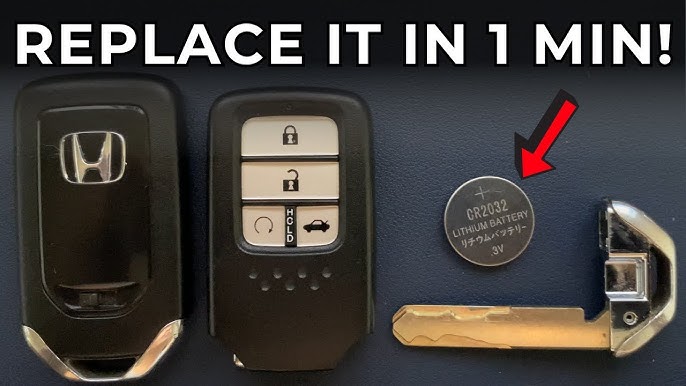
Is your Honda Civic key fob acting up or not unlocking your car like it used to? The most common reason is a dead key battery.
Changing the battery might sound tricky, but you can easily do it yourself in just a few simple steps. Imagine saving time and money by avoiding a trip to the dealer. In this guide, you’ll learn exactly how to change your Honda Civic key battery quickly and safely.
Keep reading, and you’ll have your key fob working like new again in no time.
Signs Of A Weak Key Battery
The key battery in a Honda Civic remote controls many functions. A weak battery can cause various issues. Recognizing early signs saves time and avoids frustration. These signs show the battery needs changing soon.
Remote Fails To Lock Or Unlock
The most common sign is the remote not working properly. Pressing the lock or unlock button may not respond. Sometimes, it works only from very close range. This shows the battery power is low.
Intermittent Signal Transmission
The remote may work sometimes, then stop suddenly. The signal can be weak or inconsistent. This happens because the battery cannot provide steady power. It is a clear sign the battery is fading.
Warning Light Or Message On Dashboard
Some Honda Civics show a warning on the dashboard. The message might say “Key Battery Low” or show a battery icon. This alert means the key fob battery needs replacement soon.
Slow Response From The Vehicle
The car might react slowly to remote commands. Doors may take longer to lock or unlock. The trunk may open with delay. These delays indicate low battery power in the key fob.
Key Fob Led Light Dims Or Doesn’t Light
Press the button and watch the small LED light on the remote. If it is dim or does not light, the battery is weak. This is a simple way to check battery health.

Credit: www.youtube.com
Tools Needed For Replacement
Replacing the battery in a Honda Civic key is simple with the right tools. Having the correct items on hand saves time and avoids frustration. These tools help open the key fob safely and replace the battery without damage.
Small Flathead Screwdriver
A small flathead screwdriver is essential for prying open the key fob. It fits into the small slot on the side of the fob to separate the halves. Use gentle pressure to avoid scratching or breaking the plastic.
Replacement Battery
Most Honda Civic keys use a CR2032 battery. Confirm the battery type by checking the old one. The replacement must match the size and voltage for proper function.
Clean Cloth Or Soft Surface
Work on a clean cloth or soft surface to protect the key fob parts. This prevents scratches and keeps tiny screws or components from getting lost.
Tweezers (optional)
Tweezers help to remove the old battery and place the new one precisely. They are useful if your fingers are too large for the small battery compartment.
Locating The Key Battery
Locating the key battery in a Honda Civic is the first task before replacement. Knowing where the battery sits helps avoid damage and saves time. The battery is small but crucial for your key fob to work properly.
Honda Civic key fobs usually have a hidden compartment for the battery. This compartment is easy to access with the right approach. The location may vary slightly based on the model year of your car.
Finding The Key Fob Release Button
The key fob has a small release button on its side. Pressing this button allows you to pull out the mechanical key. This key is used to open the battery compartment.
Removing The Mechanical Key
Slide the mechanical key out after pressing the release button. Keep the key safe as it helps in opening the key fob case.
Opening The Key Fob Case
Look for a small notch or seam along the key fob’s edge. Use the mechanical key or a flat tool to gently pry open the case. Be careful not to apply too much force to avoid breaking the plastic.
Locating The Battery Inside The Case
Once open, you will see a round, silver battery. It usually rests in a small holder inside the case. Take note of the battery’s position and orientation for easy replacement.

Credit: www.youtube.com
Opening The Key Fob
Opening the key fob is the first step to change the battery in your Honda Civic key. The key fob protects the battery and electronics inside. You need to open it carefully to avoid damage. Most Honda Civic key fobs have a small slot or seam where you can pry it open.
Use the right tools and a gentle touch. A flathead screwdriver or a coin works well. Avoid sharp tools that can scratch or break the plastic. Find the seam or notch along the edge of the key fob. Insert the tool and twist slowly to separate the two halves.
Keep the key fob steady on a flat surface. Opening it too fast can cause the buttons or battery to pop out. Once open, you can see the battery inside. Now the key fob is ready for the battery replacement.
Locating The Opening Slot
Look for a small gap or notch along the edge. This slot is designed for easy opening. It may be near the keyring or on the side. If you do not see a slot, gently feel for the seam between the two halves.
Using A Flathead Screwdriver Or Coin
Choose a tool that fits the slot. A flathead screwdriver is ideal but use a coin if you don’t have one. Insert the tool into the slot and twist gently. Do not force the tool. The key fob will start to separate.
Separating The Key Fob Halves
Once the tool is in place, twist slowly. The plastic halves will begin to pull apart. Use your fingers to help if needed. Open the key fob fully to expose the battery compartment.
Removing The Old Battery
Removing the old battery from your Honda Civic key is a simple task. It requires careful handling to avoid damage. Following the right steps will help you replace the battery safely and quickly.
Start by locating the small notch or seam on the key fob. This area allows you to open the key casing. Use a flat tool or a coin to gently pry the two halves apart. Avoid using excessive force to prevent breaking the plastic.
Once opened, you will see the battery inside. Take note of the battery type and its position before removing it. This helps ensure you insert the new battery correctly.
Open The Key Fob Carefully
- Find the notch along the edge of the key fob
- Use a flathead screwdriver or coin
- Insert tool into the notch
- Gently twist to separate the halves
- Keep the two parts steady to avoid snapping
Identify The Battery Type
- Look for the battery code printed on the battery
- Common types include CR2032 or CR2025
- Note the battery’s positive (+) side
- Remember the battery placement inside the fob
Remove The Old Battery
- Use your fingers or a small tool to lift the battery
- Be gentle to avoid damaging battery contacts
- Dispose of the old battery properly
- Clean any dirt inside the compartment if needed
Choosing The Right Replacement Battery
Choosing the right replacement battery for your Honda Civic key is crucial to keep your key fob working smoothly. Picking an incompatible battery can lead to poor performance or even damage. Let’s look at how you can find the perfect match easily and confidently.
Identifying Your Key Battery Type
Start by checking the existing battery inside your key fob. Most Honda Civic keys use a coin cell battery, often a CR2032 or CR2025. You can find this information printed on the battery itself or in your car’s owner manual.
Not sure how to open the key fob? Use a small flathead screwdriver to gently pry it apart along the seam. Handle the battery carefully to avoid short-circuiting it or damaging the contacts.
Understanding Battery Specifications
Battery size, voltage, and capacity all matter. The CR2032, for example, is 20mm in diameter and 3.2mm thick, delivering 3 volts. Using a battery with different specs might cause your key to malfunction.
Look for reputable brands that specify these details clearly. Cheaper batteries may save money upfront but can drain faster or corrode, leading to more hassle later.
Where To Buy Genuine Replacement Batteries
You can find replacement batteries at electronics stores, car dealerships, or online retailers. Buying from authorized sellers reduces the risk of counterfeit products. Online reviews often reveal which sellers provide genuine batteries.
Consider buying a small pack of batteries if you want to keep a spare on hand. This saves you time and stress next time your key starts acting up.
How To Avoid Common Battery Replacement Mistakes
- Don’t force the battery into the slot; it should fit snugly without pressure.
- Make sure to insert the battery with the correct polarity – usually marked with a + sign.
- Avoid touching the battery surface with your fingers too much, as oils can reduce battery life.
Have you ever installed a battery only to find your key fob still not working? Double-checking these details can save you that frustration.
Installing The New Battery
Installing the new battery in your Honda Civic key is a simple task that restores the remote’s functionality quickly. This part requires careful handling to avoid damaging the key’s internal components. Pay close attention to battery orientation and placement to ensure your key works perfectly.
Open The Key Fob Carefully
Use a small flathead screwdriver or a coin to gently pry open the key fob. Insert it into the seam between the two halves and twist lightly. Avoid using excessive force to prevent cracking the plastic casing.
Remove The Old Battery Safely
Once opened, locate the old battery. It usually sits in a small compartment secured by a metal clip. Use your fingers or a non-metal tool to lift the battery out without bending the clip or damaging the circuit board.
Insert The New Battery Correctly
Check the battery’s positive (+) and negative (-) sides before placing it in the compartment. The positive side typically faces up, but double-check your key fob’s markings. Insert the battery gently, ensuring it fits snugly under the metal clip.
Snap The Key Fob Back Together
Align the two halves of the key fob and press them firmly until you hear a click. Make sure all edges are sealed properly to prevent dust or moisture from entering. Test your key immediately by pressing the buttons to confirm it works.
What If The Key Doesn’t Work After Installation?
If your key fob still doesn’t respond, verify the battery orientation again. Sometimes the battery might not be making proper contact. Try cleaning the contacts gently with a cotton swab and isopropyl alcohol before reinserting the battery.
Reassembling The Key Fob
Reassembling the key fob is the final step after changing the battery in your Honda Civic key. This process ensures your key fob works correctly again. It is important to put all parts back carefully to avoid damage.
Start by checking the battery placement. Make sure the new battery sits flat and matches the original battery’s position. Next, align the two halves of the key fob case properly. They should fit together without forcing or gaps.
Press the halves gently but firmly until you hear a click. This sound means the fob is locked securely. Test the buttons to confirm the key fob functions as expected. If buttons feel stuck or unresponsive, open it and check the battery or alignment again.
Cleaning The Key Fob Components
- Use a soft cloth to wipe dust or dirt.
- Avoid using water or cleaning liquids inside the fob.
- Check the battery contacts for corrosion and clean gently if needed.
Aligning The Key Fob Shell Properly
- Match the grooves on both halves before closing.
- Ensure the buttons line up with the shell openings.
- Avoid forcing parts together to prevent cracks.
Testing The Key Fob After Assembly
- Press each button to check response.
- Try locking and unlocking your car.
- Replace the battery again if the fob does not work.
Testing The Key Fob Functionality
Testing the key fob functionality is essential after changing the battery. This step ensures the new battery powers the fob correctly. Confirming the fob works prevents future lockouts and inconvenience.
Check every button on the key fob. Each button should respond by locking, unlocking, or triggering the alarm as expected. A non-responsive button might indicate incorrect battery placement or a faulty battery.
Using The Key Fob Near The Vehicle
Stand close to your Honda Civic. Press the lock and unlock buttons. The doors should lock and unlock immediately. If the doors do not respond, try replacing the battery again. Sometimes, the battery may not have full contact with the terminals.
Observing The Key Fob Led Indicator
Most Honda Civic key fobs have an LED light. Press any button and watch for the light to blink. A blinking LED means the fob sends a signal. No light or weak blinking suggests the battery might be dead or inserted incorrectly.
Testing The Remote Start And Alarm Features
Press the remote start or alarm buttons if your fob has them. The car should start remotely or the alarm should sound. If there is no response, check the battery again. Sometimes, these features require a fully charged battery to work.
Using A Backup Key To Test
Use your spare key fob to test the car’s response. If the backup works fine, the first key fob may still have an issue. This comparison helps identify if the problem is with the key fob or the car’s receiver.
Tips To Extend Battery Life
Extending the battery life of your Honda Civic key helps avoid frequent replacements. Small habits protect the battery and keep the key working longer. Follow simple tips to save battery power and maintain key function.
Keep The Key Away From Moisture
Water can damage the battery and the key’s internal parts. Store the key in a dry place. Avoid exposing it to rain or sweat. Moisture shortens battery life and causes malfunctions.
Avoid Extreme Temperatures
High heat or freezing cold harms the battery. Do not leave the key in direct sunlight or inside a cold car overnight. Temperature changes reduce battery efficiency quickly.
Press Buttons Only When Needed
Unnecessary button presses drain the battery. Use the remote functions only when you need to lock or unlock the car. Keep the key in your pocket or bag to prevent accidental presses.
Remove The Battery If Not Used For Long
If you do not use the key for weeks, remove the battery. This step stops battery drain and protects the key from damage. Store the battery separately in a cool, dry spot.
Check Battery Contacts Regularly
Dirty or corroded contacts reduce power flow. Clean the contacts gently with a soft cloth or a cotton swab dipped in rubbing alcohol. This keeps the connection strong and extends battery life.

Credit: www.youtube.com
Frequently Asked Questions
How Do I Know My Honda Civic Key Battery Is Low?
If your key fob isn’t unlocking doors or starting the engine, the battery might be low. Check if the LED light on the fob is dim or not lighting up. An intermittent response when pressing buttons can also indicate a low battery.
What Type Of Battery Does A Honda Civic Key Use?
Most Honda Civic key fobs use a CR2032 lithium battery. It’s a coin-shaped battery commonly available at electronics or hardware stores. Always check your owner’s manual or existing battery for confirmation.
How Often Should I Change My Honda Key Battery?
Typically, a key fob battery lasts 2-3 years. If your key fob becomes unresponsive or the range decreases, consider replacing the battery. Regular use and environmental factors can affect battery lifespan.
Can I Change The Battery Myself?
Yes, you can change it yourself. It’s a simple process requiring a small screwdriver. Carefully open the fob, replace the battery, and snap it back together. Always handle the fob gently to avoid damage.
Conclusion
Changing your Honda Civic key battery is simple and quick. Just follow the steps carefully to avoid mistakes. Use the right tools and a new battery for best results. Regular checks help keep your key working well. This small task saves time and avoids costly trips to the dealer.
Stay confident and handle it yourself next time your key battery dies.