Have you ever wished you had an extra eye when backing up your car? A backup camera can make parking and reversing safer and easier, but what if your car didn’t come with one?
You might be wondering: can you put a backup camera in a car yourself? The good news is, yes—you can. But there are some important things to know before you dive in. Keep reading to find out how a backup camera can fit into your car, what options you have, and how to choose the right one for your needs.
This simple upgrade could change the way you drive forever.
Benefits Of A Backup Camera
Adding a backup camera to your car can make driving easier and safer. It helps you see what is behind your vehicle clearly.
Backup cameras are useful tools that assist in many everyday driving tasks. They improve your overall driving experience.
Improved Rear Visibility
A backup camera shows a wide view of the area behind your car. This helps you see objects or people you might miss by looking only in mirrors.
The camera reduces blind spots and allows you to check your surroundings with ease. This makes reversing safer and more confident.
Enhanced Parking Safety
Using a backup camera helps you park more accurately. You can judge distances better and avoid hitting obstacles or other cars.
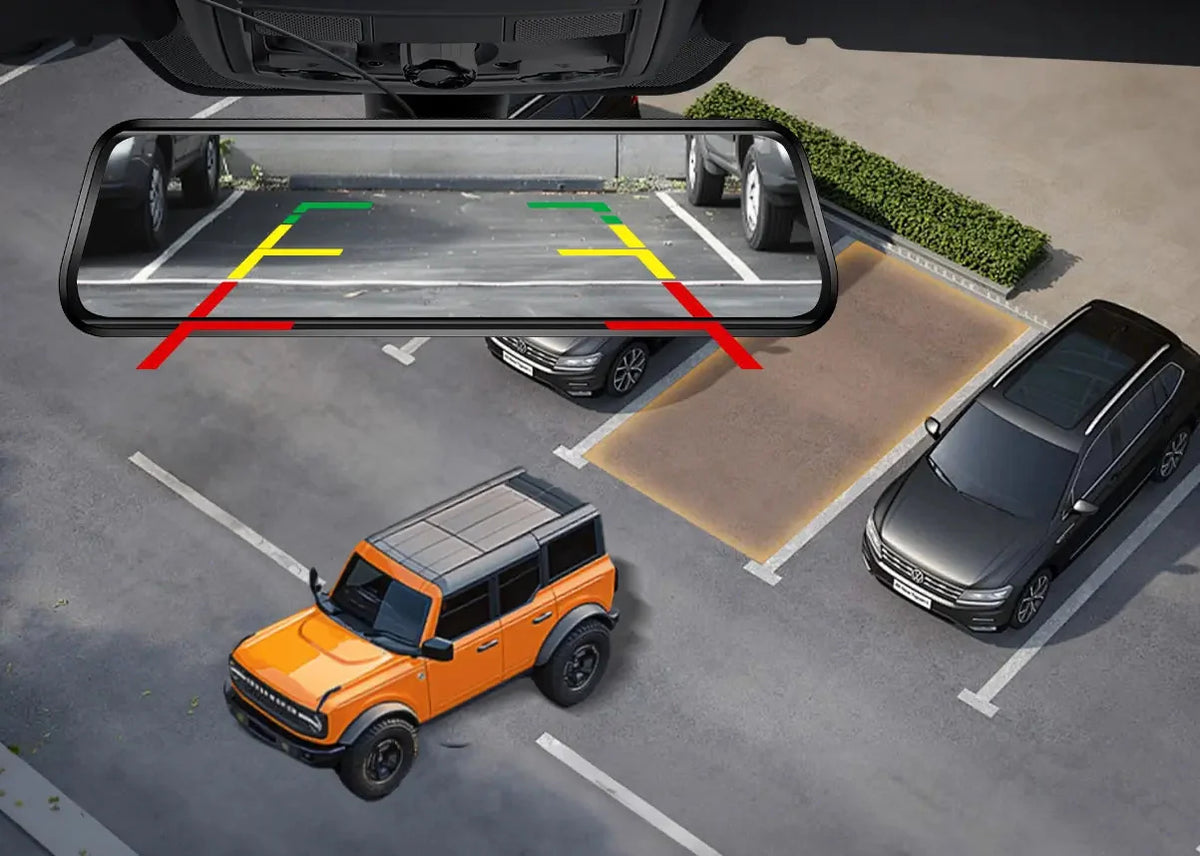
The camera often shows guidelines that assist in steering. This feature makes parallel and tight parking spots easier to handle.
Accident Prevention
Backup cameras reduce the risk of accidents while reversing. They alert you to pedestrians, pets, or objects behind your car.
By giving a clear view, the camera helps prevent collisions and damage. This keeps you and others safer on the road.

Credit: www.amazon.com
Types Of Backup Cameras
Backup cameras help drivers see behind their cars. They improve safety and prevent accidents.
There are different types of backup cameras. Each type fits different needs and car models.
Wired Vs Wireless Cameras
Wired cameras connect to the car with cables. They provide a steady video signal.
Wireless cameras send video without cables. They are easier to install but may have signal issues.
- Wired cameras need more work to install
- Wireless cameras are quick and flexible
- Wired cameras usually have better image quality
- Wireless cameras may lose signal in bad weather
License Plate Mount
License plate mount cameras attach near the plate. They use the existing plate screws for easy setup.
This mount is popular because it fits most cars. It gives a good view right behind the vehicle.
- Simple to install on most cars
- Does not require drilling new holes
- Places camera at a standard height
- Good for clear rear view coverage
Flush Mount Cameras
Flush mount cameras fit inside the car’s body. They sit flat and do not stick out.
This type looks clean and hides the camera well. It may need professional installation to fit properly.
- Blends smoothly with car design
- Less chance of damage or theft
- Requires cutting or drilling for installation
- Works best with certain car models
Choosing The Right Backup Camera
Adding a backup camera to your car can improve safety and parking ease. Picking the right camera depends on several factors.
This guide helps you decide which backup camera fits your needs and vehicle best.
Compatibility With Your Vehicle
Not all backup cameras fit every car. Check if the camera works with your vehicle’s make and model. Some cameras need specific mounts or wiring.
- Confirm the camera’s power source matches your car’s electrical system.
- Look for cameras designed for your vehicle type (car, truck, SUV).
- Check if your car has a screen or needs a separate display.
Video Quality And Features
Video quality affects how well you see behind your car. Choose a camera with clear images and useful features.
| Feature | Benefit |
| High resolution | Clearer image for better visibility |
| Night vision | Improved view in low light or darkness |
| Wide-angle lens | Shows a larger area behind the car |
| Guidelines | Helps judge distance when reversing |
Budget Considerations
Backup cameras vary in price. Decide your budget before buying to find the best option for you.
- Basic cameras cost less but may lack advanced features.
- Mid-range cameras offer better video and some extras.
- High-end cameras include night vision and wide-angle lenses.
- Consider installation costs if you need professional help.
Tools And Materials Needed
Installing a backup camera in your car needs some tools and parts. Getting these ready helps the process go smoothly.
Below are the main things you will need for the job. These include tools, camera parts, and safety gear.
Basic Installation Tools
You need some common tools to install the backup camera. These tools help you remove panels and connect wires.
- Screwdrivers (flathead and Phillips)
- Wire strippers and cutters
- Electrical tape
- Drill with drill bits
- Socket wrench set
- Multimeter for testing connections
- Panel removal tool
Having these tools ready will make the installation easier and safer.
Camera Kit Components
The backup camera kit comes with parts needed to set up the system in your car. Check that you have all pieces before starting.
- Backup camera unit
- Wiring harness for power and video
- Monitor or screen (if not already in car)
- Mounting brackets and screws
- Power adapter or fuse tap
- User manual or installation guide
Make sure the camera fits your car model. Some kits are universal, others are car-specific.
Safety Gear
Wear safety gear to protect yourself while working on your car. This prevents injuries and keeps you safe.
- Safety glasses to protect your eyes
- Gloves to protect your hands
- Work clothes that cover your skin
- Proper lighting to see clearly
- Mask if you work with dust or debris
Using safety gear is important, even if the job seems simple.
Step-by-step Installation Process
Installing a backup camera in your car helps you see better when reversing. This guide shows how to do it in easy steps.
Follow these steps to install your backup camera safely and correctly.
Preparing The Vehicle
Start by cleaning the area where you will mount the camera. Clear dirt and dust for a good fit.
Make sure the car is off and the keys are out of the ignition to avoid electrical problems.
Mounting The Camera
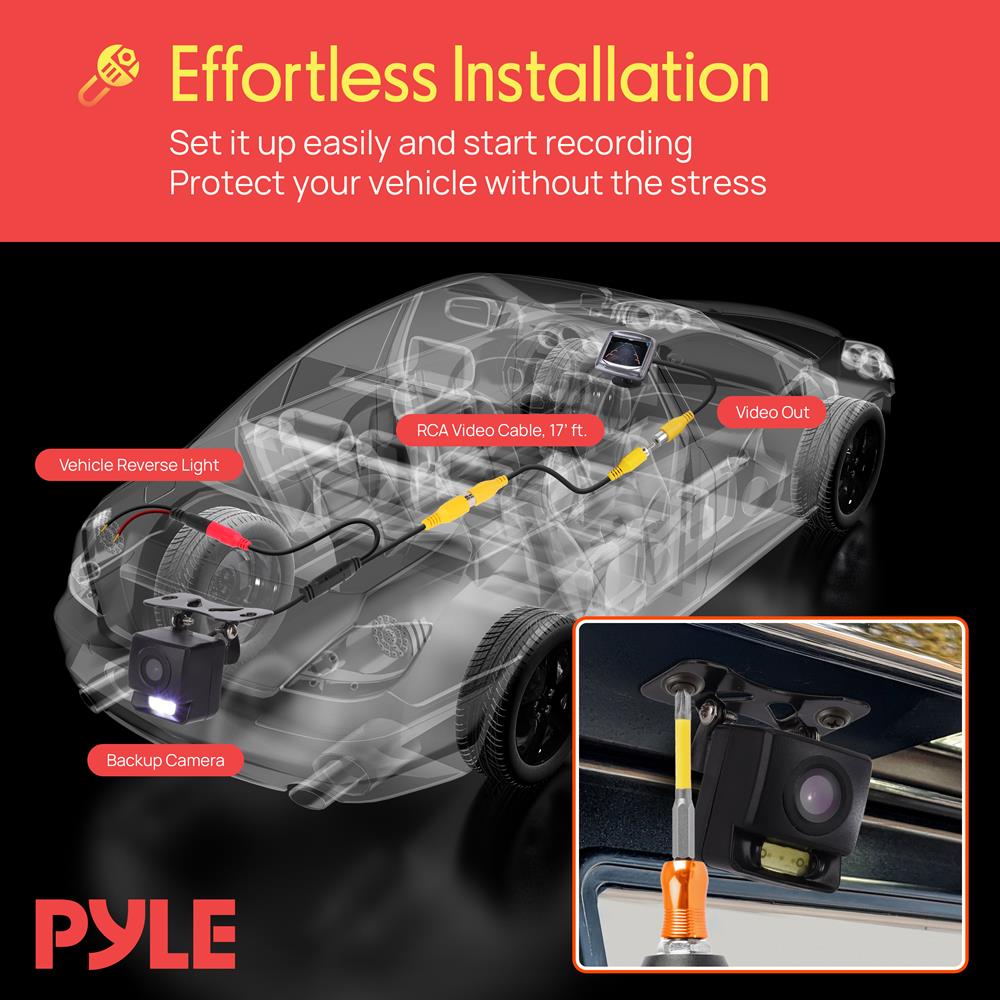
Choose a spot near the rear license plate or bumper. This gives a clear view behind the car.
Use the mounting bracket or screws that came with the camera. Secure it tightly so it does not move.
- Align the camera lens to cover the rear view
- Check for any obstacles blocking the view
- Tighten screws or adhesive firmly
Wiring And Power Connection
Route the camera wire through the trunk or rear panel. Avoid sharp edges that can damage wires.
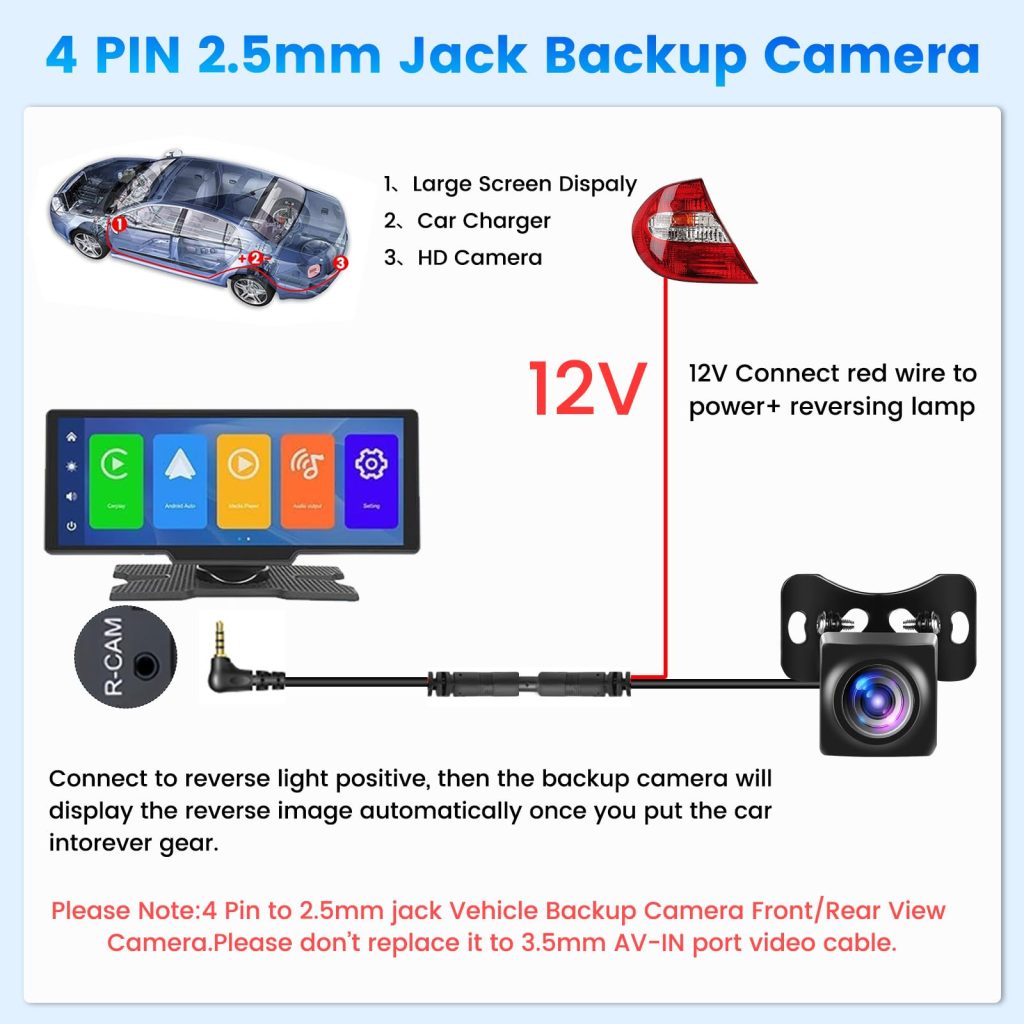
Connect the camera power cable to the car’s reverse light wire. This powers the camera when you back up.
- Use wire strippers to expose the reverse light wire
- Attach the camera power wire with a connector or tape
- Secure all wires with zip ties
Connecting To The Display
Find the video input port on your car’s display or monitor. Plug in the camera’s video cable.
If your display uses wireless connection, follow the camera’s manual to pair the devices.
- Check the display manual for video input location
- Use the correct cable for your system
- Keep cables tidy and hidden
Testing The System
Turn on your car and shift into reverse gear. The camera should turn on and show the rear view on the display.
Adjust the camera angle if the view is not clear or centered. Make sure the image is steady and bright.
- Check for any loose connections
- Test in different lighting conditions
- Confirm the camera turns off when not in reverse
Common Installation Challenges
Installing a backup camera in a car can be tricky. Many drivers face problems during setup.
Understanding common issues helps avoid mistakes and saves time. Here are key challenges to expect.
Dealing With Wiring Issues
Wiring a backup camera often causes trouble. Finding the right wires and making secure connections is hard.
- Locating the reverse light wire to power the camera
- Running wires through tight spaces without damage
- Ensuring wires are hidden but accessible for repairs
- Using proper connectors to avoid loose contacts
Mounting Difficulties
Mounting the camera in the right spot is a challenge. The angle and stability matter for clear view.
| Mounting Issue | Reason | Tip |
|---|---|---|
| Unstable mount | Wrong surface or loose screws | Use strong adhesive or brackets |
| Poor angle | Camera faces too high or low | Adjust tilt carefully during installation |
| Obstructed view | Camera blocked by car parts | Choose a clear, central location |
Signal Interference
Signal interference can reduce video quality. This happens because of electrical noise or weak signals.
- Keep video cables away from power wires
- Use shielded cables for better protection
- Avoid long cable runs without signal boosters
- Check for metal parts blocking wireless signals
Maintenance Tips For Backup Cameras
Backup cameras help drivers see behind their cars. Keeping these cameras clean and working is very important. Regular maintenance makes sure the camera gives a clear view.
Here are some simple tips to keep your backup camera in good shape. Follow these steps to avoid problems and stay safe on the road.
Cleaning The Lens
Dirt, dust, and water drops can blur the camera lens. Clean the lens often to keep the image clear. Use a soft cloth and mild cleaner to avoid scratches.
- Gently wipe the lens with a microfiber cloth
- Use water or a lens-safe cleaner for stubborn dirt
- Avoid harsh chemicals that damage the lens
- Clean the lens after rain or mud exposure
Checking Connections
Loose or damaged wires can stop the camera from working. Check all connections regularly. Make sure wires are tight and not broken.
- Inspect cables for cuts or wear
- Secure loose plugs and connectors
- Look for corrosion on metal parts
- Replace damaged wires as needed
Software Updates
Backup cameras often rely on software to work well. Keep the software updated for the best performance. Updates can fix bugs and improve image quality.
- Check the car’s manual for update instructions
- Download updates from the official source only
- Install updates when the car is parked
- Restart the system after updating
Credit: wolfbox.com
Credit: pyleusa.com
Frequently Asked Questions
How Do You Install A Backup Camera?
Installing a backup camera involves mounting the camera near the license plate. Then, connect it to your car’s reverse light for power. Finally, link the camera to a display screen inside your vehicle. Professional installation is recommended for optimal performance and safety.
Is A Backup Camera Worth The Investment?
Yes, a backup camera is worth the investment. It enhances safety by providing better rear visibility. This helps in preventing accidents and making parking easier. Additionally, it can increase your car’s resale value. Many drivers find the added safety and convenience invaluable.
Can You Add A Backup Camera To Any Car?
Yes, you can add a backup camera to almost any car. Retrofit kits are available for older models without factory-installed systems. These kits include cameras and display screens compatible with most vehicles. Professional installation ensures proper functionality and integration.
What Is The Cost To Install A Backup Camera?
The cost to install a backup camera varies. It typically ranges from $100 to $500, including parts and labor. Prices depend on the camera’s features and installation complexity. DIY installation can reduce costs, but professional installation ensures reliability.
Conclusion
Adding a backup camera to your car is a smart choice for safety. It helps you see blind spots and avoid accidents. Many cars can support easy installation of these cameras. You can choose a wired or wireless system based on your needs.
Regular use improves parking and reversing skills. Check your car’s compatibility before buying a camera. Simple tools and guides make installation doable for most people. A backup camera adds peace of mind every time you drive backward. Consider this upgrade to protect yourself and others on the road.