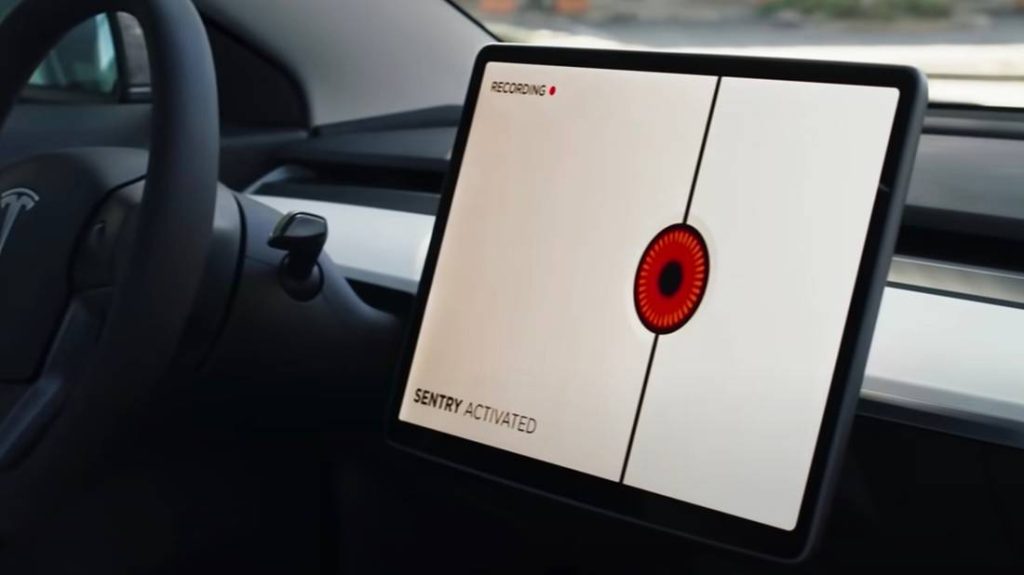
Have you ever wondered if your Tesla’s cameras keep an eye on things even when your car is turned off? You might be curious about how your vehicle protects itself and your property at all times.
Understanding how Tesla’s camera system works when the car isn’t running can give you peace of mind and help you make the most of your car’s security features. Keep reading to discover exactly what happens behind the scenes and how your Tesla stays vigilant 24/7.
Credit: eu.redtigercam.com
Tesla Camera System Basics
Tesla cars use cameras to help drivers and improve safety. These cameras give the car a view of its surroundings.
Understanding how these cameras work helps answer if they record when the car is off.
Types Of Cameras On Tesla Vehicles
Tesla vehicles have several cameras placed around the car. Each camera has a specific role to see the environment.
- Front-facing camera: sees ahead of the car.
- Rear-view camera: helps with backing up and parking.
- Side cameras: monitor blind spots on both sides.
- Wide-angle cameras: provide a broader view around the vehicle.
- Internal cabin camera: watches inside the car for safety features.
How Tesla Cameras Function
The cameras work with sensors and software to detect objects and drive safely. They send video data to the car’s computer.
| Mode | Camera Activity |
| Car On | Cameras record continuously for Autopilot and safety features. |
| Car Off | Cameras only record if Sentry Mode or Dashcam is active. |
| Sentry Mode | Cameras monitor surroundings for threats even when parked. |
| Dashcam | Records video when driving or if triggered by impact. |
Tesla cameras do not record all the time. Recording depends on the car’s mode and settings.

Credit: www.redtigercam.com
Recording Modes When Tesla Is Off
Tesla cars use cameras to keep an eye on the surroundings. These cameras can record even when the car is off. This helps protect the vehicle from theft or damage.
There are special modes that control how and when the cameras record. These modes work when the car is parked and turned off.
Sentry Mode Explained
Sentry Mode is a security feature in Tesla cars. It uses cameras to watch around the car when parked. The cameras only record if they detect a threat.
There are three states in Sentry Mode:
- Standby – the car watches but does not record.
- Alert – the car shows a warning on the screen.
- Alarm – the car records video and sounds an alarm.
Dashcam Storage Features
Tesla’s dashcam saves video files from the car’s cameras. It needs a USB drive or storage device plugged in to work. The dashcam records while driving and sometimes when parked.
The car saves clips automatically and overwrites old files when the storage is full. The driver can also save important videos manually.
- Records front, rear, and side cameras
- Saves video clips in short segments
- Needs external USB or storage device
- Overwrites old files when storage is full
- Allows manual saving of videos
Conditions Triggering Camera Activation
Tesla cars use cameras to monitor their surroundings. These cameras do not record all the time. They start recording only under certain conditions.
This helps save battery and storage space. It also focuses on important events that might need attention.
Motion Detection
The cameras activate when they detect movement near the car. This can happen if someone walks close or an object moves nearby.
- People walking or standing near the car
- Animals passing by
- Moving vehicles close to the Tesla
- Objects falling or being thrown near the car
Impact And Security Alerts
The cameras also start recording if the car senses an impact or security threat. This includes collisions or attempts to break in.
| Trigger Type | What Happens |
| Collision Impact | Cameras record footage around the car |
| Attempted Break-in | Security alerts activate and cameras record |
| Vandalism | Recording starts to capture the event |
Privacy And Data Storage
Tesla cars have cameras that record outside views. These cameras can record even when the car is off.
This feature helps protect your car and surroundings. It also raises questions about privacy and data storage.
Where Footage Is Saved
Tesla stores video clips on a USB drive or external storage device. The car must have this device plugged in for saving footage.
The clips are saved locally, not sent automatically to Tesla’s servers. This helps keep your data private.
- Footage is saved on a USB or SSD drive inside the car
- The car records in Sentry Mode and Dashcam Mode
- Storage happens only if the device is connected
- Videos are not uploaded online without user action
Accessing Recorded Videos
You can view recorded videos by removing the USB drive from the car. Then connect it to a computer or phone.
Tesla’s screen also shows recent clips when the car is on. This makes it easy to check recordings anytime.
- Remove USB or storage device to access files
- Use Tesla’s touchscreen to watch recent clips
- Videos are saved in folders by date and time
- Files can be copied or deleted like normal videos
Common Myths About Tesla Cameras
Tesla cars have several cameras for safety and security. Many people wonder if these cameras record all the time. There are myths about how and when Tesla cameras work.
This article clears up common misunderstandings about Tesla cameras. It explains if cameras always record and if they drain the car battery.
Do Cameras Always Record?
Tesla cameras do not always record video. They record only in certain cases. For example, cameras start recording if the car detects movement or an impact.
- When the car is driving, cameras record for Autopilot and safety features.
- When parked, cameras record only if Sentry Mode or Dashcam is on.
- If neither mode is active, cameras do not record while the car is off.
- Owners must enable recording features to save footage.
Battery Drain Concerns
Some people worry that cameras use a lot of battery when the car is off. Tesla has designed systems to reduce battery drain. Still, features like Sentry Mode do use extra power.
| Feature | Battery Use When Car is Off | Notes |
| Sentry Mode | High | Uses cameras to monitor surroundings |
| Dashcam | Low | Records only when driving |
| No Recording | Minimal | Cameras off, no battery drain |

Credit: eu.redtigercam.com
Enhancing Tesla Security Features
Tesla cars have built-in cameras that help keep the vehicle safe. These cameras can record video to protect your car from theft or damage.
Many wonder if Tesla cameras record when the car is off. Understanding this helps you use security features better.
Settings To Customize Camera Use
You can change Tesla camera settings to match your security needs. The cameras record differently based on these settings.
For example, the Sentry Mode records video when the car is off and senses threats. You can turn it on or off anytime.
- Enable Sentry Mode to record while parked
- Adjust sensitivity to avoid false alarms
- Choose which cameras to record from
- Review clips through the Tesla app or car screen
Tips For Better Protection
Use Tesla’s camera features wisely to protect your car well. Small actions can improve your car’s security.
Keep the software updated to get the latest security improvements. Regularly check recorded videos to spot any issues.
- Turn on Sentry Mode in busy or risky areas
- Park in well-lit places for better camera visibility
- Keep your Tesla software up to date
- Review video clips often for signs of trouble
Frequently Asked Questions
Do Tesla Cameras Record When The Car Is Off?
Tesla cameras can record when the car is off if Sentry Mode is enabled. Sentry Mode uses cameras to monitor surroundings and save footage during threats or impacts. Without Sentry Mode, cameras do not record when the vehicle is parked and powered down.
What Triggers Tesla’s Cameras To Record When Parked?
Tesla cameras record when parked if Sentry Mode detects suspicious activity or impact. The system activates cameras to capture video and save it to a USB drive. This helps provide evidence in case of theft, vandalism, or accidents near the vehicle.
Is Sentry Mode Required For Tesla Camera Recording?
Yes, Sentry Mode must be activated to record videos when the Tesla is off. It uses external cameras to monitor the car’s environment and save video clips during incidents. Without Sentry Mode, Tesla cameras remain inactive once the vehicle powers down.
Can Tesla Cameras Record Continuously When Parked?
No, Tesla cameras do not record continuously when parked. They only record during specific events like impacts or threats detected by Sentry Mode. Continuous recording would drain the battery and storage, so Tesla limits recording to triggered incidents.
Conclusion
Tesla cameras may not always record when the car is off. Their recording ability depends on specific settings and features. For instance, Sentry Mode actively monitors surroundings. This mode keeps cameras recording, even when parked. Without it, cameras stay off to save power.
So, understanding your Tesla’s settings is key. Adjust them according to your needs. That way, you can ensure cameras work when needed. Always check your vehicle’s manual for more details. This helps in making informed decisions. Stay informed for a better driving experience.