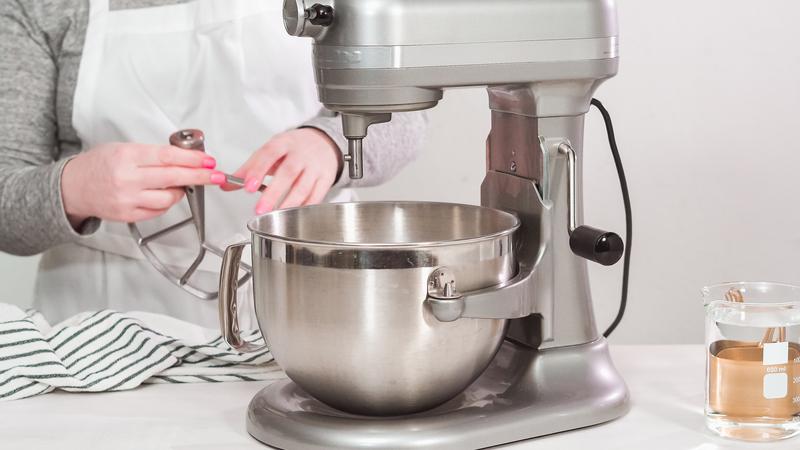
If you’ve ever used a KitchenAid mixer, you know how important it is to keep it clean and ready for your next baking adventure. But when it comes to removing the bowl, you might find yourself wondering, “How do I do this quickly and without any hassle?” You’re not alone.
Many people struggle with this simple step, which can slow down your kitchen routine. You’ll discover the easy, foolproof way to remove your KitchenAid mixer bowl every time. Keep reading, and you’ll never have to worry about this again.
Identify Your Mixer Model
Before removing the bowl from a KitchenAid mixer, you need to know which model you have. Different models have different ways to remove the bowl.
Identifying your model helps you avoid damage and makes the process easier.
Spotting The Tilt-head
The tilt-head design lets the mixer head lift up to remove the bowl. This is common in many home KitchenAid mixers.
If your mixer has a lever or button to lift the head, it is likely a tilt-head model.
- The mixer head tilts back
- The bowl stays in place on the base
- You remove the bowl by lifting it straight up
Checking For Bowl-lift Design
The bowl-lift design uses a lever to raise and lower the bowl. This style is often found in larger or commercial mixers.
Look for a small lever on the side of the mixer base. This lever moves the bowl up to meet the mixer head.
- The bowl locks into place on the base
- Use the lever to lower the bowl before removing
- Lift the bowl off once it is lowered
Prepare The Mixer
Before removing the bowl from your KitchenAid mixer, you need to prepare the machine. This makes the process safe and easy.
Taking a few simple steps helps you avoid accidents and protects your mixer parts.
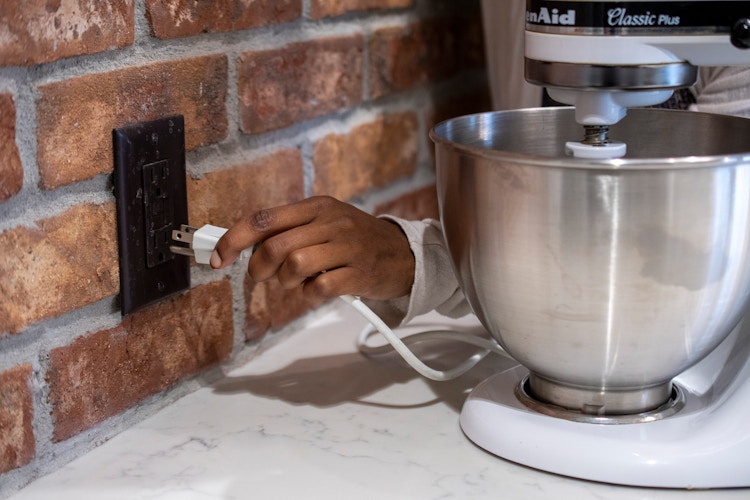
Unplug The Mixer
Always unplug the mixer before removing the bowl. This stops the mixer from turning on by mistake.
Unplugging also protects you from electric shock while handling the parts.
Remove Attachments
Detach any attachments like the beater or dough hook before removing the bowl. These parts can block the bowl’s removal.
To remove an attachment, lift it slightly and turn it counterclockwise until it releases.
- Lift the attachment up gently
- Turn it counterclockwise
- Pull it straight down to remove
Removing The Bowl On Tilt-head Models
Removing the bowl from a KitchenAid tilt-head mixer is a simple process. It involves lifting the mixer head and turning the bowl to release it.
This guide explains how to remove the bowl safely and easily on tilt-head models.
Unlock The Tilt-head
First, find the tilt-head lock lever on the side of your mixer. This lever keeps the head in place during use.
Push or pull the lever to unlock the tilt-head. This allows you to lift the head up smoothly.
Lift The Head Up
Hold the mixer head firmly with one hand. Gently lift the head up until it stays in the raised position.
Make sure the head is secure and will not fall while you remove the bowl.
Twist And Remove The Bowl
Grab the bowl handle and turn the bowl counterclockwise. This will release the bowl from the base.
Lift the bowl straight up to remove it completely from the mixer.
- Hold the bowl handle firmly
- Turn the bowl left (counterclockwise)
- Lift the bowl up and away
Credit: thekrazycouponlady.com
Removing The Bowl On Bowl-lift Models
Removing the bowl from a KitchenAid bowl-lift mixer is simple. You need to lower the bowl lift, twist to unlock, and then lift the bowl off.
These steps help you safely remove the bowl for cleaning or changing attachments.
Lower The Bowl Lift
First, find the lever on the side of the mixer. Push this lever down to lower the bowl lift.
This action moves the bowl down and frees it from the mixer’s frame.
Twist And Unlock The Bowl
Hold the bowl firmly with both hands. Twist the bowl counterclockwise to unlock it from the base.
The bowl will turn slightly and release its grip on the mixer.
- Grip the bowl at the handles or sides
- Turn the bowl gently but firmly
- Stop twisting when the bowl feels loose
Lift The Bowl Off
Once unlocked, lift the bowl straight up off the mixer. Use both hands to keep it steady.
Place the bowl on a flat surface to avoid spills or damage.
Cleaning And Maintenance Tips
Keeping your KitchenAid mixer bowl clean helps it last longer. Proper care ensures safe and smooth use every time.
Removing and cleaning the bowl correctly prevents damage. Follow simple steps for regular maintenance.
Wash The Bowl Safely
Always detach the bowl before cleaning. Use warm water and mild soap to wash it by hand or in the dishwasher if allowed.
- Remove all food residue immediately after use.
- Do not use abrasive cleaners or steel wool.
- Dry the bowl thoroughly to prevent rust or stains.
- Check the manufacturer’s instructions for dishwasher use.
Check For Wear And Tear
Inspect the bowl and attachments regularly. Look for cracks, chips, or loose parts that might affect performance.
| Part | Signs of Wear | Action Needed |
|---|---|---|
| Bowl | Chips, cracks, discoloration | Replace to avoid contamination |
| Handle | Loose or bent | Secure or replace handle |
| Attachment hub | Rust or damage | Clean carefully or service |

Credit: www.kitchenaid.com
Troubleshooting Common Issues
Removing the bowl from a KitchenAid mixer can sometimes be tricky. Some users face issues like the bowl being stuck or hard to unlock.
Knowing how to fix these problems helps keep your mixer working well. Here are simple tips to solve common bowl removal troubles.
Bowl Stuck On Mixer
The bowl may get stuck if it is not aligned properly or if food has dried between the bowl and mixer base. This can make it hard to remove.
Try loosening the bowl by gently twisting it back and forth. Avoid using too much force to prevent damage.
- Check if the bowl is locked in place correctly
- Clean any food residue around the bowl base
- Use a soft cloth to grip the bowl firmly
- Twist gently left and right to loosen the bowl
Difficulty Unlocking Bowl
Sometimes the bowl locks tightly and is hard to unlock. This may happen if the locking mechanism is dirty or if the bowl is over-tightened.
Try cleaning the locking parts and avoid pushing the bowl too hard when attaching it next time. This helps make removal easier.
- Turn off and unplug the mixer before trying to remove the bowl
- Clean the locking areas with a damp cloth
- Press the release lever or button if your model has one
- Hold the mixer steady while twisting the bowl

Credit: manuals.plus
Frequently Asked Questions
How Do I Detach The Kitchenaid Mixer Bowl?
To detach the KitchenAid mixer bowl, first ensure the mixer is off. Tilt the mixer head back or lift it, depending on your model. Rotate the bowl counterclockwise if it’s a tilt-head model or lower the bowl using the lever if it’s a bowl-lift model, then lift it out.
Why Is My Kitchenaid Bowl Stuck?
A stuck KitchenAid bowl may result from dried ingredients or misalignment. Ensure the mixer is off. Try gently rocking the bowl while rotating it counterclockwise. If it’s still stuck, check for any debris or residue around the bowl’s locking mechanism and clean it if necessary.
Can I Remove The Bowl Without Tilting The Head?
Yes, if you have a bowl-lift model, you can remove the bowl without tilting the head. Simply lower the bowl using the lever, then rotate it counterclockwise and lift it out. For tilt-head models, tilting the head is necessary to remove the bowl safely.
What Should I Do If The Bowl Won’t Unlock?
If the bowl won’t unlock, ensure the mixer is off. Gently rock the bowl while rotating it counterclockwise. Check for any dried ingredients or debris around the locking mechanism. Clean the area thoroughly and try again. If it persists, consult your user manual or contact KitchenAid support.
Conclusion
Removing the bowl from your KitchenAid mixer is simple and quick. Just unlock the bowl by turning it the right way. Lift it gently to avoid spills or damage. Regular cleaning keeps your mixer working well. Knowing this helps you handle your mixer with ease.
Enjoy your cooking without any hassle. Practice a few times to feel confident. Your KitchenAid mixer will serve you longer this way.