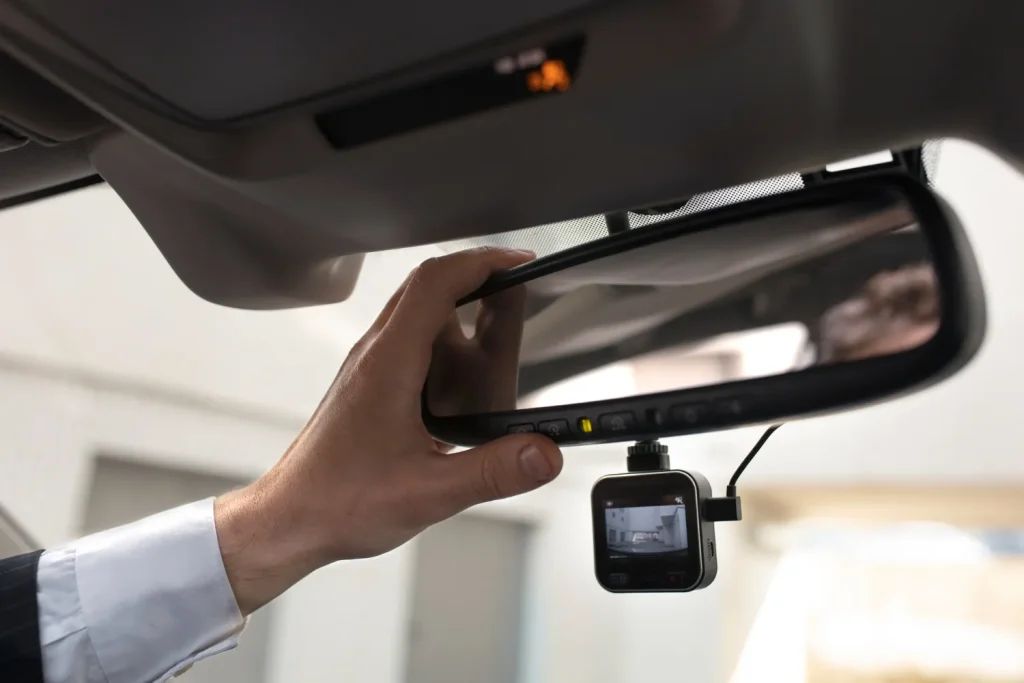
Imagine parking your car with zero stress, no blind spots, and complete confidence every time. That’s exactly what a 360 camera on your car can do for you.
But how does this clever technology work to give you a full view around your vehicle? If you’ve ever wondered how your car’s 360 camera system stitches together those seamless, all-around images, this article will break it down for you.
By the end, you’ll understand how this smart feature keeps you safer and makes driving easier—making it a must-have in your driving experience. Keep reading to discover the magic behind your car’s 360 camera.

Credit: www.rearviewsafety.com
360 Camera Basics
A 360 camera on a car gives a full view around the vehicle. It helps drivers see blind spots and park safely.
The system uses several cameras placed around the car. These cameras work together to create a single, wide image.
Key Components
A 360 camera system has several key parts. Each part plays an important role in creating a clear view.
- Cameras:Usually four or more cameras placed on the front, rear, and sides.
- Processor:Combines images from all cameras into one seamless view.
- Display Screen:Shows the combined image to the driver inside the car.
- Software:Adjusts the images to correct angles and stitch them together.
Types Of 360 Cameras
There are different types of 360 cameras for cars. Each type has unique features and uses.
- Wired Systems:Cameras connect to the car’s computer with wires. These systems are stable and reliable.
- Wireless Systems:Cameras connect without wires. They are easier to install but may face signal issues.
- Aftermarket Cameras:Added to cars after purchase. They can be customized to fit different vehicles.
- Factory-Installed Cameras:Built into new cars by the manufacturer. They offer better integration with car systems.
Credit: www.edge-ai-vision.com
Installation Process
Installing a 360 camera on a car helps drivers see all angles around them. The process needs care to ensure the camera works well.
This guide explains key steps in installing a 360 camera on your car. It covers where to mount the camera and how to connect the wiring.
Mounting Locations
Choosing the right place to mount the 360 camera is important for a full view. Cameras usually go on the front, back, and sides of the car.
Each camera must have a clear line of sight without obstacles. The mounting spots should be stable to avoid shaking while driving.
- Front camera near the grille or bumper
- Rear camera above the license plate or on the trunk
- Side cameras on the side mirrors or lower doors
Wiring And Connections
After mounting, connect the cameras to the car’s power and display system. Use the wiring harness that comes with the camera kit.
Make sure to hide wires inside the car panels to keep them safe and tidy. Secure all connections to avoid loose wires.
- Connect power wires to the car battery or fuse box
- Run video cables to the central control unit or display screen
- Use connectors that match your car’s make and model
- Test all connections before finalizing installation
Image Capture Techniques
A 360 camera on a car captures images all around the vehicle. It uses special cameras and software to create a full view.
These images help drivers see blind spots and park safely. The technology combines many small images into one big picture.
Lens Technology
360 cameras use wide-angle lenses to capture a large area. These lenses are often called fisheye lenses because they curve the image.
Fisheye lenses allow the camera to see nearly 180 degrees or more. This helps cover the front, sides, and back of the car.
- Fisheye lenses create a curved, wide view
- Multiple cameras use these lenses for full coverage
- They capture more details around the car
Stitching Multiple Views
The car’s 360 system combines images from several cameras. This process is called stitching, and it creates one seamless picture.
Special software aligns the edges of images and blends them. This makes the view look smooth without visible lines or gaps.
- Software matches overlapping areas of images
- It corrects color and brightness differences
- The final image shows a 360-degree view around the car
Data Processing
A 360 camera on a car collects images from multiple lenses around the vehicle. It then processes this data to create a clear view of the surroundings.
The processing happens quickly to help drivers see real-time images. This section explains how the camera handles data.
Real-time Image Rendering
The camera system stitches images from different lenses to form a single 360-degree view. It corrects distortions and aligns images for smooth visuals.
- Collects images from all cameras simultaneously
- Adjusts for lens distortion and light differences
- Merges images into one seamless view
- Updates the view instantly as the car moves
Software Algorithms
Software algorithms analyze image data to improve clarity and accuracy. They help detect objects and highlight important details for the driver.
| Algorithm | Purpose | Effect |
| Image Stitching | Combines images | Creates a full 360 view |
| Distortion Correction | Fixes lens curves | Produces natural-looking images |
| Object Detection | Identifies obstacles | Alerts driver to hazards |
| Lighting Adjustment | Balances brightness | Enhances visibility in shadows |
Display And User Interface
A 360 camera on a car shows a full view around the vehicle. It helps drivers see blind spots and park safely. The display and user interface make it easy to use the camera system.
The system combines images from multiple cameras. These images are shown on a screen inside the car. The user interface allows drivers to control the view and settings quickly.
Screen Integration
The 360 camera images appear on the car’s built-in display. This screen can be part of the dashboard or center console. It shows a clear, real-time view around the car.
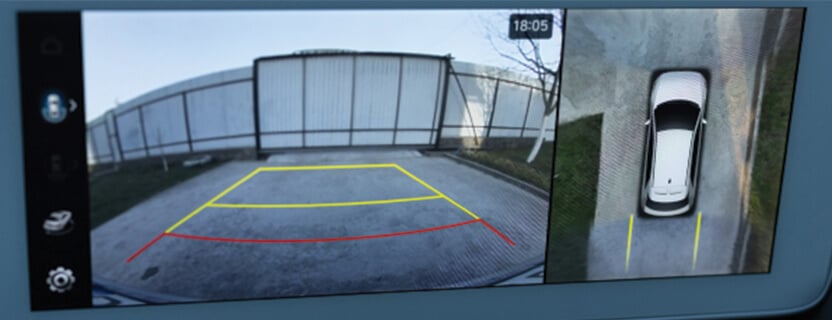
The display often switches automatically when the car is in reverse. Some screens let drivers choose different views like bird’s eye or front view. This helps with parking and tight spots.
- Dashboard or center console screen
- Automatic view switch when reversing
- Multiple viewing angles available
- High resolution for clear images
Control Options
Drivers can control the 360 camera using buttons, touchscreens, or voice commands. Controls let users change camera angles or zoom in and out. This helps get a better view when needed.
Some cars have physical buttons near the screen. Others use touchscreen menus for easy access. Voice control allows drivers to keep their hands on the wheel while adjusting views.
- Physical buttons for quick access
- Touchscreen controls for flexibility
- Voice commands for hands-free use
- Settings to adjust brightness and contrast
Benefits For Drivers
A 360 camera on a car gives drivers a full view around the vehicle. It helps to see blind spots and objects near the car.
These cameras use several lenses to create a single, wide image. This makes driving safer and easier.
Enhanced Safety
With a 360 camera, drivers can spot dangers early. It shows areas that are hard to see with mirrors alone.
- Detects pedestrians near the car
- Shows vehicles in blind spots
- Helps avoid collisions in tight spaces
- Improves awareness in bad weather
Parking Assistance
The 360 camera makes parking simpler. It gives a bird’s-eye view to guide drivers into spots.
| Feature | Benefit |
| Top-down view | See all around the car |
| Distance markers | Know how close to objects |
| Multiple angles | Check hard-to-see areas |
Common Challenges
360 cameras on cars help drivers see all around their vehicle. They improve safety but also face some issues.
These challenges can affect how well the camera works and the quality of the images it shows.
Image Distortion
360 cameras use multiple lenses to capture wide views. This can cause image distortion at the edges.
Objects may look stretched or curved, which can confuse drivers when judging distance or size.
- Wide-angle lenses create curved lines
- Stitching errors happen when images join
- Low light can increase distortion effects
Maintenance Tips
Regular care keeps 360 cameras working well. Dirt and damage can reduce image quality.
Check lenses often and clean them gently with soft cloths. Avoid harsh chemicals.
- Keep lenses free from dirt and water spots
- Inspect camera mounts for tightness and damage
- Update camera software for best performance
- Protect cameras from extreme weather
Future Trends
360 cameras on cars are growing smarter and clearer. New trends will change how these cameras work.
These trends focus on using artificial intelligence and improving picture quality. They help drivers see better and drive safer.
Ai Integration
AI helps 360 cameras process images faster. It can detect objects like pedestrians and other cars. AI also helps with parking and avoiding collisions.
- Real-time object recognition
- Automatic hazard alerts
- Improved parking assistance
- Better night vision using AI algorithms
Improved Resolution
Higher resolution means clearer images. Car 360 cameras will show more detail to the driver. This helps in tight spaces and busy roads.
| Feature | Current Cameras | Future Cameras |
| Resolution | 1080p | 4K or higher |
| Field of View | 360 degrees | 360 degrees with better clarity |
| Low Light Performance | Basic | Enhanced with new sensors |

Credit: www.ebay.com
Frequently Asked Questions
How Does A 360 Camera Capture A Car’s Surroundings?
A 360 camera uses multiple lenses to capture images from all angles. These images are stitched together to create a seamless, wide view around the car. This helps eliminate blind spots and provides drivers with a comprehensive perspective.
What Technology Powers A Car’s 360 Camera System?
The system relies on fisheye lenses, image processing software, and sensors. Cameras capture wide-angle views, which software then merges into one panoramic image. Sensors assist in aligning the images accurately for real-time display.
How Does A 360 Camera Improve Car Safety?
It enhances safety by providing a bird’s-eye view around the car. This helps drivers detect obstacles, pedestrians, and other vehicles more easily. It reduces blind spots and aids in parking, preventing collisions and accidents.
Can A 360 Camera Work In Low Light Or Night?
Yes, many 360 cameras include low-light sensors or infrared technology. These features help capture clear images in dim conditions. This ensures the system remains effective during night driving or poor visibility.
Conclusion
A 360 camera gives drivers a full view around their car. It uses multiple lenses to capture every angle. This helps in tight parking and avoiding blind spots. The camera shows a clear image on the car’s screen. It makes driving safer and easier.
Many cars now include this helpful tool. Understanding how it works can improve your driving experience. Simple technology with big benefits. A smart step toward safer roads.