Have you ever felt nervous backing up your car, worrying about blind spots or small obstacles? Adding a backup camera to your car can change that instantly.
It’s a simple upgrade that boosts your safety and makes parking easier. In this guide, you’ll learn exactly how to install a backup camera yourself, step by step. By the end, you’ll feel confident and ready to enjoy a clearer view every time you reverse.
Keep reading to discover how easy it can be to add this smart feature to your car.
Benefits Of A Backup Camera
Adding a backup camera to your car helps you see what is behind you. It shows a live video feed on your screen when you reverse.
This simple device makes driving safer and parking easier. It reduces blind spots that mirrors cannot cover well.
Improved Rear Visibility
A backup camera gives a clear view of the area behind your car. You can see objects, children, or pets that you might miss in your mirrors.
- Shows wide-angle view behind the car
- Helps detect low obstacles or curbs
- Improves visibility in low light or bad weather
- Reduces blind spots when reversing
Enhanced Safety For Pedestrians
Backup cameras help drivers avoid accidents with people walking behind the car. This is very important in busy places and parking lots.
| Safety Feature | How It Helps |
| Wide rear view | Spot pedestrians and children |
| Real-time video | React quickly to moving people |
| Night vision | See pedestrians in dark areas |
Convenience In Parking
Parking can be hard, but a backup camera makes it easier. You get a clear view of lines, other cars, and tight spaces.
Here are tips for using a backup camera in parking:
- Slowly reverse while watching the screen.
- Use the guidelines to center your car.
- Stop if you see any obstacle on the screen.
- Check mirrors and look around for safety.

Credit: www.youtube.com
Choosing The Right Backup Camera
Adding a backup camera to your car helps you see behind better. It makes parking and reversing safer and easier.
Picking the right camera depends on your needs and car type. This guide will help you understand your options.
Types Of Backup Cameras
Backup cameras come in different types. Each type has a unique way of showing the rear view.
Some common types include license plate cameras, bumper cameras, and wireless cameras with displays.
- License Plate Cameras:Mount on or near the plate for a clear view.
- Bumper Cameras:Installed in the bumper for a hidden look.
- Wireless Cameras:Send video to a screen without wires.
- Mirror Cameras:Built into rearview mirrors for easy viewing.
Wired Vs. Wireless Systems
Backup cameras can be wired or wireless. Each system has pros and cons.
Wired cameras connect directly to the screen. Wireless cameras send signals without cables.
- Wired Systems:More stable video quality. Needs more installation work.
- Wireless Systems:Easier to install. May face signal interference.
Factors To Consider
Choose a backup camera based on your car, budget, and ease of use.
Look at camera resolution, night vision, and screen size for better viewing.
- Check if the camera fits your car model.
- Choose good image quality for clear pictures.
- Night vision helps in low light or dark areas.
- Consider if you want a separate screen or a built-in display.
- Think about your budget and installation skills.
Tools And Materials Needed
Adding a backup camera to your car is a helpful safety upgrade. You need some tools and materials to do the installation.
Having the right items ready makes the process smoother and faster. This guide lists what you will need.
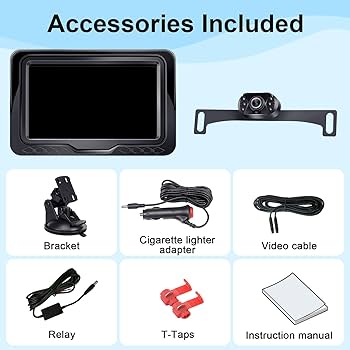
Camera Kit Components
A backup camera kit usually includes several parts. Each part has a role in the camera setup.
- Backup camera unit
- Wiring harness or cables
- Monitor or display screen
- Power adapter or connectors
- Mounting brackets or screws
- User manual or installation guide
Check all components before starting the installation. Make sure nothing is missing or damaged.
Basic Installation Tools
You need basic tools to install the backup camera. These tools help you connect and secure the parts.
- Screwdrivers (flathead and Phillips)
- Wire strippers and cutters
- Electrical tape or heat shrink tubing
- Drill with bits (if mounting holes are needed)
- Multimeter to check voltage
- Zip ties or cable clips
- Panel removal tools
Gather these tools before you begin. It will save time and keep the installation safe.

Credit: www.amazon.com
Preparing Your Car For Installation
Adding a backup camera to your car improves safety and parking ease. Before installing, you need to prepare your car properly.
Preparation includes choosing the right spot for the camera and understanding your car’s electrical system. This helps ensure a smooth installation.
Selecting The Mounting Location
Pick a mounting spot that gives a clear view behind your car. The most common place is near the license plate or the rear bumper.
Make sure the location is clean and flat. Avoid spots where dirt or water can block the camera lens.
- Near the license plate for a centered view
- Under the rear bumper for protection
- Avoid places with direct sunlight glare
- Check if the spot allows easy wiring access
Accessing The Car’s Electrical System
To power the backup camera, find the car’s reverse light wires. These wires activate the camera when you shift to reverse.
Use a wire tester to identify the correct wires safely. Disconnect the car battery before working on electrical parts to avoid shocks.
- Locate the reverse light wiring behind the tail lights
- Use a multimeter or test light to confirm wires
- Tap into the reverse light power wire for camera power
- Connect the camera ground wire to the car’s chassis
- Keep all connections secure and insulated
Step-by-step Installation Guide
Adding a backup camera to your car helps you see behind while reversing. It can make parking easier and safer.
This guide shows how to install a backup camera in simple steps. Follow along to add one yourself.
Mounting The Camera
First, pick a good spot for the camera at the back of your car. Most cameras go near the license plate.
Clean the area well before attaching the camera. Use screws or strong tape to fix it firmly.
- Choose a flat, visible spot
- Clean dirt and dust
- Attach camera using screws or tape
- Check camera angle and adjust
Routing The Wiring
Next, run the camera wires from the back to the front of the car. Hide wires under trim or carpet for safety.
Use zip ties to keep wires neat and avoid damage. Make sure wires reach the power and monitor locations.
- Start wiring at camera location
- Follow car’s existing wire paths
- Secure wires with zip ties
- Avoid moving parts and heat sources
- Run wires to power and monitor spots
Connecting To Power
Find the reverse light wire to power the camera. The camera will turn on only when you reverse.
Use a wire tap or connector to join the camera power wire to the reverse light wire. Connect the ground wire to metal.
- Locate reverse light wire in rear light cluster
- Use wire tap or connector for power
- Connect camera ground wire to car frame
- Test power by shifting car to reverse
Installing The Monitor
Choose a visible spot on your dashboard for the monitor. Make sure it does not block your view while driving.
Mount the monitor using its bracket or adhesive. Connect the monitor power wire to your car’s fuse box or cigarette lighter.
- Select a safe, visible dashboard spot
- Use mounting bracket or adhesive
- Connect monitor power to fuse box or lighter
- Attach video cable from camera to monitor
- Turn on car and test the monitor
Testing And Adjusting The System
After installing a backup camera, it is important to test and adjust it. This ensures the camera works well and shows the right view.
Proper testing helps you avoid problems while driving. Adjustments improve safety and camera performance.
Powering On And Calibration
Turn on your car and put it in reverse to power the backup camera. The screen should show the camera view clearly.
Calibration means setting the camera to show the correct distances and angles. Follow the camera’s manual for calibration steps.
- Start the car and shift into reverse gear.
- Check if the camera image appears on the screen.
- Use calibration tools or settings if available.
- Adjust settings until the image matches actual distances.
Adjusting Camera Angle
Adjust the camera angle to get the best view behind your car. The camera should show a wide area, including the bumper.
Use the camera mount to tilt or rotate the camera. Make small changes and test the view each time.
- Loosen the camera mount screws slightly.
- Move the camera up or down as needed.
- Tilt the camera left or right for better coverage.
- Tighten screws once the angle is correct.
- Test by shifting into reverse and checking the screen.
Troubleshooting Common Issues
If the camera does not turn on or the image is blurry, check the connections first. Loose wires cause many problems.
Other issues include a black screen, flickering image, or wrong colors. Fix these by checking power and settings.
- Check all cable connections for firmness.
- Clean the camera lens with a soft cloth.
- Restart the car to reset the system.
- Adjust brightness and contrast in display settings.
- Replace faulty cables or camera if problems persist.
Maintaining Your Backup Camera
Keeping your backup camera in good shape helps it work well. Regular care prevents blurry images and system errors.
Simple maintenance tasks can extend your camera’s life and improve safety while reversing.
Cleaning The Lens
Dirty lenses cause unclear or blocked views. Clean the lens often to keep the picture sharp.
Use a soft cloth and mild cleaner. Avoid strong chemicals that can damage the lens.
- Wipe the lens gently with a microfiber cloth
- Use water or a mild soap solution for tough dirt
- Dry the lens completely before use
- Check the lens after cleaning to ensure clarity
Regular System Checks
Check the camera system often for any faults. Early detection prevents bigger problems.
Test the image on your screen before driving. Make sure the camera angle is correct and the picture is clear.
- Turn on your car and activate the backup camera
- Look for any lines or spots on the screen
- Adjust the camera if the view is off-center
- Listen for unusual sounds from the camera unit
- Have a professional inspect the wiring if problems appear

Credit: www.youtube.com
Frequently Asked Questions
How Do I Choose The Right Backup Camera?
Selecting the right backup camera depends on your car’s model and needs. Consider the camera’s field of view, resolution, and night vision capabilities. Ensure compatibility with your car’s display system or opt for a standalone monitor. Check customer reviews and ratings for reliability and ease of installation.
Can I Install A Backup Camera Myself?
Yes, you can install a backup camera yourself with basic tools. Start by identifying the camera type suitable for your vehicle. Follow the manufacturer’s instructions carefully. Typically, it involves mounting the camera, connecting it to a power source, and linking it to a display unit.
Patience and precision are key.
What Tools Do I Need For Installation?
For backup camera installation, you’ll need basic tools like a drill, screwdriver, and wire connectors. Additional tools might include electrical tape and a multimeter. Having a trim removal tool can also be helpful. Always refer to the camera’s installation guide for specific tool requirements to ensure a smooth installation process.
How Much Does A Backup Camera Cost?
The cost of a backup camera varies, ranging from $20 to $500. Basic models are more affordable, while high-end options with advanced features cost more. Consider your budget and desired features. Installation costs can add to the total, so factor this into your decision if opting for professional help.
Conclusion
Adding a backup camera improves your car’s safety and convenience. It helps you see blind spots while reversing. Installation is simple with basic tools and clear instructions. Choose a camera that fits your car model well. Test the camera after installation to ensure it works properly.
This small upgrade can make parking and backing up easier. Stay safe on the road by having better rear visibility. Taking a little time to add a backup camera is worth it. Your driving experience will feel more secure and comfortable.