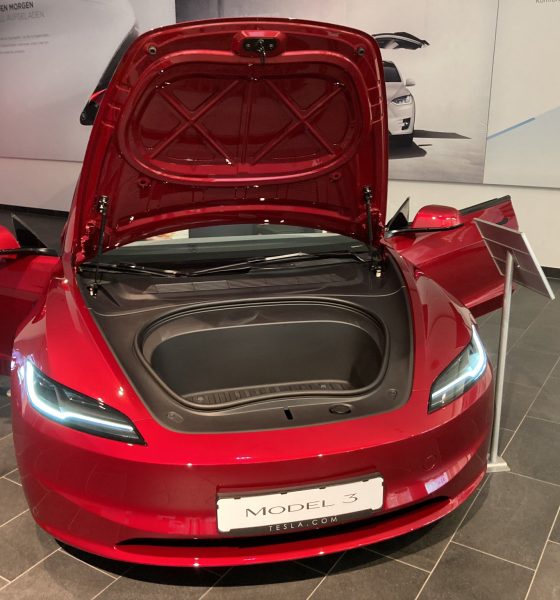
Have you ever stood by your Tesla Model 3, hands full, wondering how to open the trunk from outside without fumbling or putting things down? It’s a simple trick that can save you time and hassle every day.
Knowing exactly how to open your Model 3’s trunk quickly and easily will make your life smoother and your driving experience smarter. Keep reading, and you’ll discover the easiest ways to access your trunk without any stress—so you can focus on what really matters.

Credit: www.tesla.com
Accessing The Trunk With The Key Fob
Accessing the Tesla Model 3 trunk with the key fob is quick and simple. The key fob has a dedicated button to open the trunk without using the touchscreen or phone app. This feature adds convenience, especially when your hands are full or you are in a hurry.
Locating The Trunk Button
The trunk button on the Tesla Model 3 key fob is easy to find. It sits at the bottom of the fob, separate from the lock and unlock buttons. The button usually shows a small car icon with an open trunk.
Press this button to open the trunk from outside the car. Keep the fob close to the vehicle for the signal to work. This helps avoid unintentional openings when you are far away.
Using The Double Press Feature
The key fob requires a double press on the trunk button to open the trunk. This design prevents accidental openings. Press the button twice quickly and release.
The trunk will pop open softly, allowing you to lift it fully. The double press also works to close the trunk if it is open. Just double press and the trunk will close automatically.
Opening The Trunk Via Tesla Mobile App
The Tesla Mobile App offers a simple way to open your Model 3 trunk from outside. It saves time and effort, especially when your hands are full. The app connects directly to your vehicle, allowing remote control of many functions, including the trunk.
Opening the trunk through the app is fast and secure. You can check the trunk status and open it with a single tap. The app works anywhere you have internet access, giving you convenience on the go.
Connecting To Your Vehicle
First, download and install the Tesla Mobile App on your smartphone. Log in with your Tesla account credentials. The app will automatically detect your Model 3 if linked to your profile.
Ensure your car has a stable internet connection. The app uses this connection to communicate with your vehicle in real time. You can see your car’s status and control features remotely.
Keep Bluetooth and location services enabled on your phone for better connectivity. This setup improves the app’s performance and response time.
Steps To Open The Trunk Remotely
- Open the Tesla Mobile App on your phone.
- Tap on the car image or name to access vehicle controls.
- Look for the “Trunk” or “Frunk” option in the control menu.
- Tap the “Open Trunk” button.
- Wait a few seconds for the trunk to release and open.
The app will confirm when the trunk is open. Close the trunk manually after loading or unloading your items. This remote control makes accessing your trunk effortless from a distance.
Manual Trunk Release Options
Understanding the manual trunk release options for your Tesla Model 3 can save you time and frustration, especially when technology fails or the battery is dead. These options offer a reliable backup to access your trunk without relying on electronic systems.
Finding The Manual Release
The manual trunk release on a Tesla Model 3 is cleverly hidden for security and design reasons. You’ll find it inside the trunk area, usually behind a small panel or cover near the latch mechanism. This release often requires you to fold down the rear seats or access it through the trunk itself.
If you can’t open the trunk electronically, try folding the rear seats from inside the cabin. This gives you access to the trunk space, where the manual release lever or cable will be visible. Knowing exactly where this is before an emergency helps avoid panic.
When To Use Manual Release
Manual trunk release should be your go-to when electronic methods fail. For instance, if your key fob battery dies or the car’s main battery is completely drained, the usual electronic trunk opening won’t work.
Another situation is after an accident or if the car’s software glitches. Instead of forcing the trunk or waiting for roadside assistance, you can quickly access your belongings using the manual release. Have you ever been locked out of your own trunk? This simple tool can prevent that.

Credit: www.notateslaapp.com
Voice Commands For Trunk Access
Using voice commands to open your Tesla Model 3 trunk from outside adds a layer of convenience that many drivers appreciate. It frees your hands when you’re carrying groceries or luggage. Plus, it’s a cool tech-savvy way to interact with your car.
Activating Voice Control
To start using voice commands, make sure your Tesla’s voice control system is enabled. You can activate it by pressing the voice button on the key fob or the touchscreen inside the car.
Once activated, the system listens for your command clearly. If you’re outside the vehicle, just say the wake word or press the button and speak your request.
Keep your commands simple and direct for the best results. The system works best when you speak clearly and avoid background noise.
Common Voice Commands
Here are some practical commands you can use to open the trunk:
- “Open trunk”– This command opens the rear trunk instantly.
- “Release trunk”– Another way to unlock and open the trunk.
- “Open frunk”– Opens the front trunk, useful if you need access there.
These commands are straightforward, so you can quickly get to your items without fumbling for keys. Have you tried asking your Tesla to open the trunk while your hands were full? It’s a game-changer for busy moments.
Troubleshooting Trunk Access Issues
Having trouble opening your Tesla Model 3 trunk from outside can be frustrating, especially when you need quick access. Often, the issue lies in simple glitches or overlooked checks that you can fix yourself. Let’s look at key troubleshooting tips to help you regain smooth trunk access.
Battery And Connectivity Checks
Your Tesla’s trunk access depends heavily on battery power and connectivity between your key fob or phone and the car. Low battery in your key fob or phone can prevent the trunk from unlocking. Make sure your key fob’s battery is fresh, and your phone has a strong Bluetooth connection.
Check your phone’s Bluetooth settings and Tesla app permissions. Sometimes, reconnecting or restarting the app can restore communication. Also, ensure your car’s battery isn’t critically low, as this can disable electronic features including trunk access.
- Replace or recharge your key fob battery.
- Restart your phone and Tesla app.
- Verify Bluetooth is active and connected.
- Check the car’s 12V battery status via the app.
Resetting Trunk Mechanisms
If your battery and connectivity are fine, the trunk mechanism itself might need a reset. Sometimes, the electronic latch or sensors get stuck due to software glitches or debris. You can manually reset the system to clear these issues.
Try opening the trunk using the interior button or touchscreen first. Then, close it firmly to reset the latch. If this doesn’t work, a soft reset of your Tesla’s infotainment system might help—hold down both scroll wheels on the steering wheel until the screen restarts.
In some cases, physically cleaning the trunk latch with a dry cloth removes dirt blocking sensor signals. Ask yourself: when was the last time you inspected your trunk latch for dust or moisture buildup? This simple step often resolves access problems.

Credit: www.reddit.com
Safety Tips When Opening The Trunk
Opening the trunk of your Tesla Model 3 from outside might seem simple, but safety should always come first. Taking a few extra moments to check your surroundings and ensure the trunk operates smoothly can prevent accidents and damage. Here are some key safety tips to keep in mind every time you open the trunk.
Avoiding Obstructions
Before opening the trunk, look around for any objects, people, or pets that might be in the way. The Model 3’s trunk lid opens upward and requires clear space to avoid hitting anything. I once opened the trunk in a crowded parking lot without checking, and it nearly hit a low-hanging branch—an easy mistake that could have caused costly damage.
Make it a habit to scan the area visually and listen for any sounds that might indicate movement behind you. If you’re in a tight spot, consider opening the trunk more slowly or using the Tesla app to monitor the trunk’s progress remotely.
Ensuring Secure Closing
After loading or unloading items, always confirm the trunk is fully closed before moving your car. A partially closed trunk can pop open while driving, creating a hazard for you and others on the road. Tesla’s warning chimes and dashboard alerts help, but don’t rely on them alone.
Physically check the trunk latch by gently pressing down to ensure it’s latched securely. Have you ever experienced the sudden rush of air or noise from a trunk opening unexpectedly while driving? Taking this simple step can save you from such surprises and keep your belongings safe.
Frequently Asked Questions
How Do You Open A Tesla Model 3 Trunk?
To open the Tesla Model 3 trunk from outside, use the key fob or the Tesla mobile app. Another option is to press the exterior trunk release button located above the license plate. Ensure your key fob or app is within range for a seamless operation.
Can I Open The Trunk With The Tesla App?
Yes, you can open the Tesla Model 3 trunk using the Tesla mobile app. Simply navigate to the controls section in the app. Then, select the option to open the trunk. Ensure your phone is connected to the car and has sufficient battery power.
Where Is The Exterior Trunk Release Button?
The exterior trunk release button is located just above the license plate on the Tesla Model 3. Press it gently to open the trunk. This button allows easy and quick access without needing a key fob or app.
Does The Tesla Key Fob Open The Trunk?
Yes, the Tesla key fob can open the Model 3 trunk. Simply double-click the trunk button on the key fob. Ensure that you are within a reasonable distance of the vehicle for the fob to function properly.
Conclusion
Opening the Tesla Model 3 trunk from outside is simple and quick. You just need to know the right steps. Use the key fob, Tesla app, or the touch sensor on the trunk. Each method works well and saves time.
Practice a few times to feel confident. This helps you access the trunk easily every day. Remember these easy ways next time you need to open it. Your Tesla’s trunk is ready when you are.