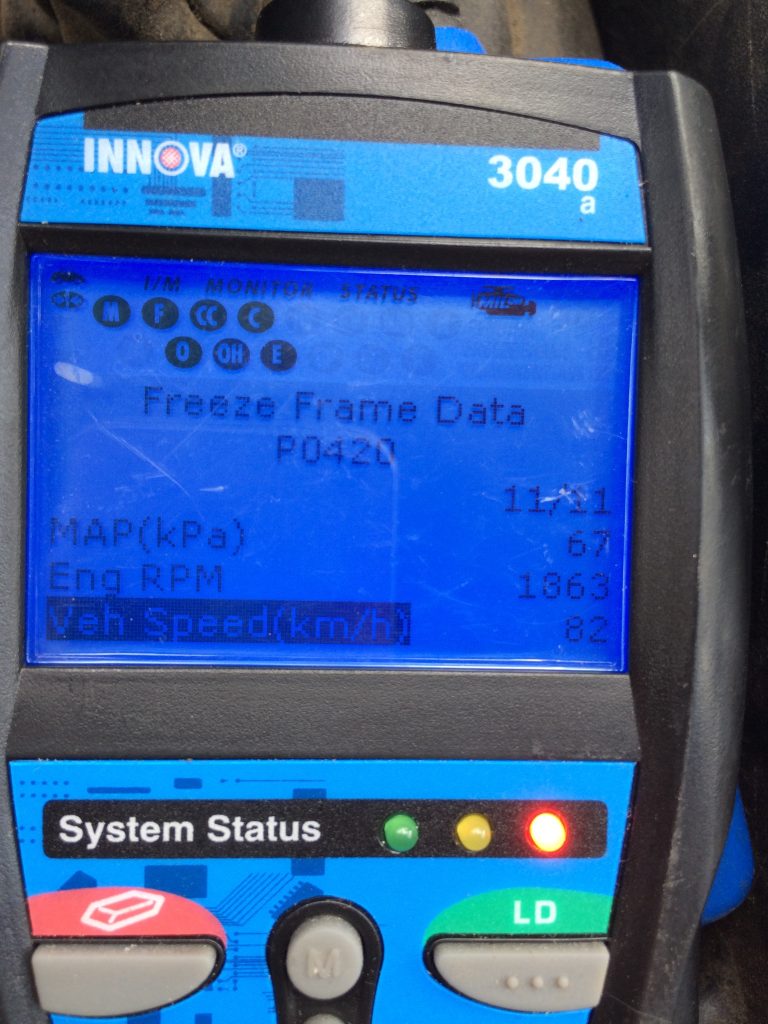
Imagine you’re driving, and suddenly, your car’s check engine light flickers on. Panic sets in, and questions swirl in your mind.
Is it a minor glitch or something serious? Here’s where freeze frame data comes to your rescue. This powerful tool captures crucial information about your car’s condition at the exact moment a fault is detected. Learning how to read freeze frame data can save you time, money, and stress.
It empowers you to understand your vehicle better and make informed decisions. So, whether you’re a car enthusiast or just someone who wants to avoid unnecessary repair costs, this guide is for you. Stick around, and let’s unravel the mystery behind this fascinating automotive technology together.

Credit: www.foxwelldiag.com
What Is Freeze Frame Data
Freeze frame data is a snapshot your vehicle’s computer takes at the moment a problem occurs. It captures key information about the engine’s condition, helping you understand what led to a fault. This data is stored temporarily and can be retrieved with diagnostic tools.
Think of freeze frame data as a photograph of your car’s vital stats during a glitch. It records parameters like engine speed, temperature, and fuel system status right when an error code pops up. Without this, you might miss crucial clues about why your check engine light came on.
What Information Does Freeze Frame Data Contain?
Freeze frame data includes various details about your vehicle’s operating state. Here are some common pieces of information you’ll find:
- Engine RPM (Revolutions Per Minute)
- Vehicle speed at the time of the fault
- Engine coolant temperature
- Fuel system status
- Throttle position
- Short-term and long-term fuel trim
This collection of data helps pinpoint conditions that triggered the error. Have you ever wondered what your car “sees” when it signals a problem?
Why Is Freeze Frame Data Important?
This data saves you time and money by narrowing down possible causes quickly. Mechanics rely on freeze frame information to avoid guesswork and unnecessary parts replacement. It can also help you decide whether a problem is urgent or minor.
Imagine fixing a car without knowing the exact moment and conditions of the failure. Freeze frame data prevents that frustration. Would you want to troubleshoot blindly or have a clear starting point?
How Is Freeze Frame Data Stored And Accessed?
When your vehicle’s computer detects a fault, it captures freeze frame data and links it to the diagnostic trouble code (DTC). This data stays until it’s overwritten by a new snapshot or cleared by a scan tool.
You can access freeze frame data using an OBD-II scanner or a professional diagnostic device. Many affordable scanners now show this info, making it easier for you to understand your car’s health without a mechanic.
Why Freeze Frame Data Matters
Freeze frame data captures a snapshot of your vehicle’s condition at the moment a problem occurs. It holds key details that help diagnose issues quickly. This data is stored by the car’s computer and shows parameters like engine speed, temperature, and sensor readings.
Understanding freeze frame data helps save time and money. It guides mechanics to the root cause without guesswork. This data improves repair accuracy and prevents further damage.
What Freeze Frame Data Reveals
- Engine speed at the time of the fault
- Vehicle speed during the error
- Coolant temperature when the problem started
- Throttle position and sensor outputs
- Fuel system status and load values
How Freeze Frame Data Speeds Up Diagnosis
Technicians see exact conditions causing the error. No need to recreate the problem or rely on guesswork. This data narrows down potential causes quickly.
Mechanics can fix the issue on the first try. This reduces repeat visits and lowers repair costs. Accurate diagnostics improve vehicle reliability and safety.
Benefits For Vehicle Owners
- Faster repairs save time and hassle
- Lower repair bills from precise diagnostics
- Better understanding of vehicle health
- Peace of mind with accurate fault information
Locating Freeze Frame Data
Locating freeze frame data is the first step to understanding your vehicle’s issue. This data captures the exact conditions when a fault occurs. It helps diagnose problems quickly and accurately. Knowing where and how to find this information saves time and effort.
Using Obd-ii Scanners
OBD-II scanners plug into the vehicle’s diagnostic port. This port is usually under the dashboard near the steering wheel. The scanner reads error codes and freeze frame data stored in the car’s computer. Most scanners display this data on their screen.
Some scanners provide detailed freeze frame information, including:
- Engine speed (RPM)
- Vehicle speed
- Coolant temperature
- Fuel system status
- Throttle position
Using an OBD-II scanner is the easiest way to access freeze frame data. It requires no special tools or skills. Simply connect the scanner, turn on the ignition, and follow the device’s instructions.
Accessing Vehicle Ecu
The Engine Control Unit (ECU) stores freeze frame data internally. Accessing the ECU often requires specialized software and hardware. Mechanics and advanced users use this method for deep diagnostics.
ECU access allows you to:
- Download detailed freeze frame data
- View historical fault codes
- Perform advanced vehicle tests
This method requires connecting to the ECU via a laptop or diagnostic tool. It is less common for everyday car owners but useful for professionals. Understanding ECU data gives a complete picture of the vehicle’s condition.

Credit: www.youtube.com
Interpreting Freeze Frame Parameters
Freeze frame data shows the vehicle’s condition at the moment a fault occurs. Interpreting these parameters helps identify the cause of engine problems quickly. Each value offers clues about how the engine and related systems were working during the fault. Understanding these key readings can guide repairs and save time.
Engine Rpm
Engine RPM shows how fast the engine was running when the fault happened. High RPM may indicate the engine was under heavy load. Low RPM might suggest idling or a stalled engine. This data helps pinpoint whether the issue relates to engine speed or load conditions.
Vehicle Speed
Vehicle speed shows how fast the car was moving during the fault. Zero speed means the car was stopped. A high speed might mean the problem occurred while driving. This value helps differentiate between problems at rest or while moving.
Coolant Temperature
Coolant temperature tells if the engine was cold, warm, or overheated. A normal range is usually between 180°F and 220°F. Low temperature can mean a cold start or thermostat issues. High temperature suggests overheating, which may cause engine damage.
Fuel Trim Levels
Fuel trim levels show how the engine adjusts fuel delivery. Short-term fuel trim changes quickly to balance fuel and air. Long-term fuel trim adjusts over time to fix ongoing issues. High positive or negative values may indicate fuel mixture problems or sensor faults.
Common Freeze Frame Codes
Freeze frame data holds crucial clues about your vehicle’s health by capturing the exact conditions when a fault occurs. Among this data, certain codes stand out as common indicators of specific problems. Understanding these common freeze frame codes can help you diagnose issues faster and decide your next move with confidence.
Misfire Codes
Misfire codes point to engine cylinders that aren’t firing correctly. These codes typically start with P0300and can specify which cylinder is affected, like P0301for cylinder 1. Ignoring misfire codes can lead to poor fuel economy and engine damage.
Have you ever felt your car hesitate or jerk while driving? That’s a classic sign of a misfire. Freeze frame data here shows engine speed, load, and temperature at the moment the misfire was detected, which helps pinpoint if the issue is ignition, fuel delivery, or mechanical.
Sensor Malfunction Codes
Sensor malfunction codes reveal problems with components like the oxygen sensor, mass airflow sensor, or coolant temperature sensor. Common codes include P0133for oxygen sensor slow response or P0115for coolant temperature sensor issues.
These sensors feed vital information to your engine control unit. When they fail, your engine’s performance suffers. Freeze frame data often shows the sensor readings at fault, so you can see if a sensor is giving erratic or out-of-range values.
Emission-related Codes
Emission-related codes track issues affecting your car’s ability to control pollutants. Examples include P0420for catalyst system efficiency below threshold and P0442for small leaks in the evaporative emission system.
Seeing these codes can be frustrating, but freeze frame data clarifies conditions like fuel trims and oxygen sensor voltages during the fault. This insight helps you avoid unnecessary repairs by targeting the real cause of the emission problem.
Steps To Diagnose With Freeze Frame Data
Diagnosing vehicle problems with freeze frame data requires a clear process. This data captures the exact conditions when a fault occurs. Following the right steps helps identify the cause quickly and accurately. The process involves retrieving the data, analyzing the conditions, and correlating symptoms to the vehicle’s behavior.
Retrieving Data
Start by connecting an OBD-II scanner to the vehicle’s diagnostic port. The scanner reads freeze frame data stored in the engine control module. This data shows engine speed, temperature, and other key factors at the fault time. Save or note this information for detailed analysis. Make sure the scanner is compatible with the vehicle model.
Analyzing Conditions
Check all recorded parameters in the freeze frame data. Look at engine RPM, coolant temperature, and throttle position. These details reveal the engine state during the fault. Compare the values to normal operating ranges. Abnormal readings point to potential causes. Focus on factors that seem unusual or out of range.
Correlating Symptoms
Match the freeze frame data with the vehicle’s symptoms. For example, if the engine stalls, check RPM and fuel system status. Consider driver reports about noise or performance issues. Use this combined information to narrow down the problem. This approach reduces guesswork and saves repair time.
Tools To Enhance Freeze Frame Analysis
Understanding freeze frame data is easier when you have the right tools. These tools help you dig deeper into the information your vehicle’s computer stores during a fault. They make the data clearer and more useful for diagnosing problems quickly.
Advanced Diagnostic Software
Advanced diagnostic software gives you detailed insights into freeze frame data. These programs connect to your car’s OBD-II port and display real-time information in an easy-to-read format. You can see engine speed, temperature, and other critical details exactly when the fault occurred.
Some software even offers graphing features, which help you spot patterns or spikes that might explain the issue. It’s like having a digital mechanic in your laptop. Have you tried comparing data from different tools to find the one that fits your style?
Mobile Apps
Mobile apps have made freeze frame data more accessible than ever. You can plug a small Bluetooth OBD-II adapter into your car and view the data right on your phone. These apps often include step-by-step guides to interpret the data, perfect if you’re new to car diagnostics.
Many apps also let you save and share freeze frame reports with mechanics or friends. This feature can speed up repairs and reduce guesswork. Wouldn’t it be great to have instant feedback on your car’s health during a road trip?
Professional Scan Tools
Professional scan tools offer the most comprehensive freeze frame data analysis. They are designed for mechanics but are becoming more affordable for DIY enthusiasts. These tools provide enhanced features like live data streaming, multiple system scans, and manufacturer-specific codes.
They also store historical freeze frame data, helping you track recurring issues over time. Using a professional tool can save you money by pinpointing the exact cause before you visit a shop. How much time could you save by diagnosing your car’s problem the first time?
Credit: www.odyclub.com
Tips To Avoid Misinterpretation
Reading freeze frame data can be tricky without the right approach. Misinterpreting this data leads to wrong repairs and wasted time. Clear understanding is key for accurate diagnostics. Follow these tips to avoid common mistakes when analyzing freeze frame data.
Cross-checking Data
Always compare freeze frame data with live sensor readings. Check multiple data points to confirm consistency. Look for patterns rather than isolated numbers. Cross-verifying helps spot errors or false triggers. Use a reliable scan tool to gather comprehensive data.
Considering Driving Conditions
Note the vehicle’s speed, engine load, and temperature at the freeze frame moment. These conditions affect sensor readings and error codes. Understanding the environment gives context to the data. Avoid making assumptions without considering these factors.
Consulting Repair Manuals
Refer to official repair manuals for code definitions and troubleshooting steps. Manuals explain what each code means under specific conditions. Follow manufacturer guidelines for interpreting freeze frame data. This reduces guesswork and improves repair accuracy.
Frequently Asked Questions
What Is Freeze Frame Data In Vehicle Diagnostics?
Freeze frame data captures a snapshot of engine conditions when a fault occurs. It helps diagnose issues by showing exact parameters at failure time.
How Do I Access Freeze Frame Data On My Car?
You can access freeze frame data using an OBD-II scanner. Connect the scanner to the vehicle’s port and retrieve stored fault information.
Why Is Freeze Frame Data Important For Repairs?
Freeze frame data provides precise engine details during a fault. This helps mechanics identify problems faster and make accurate repairs, saving time and cost.
Can Freeze Frame Data Be Reset Or Cleared?
Yes, freeze frame data can be cleared with an OBD-II scanner. However, clearing it erases stored fault snapshots useful for diagnosis.
Conclusion
Reading freeze frame data helps you find car problems fast. This data shows key details at the moment a fault happens. Understanding it guides you to the right fix. Keep practicing to get better at reading these codes. Use a good scanner and read the manual too.
This skill saves time and money on repairs. Stay patient and learn step by step. Your car will thank you for the care.