Imagine stepping into your Buick Enclave on a chilly morning or a hot afternoon, and it’s already at the perfect temperature. Sounds convenient, right?
If you want to learn how to remote start your Buick Enclave quickly and easily, you’re in the right place. This simple trick can save you time and make every drive more comfortable. Keep reading, and you’ll discover step-by-step instructions that anyone can follow—no tech skills needed.
Ready to make your daily routine smoother? Let’s dive in.

Credit: www.keylessentryremotefob.com
Remote Start Basics
Understanding the basics of remote start helps you use your Buick Enclave more comfortably. This feature allows you to start your vehicle’s engine from a distance. It saves time and adds convenience in daily life. Knowing how remote start works can improve your experience with your car.
What Is Remote Start
Remote start is a system that lets you start your car engine without being inside. Using a key fob or smartphone app, you can turn on the engine from afar. The system warms or cools the car before you get in. This feature works within a specific range set by the car’s technology.
Remote start is especially useful in extreme weather. It prepares your car to a comfortable temperature quickly. The engine runs quietly without the need to unlock or enter the vehicle first.
Benefits Of Remote Starting Your Buick Enclave
- Comfort: Warm up or cool down the car before entering.
- Time-saving: Start your engine while finishing other tasks.
- Safety: Defrost windows and mirrors in winter.
- Convenience: Avoid sitting in a cold or hot car.
- Engine care: Let the engine warm up gently before driving.
Using remote start makes daily driving easier. It adds a layer of comfort and safety every time you use your Buick Enclave.

Credit: www.keylessentryremotefob.com
Preparing Your Buick Enclave
Getting your Buick Enclave ready for remote start is essential to ensure a smooth and safe experience. Before you press that button on your key fob, it’s important to confirm that your vehicle and remote system are properly set up. This preparation can save you time and prevent potential issues.
Checking Key Fob Compatibility
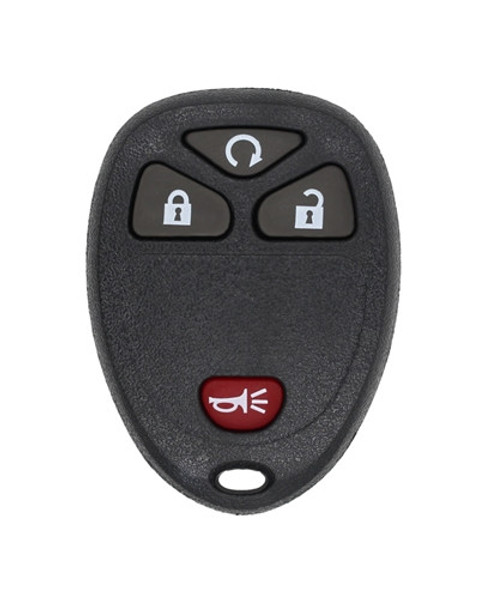
Not all key fobs support the remote start feature. First, check your key fob to see if it has a dedicated remote start button, usually marked with a circular arrow or a car icon.
If you’re unsure, consult your Buick Enclave’s owner manual or contact your dealership to verify compatibility. Using an incompatible key fob won’t activate the remote start and may cause confusion or frustration.
Have you ever tried pressing a button repeatedly only to realize later that your remote didn’t have the function? Avoid that hassle by confirming compatibility upfront.
Ensuring Vehicle Is Ready For Remote Start
Your Enclave must meet certain conditions before remote start will work. Make sure the vehicle is in “Park” and that all doors, the hood, and the trunk are fully closed.
Check the fuel level—many models won’t allow remote start if the fuel is too low. Also, the vehicle’s security system must be armed, which usually happens automatically when the doors lock.
Think about the last time you left your car running unintentionally. Remote start systems prevent this by requiring these safety checks. Double-checking these factors keeps your vehicle secure and ready to go before you step inside.
Step-by-step Remote Start Guide
Remote starting your Buick Enclave saves time and boosts comfort, especially on cold or hot days. Knowing how to do it correctly ensures your vehicle is ready when you are, without any hassle or confusion. Let’s walk through the exact steps you need to follow to get your Enclave started remotely, whether using the key fob or the mobile app.
Using The Key Fob Buttons
Check that your Buick Enclave is locked before you try to remote start it. The system won’t activate if the doors are unlocked for safety reasons.
- Press the lockbutton on your key fob once to secure the vehicle.
- Within a few seconds, press and hold the remote startbutton (usually a circular arrow) for about three seconds.
- The vehicle’s lights will flash, and the engine will start, running for up to 15 minutes.
- To extend the run time, repeat the remote start process before the initial 15 minutes expire.
If your Enclave doesn’t start, double-check that the hood is fully closed and that the key fob battery isn’t low. Have you ever been stuck outside waiting because the remote start didn’t work? This quick check can save you that frustration.
Activating Remote Start Through Mobile App
Your Buick Enclave supports remote start via the myBuick mobile app, giving you control right from your smartphone.
- Open the myBuick appand log in with your credentials.
- Navigate to the Remote Startsection within the app interface.
- Tap the Start Enginebutton to begin remote starting your Enclave.
- The app will confirm when the engine starts, and you can monitor the remaining run time.
Using the app is especially useful if you’re away from your vehicle or want to warm it up before you even step outside. Do you prefer the convenience of your phone over the key fob? Many find it easier, especially if they often misplace their keys.
Credit: www.keylessentryremotefob.com
Troubleshooting Common Issues
Troubleshooting common issues with your Buick Enclave’s remote start can save you time and frustration. Sometimes, the remote start feature might not work as expected due to simple reasons. Understanding these problems helps you fix them quickly and get back on the road comfortably.
Remote Start Not Working
If your remote start isn’t activating, first check if your vehicle is in park. The system won’t work if the car is in gear, which is a common oversight. Also, ensure all doors, the hood, and the trunk are fully closed; any open entry point disables the remote start.
Another reason might be that your Buick’s security system has been triggered. This can happen if the alarm was set off recently. Try locking and unlocking the car manually with the key fob to reset the system before attempting remote start again.
Have you noticed whether the remote start works better when you’re closer to the vehicle? Distance and obstacles can affect the signal, so try standing nearer to see if that changes anything.
Battery And Signal Problems
Weak battery power in your key fob is a common cause of remote start failure. If the remote doesn’t respond or only works intermittently, replacing the battery might be the fix. Key fob batteries typically last 1-2 years, so it’s worth checking even if you haven’t replaced it recently.
Signal interference can also block the remote start from working. Nearby electronics, metal structures, or even bad weather can weaken the signal between your remote and the vehicle. Testing the remote start in different locations can help identify if interference is the issue.
Consider the environment where you usually use the remote start. Are you in a garage with thick walls or near heavy machinery? These factors could reduce the remote’s effectiveness and are worth remembering next time you troubleshoot.
Safety Tips For Remote Starting
Remote starting your Buick Enclave adds convenience, especially during cold mornings or hot afternoons. However, safety should always come first when using this feature. Understanding key safety tips can help you avoid potential hazards and keep both you and your vehicle secure.
Avoiding Accidental Starts
Accidental remote starts can be more than just an inconvenience—they can lead to security risks or drain your vehicle’s battery. Always keep your key fob in a secure place where it won’t be accidentally pressed, like a pocket or bag with dedicated compartments.
Some Buick Enclave models allow you to disable the remote start feature temporarily. Have you checked if your vehicle has this option? Using it can prevent unintentional starts during times when you don’t need the engine running remotely.
Another practical step is to familiarize yourself with the remote start button layout. Knowing exactly which buttons to press reduces the chance of triggering the start by mistake.
Ensuring Proper Ventilation
Remote starting your Buick Enclave inside a garage can quickly become dangerous without proper ventilation. Carbon monoxide from the exhaust can accumulate and cause serious health risks.
Always ensure your garage door is open or your vehicle is outside before using remote start. Have you considered installing carbon monoxide detectors in your garage for added safety?
If you live in an area with extreme weather, remote start helps by warming or cooling the cabin. Just remember that fresh air circulation is essential to avoid any buildup of harmful gases inside the vehicle or nearby spaces.
Enhancing Remote Start Experience
Enhancing your remote start experience with the Buick Enclave can turn a simple convenience into a personalized comfort ritual. You can tailor the system to fit your daily routine, making every start feel just right. Small adjustments in settings and smart use of accessories can create a truly enjoyable environment before you even step inside.
Customizing Remote Start Settings
You have control over how your Buick Enclave behaves when you use remote start. Adjusting settings like engine run time and climate preferences lets you prepare your vehicle exactly how you like it.
- Engine run time:Choose how long the engine stays on after remote start—whether it’s 5, 10, or 15 minutes. This helps save fuel or ensures the car is perfectly warmed up.
- Climate control:Set your preferred cabin temperature so the interior is cozy in winter or cool in summer.
- Lock and security:Ensure the doors automatically lock once the engine starts to keep your vehicle secure.
Have you tried adjusting these settings to match your schedule? A quick tweak might save you time and make your drives more comfortable.
Using Accessories For Added Comfort
Accessorizing your Buick Enclave can elevate the remote start experience beyond the basics. Think about items that enhance convenience and comfort right from the moment you start the engine remotely.
- Remote start key fob:Some key fobs offer extended range or smartphone integration, making it easier to start your vehicle from inside your home or office.
- Heated seat cushions:Plug in or wireless options can warm your seats quickly, especially useful on cold mornings.
- Wireless charging pads:Keep your devices powered up without fumbling for cords as soon as you get in.
What small accessories have you found helpful for your comfort during those chilly mornings or hot afternoons? Sometimes the right add-on can completely change how you feel about remote start.
Frequently Asked Questions
How Do I Remote Start My Buick Enclave?
To remote start your Buick Enclave, ensure the vehicle is locked. Press the lock button on your key fob, then immediately press and hold the remote start button until the turn signals flash. This process starts the engine, allowing you to preheat or cool the interior before driving.
Can I Remote Start My Buick Enclave With An App?
Yes, you can use the myBuick app for remote starting. Download the app, sign in with your GM account, and ensure your Buick Enclave is connected to the app. You can then use your smartphone to start the engine remotely, offering convenience and flexibility.
What Is The Range For Remote Starting?
The range for remote starting a Buick Enclave with the key fob is typically 200 feet. This range can vary depending on obstacles and environmental conditions. Using the myBuick app may provide a greater range, depending on cellular network availability and connectivity.
Does Remote Start Affect My Buick’s Warranty?
No, using remote start does not affect your Buick’s warranty. The remote start feature is a factory-installed option, ensuring it is covered under your vehicle’s warranty. Always follow the user manual guidelines to ensure proper use and maintenance.
Conclusion
Remote starting your Buick Enclave saves time and adds comfort. You can warm up or cool down the car before driving. The process is simple once you know the steps. Always check your vehicle’s manual for safety tips. Practice the steps a few times to gain confidence.
This feature makes your driving experience easier and more pleasant. Try it today and enjoy the convenience it offers.