Imagine stepping into your Infiniti QX80 on a chilly morning, already feeling the warmth inside. Sounds great, right?
If you want to learn how to remote start your Infiniti QX80 quickly and easily, you’re in the right place. This guide will show you simple steps that save you time and keep you comfortable, no matter the weather. Keep reading to discover how to make your driving experience smoother from the very first moment.
Remote Start Features
Remote starting the Infiniti QX80 lets you warm up or cool down the car before driving. Use the key fob by pressing the remote start button twice. This feature saves time and adds comfort on cold or hot days.
Remote start features in vehicles like the Infiniti QX80 have transformed the driving experience, offering convenience and efficiency right at your fingertips. Imagine stepping into a perfectly cooled car on a scorching summer day or a warm and cozy interior during the chilling winter months. These features elevate your daily commute, making it more enjoyable and stress-free. But what exactly makes the remote start feature on the Infiniti QX80 so beneficial and compatible?Benefits Of Remote Start
Remote start offers a host of advantages that enhance both comfort and security. One of the standout benefits is climate control. You can start your Infiniti QX80 remotely to ensure it’s at your preferred temperature before you even step inside. Another key benefit is the added security. With the remote start, your vehicle remains locked and secure. The engine will only remain on if the key fob is nearby, reducing the risk of unauthorized access. Moreover, remote start can improve your vehicle’s performance. By allowing your engine to warm up before driving, you reduce wear and tear, potentially extending its lifespan. Isn’t it fascinating how a simple feature can make such a difference?Compatibility With Infiniti Qx80
The Infiniti QX80, renowned for its luxury and performance, comes equipped with a user-friendly remote start system. This feature is integrated into the key fob, making it accessible and convenient. To ensure compatibility, check that your key fob has the remote start button. This feature is often standard on newer models but can vary based on trim levels and packages. If you’re unsure, consult your vehicle’s manual or contact your Infiniti dealer. They can confirm if your QX80 is equipped with remote start and offer insights on how to maximize its use. Imagine the possibilities when you fully harness the potential of your vehicle’s remote start capabilities.
Credit: www.travissawyer.com
Preparing Your Vehicle
Preparing your Infiniti QX80 for remote start is more than just pressing a button. It involves a few important checks that ensure your vehicle responds correctly and safely. Taking a moment to prepare can save you from unexpected hassles and keep your driving experience smooth.
Checking Battery And Key Fob
Your vehicle’s battery needs enough charge to handle the remote start system. A weak battery might cause the remote start to fail or trigger warning lights. Make it a habit to check the battery voltage and look for signs like dim headlights or slow engine crank.
The key fob’s battery is just as crucial. A dying key fob battery can prevent your car from recognizing the remote start command. Try pressing other buttons to test its responsiveness. If the signal seems weak, replace the battery before you rely on remote start.
Ensuring Safety Conditions
Your Infiniti QX80 has built-in safety features that must be met before the engine starts remotely. The vehicle must be in park, and the doors need to be locked. This prevents accidental movement and ensures no one is inside the car when it starts.
Consider your surroundings as well. Is your car parked in a well-ventilated area? Starting the engine in a closed space like a garage can be dangerous. Always check that the exhaust has a clear path to avoid buildup of harmful gases.
Using The Key Fob
Using the key fob to remote start your Infiniti QX80 offers quick comfort. You can warm up or cool down the vehicle before entering. This feature saves time and enhances convenience, especially in extreme weather.
Locating The Remote Start Button
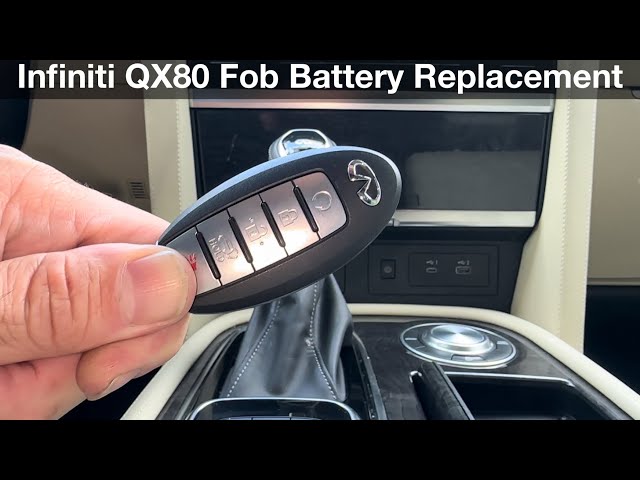
The remote start button on the Infiniti QX80 key fob looks like a circular arrow. It is usually found on the back or side of the fob. Some models may have it combined with the lock button.
Check your key fob carefully to identify this button. It may be smaller than the lock or unlock buttons.
Step-by-step Activation
- Press the lock button once to secure the vehicle.
- Within three seconds, press and hold the remote start button.
- Hold the button for about two seconds until the lights flash.
- The engine will start remotely, and the vehicle will run for about 10 minutes.
- To extend the run time, repeat the remote start sequence before the 10 minutes end.
Make sure the vehicle is in park before starting remotely. The system will not activate if doors are open or the hood is not closed.
Using The Infiniti Intouch App
The Infiniti InTouch app offers a simple way to remote start your QX80. It connects your smartphone to the vehicle securely. This app gives you control from anywhere, saving time and adding comfort. Using the app is easy once it is set up correctly. You can start your engine before you even reach your car.
Setting Up The App
Download the Infiniti InTouch app from the App Store or Google Play. Create an account using your email address. Link your Infiniti QX80 by entering the vehicle identification number (VIN). Follow the on-screen instructions to complete the registration. Make sure your smartphone has a good internet connection. Enable location services and notifications for best performance.
Starting The Engine Remotely
Open the Infiniti InTouch app on your smartphone. Select your QX80 from the vehicle list. Tap the “Remote Start” button on the app screen. Wait for the confirmation message that the engine has started. The car will run for a preset time before shutting off automatically. You can stop the engine anytime through the app as well.
Troubleshooting Tips
Remote starting your Infiniti QX80 is a great convenience, especially during extreme weather. But what happens when it doesn’t work as expected? Troubleshooting can save you time and frustration, helping you get back on the road quickly. Let’s look at some common issues and how to fix them, along with signs that it’s time to reach out for professional support.
Common Issues And Fixes
One frequent problem is the remote start not activating at all. This might be due to a dead key fob battery. Try replacing the battery first; it’s a simple fix that often solves the issue immediately.
Another issue is the engine starting but shutting off quickly. This can happen if your Infiniti’s hood is not fully closed or if the vehicle is in gear. Double-check that the hood is securely latched and the gear shift is in “Park” before trying again.
If your remote start works intermittently, interference from other electronic devices could be the culprit. Try moving away from crowded areas or turning off nearby devices to test if that resolves the problem.
- Vehicle won’t start remotely:Replace key fob battery, ensure car battery is charged.
- Engine stops after a few seconds:Check hood latch and gear position.
- Intermittent remote start:Avoid interference from other electronics.
- Remote range issues:Try standing closer to your vehicle or check for obstacles blocking signal.
When To Contact Support
If you’ve tried basic troubleshooting without success, it might be time to contact Infiniti support or a certified mechanic. Persistent problems such as the remote start system failing despite new batteries and correct procedures suggest a deeper electrical or software issue.
Also, if your vehicle’s security system triggers unexpectedly when using remote start, do not ignore it. This could indicate a malfunction that needs professional attention to avoid compromising your car’s safety features.
Ask yourself: Is the issue something simple you can fix, or does it seem complex and risky? If it’s the latter, professional help ensures you don’t accidentally cause more damage.
Credit: m.youtube.com
Safety Precautions
Remote starting your Infiniti QX80 offers comfort and convenience. Safety is the top priority when using this feature. Taking proper precautions keeps you and your vehicle secure. Follow these safety tips to ensure a safe remote start experience.
Avoiding Carbon Monoxide Risks
Never start your vehicle in an enclosed space like a garage. Carbon monoxide can build up quickly, causing serious harm. Always use remote start outdoors or in well-ventilated areas.
Check that exhaust pipes are clear of snow or debris. Blocked exhaust can trap dangerous gases inside the vehicle. Keep windows slightly open if you start the engine remotely for fresh air flow.
Locking And Security Measures
Ensure your Infiniti QX80 is locked before using remote start. The system will not activate if the car doors are open. This prevents theft or unauthorized access.
Keep your key fob secure and avoid sharing it. Treat it like a house key to prevent misuse. Regularly check your vehicle’s security system for updates.

Credit: www.ebay.com
Frequently Asked Questions
How Do I Remote Start My Infiniti Qx80?
To remote start your Infiniti QX80, press the lock button on the key fob twice. Then, press and hold the remote start button until the engine starts. This activates the engine remotely for convenience and comfort before entering the vehicle.
Can I Remote Start Infiniti Qx80 In Cold Weather?
Yes, remote starting your Infiniti QX80 in cold weather helps warm the engine and cabin beforehand. This feature is especially useful to defrost windows and ensure comfortable driving conditions during winter.
Is Remote Start Safe For Infiniti Qx80?
Remote start is safe when used properly. The vehicle remains locked and secure, and the engine shuts off if the doors open without the key. Always follow manufacturer guidelines for safe remote start use.
What Is The Range Of Infiniti Qx80 Remote Start?
The remote start range typically varies between 300 to 1000 feet depending on obstacles and environment. Ensure you are within this range to successfully start your Infiniti QX80 remotely.
Conclusion
Starting your Infiniti QX80 remotely saves time and adds comfort. Follow the steps carefully to avoid any issues. Keep your key fob nearby for quick access. Remember, safety comes first when using remote start features. Practice a few times to get comfortable with the process.
Enjoy a warm or cool cabin before you get inside. This small convenience makes driving easier every day. Try it today and feel the difference.