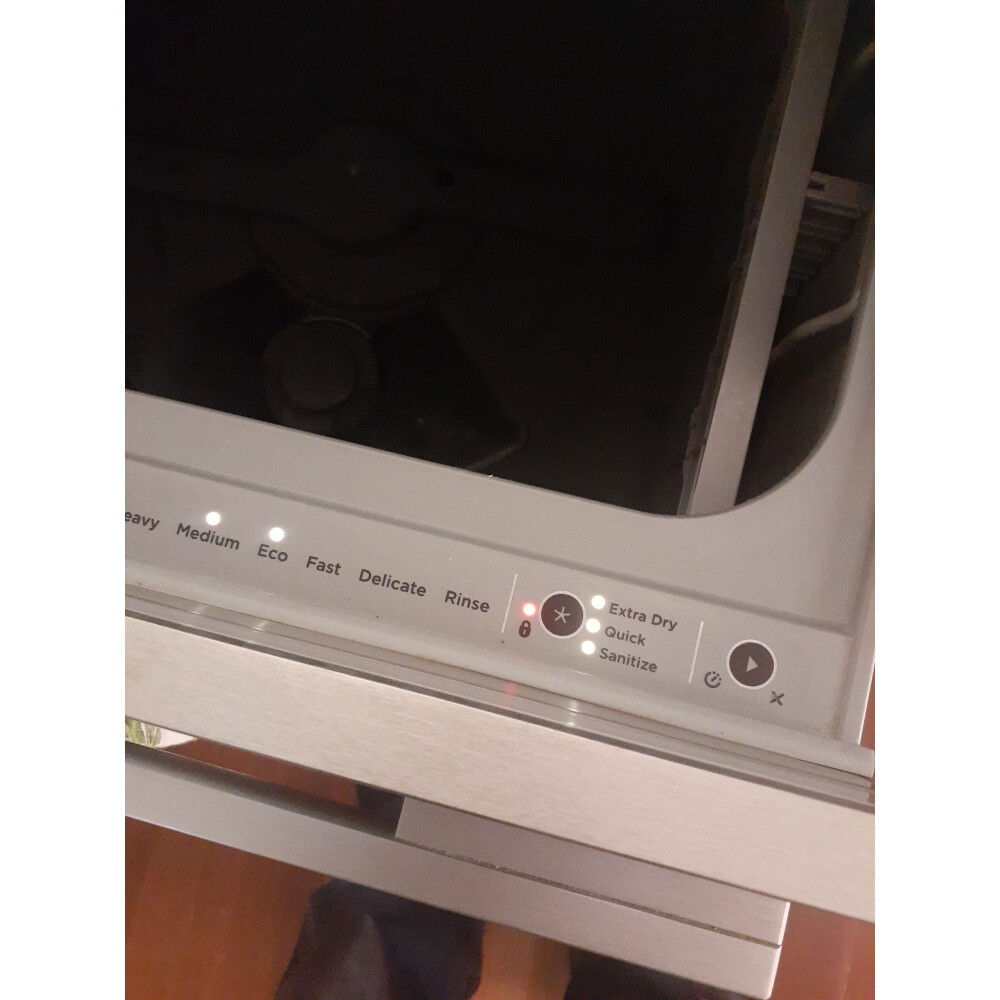
Are you struggling with your Fisher and Paykel dishwasher not working as it should? Perhaps it’s not cleaning as effectively, or maybe it’s not starting at all.
These issues can be frustrating, especially when they disrupt your daily routine. But don’t worry—resetting your dishwasher might just be the simple solution you need. In this guide, you’ll discover straightforward steps to reset your Fisher and Paykel dishwasher, bringing it back to optimal performance.
Understanding how to reset your appliance can save you time and potentially money on repairs. So, let’s get started and have your dishwasher running smoothly again in no time!
Signs You Need To Reset
Recognizing when to reset your Fisher and Paykel dishwasher can save time and avoid damage. Certain signs signal that a reset might fix the problem quickly. Resetting helps clear errors and restores normal function. Watch for these common indicators before calling for repairs.
Common Error Messages
Error codes often appear on the dishwasher display. Codes like “F1,” “F2,” or “F5” show problems with water or sensors. These errors sometimes clear after a reset. Ignoring error messages may cause more damage. A reset can stop flashing codes and restart the cycle.
Performance Issues
The dishwasher may not clean dishes well. Spots or food residue might stay on plates. Water might not drain properly or sprays unevenly. A reset often restores proper washing and draining. Poor performance signals that the machine needs a quick refresh.
Unresponsive Controls
Buttons or touch controls may stop working. The display might freeze or stay blank. The dishwasher may not start or pause mid-cycle. Resetting the system can restore control panel function. Unresponsive controls usually mean the dishwasher needs a reset to work again.

Credit: manuals.plus
Preparation Before Reset
Preparation before resetting your Fisher and Paykel dishwasher is key to a smooth process. Taking a few simple steps helps avoid further issues and ensures the reset works correctly. This section guides you through essential checks and actions to perform before starting the reset.
Unplugging The Dishwasher
Disconnect the dishwasher from the power source. Unplugging cuts off electricity and prevents any electrical hazards. It also helps the dishwasher’s internal system to fully reset.
Wait for at least one minute before plugging it back in. This brief pause lets the dishwasher’s control board clear any errors.
Checking The Door Latch
Inspect the dishwasher door latch carefully. A faulty or loose latch stops the dishwasher from running properly.
Make sure the latch closes tightly and locks firmly. If it feels loose, adjust or clean it to ensure a secure fit.
Clearing Water And Debris
Look inside the dishwasher for standing water or food debris. Water left inside can cause error codes or stop the dishwasher.
Remove any visible debris from the filter and bottom of the tub. Wipe the interior dry with a clean cloth before proceeding with the reset.
Step-by-step Reset Methods
Resetting your Fisher and Paykel dishwasher can fix common issues fast. Follow clear steps to reset the appliance safely. Each reset method targets different parts of the dishwasher’s system. Choose the right one based on the problem you face.
Basic Power Cycle Reset
Unplug the dishwasher from the power outlet. Wait for 1 to 2 minutes to clear the memory. Plug the dishwasher back in. Turn on the dishwasher and check if the issue is gone. This simple reset often resolves minor glitches.
Control Panel Reset
Locate the control panel on your dishwasher. Press and hold the “Start” button for 3 seconds. Release the button and wait for the control panel to reset. The lights may blink or go off during this time. Try running a cycle to confirm the reset worked.
Circuit Breaker Reset
Find the circuit breaker connected to your dishwasher. Flip the breaker switch off. Wait for 30 seconds to 1 minute. Flip the switch back on to restore power. This reset helps if the dishwasher stopped working due to power issues.

Credit: www.youtube.com
Post-reset Checks
After resetting your Fisher and Paykel dishwasher, it is important to perform some checks. These help confirm the reset worked and the appliance runs smoothly. Post-reset checks ensure your dishwasher is ready for use without issues.
Running A Test Cycle
Start by running a short test cycle. Use a quick wash setting to save time. Listen for unusual sounds and check if the dishwasher fills and drains properly. A successful test cycle means the reset cleared any faults.
Inspecting For Error Codes
Look at the control panel for any error codes. These codes indicate specific problems that might still exist. Consult the user manual to understand each code’s meaning. Clearing error codes confirms the dishwasher reset was effective.
Ensuring Proper Drainage
Check the drainage system after the test cycle. Water should drain out completely without pooling inside. Inspect the drain hose for kinks or blockages. Proper drainage is essential for dishwasher performance and prevents water damage.
Tips To Avoid Future Resets
Resetting your Fisher and Paykel dishwasher can be frustrating and time-consuming. Preventing frequent resets saves time and keeps your dishwasher working smoothly. Simple care habits and smart use help avoid common issues. Follow these practical tips to reduce the need for future resets.
Regular Maintenance
Clean the filter regularly to prevent blockages. Remove food particles and rinse the filter under running water. Check spray arms for clogs and clear any debris. Wipe down door seals to avoid leaks and sensor errors. Run a cleaning cycle monthly using dishwasher cleaner. This removes grease and build-up from inside the machine.
Proper Loading Techniques
Place dishes according to manufacturer guidelines. Avoid overcrowding, which blocks water flow and reduces cleaning. Load items facing down or inward for better water coverage. Separate large pots from smaller dishes to allow space. Keep plastic items on the top rack to prevent melting. Proper loading ensures thorough cleaning and less strain on the dishwasher.
Using The Right Detergents
Choose detergents made for dishwashers, not regular dish soap. Use the recommended amount to avoid excess suds and residue. Avoid mixing different brands or types of detergent. Check water hardness and select detergent suited for your area. Using the right detergent protects internal parts and improves cleaning results.
When To Contact Support
Knowing when to contact support for your Fisher and Paykel dishwasher can save you time and prevent further damage. Sometimes, a simple reset does the trick. Other times, the problem signals a deeper issue that needs professional help.
Persistent Error Codes
If your dishwasher keeps displaying the same error code even after multiple resets, it’s a clear sign to reach out for support. These codes often indicate specific problems, such as sensor failures or water supply issues, that you can’t fix on your own.
Ignoring persistent errors can lead to more expensive repairs down the line. Have you noticed any error codes sticking around no matter what you try? That’s the moment to get expert advice.
Unusual Noises Or Leaks
Strange sounds like grinding, banging, or continuous humming are warning signs that something inside your dishwasher might be broken or misaligned. Similarly, water leaks under or around the appliance should not be ignored.
These issues often require specialized tools and knowledge to fix safely. If you hear odd noises or spot leaks, don’t hesitate to contact support immediately. Your dishwasher’s health—and your floor—depend on it.
Warranty And Service Options
Before attempting any major repairs yourself, check if your dishwasher is still under warranty. Fisher and Paykel often provide service options that can save you money and ensure proper fixes.
Contacting authorized service providers guarantees that your appliance is handled by trained technicians using genuine parts. Have you reviewed your warranty details recently? It might be the best reason to call support instead of risking DIY fixes.

Credit: www.reddit.com
Frequently Asked Questions
How Do I Reset My Fisher And Paykel Dishwasher?
To reset, turn off the dishwasher power for 5 minutes. Then, turn it back on. This clears minor errors and restarts the system.
Why Is My Fisher And Paykel Dishwasher Not Responding?
Your dishwasher may need a reset due to an error or power surge. Try unplugging it for 5 minutes, then plug it back in.
Can Resetting Fix Fisher And Paykel Dishwasher Error Codes?
Yes, resetting can clear many error codes. If errors persist, consult the user manual or call customer support for assistance.
How Often Should I Reset My Fisher And Paykel Dishwasher?
Resetting is usually needed only when the dishwasher malfunctions or shows errors. Regular use does not require frequent resets.
Conclusion
Resetting your Fisher and Paykel dishwasher can fix many common issues. Follow the steps carefully for a smooth reset process. Doing this often saves time and avoids costly repairs. Keep your dishwasher working well by resetting it when needed. A simple reset helps maintain its performance and extends its life.
Try these steps next time your dishwasher acts up. Easy and quick. You can handle this yourself without extra help.