Have you ever disconnected your Kia’s battery and suddenly noticed that your radio presets, clock, or other settings have disappeared? It can be frustrating when your car seems to forget everything after a battery reset.
But don’t worry—you’re not alone, and fixing this is easier than you think. You’ll learn exactly how to reset your Kia quickly and get all your settings back to normal. Keep reading, and you’ll have your car running smoothly again in no time.
Signs You Need To Reset Your Kia
After disconnecting your Kia’s battery, you might notice some unusual behaviors. These signs indicate that your vehicle needs a reset to restore normal function. Recognizing these clues early can save you time and prevent further issues.
Dashboard Warning Lights
One of the first signs is unexpected warning lights on your dashboard. Lights like the check engine, ABS, or airbag indicators may stay on even if there’s no real problem. This happens because the car’s computer needs to recalibrate after losing power.
Have you ever seen warning lights pop up right after changing your battery? It’s a clear hint your Kia’s system requires a reset to clear these alerts and update sensor data.
Radio And Clock Reset
If your radio or clock resets to default settings, it’s a simple but obvious sign. Your saved radio stations might disappear, and the clock may start from 12:00. This happens because the battery disconnect erases stored memory in your car’s electronics.
Resetting these features is usually straightforward, but ignoring them can lead to frustration every time you start your car. Wouldn’t you rather have your favorite station ready to go instantly?
Electrical System Glitches
Electrical glitches are common after battery disconnection. You might notice windows not rolling smoothly, door locks acting up, or interior lights flickering. These symptoms show that your Kia’s systems need to be synchronized again.
Sometimes, these glitches resolve after driving a few miles, but other times a manual reset is necessary. Why put up with inconsistent controls when a reset can bring everything back to normal?
Tools Needed For Reset
Resetting your Kia after disconnecting the battery requires a few essential tools. Having the right tools ready makes the process smooth and safe. This section covers the basic tools and safety equipment needed.
Basic Tools Checklist
- Socket wrench set – for loosening and tightening bolts
- Flathead screwdriver – to pry open covers or clips
- Battery terminal cleaner – to remove corrosion from terminals
- Digital multimeter – to check battery voltage if needed
- Owner’s manual – for specific reset instructions related to your Kia model
Safety Equipment
- Safety gloves – protect your hands from acid and sharp parts
- Safety glasses – shield your eyes from sparks or debris
- Work clothes – wear old or durable clothing for protection
- Fire extinguisher – keep nearby in case of electrical fire
Step 1: Reconnect The Battery
Reconnecting the battery is the first crucial task after it is disconnected from your Kia. This step restores the electrical connection and allows the vehicle’s systems to reboot. Handling the battery with care ensures safety and proper function of your car’s electronics. Follow these instructions carefully to reconnect the battery correctly.
Locate The Battery
Open the hood of your Kia to find the battery. It is usually near the front, on one side of the engine bay. Look for a rectangular box with two thick cables attached. The positive terminal is marked with a plus (+) sign and often has a red cover. The negative terminal shows a minus (-) sign and is usually black or bare metal.
Proper Reconnection Techniques
Start by connecting the positive terminal first. Place the red cable clamp securely on the positive battery post. Tighten the clamp using a wrench or socket, but do not overtighten. Next, connect the negative terminal by securing the black cable clamp to the negative battery post. Make sure both clamps are tight and stable. Avoid touching both terminals at the same time to prevent sparks. Double-check that no tools or metal objects remain near the battery before closing the hood.
Credit: www.kia-forums.com
Step 2: Resetting The Clock And Radio
After reconnecting your Kia’s battery, the clock and radio settings often reset to default. This can be frustrating, especially if you rely on your radio presets and need the correct time displayed. Resetting these settings is straightforward and ensures your car feels just like it did before the battery was disconnected.
Accessing Radio Settings
Start by turning on your car’s ignition without starting the engine. This powers the radio system and lets you access its settings.
Look for a “Menu” or “Setup” button on your radio panel. Press it to open the settings menu where you can adjust various options including time and radio presets.
If your Kia uses a touchscreen system, tap the settings icon on the screen. Navigating through these menus might differ slightly depending on your model, but the clock and radio settings are usually easy to find.
Setting The Correct Time
Once you are in the settings menu, locate the “Clock” or “Time” option. Select this to begin adjusting the time.
You’ll typically see options to change the hours and minutes separately. Use the tuning knob, arrow buttons, or touchscreen controls to set the correct time.
After setting the time, confirm or save the changes. Double-check the display to ensure the clock shows the correct time before exiting the menu.
Have you ever noticed how a small detail like the wrong clock can throw off your entire day? Resetting it right away saves you from that hassle.
Step 3: Clearing Error Codes
Step 3 involves clearing error codes that appear after disconnecting the Kia battery. These codes can trigger warning lights on the dashboard. Clearing them helps the car’s computer reset and work correctly. There are two common ways to clear error codes. One uses a scanner tool, and the other uses manual methods.
Using An Obd-ii Scanner
An OBD-II scanner is a device that reads and clears error codes from the car’s computer. Connect the scanner to the vehicle’s OBD-II port, usually found under the dashboard. Turn the ignition on without starting the engine. Follow the scanner’s instructions to read the codes.
After reading, select the option to clear or erase the codes. This will reset the check engine light and other warnings. The process takes a few seconds. Once done, turn off the ignition and disconnect the scanner. Start the car to see if the lights stay off.
Manual Reset Methods
Some Kia models allow manual clearing of error codes without a scanner. One way is to turn the ignition key to the “on” position. Press the gas pedal fully three times within five seconds. Then, turn the ignition off. This can reset some warning lights.
Another method is disconnecting the negative battery cable for about 15 minutes. This cuts power to the car’s computer and can erase stored codes. Reconnect the battery and start the car. Check if the warning lights have cleared.
Step 4: Recalibrating Electronic Systems
After reconnecting the battery, the Kia’s electronic systems need recalibration. This step ensures smooth operation of features affected by power loss. Resetting these systems prevents errors and restores normal function.
Power Window Reset
Power windows require recalibration to work properly. Follow these simple steps:
- Close the window fully by holding the switch up.
- Keep holding the switch for 3 to 5 seconds after it closes.
- Press the switch down to open the window completely.
- Hold the switch down for 3 to 5 seconds once fully open.
- Test the window by opening and closing it normally.
This process resets the window’s auto-up and auto-down functions.
Sunroof And Other Features
Sunroofs and other electronic features may need recalibration too. Use these tips:
- Fully close the sunroof by holding the control button.
- Keep holding the button for a few seconds after closing.
- Open the sunroof fully and hold the button again.
- Test the operation by opening and closing the sunroof.
- Consult the owner’s manual for specific resets on other features.
Recalibrating helps avoid malfunctions and restores smooth function.
Common Issues After Battery Disconnection
Disconnecting the battery in a Kia can cause a few common issues. These problems often arise because the car’s electronic systems lose power. Some functions may stop working or behave oddly. Knowing these issues helps you reset and fix your vehicle quickly.
Security System Lockouts
The security system may activate after battery disconnection. This stops the engine from starting. The car thinks someone is trying to steal it. You might hear a warning beep or see a flashing light. To fix this, use your key fob or enter the security code. This resets the system and allows normal use.
Loss Of Personalized Settings
Battery disconnection can erase saved settings in your Kia. Radio stations, clock time, and seat positions may reset. You must set them again manually. This can be annoying but is easy to fix. Write down your preferred settings before disconnecting the battery next time.
Credit: www.kianiroforum.com
Tips To Prevent Future Resets
Resetting your Kia after disconnecting the battery can be a hassle, especially if you have to do it repeatedly. Preventing future resets saves time and keeps your car’s settings intact. Here are practical tips to help you avoid unnecessary resets and maintain your vehicle’s electronic system smoothly.
Using A Memory Saver
A memory saver is a small device that keeps the car’s electrical system powered while the battery is disconnected. It plugs into the OBD-II port or the cigarette lighter and provides enough power to retain your car’s settings.
Using a memory saver prevents losing radio presets, clock settings, and ECU data. I once forgot to use one during a battery change and had to reset everything, which took more time than I expected. Have you ever thought about how much these small devices can simplify your car maintenance?
Keep a memory saver in your toolkit if you plan to disconnect the battery often. It’s an easy way to protect your car’s memory without extra effort.
Regular Battery Maintenance
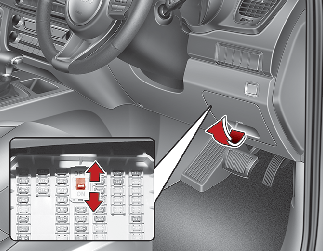
Maintaining your battery regularly reduces the chances of unexpected disconnections. Check the battery terminals for corrosion and clean them if needed. Loose or dirty connections can cause your battery to lose charge or disconnect abruptly.
Test the battery voltage every few months. A weak battery is more likely to fail and cause resets. When I started checking my battery regularly, I noticed fewer electronic glitches and better overall performance.
Don’t forget to secure the battery firmly in its tray. Movement during driving can disconnect cables or damage the battery. Are you paying enough attention to your battery’s health before it affects your car’s electronics?
Credit: ownersmanual.kia.com
Frequently Asked Questions
How Do I Reset My Kia Radio?
To reset your Kia radio after a battery disconnection, turn the ignition on. Press and hold the radio power button for 10 seconds. This should reset your radio. If it doesn’t work, consult your owner’s manual for specific instructions related to your model.
Why Is My Kia Screen Not Working?
Your Kia’s screen might not work after battery disconnection due to system glitches. Try a reset by turning the ignition on and off. If the issue persists, check the fuses or consult a professional. Regular updates and maintenance can prevent these issues.
How To Reset Kia Clock After Battery Change?
After a battery change, the Kia clock might need resetting. Use the clock or setup button on the dashboard. Adjust the time using the tuning knob or buttons. Follow the prompts on your vehicle’s screen for precise steps according to your Kia model.
Will Disconnecting Battery Reset Kia Ecu?
Yes, disconnecting the battery can reset the Kia ECU. This will erase error codes and reset the system. However, it might also erase saved settings. Ensure all systems function correctly after reconnecting. If issues persist, consult a professional for further assistance.
Conclusion
Resetting your Kia after disconnecting the battery is simple. Follow the steps carefully to avoid issues. This process helps your car’s electronics work properly again. You can do it yourself without special tools. Remember to stay patient and check each step.
Your Kia will be ready to drive smoothly soon. Keep this guide handy for future reference. Taking these small steps saves time and money. Stay confident and enjoy your well-maintained vehicle.