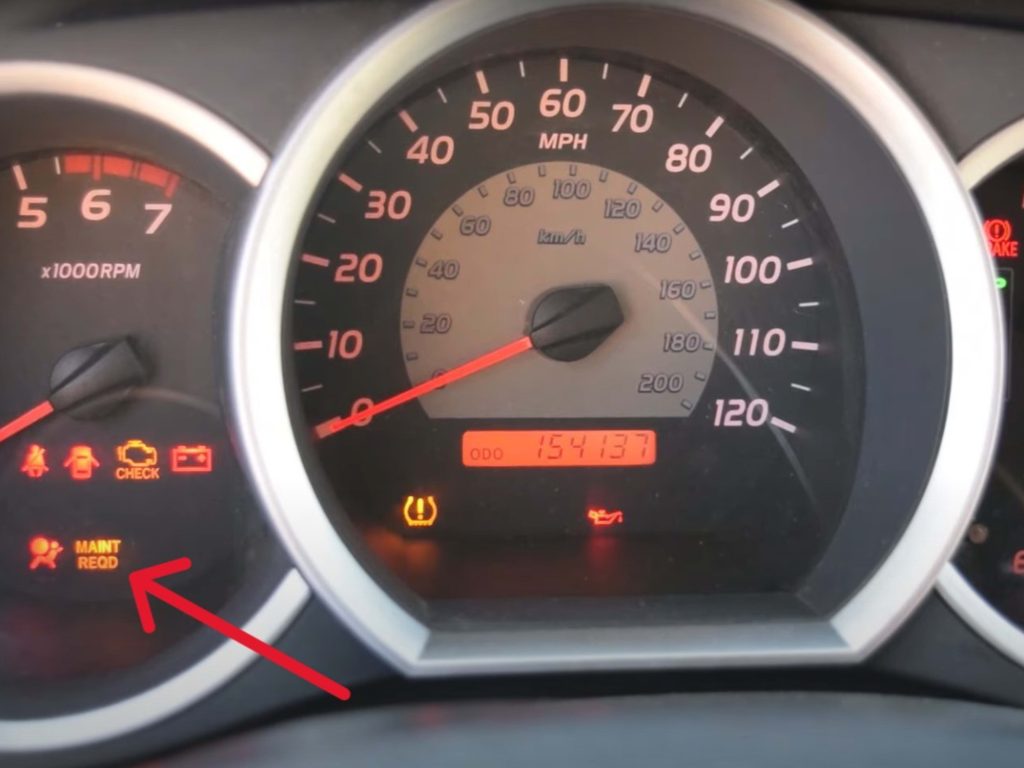
If you own a Toyota Tacoma, you’ve probably seen the “Maint Reqd” light pop up on your dashboard. It can be confusing and a bit frustrating, especially when you’re not sure how to turn it off.
But don’t worry—resetting this light is easier than you think. You’ll learn exactly how to reset the “Maint Reqd” light yourself, saving you time and trips to the mechanic. Keep reading, and you’ll have your Tacoma back to normal in no time.

Credit: www.youtube.com
What Maint Reqd Light Means
The Maint Reqdlight in your Toyota Tacoma is a helpful reminder, not a warning. It signals that your vehicle is due for routine maintenance, like an oil change or tire rotation. This light is designed to keep your truck running smoothly and prevent bigger issues down the road.
Ignoring this light can lead to decreased performance or even costly repairs. But what exactly does it mean, and how do you respond when it comes on? Understanding the Maint Reqd light gives you control over your Tacoma’s health.
What Triggers The Maint Reqd Light?
The Maint Reqd light usually turns on after a set number of miles driven since the last reset. Toyota programs it to appear every 5,000 miles, which is a common interval for oil changes. It’s not triggered by any malfunction but simply serves as a timely reminder.
If your light suddenly comes on, think about how many miles you’ve driven since your last service. Have you kept up with oil changes and other maintenance? This light helps you stay on top of those important tasks.
Is The Maint Reqd Light A Warning?
Unlike the Check Engine light, the Maint Reqd light isn’t indicating a problem that needs immediate attention. It’s more like a friendly nudge that your Tacoma needs some routine care. However, ignoring it for too long can cause your truck to miss out on essential upkeep.
Have you ever ignored a reminder light and regretted it later? This light is your chance to avoid that. Treat it as a prompt to schedule your next service.
What Services Does The Maint Reqd Light Usually Indicate?
- Oil and filter change
- Tire rotation
- Fluid level checks
- Inspection of brakes and belts
These are basic but crucial services that keep your Tacoma reliable. Skipping them can reduce fuel efficiency and wear out parts faster. Regular maintenance is a small effort that pays off big in vehicle longevity.
How To Respond When The Maint Reqd Light Comes On
First, check your service records to see if it’s time for an oil change or other routine maintenance. If you’re due, book a service appointment or do the maintenance yourself if you’re comfortable. After servicing, the light needs to be reset manually to turn off.
Have you ever reset this light without performing maintenance? It might turn off temporarily but will come back, reminding you again. Proper maintenance paired with resetting the light ensures your Tacoma stays in top shape.

Credit: www.youtube.com
When To Reset Maint Reqd Light
The Maint Reqd light on a Toyota Tacoma signals scheduled maintenance. It reminds drivers to check and service the vehicle. Resetting this light helps track future maintenance intervals.
Knowing when to reset the Maint Reqd light is important. Resetting it too soon or without completing service can cause confusion. The light should turn off only after proper maintenance is done.
After Completing Scheduled Maintenance
Reset the Maint Reqd light only after performing required maintenance. This includes oil changes, filter replacements, and inspections. Resetting ensures the system tracks the next service interval correctly.
When The Light Turns On
The Maint Reqd light usually appears after 5,000 miles. It signals that scheduled service is due soon. Ignoring it can lead to engine problems or reduced performance.
After Replacing The Oil And Filter
Oil and filter changes are the most common reason for the light. Reset the light after completing these changes. This confirms the maintenance is done and resets the mileage counter.
When Performing Other Routine Maintenance
Reset the light after other routine work like tire rotation or brake checks. This keeps the maintenance system updated and helps avoid unnecessary alerts.
Tools Needed For Reset
Resetting the Maintenance Required (Maint Reqd) light on your Toyota Tacoma is a straightforward task, but having the right tools makes it even easier. Before you start, gather everything you need to avoid frustration and save time. The tools are simple and often items you already have at home or in your vehicle.
Basic Tools Required
- Owner’s Manual:It’s helpful to have your Toyota Tacoma’s owner’s manual handy. It provides specific instructions and safety tips tailored to your vehicle model.
- Vehicle Key or Smart Key:You need the key to turn the ignition on and off during the reset process. Make sure your key fob is working properly.
- Clean Cloth or Glove:While not mandatory, a clean cloth or glove can help keep buttons and surfaces clean during the reset.
Optional Diagnostic Tools
If you want to go beyond the basic reset, certain tools can read and clear maintenance codes more efficiently.
- OBD-II Scanner:This device plugs into your truck’s diagnostic port and can reset maintenance lights. It also reads error codes that might indicate other issues.
- Mobile App with Bluetooth Adapter:Some smartphone apps pair with Bluetooth OBD-II adapters to reset lights and monitor vehicle health in real time.
Why Keep It Simple?
Many drivers overcomplicate the reset by assuming they need expensive tools. I once spent hours searching for high-tech gadgets only to find that just turning the ignition and pressing a few buttons did the job. Do you really need fancy equipment, or is simplicity the key?
Step-by-step Reset Process
Resetting the “Maint Reqd” light on a Toyota Tacoma is simple and quick. Follow these clear steps to reset the maintenance reminder. This process helps keep your dashboard clean and lets you track your next service easily.
Turn On Ignition Without Starting
Insert your key into the ignition. Turn the key to the “On” position. Do not start the engine. The dashboard lights will come on.
Press Odometer Button
Locate the odometer button on the dashboard. Press it until the odometer reading appears. This may show “ODO” or the mileage.
Hold Button While Turning Off Ignition
Press and hold the odometer button firmly. While holding, turn the ignition off. Keep holding the button for about 10 seconds.
Release Button And Verify Reset
Release the odometer button. Turn the ignition back on without starting the engine. Check the display. The “Maint Reqd” light should be off.
Troubleshooting Reset Issues
Resetting the “Maint Reqd” light on a Toyota Tacoma can sometimes pose challenges. This section helps identify common problems during the reset process. Clear instructions and simple tips make troubleshooting easier. Follow these points to fix reset issues quickly.
Check The Vehicle’s Ignition Position
The ignition must be in the correct position for the reset to work. Turn the key to the “ON” position without starting the engine. Wait a few seconds. If the light does not reset, switch the key off and repeat the process slowly.
Inspect The Dashboard Display
Make sure the dashboard display is active and visible. Sometimes, dim lighting or display issues cause confusion. Adjust the brightness if needed. Confirm the “Maint Reqd” light is actually on before attempting a reset.
Ensure Proper Button Press Timing
Press and hold the reset button firmly. Hold it for at least 10 seconds. Releasing the button too soon may prevent the reset. Patience is key during this step. Wait until the light blinks or turns off.
Verify Battery Voltage
Low battery voltage can affect the vehicle’s electronic systems. Use a multimeter to check the battery voltage. A reading below 12 volts may cause reset issues. Charge or replace the battery if necessary before resetting.
Consult The Owner’s Manual
Different model years might have slight variations in the reset procedure. Refer to the Toyota Tacoma owner’s manual. It contains specific instructions for your model. Following manual steps increases reset success chances.
Use An Obd-ii Scanner
When the manual reset fails, an OBD-II scanner helps. Connect the scanner to the vehicle’s port. Clear maintenance codes through the device. This method works if the light stays on despite attempts to reset.
Maintaining Your Toyota Tacoma
Keeping your Toyota Tacoma in top shape goes beyond just resetting the maintenance required light. True care means understanding what your truck needs to stay reliable and strong. Regular attention to simple upkeep tasks can save you from costly repairs and keep your Tacoma running smoothly for years.
Regular Oil Changes
Your engine depends on clean oil to run efficiently. Changing the oil regularly prevents buildup of dirt and sludge that can damage engine parts. You might think skipping an oil change won’t hurt, but even a short delay can reduce engine performance and fuel economy.
Check your owner’s manual for the exact oil change interval, but many Tacoma owners find changing oil every 5,000 miles keeps their truck happy. When I skipped an oil change once, I noticed the engine sounded rougher and fuel use increased. That experience taught me the value of staying on schedule.
Scheduled Maintenance Checks
Toyota designs maintenance schedules for a reason. These checks catch small problems before they grow into major issues. When you bring your Tacoma in for scheduled inspections, mechanics look over brakes, tires, filters, and other vital components.
Have you ever ignored a warning only to face a bigger repair later? Staying on top of scheduled maintenance helps avoid that. It’s a smart way to protect your investment and enjoy peace of mind on the road.
Using Genuine Parts
When replacing parts, using genuine Toyota components matters. They’re made to fit perfectly and meet strict quality standards. Cheaper aftermarket parts might save money upfront but can lead to poor performance or early failure.
Your Tacoma deserves parts designed specifically for it. Genuine parts often come with warranties and ensure your truck runs as intended. Have you ever noticed a difference after switching to genuine parts? That reliability is worth the cost.

Credit: www.youtube.com
Frequently Asked Questions
How Do You Reset The Maintenance Light?
To reset the maintenance light on a Toyota Tacoma, turn the ignition to the “ON” position. Press the odometer button until the display shows the total mileage. Turn the ignition off. Hold the odometer button while turning the ignition back on.
Release the button when the maintenance light turns off.
Why Does The Maintenance Light Come On?
The maintenance light on a Toyota Tacoma alerts you for scheduled service. It typically appears after driving 5,000 miles. This reminder ensures timely oil changes and other routine maintenance. Ignoring it can lead to decreased performance and potential mechanical issues.
Can You Drive With The Maintenance Light On?
Yes, you can drive with the maintenance light on, but it’s not recommended. The light indicates that routine maintenance is due. Delaying service can lead to reduced fuel efficiency and potential vehicle issues. Addressing the maintenance promptly helps ensure your vehicle’s longevity and performance.
How Often Should You Reset The Maintenance Light?
The maintenance light on a Toyota Tacoma should be reset every 5,000 miles after an oil change. This helps keep track of your vehicle’s service intervals. Regularly resetting it ensures you’re reminded of necessary maintenance, keeping your Tacoma in optimal condition.
Conclusion
Resetting the Maint Reqd light on your Toyota Tacoma is simple. Follow the steps carefully to avoid mistakes. This small task helps keep your truck’s maintenance on track. Regular resets show that you care for your vehicle. It saves time and money in the long run.
Drive safely and check your maintenance often. Keeping your Tacoma in good shape means fewer problems later. Easy and quick – anyone can do it.