Are you tired of that pesky little light on your GE refrigerator constantly reminding you to change the water filter? You’re not alone.
That tiny indicator can be a real nuisance if you’re unsure how to reset it. But don’t worry; you’re about to discover the simple steps to get it done. Imagine the relief of seeing your refrigerator back to its normal state, without any nagging reminders.
Not only will your water taste fresher, but resetting the filter also helps keep your appliance running efficiently. Stick around, and we’ll guide you through the hassle-free process of resetting the water filter on your GE refrigerator. Your fridge and your peace of mind will thank you!

Credit: www.reddit.com
Locate The Water Filter
Locating the water filter in your GE refrigerator is the first step to reset it properly. Knowing its exact position saves time and avoids confusion. The water filter is usually hidden but easy to find once you know where to look.
Find The Filter Housing
The water filter housing holds the filter securely. It is often inside the fridge compartment or at the base grille. Check along the upper right or left corners inside the fridge.
Look for a small rectangular or round cover. Some models have a push-button or twist-off cap. The filter housing might also be behind a panel near the bottom front.
Check The Model Specifics
Different GE refrigerator models place filters in varied spots. Reading your user manual gives exact locations. You can also find this information on the GE website by entering your model number.
Model specifics matter for proper removal and reset steps. Knowing your model helps avoid damage or wrong handling. Keep the model number handy for quick reference.
Remove The Old Filter
Removing the old water filter from a GE refrigerator is a simple but important task. It ensures fresh water flow and keeps the filter system working well. Before installing a new filter, take time to remove the old one carefully. This process prevents leaks and helps maintain water quality.
Turn Off Water Supply
Locate the water supply valve behind the refrigerator. Turn the valve clockwise to stop water flow. This step stops water from spilling during filter removal. Double-check by trying to dispense water from the fridge. No water should come out.
Release The Filter
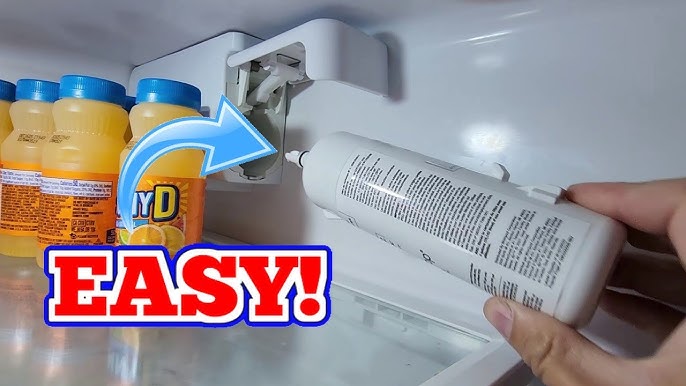
Open the filter compartment inside the fridge. Depending on the model, twist the filter counterclockwise or press the release button. Gently pull the old filter straight out. Keep a towel nearby to catch any drips. Dispose of the used filter according to local guidelines.
Install The New Filter
Installing the new water filter is a key part of maintaining your GE refrigerator. A proper installation ensures clean water and smooth operation. Taking time to align and secure the filter prevents leaks and malfunctions.
Align The Filter Correctly
Start by matching the new filter’s tabs with the slots inside the filter housing. The filter should fit smoothly without forcing. Check the arrows or guides on the filter for the right direction. Proper alignment helps water flow properly through the filter.
Secure The Filter In Place
Push the filter gently into the housing until it clicks or locks. Some models require a quarter turn to secure the filter. Make sure the filter feels tight and does not wiggle. A secure filter stops water leaks and keeps the system sealed.

Credit: www.reddit.com
Reset The Filter Indicator
Resetting the filter indicator on your GE refrigerator keeps your water fresh and clean. The indicator lights up when the water filter needs replacement. Resetting it after changing the filter helps track the filter’s life correctly. This guide shows easy ways to reset the filter indicator.
Using The Control Panel
Most GE refrigerators have a control panel with a filter reset button. Follow these simple steps:
- Locate the control panel on the fridge door or near the display.
- Press and hold the “Reset Filter” or “Water Filter” button.
- Hold the button for about 3 to 5 seconds.
- Watch for the indicator light to turn off or change color.
- Release the button once the light resets.
This method works on many models and is the quickest way to reset.
Manual Reset Methods
If your refrigerator does not have a reset button, try these manual ways:
- Unplug the refrigerator from the power source.
- Wait for 5 minutes to let the system reset.
- Plug the refrigerator back in.
- Check if the filter indicator has turned off.
- Alternatively, press and hold the “Ice Type” or “Light” button for 10 seconds.
- Look for the filter light to clear after this.
Manual resets may vary by model, so check your user manual for exact details.
Flush The New Filter
Flushing the new water filter is an important step to ensure clean and fresh water. It helps remove any loose carbon particles inside the filter. These particles can cause cloudy water or strange taste. Flushing also prepares the filter for proper use and extends its life.
Run Water Through The Filter
Turn on the water dispenser and let water flow through the new filter. Run at least 2-3 gallons of water to flush out impurities. This process may take 5 to 10 minutes. Use a large container to catch the water. The water might look cloudy at first. This is normal and clears up quickly. Flushing clears air pockets and activates the filter media.
Check For Leaks
After flushing, inspect the filter area for leaks. Look around the filter housing and water lines carefully. Tighten the filter if you see water dripping. Leaks can cause water damage and reduce filter efficiency. Make sure the filter is firmly seated and sealed properly. A good seal prevents leaks and keeps water flowing correctly.
Troubleshooting Tips
Troubleshooting common issues can save time and frustration when resetting the water filter on a GE refrigerator. Problems like the filter not resetting or poor water flow often have simple fixes. Understanding these can help maintain clean water and smooth operation.
Filter Not Resetting
The filter reset button might not respond due to system glitches. Try these quick checks:
- Press and hold the reset button for at least 3 seconds.
- Ensure the refrigerator’s power is on and stable.
- Check if the filter is properly installed and locked in place.
- Unplug the refrigerator for 5 minutes, then plug it back in.
If the issue continues, the control board might need a reset or replacement.
Water Flow Issues
Slow or no water flow may signal filter or line problems. Check these points:
- Confirm the water filter is not clogged or expired.
- Inspect water lines for kinks or leaks.
- Make sure the water supply valve is fully open.
- Flush the water dispenser for a few minutes to clear air or debris.
Persistent water flow problems may require professional service to inspect internal parts.

Credit: www.haierappliances.com
Frequently Asked Questions
How Do I Reset The Water Filter On A Ge Refrigerator?
To reset the water filter, press and hold the reset button for 3 seconds. This clears the filter indicator light. The button is usually on the control panel or inside the fridge.
When Should I Reset My Ge Refrigerator Water Filter?
Reset your water filter after replacing the cartridge. This keeps the filter indicator accurate. It helps maintain clean, fresh water and ice.
What If The Water Filter Reset Won’t Work?
If resetting fails, check the new filter installation. Make sure it’s properly seated and locked. Try unplugging the fridge for 5 minutes, then reset again.
How Often Do I Need To Change The Water Filter?
Change the GE water filter every 6 months or when the indicator light turns red. Frequent changes ensure better water taste and prevent clogging.
Conclusion
Resetting the water filter on your GE refrigerator keeps water fresh and clean. Follow the steps carefully to avoid mistakes. Regular resets help maintain good taste and proper function. It saves you time and prevents problems later. Remember to check your filter status often.
A simple reset can improve your daily water use. Keep your fridge running smoothly with this easy task. Clean water is just a few steps away.