Have you ever found yourself standing in front of your Whirlpool microwave oven, frustrated because it’s not working as it should? You’re not alone.
Many of us rely heavily on our microwave ovens for quick meals and reheating leftovers, so when they act up, it’s an instant inconvenience. But before you rush out to buy a new one or call for expensive repairs, there’s a simple solution that might just bring your appliance back to life: resetting it.
Resetting your Whirlpool microwave oven can solve many common issues, from strange error codes to unresponsive buttons. And the best part? You can do it yourself in just a few easy steps. Imagine the relief of having your microwave back to normal, saving you time and stress. In this guide, we’ll walk you through the process of resetting your Whirlpool microwave oven, so you can get back to your routine without a hitch. Stick with us, and let’s get your microwave back on track!

Credit: www.reddit.com
Reasons To Reset Whirlpool Microwave
Resetting your Whirlpool microwave oven can be the simple fix you need to get it back to working smoothly. Knowing why you should reset it helps you avoid unnecessary repairs or replacements. Sometimes, a reset clears glitches that cause frustrating interruptions in your kitchen routine.
Common Issues Requiring Reset
Microwaves can develop minor errors that affect their performance. You might notice the display acting strangely, buttons not responding, or the microwave stopping mid-cycle. These issues often happen due to power surges or software hiccups.
- Microwave buttons become unresponsive or stuck.
- Display screen shows random numbers or error codes.
- Microwave stops heating despite running.
- Unusual noises or smells coming from the unit.
- Timer or clock settings won’t update.
When these problems occur, resetting the microwave can clear the internal memory and restore normal function without complicated repairs.
When To Try Resetting
Before calling a technician, consider if a reset might solve the problem. If your microwave behaves oddly right after a power outage, a reset is often the quickest fix. You should also try resetting if the microwave’s control panel freezes or shows errors you can’t explain.
However, if your microwave has visible physical damage or smells burnt, resetting won’t help and you should seek professional help. Think about whether the issue started suddenly or gradually; sudden glitches often respond well to resets.
Have you noticed your microwave’s problems vanish after a reset? That’s a sign it was just a minor glitch. Don’t hesitate to reset your Whirlpool microwave when it acts up—it might save you time and money.
Preparing For The Reset
Before you dive into resetting your Whirlpool microwave oven, it’s important to prepare properly. Preparation helps avoid mistakes and protects both you and your appliance. Taking a moment to get ready can save you from frustration and ensure the reset process goes smoothly.
Safety Precautions
Your safety is the top priority when working with any electrical appliance. Microwaves contain high-voltage components that can be dangerous even when unplugged. Always unplug the microwave from the power outlet before starting any reset or maintenance.
Wear rubber-soled shoes to reduce the risk of electrical shock. Avoid touching internal parts unless you are absolutely sure what you’re doing. If you notice any damage to the microwave’s cord or casing, don’t proceed until it’s repaired.
Gathering Necessary Tools
Having the right tools ready makes the reset process faster and less stressful. Most Whirlpool microwave resets don’t require many tools, but a few essentials can help.
- A soft cloth for cleaning the control panel
- A screwdriver set for accessing the control board if needed
- A flashlight to see inside dark areas
- Your microwave’s user manual or model number handy for reference
Do you have everything you need within reach? Sometimes, just missing one small tool can delay the entire process. Double-check before you start to keep your reset effort efficient and effective.
Step-by-step Reset Process
Resetting your Whirlpool microwave oven can solve many common issues, from unresponsive controls to error codes. The reset process is straightforward and requires just a few simple actions. Let’s walk through each step clearly so you can get your microwave working smoothly again.
Unplugging The Microwave
Start by disconnecting your microwave from the power source. This is essential to clear any temporary glitches in the system. Pull the plug from the wall outlet rather than using the microwave’s power button, if available.
Have you noticed how a quick unplug can sometimes fix other electronics too? This simple action often resets the internal electronics and gives the appliance a fresh start.
Waiting Period
After unplugging, wait at least 1 to 5 minutes before plugging the microwave back in. This pause lets the microwave’s internal memory clear any stored errors. It’s a small step that can make a big difference.
During this waiting time, you can check the user manual or prepare your kitchen for your next meal. Sometimes, a little patience goes a long way in troubleshooting.
Plugging Back In
Once the waiting time is over, plug the microwave back into the power outlet firmly. Make sure the connection is secure and not loose. A poor connection can cause the microwave to malfunction again.
After plugging it back in, watch for any startup sounds or lights. These signals indicate the microwave is powering up correctly.
Performing A Control Panel Reset
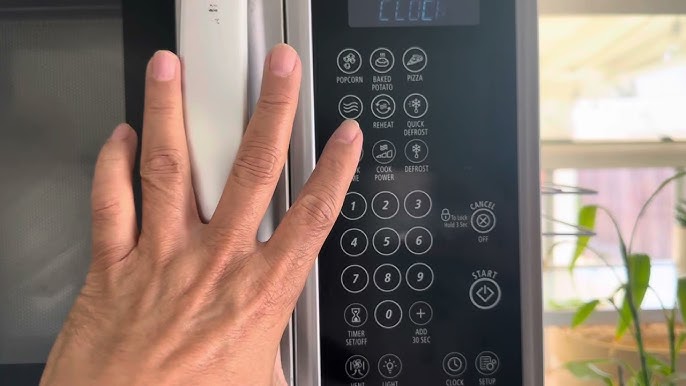
Many Whirlpool microwaves allow you to reset the control panel by pressing a specific button combination. Usually, holding down the “Clear” or “Stop/Cancel” button for 3 to 5 seconds does the trick.
If your model has a “Reset” button, press it as directed in the manual. This step clears any lingering errors and resets the control settings to default.
Have you ever found yourself hitting random buttons hoping for a fix? A targeted control panel reset is much more effective and saves time.
Using The Control Panel Reset Button
The control panel reset button on your Whirlpool microwave helps clear errors fast. This button resets the microwave’s settings to fix minor issues. Using it is simple and requires no tools.
Resetting the microwave can solve problems like unresponsive buttons or display errors. This method saves time and avoids unplugging the appliance. Let’s explore how to find and use this reset button.
Locating The Reset Button
The reset button is part of the microwave’s control panel. It may be labeled as “Reset” or shown as a small icon. Sometimes it is combined with the “Clear” or “Stop” button.
Look closely at the buttons around the display screen. The reset button stands out by its label or size. If unsure, check the microwave’s user manual for exact location.
Executing The Reset
Press the reset button firmly once. Hold it for about 3 seconds if needed. The microwave’s display should clear or change, indicating a reset.
Wait a few seconds after pressing. The microwave will return to its default settings. Try using the microwave normally to see if the issue is fixed.
Troubleshooting After Reset
After resetting your Whirlpool microwave oven, some issues may still persist. Troubleshooting helps identify and fix these problems quickly. This section guides you through common concerns and what to do next.
Microwave Not Responding
The microwave may not respond after a reset due to power issues or internal errors. Check the power cord and outlet first. Make sure the door is fully closed. If the microwave still does not respond, try pressing the start button again. Sometimes, the control panel needs a moment to reset fully.
Error Codes And Solutions
Whirlpool microwaves display error codes to indicate specific problems. Common codes include:
- F1– Control board error
- F2– Keypad stuck or malfunction
- F3– Door switch issue
To fix these errors, unplug the microwave for 5 minutes and plug it back in. Clear the display and try again. For keypad issues, gently clean the buttons with a soft cloth. If the door switch causes errors, ensure the door latches firmly.
When To Contact Support
Contact Whirlpool support if the microwave:
- Shows persistent error codes after reset
- Does not heat food despite running
- Makes unusual noises or smells
- Has visible damage or broken parts
Professional help prevents further damage and ensures safety. Keep your model number handy to speed up the process.

Credit: www.youtube.com
Tips To Avoid Future Issues
Preventing problems with your Whirlpool microwave saves time and money. Simple care and smart use keep it running smoothly. Follow these tips to avoid future issues after resetting your microwave.
Regular Maintenance
Clean the microwave interior after each use. Wipe spills immediately to prevent stains and odors. Check the door seal often. Make sure it closes tightly to keep heat inside. Remove and clean the turntable weekly. This avoids food buildup and ensures even cooking. Inspect the vents for dust or blockages. Clear them gently to maintain proper airflow. Schedule a professional checkup if you notice strange noises or smells. Regular care extends the appliance’s life.
Proper Usage Practices
Use microwave-safe containers only. Avoid metal or foil that can cause sparks. Do not operate the microwave when empty. It may damage internal parts. Follow the manufacturer’s cooking instructions closely. Overheating food or liquids can cause burns or damage. Avoid slamming the door to protect the latch. Keep the control panel dry and clean. Use gentle touches to preserve button function. These habits help your microwave work well for years.
Credit: www.consumerreports.org
Frequently Asked Questions
How Do I Reset My Whirlpool Microwave Oven?
To reset your Whirlpool microwave, unplug it from the power outlet. Wait for 1-2 minutes, then plug it back in. This clears any errors and resets the control panel for normal operation.
Why Is My Whirlpool Microwave Not Responding?
Your microwave may need a reset if it’s unresponsive. Power cycling by unplugging and plugging back in often fixes control board glitches. Check the door latch and ensure power supply is stable.
Can A Factory Reset Fix Whirlpool Microwave Errors?
Yes, a factory reset can resolve many software-related errors. Unplug the microwave for a few minutes to clear memory. This restores default settings and can fix minor issues.
How Long Does It Take To Reset A Whirlpool Microwave?
Resetting your Whirlpool microwave typically takes 1-2 minutes. Unplug the unit, wait briefly, then plug it back in. This quick process clears errors and resets the system efficiently.
Conclusion
Resetting your Whirlpool microwave is simple and quick. Just follow the steps carefully for best results. This process helps fix many common issues. You can save time and avoid costly repairs. Keep your microwave working smoothly by resetting it now and then.
Remember to unplug the oven before starting. A reset often clears minor errors easily. Feel confident handling small microwave problems yourself. Stay safe and enjoy your cooking without hassle.