Have you ever struggled with your car’s anti-theft system locking you out or causing false alarms? It can be frustrating when your own security feature feels like a roadblock.
But don’t worry—knowing how to take off the anti-theft system on your car can save you time, stress, and even money. You’ll discover simple steps to disable or reset your car’s anti-theft device safely. Whether you’re dealing with a faulty alarm or need to disable it temporarily, these tips will help you regain control quickly and easily.
Keep reading to learn how to make your car’s security system work for you, not against you.

Credit: www.superblocksmithofcoarsegold.com
Common Car Anti-theft Systems
Car anti-theft systems help protect vehicles from theft. They use different devices and technology.
Understanding these systems can help you know how to safely remove or disable them if needed.
Types Of Anti-theft Devices
There are many kinds of anti-theft devices. Each type works in a special way to stop thieves.
- Steering Wheel Locks: Physical bars that block steering wheel movement.
- Car Alarms: Sounds loud alerts when the car is tampered with.
- Immobilizers: Prevent the engine from starting without the key.
- GPS Trackers: Help locate the car if it is stolen.
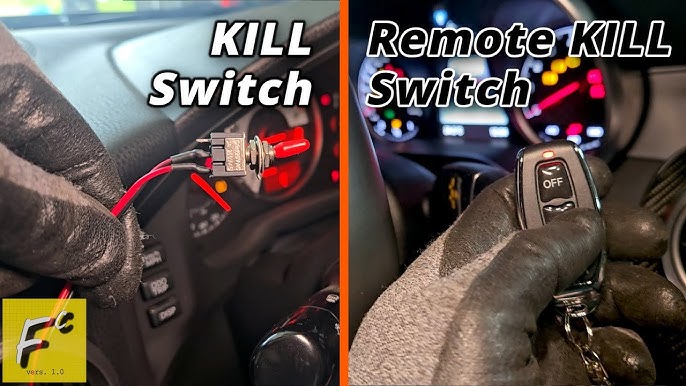
- Kill Switches: Cut off power to stop the engine from running.
How These Systems Work
Anti-theft systems work by blocking car use or alerting owners. They use sensors and electronic signals.
Some systems stop the engine, while others lock parts or make noise to scare thieves.
- Steering Wheel Locks stop the wheel from turning.
- Car Alarms detect door or window opening and sound an alarm.
- Immobilizers check for the right key before starting the car.
- GPS Trackers send the car’s location to the owner.
- Kill Switches disconnect power to the engine or fuel system.
When To Disable Anti-theft
Anti-theft systems protect cars from theft. Sometimes, you need to disable them. Knowing when to turn off these systems is important.
Disabling anti-theft devices should be done carefully. Only do it in proper situations to avoid problems.
Situations Requiring Disabling
There are several times when you might need to disable your car’s anti-theft system. This helps avoid issues or damage.
- When replacing the car battery
- During electrical repairs or upgrades
- If the system malfunctions or causes false alarms
- When towing the vehicle
- Before selling or transferring the car
Legal Considerations
Disabling anti-theft devices has legal rules. Knowing these helps you stay safe and avoid fines.
| Consideration | Details |
| Owner Permission | Only disable if you own the car or have permission. |
| Local Laws | Some areas forbid disabling security systems without cause. |
| Insurance Impact | Disabling may affect insurance coverage or claims. |
| Safe Handling | Follow manufacturer instructions to avoid damage. |
Basic Steps To Disable Anti-theft
Car anti-theft systems protect your vehicle from theft. Sometimes, you need to disable the system to start your car or fix issues. This guide explains simple ways to turn off the anti-theft system.
Using the key fob or manual methods can help you disable the anti-theft system safely. Read the steps below to learn how.
Using The Key Fob
The key fob controls your car’s locks and alarm. It can also reset the anti-theft system in many cars.
- Press the unlock button on your key fob to disarm the alarm.
- If the alarm sounds, press the lock then unlock buttons quickly.
- Start the car within a few seconds after unlocking to reset the system.
- If the key fob battery is dead, replace it to ensure it works properly.
Manual Override Methods
If the key fob does not work, you can try manual ways to disable the anti-theft system. These methods depend on your car model.
| Method | Description | When to Use |
| Insert Key and Turn | Turn the ignition key to the “On” position and leave it for 10 minutes. | Reset system when alarm won’t stop. |
| Disconnect Battery | Remove the negative battery cable for 15 minutes to reset the electronics. | If system malfunctions or key fob fails. |
| Use Ignition Override Switch | Locate and press the override switch inside the car to disable the alarm. | Some models have a hidden switch for manual override. |

Credit: www.jalopnik.com
Resetting The Alarm System
Car alarm systems protect vehicles from theft. Sometimes, the alarm can get stuck or malfunction. Resetting the alarm system can help fix these issues. This guide shows two common ways to reset the alarm system on cars.
Follow the instructions carefully to avoid causing damage to your vehicle’s electrical system. These methods are simple and can be done with basic tools or just the car’s ignition key.
Disconnecting The Battery
Disconnecting the car battery is a direct way to reset the alarm system. This cuts power to the alarm and clears its memory.
- Turn off the car and remove the key from the ignition.
- Open the car’s hood and locate the battery.
- Use a wrench to loosen the negative battery cable (usually black).
- Remove the negative cable from the battery terminal.
- Wait for 10 to 15 minutes to let the system reset.
- Reconnect the negative cable and tighten it securely.
- Close the hood and start the car to check if the alarm is reset.
Disconnecting the battery will also reset other electronic systems. You may need to reset the clock or radio afterward.
Using The Ignition Key Sequence
Some cars allow you to reset the alarm using a special sequence with the ignition key. This method does not require tools.
| Action | Instruction |
| Insert Key | Put the key into the ignition without starting the car. |
| Turn Key | Turn the key to the “On” position (do not start engine). |
| Wait | Hold the key in the “On” position for 10 seconds. |
| Turn Off | Turn the key back to the “Off” position. |
| Repeat | Repeat turning the key on and off three times. |
| Start Car | Start the engine to see if the alarm reset. |
If the alarm does not reset, check the car manual for the exact key sequence. Different car models may have different reset procedures.
Advanced Techniques
Removing an anti-theft system from a car requires careful steps. Advanced techniques help disable alarms without damage.
These methods focus on accessing key components and safely turning off the system. Follow each step carefully.
Accessing The Fuse Box
The fuse box controls power to the car’s anti-theft system. Finding it is the first step to disabling the alarm.
Most cars have fuse boxes under the dashboard or in the engine compartment. Check your car manual for exact location.
- Turn off the car and remove the key.
- Open the fuse box cover carefully.
- Look for the fuse related to the anti-theft system.
- Use a fuse puller or pliers to remove the fuse.
- Removing the fuse cuts power to the alarm system.
Disabling The Alarm Module
The alarm module controls the car’s security alerts. Disabling it stops the alarm from activating.
Locate the alarm module, usually under the dashboard or near the steering column. Disconnect its wiring harness.
- Disconnect the car battery before working on the module.
- Find the alarm module by checking wiring diagrams or the car manual.
- Unplug the wiring harness from the module carefully.
- Use electrical tape to cover exposed wires.
- Reconnect the battery and test if the alarm is off.
Precautions And Safety Tips
Removing an anti-theft system from your car requires care and attention. Taking safety measures helps protect both you and your vehicle.
Follow simple precautions to avoid damage and know when to ask for expert help. This guide covers key safety tips.
Avoiding Damage To Vehicle Electronics
Car anti-theft systems connect to your vehicle’s electronic parts. Mishandling can cause faults or failures. Protect your car’s electronics by working carefully.
- Disconnect the car battery before starting any work.
- Use insulated tools to prevent electric shocks.
- Avoid touching wires or connectors with wet hands.
- Refer to the car’s manual for wiring diagrams.
- Do not cut or splice wires without proper knowledge.
- Work in a dry, well-lit area to see clearly.
When To Seek Professional Help
Sometimes, removing the anti-theft system is complex or risky. Knowing when to get expert assistance can save time and money.
| Signs You Need a Professional | Reason |
| Complex wiring or hidden components | May damage electronics or safety systems |
| Car warranty is still active | Improper work can void warranty |
| Unclear or missing manuals | Risk of incorrect removal |
| Anti-theft system linked to ignition | Requires special tools and knowledge |
| Previous failed attempts to remove system | Could cause more harm |

Credit: www.jalopnik.com
Frequently Asked Questions
How Do I Disable The Car’s Anti-theft System?
To disable the anti-theft system, use your car key or remote to unlock the door. Then, turn the ignition to the “ON” position. This action usually resets the alarm. Refer to your car manual for model-specific steps.
Why Won’t My Car Anti-theft System Turn Off?
The anti-theft system may not turn off due to a dead key fob battery or faulty sensor. Try replacing the battery or using the physical key. If issues persist, consult a professional mechanic for diagnosis and repair.
Can I Remove The Anti-theft System Permanently?
Removing the anti-theft system permanently is possible but not recommended. It can reduce your car’s security and may void warranties. Always seek professional assistance to ensure safe and legal removal.
What Tools Are Needed To Disable Anti-theft On Cars?
Typically, no special tools are required to disable the anti-theft system. Most systems reset using the key fob or ignition. For complex cases, a diagnostic scanner or professional tools might be necessary.
Conclusion
Taking off anti-theft systems can seem tricky. But with clear steps, it’s easier. Always start by checking the car manual. It often holds useful advice. Ensure the car battery is disconnected. This prevents any shocks. Using the right tools helps avoid damage.
If unsure, seek professional help. They have the right skills. Remember, safety comes first. Practice patience throughout the process. Don’t rush or skip steps. With these tips, you’ll handle the task confidently. Your car will be theft-free and functional. Drive safely and enjoy the ride!