Are your Toyota’s high beams turning on at the wrong moments? It can be frustrating when your headlights switch automatically, especially if you’re driving in well-lit areas or behind other cars.
You might wonder how to take back control and turn off the auto high beam feature. This guide will walk you through simple steps to disable it, so you can drive with confidence and avoid blinding other drivers. Keep reading to learn exactly how to switch off your Toyota’s auto high beams quickly and easily.
Locate The Auto High Beam Switch
Locating the auto high beam switch in your Toyota is the first step to taking control of your headlights. Knowing exactly where this feature lives can save you time and frustration when you want to turn it off. Don’t let your car decide for you when to use high beams—find the switch and make it your choice.
Check The Steering Column Controls
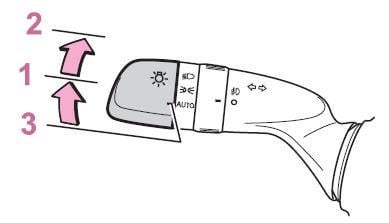
The auto high beam switch is often found on or near the steering column. Look for a stalk or dial that controls your headlights and turn signals.
In many Toyota models, the auto high beam function is integrated into the headlight control stalk. You might see a button labeled with an “A” or a headlight icon with beams.
If you spot a toggle or button, try pressing or flipping it. This action usually enables or disables the auto high beam feature.
Refer To The Owner’s Manual
Your Toyota’s owner’s manual is a goldmine of information. It provides exact details on where the auto high beam switch is located for your specific model and year.
Look under the “Lighting” or “Headlights” section. The manual will often include images or diagrams showing the switch.
Have you ever missed a simple control because you didn’t check the manual? This is a perfect moment to grab it. It ensures you’re not guessing and helps you avoid unnecessary trips to the dealership.

Credit: www.youtube.com
Disable Auto High Beam Using The Control Stalk
Disabling the auto high beam feature on your Toyota using the control stalk is a quick and easy process. This method puts you in full control of your headlights. It helps avoid sudden switching between high and low beams, which some drivers find distracting.
The control stalk is the lever on the left side of the steering wheel. It controls your headlights and turn signals. By adjusting this stalk, you can switch from automatic to manual headlight mode. This section explains how to do it step-by-step.
Switch To Manual Headlight Mode
Start by locating the control stalk on the left side of the steering wheel. Look for the headlight control ring on the stalk. Turn the ring away from the “Auto” position to the “Headlights On” or “Off” position.
This action disables the automatic high beam feature. Now, you must manually switch between high and low beams. Push the stalk forward to activate high beams. Pull it back to return to low beams.
Confirm The Auto High Beam Indicator
After switching to manual mode, check your dashboard for the auto high beam indicator. The indicator light looks like a headlight with an “A” inside.
If this symbol is off, the auto high beam is disabled. If it stays on, repeat the previous step. Ensuring the indicator is off confirms the system is in manual mode.
Adjust Settings Via The Infotainment System
Adjusting your Toyota’s auto high beam settings through the infotainment system gives you direct control without fiddling with physical switches. This digital approach is both quick and intuitive, letting you tailor your driving experience to fit your preferences. Have you ever wanted to switch off the auto high beams instantly because they were too sensitive? The infotainment system makes that possible in just a few taps.
Access Vehicle Settings Menu
Start by turning on your vehicle’s infotainment screen. Look for the “Settings” or “Setup” icon, usually represented by a gear symbol. Once there, navigate to the “Vehicle” or “Driver Assistance” section—this is where high beam controls are typically found.
If you’re unsure, your Toyota’s user manual can pinpoint the exact menu location. Some models also let you use voice commands to jump directly to vehicle settings, saving you even more time.
Toggle Auto High Beam Off
Within the vehicle settings menu, find the option labeled “Auto High Beam” or “Automatic High Beam.” You’ll usually see a simple toggle switch or checkbox. Tap to turn it off, and your high beams will no longer automatically activate.
Remember to confirm your selection if prompted. After disabling, take a moment to test your lights in a safe spot to ensure the setting has been applied. This small adjustment can make night driving less distracting, especially in areas with frequent oncoming traffic.
Credit: www.toyotanation.com
Use The Multi-information Display
The Multi-Information Display (MID) in your Toyota provides easy control over many vehicle settings. It shows important information and lets you change features without using physical buttons. Turning off the Auto High Beam feature is simple using the MID. This method saves time and keeps your focus on driving.
Navigate To Lighting Options
Start by turning on your Toyota’s ignition. Use the steering wheel controls to open the Multi-Information Display menu. Look for the “Settings” or “Vehicle Settings” option. Scroll through the menu until you find “Lighting” or “Lighting Options.” Select this to access all light-related settings.
Deactivate Auto High Beam Feature
Inside the Lighting Options, find “Auto High Beam” or “Automatic High Beam.” Highlight this option and press the select button. Choose “Off” to deactivate the feature. The display will confirm the change. You can now drive without the headlights switching to high beam automatically.
Troubleshooting Common Issues
Troubleshooting common issues with the auto high beam feature in your Toyota can save time and frustration. Problems may occur even after trying to turn off the system. Understanding these issues helps you fix them quickly and safely.
Some issues are simple and related to settings. Others might need a deeper check of sensors or wiring. Always start with basic checks before moving to complex solutions.
Auto High Beam Remains On
The auto high beam might stay on despite attempts to switch it off. This can happen due to sensor blockage or system glitches.
- Check the front camera and sensors for dirt or obstructions.
- Clean the windshield in front of the sensors carefully.
- Turn the car off and on to reset the system.
- Verify the auto high beam setting in the vehicle’s menu.
- If the problem continues, consult a Toyota technician.
Indicator Light Doesn’t Appear
The indicator light shows if the auto high beam is active. If it does not appear, the system may not be working properly.
- Check if the auto high beam feature is enabled in settings.
- Inspect the dashboard for any warning lights that may affect the system.
- Look for blown fuses related to lighting or sensors.
- Ensure the headlights are functioning correctly.
- Visit a dealer if the indicator light still does not show.
Benefits Of Turning Off Auto High Beam
Turning off the auto high beam feature in your Toyota can offer several practical benefits. While the technology aims to enhance safety by automatically adjusting your headlights, there are moments when manual control serves you better. Understanding these benefits can help you decide when to switch off the auto high beam for a smoother and safer driving experience.
Avoiding Glare For Other Drivers
One key advantage of turning off your auto high beam is preventing glare that can blind oncoming drivers. Auto high beams sometimes switch on unexpectedly, especially on poorly lit roads where other vehicles are present. By controlling your headlights manually, you ensure other drivers maintain clear vision, reducing the risk of accidents.
Have you ever noticed a car’s bright lights suddenly shining in your eyes on a dark road? That uncomfortable glare can be avoided if drivers choose to turn off auto high beam in such situations. This small action shows consideration and improves overall road safety.
Improving Control In Certain Conditions
Manual control over your headlights allows you to adapt quickly to changing road conditions. Fog, rain, or snow can confuse the sensors of auto high beam systems, causing the lights to switch improperly. You can avoid this by turning off the auto feature and selecting the appropriate beam for the environment.
For example, during heavy fog, high beams can reflect back and reduce your visibility. Switching off the auto high beam lets you use low beams that better penetrate fog, giving you more control and confidence while driving. Have you experienced moments when your car’s automatic settings didn’t match the road conditions? Taking control yourself can make a big difference.

Credit: www.youtube.com
Frequently Asked Questions
How Do I Disable Auto High Beams On My Toyota?
To disable auto high beams on a Toyota, locate the lever near the steering wheel. Push the lever forward to turn off the feature. This action will switch your headlights to manual control. Always consult your vehicle’s manual for specific instructions tailored to your model.
Why Is My Toyota’s Auto High Beam Not Working?
If your Toyota’s auto high beam isn’t working, ensure the feature is activated. Check the lever position and that your headlights are set to auto. Poor visibility or obstructions on the sensors can also cause issues. Refer to your vehicle’s manual for troubleshooting specific to your model.
Can I Adjust The Auto High Beam Sensitivity?
Toyota vehicles generally do not offer user-adjustable sensitivity for auto high beams. The system is calibrated to optimize performance in varying conditions. However, keeping sensors clean and unobstructed ensures the best functionality. For specific concerns, consult a Toyota service center or your vehicle’s manual.
Is It Safe To Use Auto High Beams?
Yes, using auto high beams is safe and enhances visibility during night driving. The system automatically switches between high and low beams based on surrounding traffic and lighting conditions. This ensures optimal road illumination without blinding other drivers. Always maintain clean sensors for accurate system operation.
Conclusion
Turning off the auto high beam on your Toyota is quick and easy. Just follow the steps described above. This lets you control your headlights better while driving. It helps avoid blinding other drivers at night. Remember to check your vehicle’s manual for model-specific details.
Safe driving means using your lights the right way. Keep your focus on the road and stay alert. Adjust your settings when needed for a comfortable drive. Your Toyota’s features are there to help you, not confuse you. Simple changes can improve your driving experience a lot.