Driving your 2023 Kia Sportage should always feel comfortable and under your control. But what if the Lane Assist feature keeps nudging you, even when you don’t want it?
You’re not alone. Many drivers want to know how to turn off Lane Assist quickly and easily. You’ll discover simple steps to disable this feature, giving you the freedom to drive exactly how you want. Keep reading to take back control of your drive today.
Locate Lane Assist Controls
Finding the lane assist controls in the 2023 Kia Sportage is quick and simple. These controls let you turn the feature on or off as needed. Knowing where to look helps you drive with confidence and ease.
The lane assist system is managed through buttons on the dashboard and options on the steering wheel. Both areas are designed for easy access while driving.
Dashboard Button
The dashboard holds a dedicated lane assist button. It often has a small icon showing a car between two lines. This button is usually near the steering wheel on the left side of the dashboard.
Pressing this button switches lane assist on or off. A light on the button or dashboard will indicate the system’s status.
Steering Wheel Options
Some Kia Sportage models include lane assist controls on the steering wheel. These controls are part of the multi-function buttons.
Use the arrows or menu buttons to navigate through the settings on the instrument cluster display. Here, you can find lane assist options to enable or disable.

Credit: www.salmonarmgm.com
Use Infotainment System
The infotainment system in your 2023 Kia Sportage is more than just a screen for music and navigation. It acts as the central hub for managing many of your vehicle’s features, including safety settings like Lane Assist. Learning to use this system effectively can save you time and give you control over features that impact your driving experience.
Access Vehicle Settings
Start by turning on your Kia Sportage’s infotainment display. From the main menu, look for the “Settings” icon—usually represented by a gear symbol.
Tap on this to open the vehicle settings menu. Here, you’ll find options that let you customize various aspects of your car’s behavior, including driver assistance systems.
Navigate To Safety Features
Within the vehicle settings, scroll until you see the “Safety” or “Driver Assistance” section. This is where Kia groups all safety-related controls, including Lane Assist.
Once inside this menu, locate “Lane Assist” or “Lane Keeping Assist.” You’ll typically find an on/off toggle switch or checkbox here.
Switch it off to disable Lane Assist immediately. The infotainment system may also allow you to adjust the sensitivity or alerts if you prefer keeping it on but want it less intrusive.
Disable Lane Assist
Disabling lane assist features on your Kia Sportage 2023 can give you more control over your driving experience. Whether you find the alerts distracting or prefer to steer without assistance, turning off these features is straightforward. Let’s look at how you can disable lane assist functions easily through your vehicle’s settings.
Toggle Off Lane Departure Warning
The Lane Departure Warning system alerts you if you start drifting out of your lane without signaling. To turn this off, start by accessing the vehicle’s touchscreen display.
- Tap the “Settings” icon on your dashboard screen.
- Navigate to the “Driver Assistance” menu.
- Find the “Lane Departure Warning” option and switch it off.
Once disabled, the vehicle will no longer beep or vibrate when you unintentionally leave your lane. Have you noticed if this reduces distractions during your drive?
Turn Off Lane Keeping Assist
Lane Keeping Assist actively helps steer your Kia back into the lane if you begin to drift. If you want to turn this feature off, follow similar steps in the settings menu.
- Open the “Settings” on your touchscreen.
- Go to “Driver Assistance” or “Safety Features.”
- Locate “Lane Keeping Assist” and toggle it to the off position.
Disabling this can make your steering feel more natural if you prefer full control. Have you tried driving both with and without this feature to see which suits your style better?
Confirm Deactivation
Confirming that Lane Assist is off in your 2023 Kia Sportage is important for safe driving. This step ensures the system truly deactivates and does not interfere while driving. Taking a moment to verify helps avoid surprises on the road.
Check Dashboard Indicators
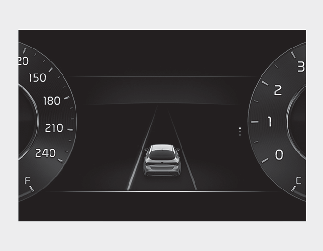
Start by looking at the dashboard display after turning off Lane Assist. The lane assist icon should disappear or show as inactive. This visual cue confirms the system no longer monitors lane markings.
Keep an eye on any warning lights related to driver assistance. If these remain lit, the feature might still be active. Always rely on dashboard signals as your first check.
Test Drive To Verify
Take a short drive on a marked road to confirm Lane Assist is off. Notice if the steering wheel or alerts activate unexpectedly. No intervention means the system is properly deactivated.
Drive at a steady speed and avoid abrupt maneuvers. This helps you clearly detect if Lane Assist tries to correct your path. Testing ensures full control over your vehicle’s behavior.
Troubleshoot Common Issues
Encountering issues while trying to turn off Lane Assist on your 2023 Kia Sportage can be frustrating. Understanding common problems and knowing how to address them saves time and stress. Let’s dive into practical fixes that you can try right away.
System Not Turning Off
If your Lane Assist system refuses to switch off, start by checking if the vehicle is in a mode that restricts this action. Sometimes, Lane Assist remains active during certain driving conditions, like highway mode or cruise control engagement.
Double-check the dashboard for any warning lights or messages that might indicate a system fault. Ignoring these alerts can prevent the system from deactivating.
Have you ensured that you are using the correct button or menu option? The Sportage uses a combination of physical buttons and touchscreen controls. Press and hold the Lane Assist button for a few seconds, or access the settings menu via the infotainment system to toggle the feature off.
Resetting Settings
If the system still won’t turn off, resetting your vehicle’s settings might help. This can clear minor software glitches affecting Lane Assist.
Navigate to the “Settings” menu on your infotainment screen, then select “Vehicle” or “Driver Assistance.” Look for an option like “Restore to Default” or “Reset Settings.”
Keep in mind, resetting will revert other personalized settings too, such as audio preferences or seat memory. It’s a simple process but consider backing up your preferred configurations first.
After resetting, try turning off Lane Assist again. Does the system respond now? If it still doesn’t, it might be time to visit your Kia dealership for a deeper diagnostic check.
Credit: www.kiasoulforums.com
Safety Tips When Disabling Lane Assist
Disabling the lane assist feature in your Kia Sportage 2023 might seem straightforward, but it requires careful attention to safety. This system is designed to help keep you on track, so turning it off means you need to be extra vigilant. Understanding how to manage your driving habits without this aid can make a big difference in staying safe on the road.
Stay Alert On Roads
Without lane assist guiding you, your focus becomes even more critical. Keep your eyes on the road and avoid distractions like phones or loud music. Remember, the technology won’t warn you if you drift out of your lane, so your awareness is your best defense.
Think about the last time you caught yourself drifting slightly without noticing. How quickly did you react? Staying alert means anticipating what’s ahead and being ready to correct your course immediately.
Use Manual Driving Controls
When lane assist is off, you must rely fully on your steering and braking skills. Practice smooth, deliberate steering to maintain lane position. Avoid abrupt moves that could surprise other drivers or cause loss of control.
Use your mirrors often to stay aware of traffic around you. Adjust your speed to match road conditions and traffic flow since lane assist won’t help regulate this for you. Taking charge of these controls confidently ensures your safety and that of others on the road.

Credit: www.kia.com
Frequently Asked Questions
How Do I Disable Lane Assist On Kia Sportage 2023?
To disable lane assist, press the lane assist button on the dashboard. The indicator light will turn off, confirming deactivation. You can also turn it off via the vehicle settings menu on the touchscreen display.
Can I Turn Off Lane Assist Temporarily In Kia Sportage 2023?
Yes, you can temporarily disable lane assist by pressing the lane assist button. It will stay off until you turn the car off or reactivate the system manually.
Does Turning Off Lane Assist Affect Other Safety Features?
No, turning off lane assist only disables lane-keeping assistance. Other safety features like collision warning and blind-spot detection remain active and functional.
Is It Safe To Drive Without Lane Assist In Kia Sportage 2023?
Yes, it is safe to drive without lane assist as long as you remain attentive. Lane assist is a helpful aid but not a substitute for driver focus.
Conclusion
Turning off Lane Assist on the 2023 Kia Sportage is simple and quick. Just follow the steps carefully to ensure safety. You can control the feature anytime you want. This helps you drive more comfortably on different roads. Always stay aware of your surroundings while driving.
Adjust settings to match your driving style. Enjoy your ride with confidence and ease. Keep your Kia’s manual handy for extra help. Staying informed makes your drive safer and more pleasant.