Is the heat inside your home making you uncomfortable? You don’t have to suffer through the sweltering temperatures any longer.
Knowing how to turn on your air conditioner quickly can bring instant relief and cool down your space in no time. Whether you’re new to using AC or just need a simple refresher, this guide will walk you through the easy steps to get your air conditioner running smoothly.
Keep reading to discover how you can create a cool, comfortable environment for you and your family right now.
Credit: www.aiellohomeservices.com
Check The Power Supply
Before turning on your air conditioner, check the power supply. A proper power connection helps the unit work safely and well.
Power issues cause many problems with air conditioners. Make sure electricity flows to the unit.
Locate The Circuit Breaker
Find the circuit breaker box in your house. It controls electricity to many appliances, including your air conditioner.
Look for a switch labeled for the air conditioner or HVAC system. Make sure it is turned on to allow power.
- Go to the breaker box, usually in a basement or garage
- Check the air conditioner switch position
- Flip the switch off and on if it looks tripped
Ensure Outlet Functionality
Check the power outlet where the air conditioner plugs in. It must work to supply electricity.
Use a lamp or another device to test the outlet. If it does not work, the problem is the outlet, not the air conditioner.
- Unplug the air conditioner
- Plug in a small device like a lamp
- Turn on the device to see if it gets power
- If no power, try a different outlet or check wiring

Credit: www.callsmarthouse.com
Prepare The Air Conditioner
Before turning on your air conditioner, you need to prepare it well. This helps the unit work better and last longer.
Cleaning and checking the air conditioner makes sure it cools your home efficiently and safely.
Clean Or Replace Filters
Dirty filters block airflow and reduce cooling power. Clean or replace them before use.
Look at the filter for dust and dirt. Wash it if it is washable or swap it if it is old.
- Turn off the air conditioner before removing the filter
- Use a vacuum or wash the filter with water
- Let the filter dry completely before putting it back
- Replace filters every 3 months or as needed
Inspect The Unit For Damage
Check the air conditioner for any signs of damage before turning it on. Look for cracks or loose parts.
Damaged parts can cause the unit to work poorly or stop working. Fix any problems first.
- Look at the outside casing for cracks or dents
- Check the fan blades for breaks or dirt buildup
- Make sure all screws and bolts are tight
- Inspect electrical wires for frays or loose connections
Use The Remote Or Control Panel
Turning on your air conditioner is easy with the remote or the control panel. Both options let you start cooling your house quickly.
Using the remote gives you control from anywhere in the room. The control panel on the unit works if you cannot find the remote.
Locate The Power Button
First, find the power button on your remote or control panel. It usually has a circle with a line in the middle.
Press the power button once. The air conditioner should start making a soft noise or show a light.
- On the remote, the power button is often red or marked with “ON/OFF”.
- On the control panel, it may be a physical button or touch-sensitive area.
- Some models have a small display that lights up when powered on.
Select Desired Mode
After powering on, choose the mode for your air conditioner. Modes control how the unit cools or heats the room.
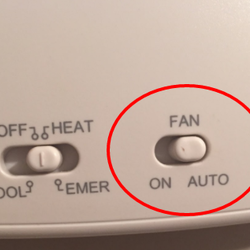
Common modes include Cool, Fan, Dry, and Auto. Pick the one that suits your comfort.
- Cool:Lowers room temperature.
- Fan:Circulates air without cooling.
- Dry:Removes humidity from the air.
- Auto:Adjusts settings automatically.
Adjust Temperature Settings
Turning on your air conditioner is easy. Adjusting the temperature helps keep your home comfortable.
Setting the right temperature saves energy and keeps the room cool.
Set Cooling Temperature
Use the remote or control panel to set the cooling temperature. Choose a temperature that feels comfortable for you.
Most people set the temperature between 72°F and 78°F for efficient cooling.
- Press the temperature button on the remote.
- Use the up or down arrows to select the temperature.
- Wait a few seconds for the air conditioner to adjust.
Use Fan Speed Options
The fan speed controls how fast the air moves in the room. Adjusting fan speed can improve comfort.
You can usually choose from low, medium, and high fan speeds.
- Low fan speed is quiet and saves energy.
- Medium fan speed balances noise and cooling.
- High fan speed cools the room quickly.
Optimize Airflow
Good airflow helps your air conditioner cool your house well. It moves cool air around the rooms evenly.
To get the best air flow, check your vents and make sure air can move freely. This helps your AC work better.
Adjust Louvers Or Vents
Louvers and vents direct the air from your air conditioner. Adjust them to point air where you need it most.
Keep vents open and face them towards the center of the room. This spreads cool air evenly.
- Move louvers up or down to control air height
- Turn vents left or right to reach different areas
- Close vents only in unused rooms to save energy
Ensure Unobstructed Air Circulation
Clear space around vents to let air flow freely. Avoid placing furniture or curtains near vents.
Blocked vents cause poor cooling and make your AC work harder. Check vents for dust and clean them regularly.
- Keep furniture at least 2 feet away from vents
- Remove curtains or blinds that cover vents
- Clean vent covers to prevent dust buildup

Credit: www.acostainc.com
Troubleshoot Common Issues
Sometimes your air conditioner may not turn on or work properly. This guide helps you fix common problems fast.
Follow simple steps to check your AC and get it running again. You do not need special tools.
Reset The Unit
Resetting the air conditioner can fix minor errors. It clears the system and starts fresh.
To reset, turn off the AC and unplug it. Wait at least 5 minutes before plugging it back in.
- Turn off the AC using the remote or power button
- Unplug the unit from the wall socket
- Wait 5 minutes to let the system reset
- Plug the AC back in and turn it on
Check For Error Codes
Modern air conditioners show error codes on the display. These codes tell you what is wrong.
Look at the AC screen or remote display for numbers or letters. Write them down to find solutions.
- Check the AC display for error codes
- Refer to the user manual for code meanings
- Follow the suggested fix in the manual
- Contact a technician if the error repeats
Maintain Efficient Cooling
Keeping your air conditioner running well saves energy and keeps your home cool. Simple care steps help the unit work at its best.
Regular maintenance also extends your air conditioner’s life and avoids costly repairs.
Regular Cleaning Schedule
Clean your air conditioner often to stop dust and dirt from blocking airflow. This keeps the cool air flowing freely.
- Clean or replace air filters every 1 to 2 months.
- Wipe down the exterior unit to remove debris and leaves.
- Vacuum the indoor vents to clear dust buildup.
- Check the drain channels and clear any blockages.
Schedule Professional Servicing
Hire a technician at least once a year to check your air conditioner. They test parts and fix small issues before they grow.
| Service Task | Purpose |
| Inspect refrigerant levels | Ensure efficient cooling power |
| Check electrical connections | Prevent breakdowns and hazards |
| Clean coils and fins | Improve heat exchange and airflow |
| Test thermostat accuracy | Maintain proper temperature control |
Frequently Asked Questions
How Do I Turn On My Air Conditioner?
To turn on your air conditioner, locate the thermostat in your home. Set the desired temperature by adjusting the dial or pressing the buttons. Make sure the system is set to “Cool” mode. Once set, the air conditioner should start working to cool your home.
What Should I Check Before Turning On Ac?
Before turning on your AC, ensure the power supply is on. Check the thermostat settings and set it to “Cool” mode. Inspect the air filter for cleanliness and replace if necessary. Ensure vents are open and unobstructed for optimal airflow.
These steps help in efficient cooling.
Why Is My Air Conditioner Not Turning On?
If your air conditioner isn’t turning on, check the power supply first. Ensure the circuit breaker hasn’t tripped. Verify the thermostat settings are correct and the batteries are functioning. Inspect the air filter and clean or replace it if necessary.
If issues persist, consult a technician.
Can I Use A Remote To Turn On Ac?
Yes, many modern air conditioners come with a remote control for convenience. Ensure the remote has working batteries. Point the remote at the AC unit and press the “Power” button. Use the remote to adjust temperature and settings as needed.
This provides easy control over your air conditioner.
Conclusion
Turning on your air conditioner is simple and quick. First, check the power and remote control. Then, set the temperature to your comfort level. Keep doors and windows closed to save energy. Clean filters help the AC run better. Regular care ensures cool air all summer.
Enjoy a fresh, cool home anytime you want. Stay comfortable without any hassle. Easy steps make your house a cool place.