Do you have an iPhone and want to watch your baby? You can use your iPhone as a baby monitor. It is easy and does not need extra devices. This guide will help you step by step.
Why Use an iPhone as a Baby Monitor?
Many parents want to keep an eye on their babies. But buying a baby monitor can be expensive. Also, some monitors need many parts and batteries.
Your iPhone can help without extra cost. It has a camera and microphone. You can see and hear your baby from another phone.
This way, you can check your baby anytime. It is useful during naps or night sleep.
What Do You Need?
- Two iPhones or one iPhone and one iPad
- Wi-Fi or mobile data connection
- A free app or built-in features
- A safe place to put the iPhone near the baby
- Charger to keep the phone on
Step 1: Prepare the Devices
First, choose which iPhone will stay near the baby. This phone will act as the camera. The other phone will be with you.
Make sure both phones have enough battery. Plug in the phone near the baby so it does not turn off.
Check if both phones connect to the internet. Use Wi-Fi for better quality. Mobile data can work but may use more data.
Credit: www.thebump.com
Step 2: Use FaceTime for Baby Monitoring
FaceTime is built into iPhones. You can make a video call between two phones.
To use FaceTime:
- Open FaceTime on both iPhones.
- Make a video call from your phone to the baby’s phone.
- Answer the call on the baby’s phone.
- Put the baby’s phone near the crib with the camera facing the baby.
- Turn off the sound on the baby’s phone so it does not disturb the baby.
You will see and hear your baby on your phone. Keep the screen on your phone to watch continuously.
Step 3: Use Third-Party Baby Monitor Apps
There are many free and paid apps for baby monitoring. Some apps have special features like noise alerts.
Popular baby monitor apps include:
- Baby Monitor 3G
- Dormi
- Cloud Baby Monitor
- Alfred Home Security Camera
These apps work over Wi-Fi or mobile data. They let you watch video and hear sounds. Some apps send alerts when your baby cries.
How To Use Baby Monitor Apps
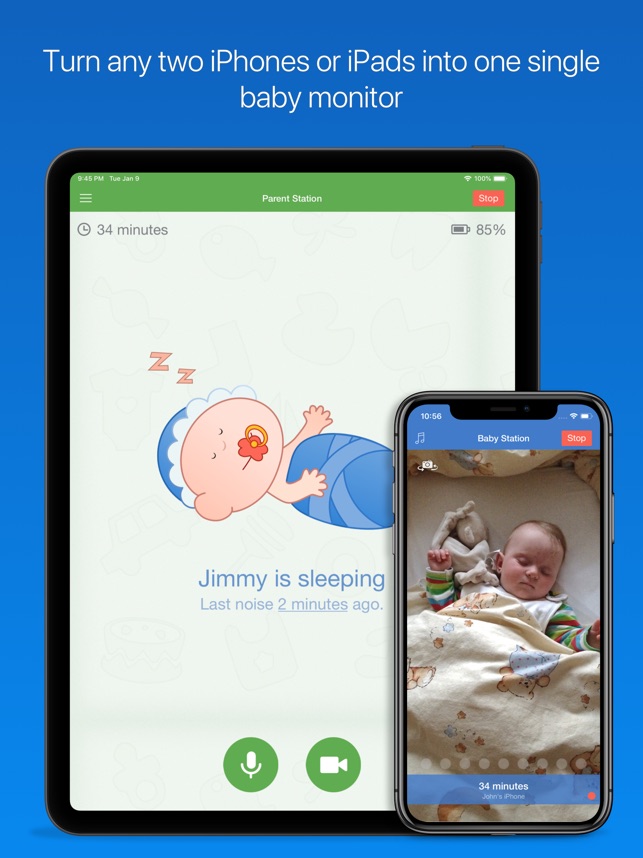
- Download the app on both iPhones.
- Create an account if needed.
- Set one phone as the “Baby Unit” near the baby.
- Set the other phone as the “Parent Unit” with you.
- Follow the app instructions to connect both phones.
- Place the baby unit phone safely near the baby.
- Watch and listen from your phone anytime.
Step 4: Place the iPhone Safely
Safety is very important. Do not put the phone inside the crib. It can harm the baby.
Place the phone on a stable surface near the crib. Make sure the camera sees the baby clearly.
A good place can be a shelf, table, or wall mount. Use a secure holder or stand to keep the phone steady.
Credit: apps.apple.com
Step 5: Use Do Not Disturb Mode
To avoid interruptions, turn on “Do Not Disturb” on both phones.
This stops calls and notifications from ringing. It helps keep the video and audio clear.
On iPhone, go to Settings > Do Not Disturb. Turn it on and customize as needed.
Step 6: Adjust Volume and Brightness
Make sure the baby’s phone volume is low or off. You do not want to wake the baby.
On your phone, adjust the volume to hear clearly. Use headphones if needed.
Lower the screen brightness on the baby’s phone to save battery and avoid light disturbance.
Benefits of Using iPhone as Baby Monitor
- No extra cost if you already have iPhones
- Easy to set up and use
- Good video and sound quality
- Works anywhere with internet
- Can send alerts with some apps
Things to Remember
- Keep the baby’s phone charged all the time
- Use Wi-Fi for better connection and less data use
- Never leave the baby alone for a long time
- Check the phone’s position often
- Test the setup before using it overnight
Summary Table: How to Use iPhone as Baby Monitor
| Step | Action | Details |
|---|---|---|
| 1 | Prepare Devices | Charge phones, connect to Wi-Fi |
| 2 | Use FaceTime | Make video call between phones |
| 3 | Use Baby Monitor Apps | Download, set baby and parent units |
| 4 | Place Phone Safely | Put phone near crib on stable surface |
| 5 | Do Not Disturb | Turn on to avoid interruptions |
| 6 | Adjust Volume & Brightness | Keep baby phone quiet, adjust parent phone volume |
Final Tips
Using your iPhone as a baby monitor is simple and helpful. It saves money and uses devices you already have.
Always check the connection and the phone’s position. Make sure the baby is safe and comfortable.
Try the setup during the day first. This way, you learn how it works.
With a little care, your iPhone can help watch your baby well.
Frequently Asked Questions
Can I Use Any Iphone Model As A Baby Monitor?
Most iPhones with a camera and internet can work as baby monitors using apps.
What App Is Best For Iphone Baby Monitoring?
Apps like Baby Monitor 3G and Cloud Baby Monitor are popular and reliable choices.
How Do I Connect Two Iphones For Baby Monitoring?
Connect both iPhones to the same Wi-Fi and use a baby monitor app.
Is It Safe To Use Iphone As A Baby Monitor?
Yes, with secure apps and strong Wi-Fi, it is safe for monitoring.