If you own a Dodge Charger and want to unleash its full power, mastering Launch Control is a game-changer. You might have heard about this feature but aren’t sure how to use it or why it matters.
This guide will walk you through every step, so you can hit the road with confidence and get the fastest, smoothest starts possible. Ready to turn your Charger into a true street beast? Keep reading, and you’ll learn exactly how to make Launch Control work for you.
Credit: www.chargerforumz.com
Launch Control Basics
Understanding Launch Control Basics is key to getting the most out of your Dodge Charger’s performance features. This system helps you achieve the best possible acceleration from a standstill, making those quick starts smoother and more controlled. Let’s break down what Launch Control is and why it matters for you as a Dodge Charger driver.
What Is Launch Control
Launch Control is a built-in electronic system designed to help drivers accelerate from zero with maximum traction and minimal wheel spin. It manages engine power, transmission, and traction control settings to deliver a consistent and powerful launch every time.
When you activate Launch Control, your Charger holds the engine at a specific RPM, allowing you to focus on releasing the brake and stepping on the accelerator. This process reduces the guesswork involved in manual launching and helps you achieve quicker, more stable starts.
Benefits For Dodge Charger Drivers
Using Launch Control provides clear advantages, especially if you enjoy spirited driving or track days. It helps preserve your tires and drivetrain by preventing excessive wheel spin and loss of traction.
- Improved acceleration:Get faster and more consistent 0-60 times.
- Better control:Maintain stability during aggressive starts without risking loss of control.
- Reduced mechanical strain:Protect your transmission and engine components from sudden, harsh launches.
Think about the last time you tried a hard launch without Launch Control—did you experience wheel spin or jerky starts? With this system, those issues become much less common, allowing you to focus on the thrill of driving rather than managing tricky launches.

Credit: www.youtube.com
Activating Launch Control
Activate Launch Control by pressing the brake and gas pedals simultaneously. Release the brake to start with maximum power and smooth acceleration. This feature helps improve your Dodge Charger’s launch performance on the track or street.
Activating Launch Control in your Dodge Charger can enhance your driving experience. This feature allows for a smooth and powerful start from a standstill. Whether you’re at the track or on the road, activating Launch Control can offer an exhilarating start. Follow these steps to ensure a flawless launch.Preparing Your Charger
First, ensure your Charger is in optimal condition. Check tire pressure and fuel levels. Warm up the engine for better performance. Make sure your Charger is on a flat surface. This helps with traction during launch.Step-by-step Activation
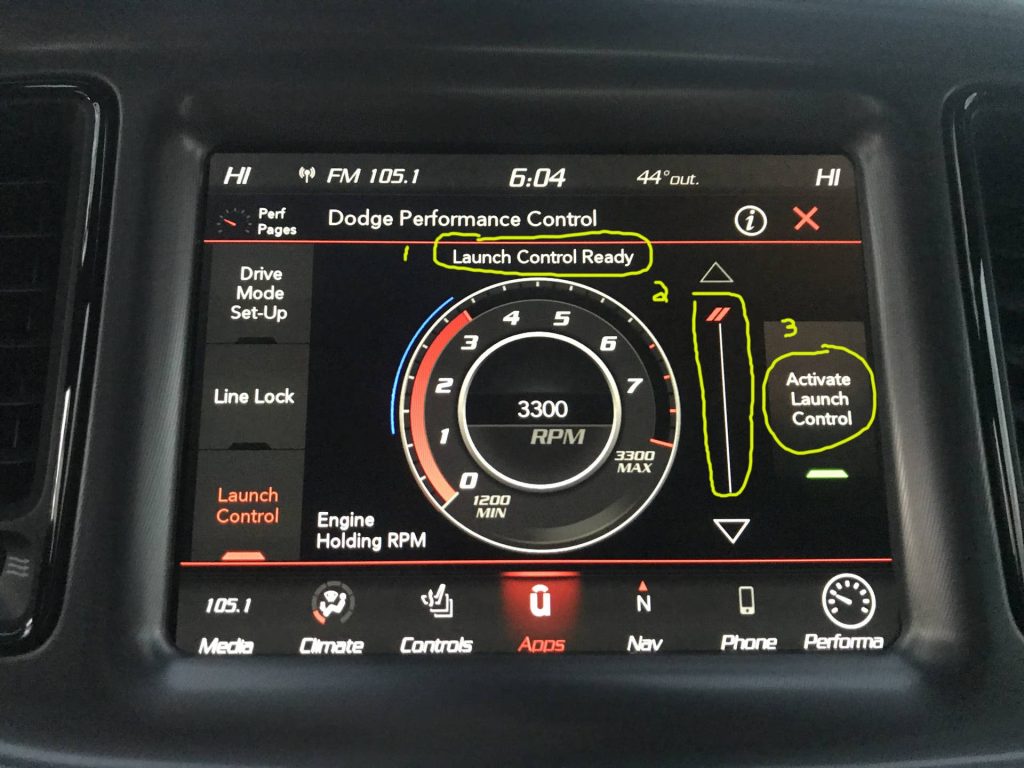
Ready to engage Launch Control? Follow these simple steps:- Turn on your Charger and locate the “Drive Modes” button.
- Select the “SRT” mode from the menu.
- Navigate to the “Race Options” screen.
- Tap on “Launch Control” to activate it.
- Set your desired RPM for the launch.
Optimizing Launch Settings
Optimizing launch settings in your Dodge Charger enhances your control and improves acceleration. These settings help match the car’s power to road conditions. Adjusting the launch settings ensures a smoother and faster start. It also protects your tires and drivetrain from damage.
Adjusting Traction Control
Traction control prevents wheel spin during launch. You can adjust its level based on the road surface. For wet or slippery roads, keep traction control on a higher setting. This helps maintain grip and stability. On dry pavement, lowering traction control allows more power to reach the wheels. This setting is ideal for quick, aggressive launches. Always test settings in a safe area to find the best balance.
Selecting Drive Modes
The Dodge Charger offers multiple drive modes that change launch control behavior. Sport mode sharpens throttle response for quicker acceleration. Track mode reduces traction control interference for maximum power delivery. Custom mode lets you tailor settings to your preference. Choose the mode that fits your driving style and conditions. Switching modes is simple and changes launch control instantly.
Mastering The Launch
Mastering the launch with your Dodge Charger’s Launch Control can transform your driving experience. It’s not just about flooring the gas pedal; it’s about controlling power, precision, and timing. Learning how to balance these elements will give you smoother, faster starts every time.
Perfecting Rpm And Throttle Control
The key to a clean launch lies in managing the engine’s RPM and your throttle input. Launch Control sets a target RPM range, but you need to maintain steady pressure on the gas pedal. Too little throttle, and the car bogs down; too much, and you risk wheel spin.
Try holding the pedal just enough to keep the RPM within the optimal window—often around 3,500 to 4,000 RPM on the Dodge Charger. This balance lets the engine build power without wasting traction. Have you noticed how a slight change in pedal pressure can change the whole launch feel? That’s why practice is crucial.
Timing Your Launch
Timing your launch perfectly means knowing exactly when to release the brake and let the car surge forward. Launch Control holds the RPM steady while you keep the brake engaged. The moment you lift your foot off the brake, the car uses that stored power to accelerate quickly.
Don’t rush the release; a smooth, confident lift of the brake pedal helps maintain traction and control. If you release too early or too abruptly, the wheels might spin or the car might hesitate. Think about the timing like a dance—each move has to flow naturally into the next.
Common Mistakes To Avoid
Using Launch Control on your Dodge Charger can enhance your driving experience. Yet, some common mistakes can reduce its effectiveness and cause damage. Avoiding these errors helps you get the best results safely.
Overusing Launch Control
Launch Control is designed for short bursts, not constant use. Overusing it can overheat the engine and transmission. This leads to quicker wear and costly repairs. Use Launch Control only when needed, such as during a quick start or a race. Give your car time to cool down between uses.
Ignoring Tire Conditions
Tires play a key role in Launch Control performance. Worn or underinflated tires reduce grip and control. This causes wheel spin and loss of traction. Always check your tire pressure and tread depth before using Launch Control. Good tires ensure a smooth and safe launch every time.
Credit: www.challengertalk.com
Maintaining Your Vehicle Post-launch
Using Launch Control on your Dodge Charger puts extra stress on the vehicle. Maintaining your car after these launches keeps it safe and ready. Small checks and care help prevent costly repairs and keep performance high.
Regular attention to key parts protects your investment. Focus on drivetrain components and tire condition for best results. These areas face the most strain during and after a launch.
Checking Drivetrain Components
Drivetrain parts carry the engine’s power to the wheels. After using Launch Control, these parts can wear faster. Look for signs of damage or leaks in the differential and driveshaft. Listen for unusual noises when driving. Check the transmission fluid level and quality. Clean fluid helps keep gears shifting smoothly. Tighten any loose bolts or connections. Replace worn-out parts quickly to avoid bigger problems.
Tire Care Tips
Tires take the most force during launches. Inspect tires for cuts, bubbles, or uneven wear. Measure tire pressure to match manufacturer guidelines. Proper pressure improves grip and safety. Rotate tires regularly to ensure even wear. Avoid harsh acceleration and braking during warm-up. Warm tires perform better and last longer. Keep tires balanced and aligned to prevent shaking and uneven tread wear.
Advanced Tips For Experienced Drivers
Experienced drivers can push the Launch Control feature further to enhance performance. This section covers advanced tips to refine your skills and get the most from your Dodge Charger’s Launch Control. Tuning settings and combining them with racing techniques helps improve start times and control.
Customizing Launch Control Settings
Adjust the Launch Control parameters to fit your driving style and track conditions. You can change the RPM limit to optimize the power delivery at launch. A higher RPM setting gives more power but risks wheel spin. Lower RPM settings offer smoother starts but less acceleration.
Use the vehicle’s onboard menu to:
- Set the desired RPM for launch
- Adjust traction control levels
- Control throttle sensitivity
Experiment with these settings in safe, controlled environments. Small changes can lead to better consistency and faster launches.
Integrating Launch Control With Racing Techniques
Launch Control works best combined with solid racing skills. Practice timing your clutch release and throttle input to match the system’s power delivery. Smooth, quick releases reduce wheel spin and improve traction.
Pay attention to:
- Track surface and grip
- Weather conditions affecting traction
- Weight transfer during launch
Use Launch Control as a tool, not a crutch. Focus on body control and anticipating the car’s behavior. This approach creates faster, more stable starts on the track or street.
Frequently Asked Questions
What Is Launch Control On A Dodge Charger?
Launch Control is a feature that helps optimize acceleration from a standstill. It manages engine power and traction for a faster, smoother launch. This system is especially useful for drag racing or quick starts, ensuring maximum performance with minimal wheel spin.
How Do I Activate Launch Control In Dodge Charger?
To activate Launch Control, first press the brake firmly. Then, fully press the accelerator pedal. The system will engage automatically, holding engine RPM at the optimal level. Release the brake to launch your Dodge Charger with controlled power and enhanced traction.
Can Launch Control Damage My Dodge Charger?
No, Launch Control is designed to protect your vehicle. It monitors engine and transmission parameters to prevent damage. However, frequent use under extreme conditions may cause wear. Always follow manufacturer guidelines to ensure safe and proper use of Launch Control.
Does Launch Control Improve Dodge Charger’s 0-60 Time?
Yes, Launch Control significantly improves 0-60 mph acceleration times. It optimizes torque delivery and reduces wheel spin for quicker launches. This results in faster, more consistent acceleration compared to manual starts without the system.
Conclusion
Using Launch Control in your Dodge Charger helps improve your car’s start. It keeps the engine steady and avoids wheel spin. Practice a few times to get the timing right. Always stay safe and follow traffic rules. This feature makes launches smoother and more controlled.
Enjoy the power of your Charger with confidence. Keep learning and driving smart for the best experience.