Backing up a trailer with your Ford F150 can feel tricky and stressful. But what if you could make it simple and almost effortless?
You’re about to discover how to use the trailer backup feature on your Ford F150, a tool designed to take the guesswork out of reversing with a trailer. By the end of this article, you’ll gain confidence and control, making every backup smoother and safer.
Ready to master this game-changing feature? Let’s dive in.
Credit: www.brandonford.com
Trailer Backup Basics
Tackling trailer backing can feel intimidating at first. But understanding the basics of Trailer Backup on your Ford F150 can make the whole process smoother and less stressful. Getting familiar with how the system works helps you gain confidence and control behind the wheel.
What Is Trailer Backup Assist
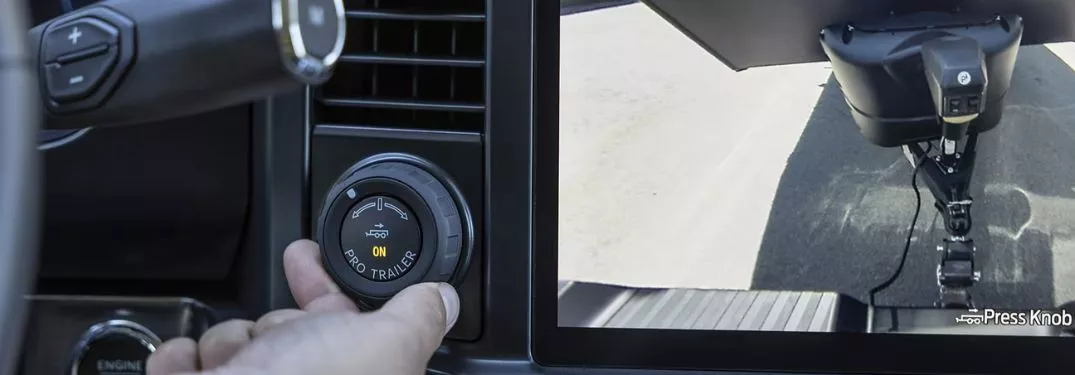
Trailer Backup Assist is a smart feature designed to help you steer your trailer when reversing. Instead of twisting the steering wheel yourself, you simply turn a knob that directs the trailer’s path. The system takes over steering the truck’s wheels to match your input, making tight backing maneuvers easier.
This technology reduces the guesswork and constant corrections that usually come with trailer backing. It’s like having a co-pilot who knows exactly how to guide your trailer into place.
Compatible Ford F150 Models
Not every Ford F150 comes with Trailer Backup Assist, so it’s important to check if your model supports it. The system is generally available on newer trims and certain packages starting around the 2017 model year. Higher trims like Lariat, King Ranch, and Platinum often include this feature or offer it as an option.
If you’re unsure about your truck’s compatibility, you can find out by:
- Checking your owner’s manual
- Visiting your Ford dealer
- Looking up your VIN online for feature details
Benefits Of Using Trailer Backup
Using Trailer Backup Assist can save you time and frustration. It eliminates the need to twist your body to look behind while backing up, which can be physically uncomfortable and error-prone. This feature improves safety by minimizing the chances of jackknifing or hitting obstacles.
Many drivers notice they make fewer corrections and complete backing tasks faster. Have you ever found yourself stuck trying to align a trailer in a tight spot? This system can turn that struggle into a quick, stress-free maneuver.

Credit: www.ford.com.au
Preparing For Trailer Backup
Preparing your Ford F150 for trailer backup is essential for a safe and smooth experience. Proper setup helps the backup system work accurately. It reduces the risk of accidents and damage. Follow these important steps before you start the backup process.
Connecting The Trailer
Ensure the trailer is securely attached to the Ford F150’s hitch. Check the locking mechanism to confirm it is tight. Connect the trailer’s electrical plug to the truck’s socket. This connection powers the trailer lights and signals. Verify that all lights on the trailer function correctly.
Calibrating The System
Activate the trailer backup assist system through the truck’s dashboard menu. Follow the on-screen instructions to calibrate the system. Calibration helps the sensors understand the trailer’s size and angle. Drive the truck slowly in a straight line to finish calibration. This step ensures precise steering control during backup.
Checking Surroundings
Walk around the truck and trailer to check for obstacles. Look for low objects, pedestrians, or pets near the vehicle. Use mirrors and cameras to inspect blind spots. Clear the area around the trailer to avoid collisions. Being aware of the surroundings improves safety while backing up.
Activating Trailer Backup Assist
Activating Trailer Backup Assist on the Ford F150 is simple and designed for ease. This feature helps you steer the trailer while reversing. It reduces the stress of backing up with a trailer attached. Follow these steps to activate and use the system effectively.
Engaging The System
Start by shifting your Ford F150 into reverse gear. The Trailer Backup Assist icon appears on the touchscreen display. Press the icon to activate the system. Make sure the trailer is connected properly before engaging. The system will then prepare to help with backing up.
Using The Control Knob
Turn the control knob located on the dashboard. Rotate it left or right to steer the trailer in the desired direction. The system adjusts the truck’s steering automatically. Focus on the trailer’s movement rather than the truck. Small, smooth turns provide the best control.
Monitoring Dashboard Alerts
Watch the dashboard for alerts during operation. The system shows warnings if the trailer moves unexpectedly. It also notifies if the trailer disconnects. Pay attention to these alerts to avoid accidents. Keep your eyes on both the screen and the trailer while backing up.
Step-by-step Parking Guide
Parking a trailer with your Ford F150 can feel tricky, but breaking the process into simple steps makes it manageable. The truck’s built-in trailer backup system is designed to ease this task, letting you focus on precision rather than stress. Here’s a clear, step-by-step guide to help you master trailer backing like a pro.
Starting The Backup Maneuver
Begin by shifting your Ford F150 into reverse. Activate the trailer backup assist system using the designated knob on your dashboard. The rearview camera will provide a live feed, giving you a clear view of your trailer and surroundings.
Take a moment to align your truck and trailer as straight as possible before you start moving. This initial setup can save you time and reduce the need for corrections later. Have you noticed how small adjustments early on can prevent big headaches down the line?
Adjusting Steering With The Knob
Use the trailer backup assist knob to control the direction of the trailer instead of the steering wheel. Turn the knob in the direction you want the trailer’s tail to go. The truck’s wheels will automatically steer to follow your input.
This feature means you don’t have to turn the steering wheel wildly to get the trailer moving in the right direction. It’s all about subtle, smooth movements. Try to make gradual adjustments rather than sharp turns to keep everything controlled.
Correcting Your Path
If the trailer starts veering off course, don’t panic. Simply turn the knob in the opposite direction to bring it back in line. The system responds quickly, so small course corrections are easy to manage.
Keep your eyes on the trailer and your surroundings through the camera feed. You’ll gain confidence as you learn to anticipate how the trailer reacts to your inputs. What challenges have you faced when backing up a trailer? This system helps tackle those head-on.
Troubleshooting Common Issues
Troubleshooting common issues with the trailer backup system on your Ford F150 helps keep your towing experience smooth. Sometimes the system may not work as expected. Understanding typical problems can save time and frustration. The following sections explain how to handle frequent problems.
System Not Engaging
The trailer backup system might not activate for several reasons. First, check if the truck is in reverse gear. The system only works in reverse. Next, ensure the trailer is properly connected to the truck. The system needs the trailer’s wiring to communicate.
Also, inspect the touchscreen or control knob. Sometimes, the system may be turned off accidentally. Restart the vehicle to reset the system. If the problem continues, a software update at the dealer may be necessary.
Calibration Errors
Calibration keeps the system accurate. Errors occur if the sensors or cameras are misaligned. Recalibrate the system after installing a new trailer or after any repair work on the truck’s rear.
Follow the on-screen instructions for calibration. Make sure the trailer is straight and the truck is on a level surface. Calibration may fail if the truck is on a slope or uneven ground.
Dealing With Sensor Obstructions
Dirty or blocked sensors cause backup issues. Mud, snow, or debris can cover the sensors and cameras. Clean them regularly with a soft cloth. Avoid using harsh chemicals that could damage the lenses.
Park the truck and trailer in a clean area. Check for spider webs or ice around the sensors. Clear any obstructions before using the system to ensure accurate operation.

Credit: www.youtube.com
Tips For Perfect Trailer Parking
Parking a trailer with your Ford F150 can feel tricky at first. Following some simple tips can make the process easier and safer. These tips help you avoid damage and save time. Focus and patience make trailer parking smoother.
Practice In Open Areas
Choose a large, empty space like a parking lot. Practice backing up your trailer slowly. This helps you understand how the trailer moves. Try different angles and distances. Practicing builds confidence and skill before parking in tight spots.
Slow And Steady Movements
Move the truck and trailer slowly. Quick moves can cause the trailer to swing out. Use small steering adjustments. Watch your mirrors carefully. Slow actions give you better control and reduce mistakes.
Using Additional Camera Views
Your Ford F150 has multiple camera views. Use the trailer backup camera for a clear view behind. Switch to side cameras to check trailer position. These views help you see blind spots. Rely on cameras to guide your steering precisely.
Frequently Asked Questions
What Is Trailer Backup On Ford F150?
Trailer Backup on Ford F150 is an advanced technology that assists drivers in reversing their trailers. By using the Pro Trailer Backup Assist system, it simplifies steering. Drivers just need to turn a knob in the direction they want the trailer to go.
How Do I Activate Trailer Backup Assist?
To activate Trailer Backup Assist, start by pressing the Trailer Backup button. Then, follow the on-screen prompts to calibrate the system. Ensure your trailer is properly connected. Turn the knob to steer the trailer in the desired direction.
Is Trailer Backup Available On All Ford F150 Models?
Trailer Backup Assist is available on most Ford F150 models, especially newer ones. It might not be standard on all trims. Check the specific model and trim to confirm its availability.
Can Beginners Use The Trailer Backup System Easily?
Yes, beginners can use the Trailer Backup system easily. It simplifies the process by reducing manual steering input. The system guides the driver, making reversing with a trailer less daunting and more manageable.
Conclusion
Using trailer backup on your Ford F150 makes parking easier and safer. The system guides your truck smoothly into tight spots. Always stay calm and take your time while backing up. Practice a few times to get comfortable with the controls.
This feature helps reduce stress and saves effort. Remember, patience is key for a successful backup. Keep your focus on the trailer and surroundings. With some practice, you will feel confident using trailer backup every time. It’s a useful tool that makes towing less tricky.