
Imagine being able to cook a perfect meal without the guesswork. No more undercooked chicken or rubbery vegetables.
Just press a button, and let your microwave handle the rest. Sounds like a dream, right? This is the promise of sensor cooking. But what exactly is it, and how can it transform your kitchen experience? Sensor cooking on a microwave oven is designed to make your life easier, offering precision and convenience at your fingertips.
With this feature, your microwave can automatically adjust cooking times and power levels, ensuring your food is cooked just right every time. This means less stress and more delicious meals for you and your family. Intrigued? Stay with us as we uncover how sensor cooking works and why it might be the kitchen upgrade you’ve been waiting for.
Sensor Cooking Basics
Sensor cooking on a microwave oven helps cook food perfectly. It uses technology to measure food’s condition. This means less guesswork and fewer mistakes. You get better taste and texture without overcooking or undercooking.
Understanding sensor cooking basics makes using your microwave easier. It saves time and energy. The oven adjusts cooking time automatically. This feature is helpful for busy kitchens and simple meals.
How Sensor Cooking Works
Sensor cooking uses special sensors inside the microwave. These sensors detect steam or humidity from the food. As food heats, steam rises. The microwave measures this steam level to judge cooking progress.
Once the sensor detects enough steam, it stops cooking. This prevents food from drying out. It also avoids overheating or burning. The microwave changes power levels and time based on sensor feedback.
Types Of Sensors Used
- Humidity Sensors:Detect moisture released during cooking. Most common type in sensor cooking microwaves.
- Temperature Sensors:Measure heat inside the oven or on food surface. Help adjust cooking temperature precisely.
- Weight Sensors:Some microwaves use weight sensors to estimate cooking time. Less common but useful for certain foods.

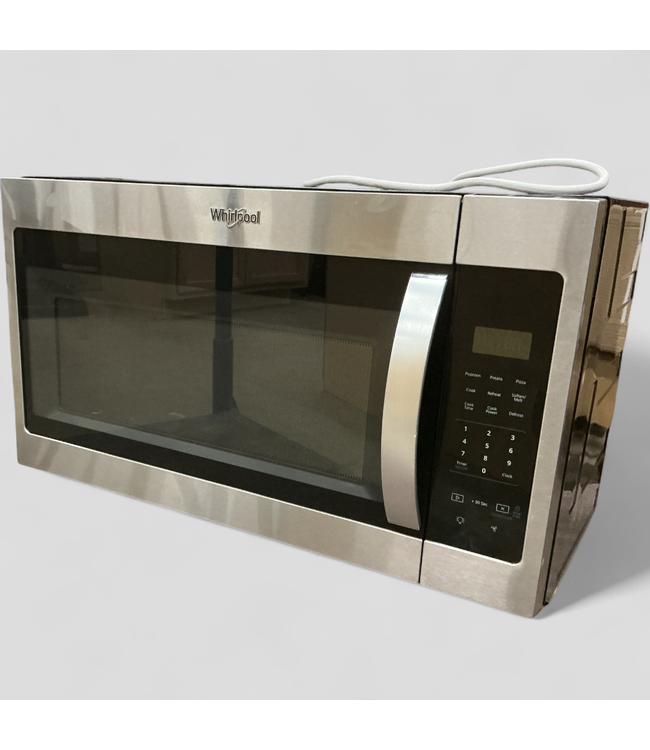
Credit: rebennackappliance.com
Benefits Of Sensor Cooking
Sensor cooking brings a range of benefits that can change how you use your microwave oven. It adjusts cooking time and power based on the moisture and temperature inside the food, so you get better results without the guesswork. Here’s how these advantages can make a real difference in your kitchen.
Improved Cooking Accuracy
Sensor cooking detects the steam emitted by your food to know exactly when it’s done. This means your meals come out perfectly cooked—no more undercooked centers or overheated edges. You don’t need to rely on timers or guesswork, which makes cooking less stressful and more reliable.
Energy Efficiency
Because sensor cooking adjusts the cooking time automatically, it prevents your microwave from running longer than necessary. This saves electricity and reduces your energy bills over time. Plus, it’s better for the environment since it uses power only when needed.
Time-saving Features
You save time by letting the microwave decide how long to cook your food. You can focus on other tasks instead of constantly checking or adjusting settings. This feature is especially handy when you’re in a rush or multitasking in the kitchen.
Common Sensor Cooking Functions
Sensor cooking functions on microwave ovens take the guesswork out of heating and cooking. These smart features use built-in sensors to measure moisture, temperature, or steam, adjusting cooking times automatically. This helps you avoid overcooking or undercooking your food, making your kitchen routine easier and more efficient.
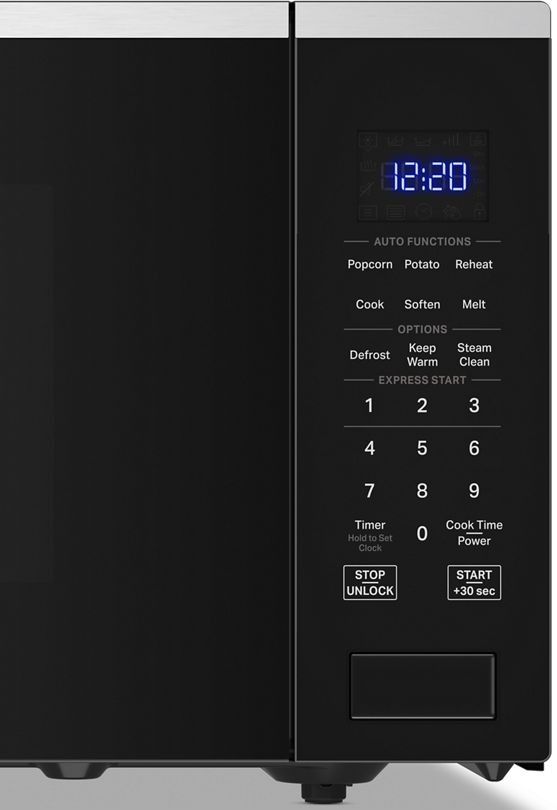
Popcorn Setting
The popcorn setting is a popular sensor cooking function designed to cook popcorn perfectly. Instead of relying on a fixed time, the microwave detects the steam released from the kernels. This means your popcorn won’t burn or leave many unpopped kernels, saving you from that smoky kitchen smell.
Have you ever struggled to find the right time to pop your favorite snack? This setting takes that hassle away, so you can focus on enjoying your movie night.
Vegetable Cooking
Vegetables can be tricky to cook just right. The vegetable sensor function measures steam to ensure your veggies are cooked evenly without losing nutrients or becoming mushy. This setting is especially handy for busy days when you want a quick, healthy side dish.
Next time you steam broccoli or carrots, try this sensor mode. Notice how it keeps the texture crisp and the flavor fresh, unlike manual cooking where timing often varies.
Reheat Mode
Reheating leftovers is a daily task, but uneven heating can ruin your meal. The reheat mode uses sensors to adjust power levels and time based on the moisture content of your food. This means no more cold spots or overheated edges.
Think about the last time you reheated pizza or pasta in a microwave—did it come out just right? Using sensor reheat mode can help you avoid that soggy or dry result every time.
Credit: www.budswarehouse.org
Using Sensor Cooking Effectively
Using sensor cooking effectively can transform how you prepare meals in your microwave oven. This feature takes the guesswork out of heating and cooking by automatically adjusting time and power based on the food’s moisture and temperature. Mastering its use means you get perfectly cooked dishes without overcooking or underheating.
Choosing The Right Sensor Mode
Microwave ovens offer several sensor cooking modes, such as popcorn, vegetables, reheating, and frozen meals. Picking the right mode is crucial because each is calibrated for specific moisture levels and cooking times. For example, using the popcorn mode for a bag of frozen vegetables might lead to uneven cooking.
Look at the food you’re cooking and match it closely to the available sensor options. If your microwave has a “beverage” mode, use it for drinks instead of a general reheat setting. This precision helps the sensor work accurately and deliver the best results.
Tips For Best Results
- Use microwave-safe containers:Glass or ceramic dishes allow sensors to detect moisture better than plastic or metal.
- Cover your food:A microwave-safe lid or vented wrap traps steam, helping sensors measure moisture levels more effectively.
- Stir or rotate when prompted:Some models pause to let you stir, ensuring even heating throughout.
- Don’t overload the microwave:Too much food can confuse the sensor, leading to uneven cooking.
Have you noticed how a quick stir can change the texture of reheated soup? That little action can make a big difference in how sensor cooking performs.
Avoiding Common Mistakes
One common error is relying on sensor cooking for foods without enough moisture, like dry snacks or bread. These items don’t emit steam properly, causing the microwave to overcook them. Also, placing foil or metal utensils inside can interfere with the sensor’s readings and damage your microwave.
Another mistake is ignoring the sensor’s feedback. If the microwave beeps or pauses, don’t rush. Take a moment to check or stir the food. Your attention helps the sensor do its job right.
Troubleshooting Sensor Cooking
Sensor cooking is designed to make your microwave experience easier by automatically adjusting time and power based on the moisture emitted from your food. But what happens when this feature doesn’t work as expected? Troubleshooting sensor cooking can save you from unevenly cooked meals and wasted time.
When Sensor Cooking Fails
Sometimes, your microwave might overcook or undercook food despite using the sensor cooking function. This can happen if the sensor is blocked or damaged. Think about the last time your popcorn came out burnt—could the sensor have been the culprit?
Another common issue is placing food in the wrong spot inside the microwave. The sensor needs to detect steam properly, so if your dish is off-center, it might not sense moisture accurately. Try repositioning your plate and running the sensor cooking again to see if results improve.
Cleaning And Maintenance
Grease and food splatters can cover the sensor, causing it to misread moisture levels. Regular cleaning is crucial to keep the sensor working properly. Use a soft cloth and mild detergent to wipe the sensor area gently—avoid harsh chemicals or abrasive materials that could damage it.
Check your microwave’s manual to locate the sensor precisely. You might be surprised how a little cleaning can fix cooking problems instantly. When was the last time you cleaned the sensor inside your microwave?
Sensor Calibration
Sometimes, sensor cooking issues stem from calibration problems. If your microwave lets you recalibrate the sensor, follow the instructions carefully to reset it. This process often involves running a test cycle with specific food items or settings.
Calibration ensures the sensor accurately measures steam and adjusts cooking time accordingly. If your microwave doesn’t have a user-accessible calibration option, consulting the manufacturer or a technician might be necessary. Could recalibrating your sensor be the missing step to perfect cooking?
Comparing Sensor Cooking To Manual Settings
Sensor cooking and manual settings offer two different ways to cook food in a microwave oven. Sensor cooking uses built-in sensors to measure humidity and temperature. It adjusts cooking time and power automatically. Manual settings require users to set the cooking time and power level themselves. Both methods have unique benefits and suit different cooking needs.
Convenience Vs Control
Sensor cooking brings great convenience. It removes guesswork and adjusts to food automatically. This means less need to watch the microwave or stop to check food. It works well for common foods like vegetables, popcorn, or reheating meals.
Manual settings give full control over cooking. Users can choose exact time and power level. This is helpful for special recipes or foods that need precise cooking. It also allows experimenting with different power levels to get the best texture.
When To Use Each Method
- Use sensor cooking for quick meals or reheating leftovers.
- Choose manual settings for baking, defrosting, or cooking unique dishes.
- Sensor cooking suits busy days with little time to monitor food.
- Manual mode fits situations requiring careful cooking or checking.
- Try sensor mode first, then adjust manually if needed.
Credit: www.greersappliance.com
Frequently Asked Questions
What Is Sensor Cooking In A Microwave?
Sensor cooking uses built-in sensors to detect steam from food. It automatically adjusts cooking time and power for perfect results. This feature prevents overcooking and saves energy by stopping the microwave when food is done.
How Does Sensor Cooking Improve Microwave Performance?
Sensor cooking ensures accurate cooking by monitoring moisture levels. It customizes cooking time based on food type and quantity. This results in evenly cooked meals without guesswork or manual time settings.
Can Sensor Cooking Work For All Food Types?
Sensor cooking works best with moist foods like vegetables, soups, and leftovers. It may not be as effective for dry or frozen foods. Always check your microwave’s manual for specific food compatibility.
Is Sensor Cooking Energy Efficient?
Yes, sensor cooking saves energy by stopping the microwave once food is cooked. It avoids unnecessary heating, reducing electricity usage and shortening cooking times. This makes it an eco-friendly cooking option.
Conclusion
Sensor cooking makes microwave use easier and more precise. It adjusts cooking time by sensing food moisture and temperature. This helps avoid overcooking or undercooking meals. You save time and energy with this smart feature. It suits busy people who want quick, tasty results.
Understanding sensor cooking helps you use your microwave better. Try it to enjoy perfectly cooked food every time.