Is your Shark vacuum acting up, leaving behind more dirt than it picks up? If you’re frustrated with your once-reliable cleaning companion, you’re not alone.
Many Shark vacuum owners face this issue, and it’s not just about dealing with a messy floor. Your home deserves to be as clean and fresh as you envision, and that starts with a vacuum that works like new. But don’t worry, understanding why your Shark vacuum isn’t performing can be easier than you think.
Dive into our comprehensive guide where we reveal the common culprits behind the lack of suction and share simple tips to get your trusty appliance back in action. Let’s transform your cleaning routine and restore your vacuum’s efficiency, so you can enjoy a spotless home once again.
Credit: dengarden.com
Common Causes Of Poor Suction
Poor suction in your Shark vacuum can be frustrating, especially when you expect it to clean efficiently. Identifying the root cause is key to fixing the problem quickly. Several common issues can reduce suction power, and understanding these can save you time and effort.
Clogged Filters And Hoses
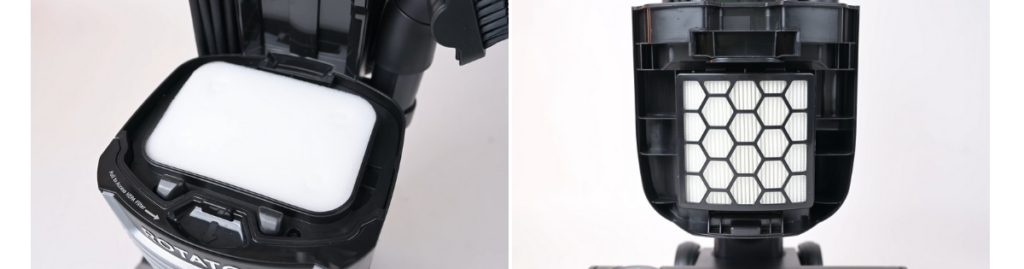
Filters and hoses trap dust and debris, but they can also get clogged over time. If your vacuum’s suction feels weak, check these parts for blockages. Cleaning or replacing dirty filters can restore airflow and improve suction dramatically.
Have you noticed a musty smell or visible dust buildup inside the hose? That’s a clear sign it needs attention. Removing obstructions from the hose is often a simple fix that makes a big difference.
Full Or Dirty Dustbin
A full dustbin limits the vacuum’s ability to pick up more dirt. Empty your dustbin regularly to maintain strong suction. Even a partially full bin can reduce performance, so don’t wait until it’s completely packed.
Sometimes, fine dust settles and clings to the inside of the dustbin, affecting suction as well. Wiping it clean during emptying helps keep your vacuum working at its best.
Blocked Brush Roll
The brush roll agitates carpet fibers and loosens dirt, but it can get tangled with hair, threads, or debris. When this happens, suction suffers because the vacuum can’t lift dirt efficiently. Check the brush roll for blockages and clean it regularly.
If the brush roll spins unevenly or not at all, it might be stuck or damaged. Have you inspected yours lately? A quick untangle or cleaning could solve your suction woes.
Worn Out Or Damaged Parts
Over time, parts like belts, seals, and gaskets wear down or break. These components help maintain suction pressure, so damage can cause leaks and reduce effectiveness. Inspect these parts for signs of wear and replace them if needed.
Ignoring worn parts can lead to bigger problems, such as motor strain or complete vacuum failure. Are you keeping an eye on your vacuum’s condition? Regular maintenance can prevent unexpected breakdowns and keep suction strong.
Credit: vacuumwars.com
Simple Steps To Restore Suction
Low suction is a common problem with Shark vacuums. Restoring suction often takes a few simple actions. These steps help maintain your vacuum’s performance. Follow them to keep your vacuum working well.
Empty And Clean The Dustbin
A full dustbin blocks airflow and reduces suction. Remove the dustbin from the vacuum. Empty all dirt and debris into a trash bin. Rinse the dustbin with water to remove fine dust. Let it dry completely before placing it back.
Check And Clean Filters
Dirty filters stop air from flowing properly. Locate the vacuum’s filters, usually near the dustbin. Remove them carefully and tap gently to remove dust. Wash the filters with water if washable. Allow filters to dry fully before reinstalling.
Clear Blockages In Hoses And Nozzles
Blockages in hoses or nozzles limit suction power. Detach hoses and check inside for clogs. Use a long object or compressed air to clear any debris. Inspect the nozzle opening for hair or dirt. Remove all obstructions to restore airflow.
Inspect And Clean The Brush Roll
The brush roll picks up dirt but can get tangled. Flip the vacuum to access the brush roll. Cut away hair or threads wrapped around it. Remove dirt buildup from the bristles. Spin the brush roll to ensure it moves freely.
When To Replace Parts
Knowing when to replace parts on your Shark vacuum is key to keeping it working at its best. Worn or damaged components can seriously cut down its suction power and cleaning efficiency. Paying attention to specific signs helps you avoid unnecessary repairs or even buying a new vacuum.
Signs Of Worn Brushes
Brushes that look frayed or have missing bristles won’t pick up dirt effectively. If you notice your vacuum leaves hair or debris behind, it’s a good hint that the brushes need replacing. Also, if they spin unevenly or get stuck often, it’s time to swap them out.
Damaged Filters And Their Impact
Filters clogged with dust or torn reduce airflow and lower suction power. You might smell dust coming from your vacuum or see dust escaping during use. Replacing filters regularly keeps your vacuum running smoothly and protects your home’s air quality.
Replacing Hoses And Seals
Cracks or holes in hoses and seals cause air leaks that weaken suction. Check for any visible damage or feel for suction loss around connections. Replacing these parts is simple but crucial for restoring full vacuum power.
Maintenance Tips To Prevent Issues
Keeping your Shark vacuum in top shape depends a lot on how you maintain it regularly. Small habits can make a huge difference in preventing common issues like loss of suction or clogging. Let’s look at some practical tips that will help you avoid frustration and keep your vacuum running smoothly.
Regular Cleaning Schedule
Setting a cleaning routine for your vacuum can save you from many headaches. Empty the dustbin after every use to prevent buildup that clogs the system.
Check and clean the filters at least once a month. Dirty filters reduce suction power and can strain the motor.
Don’t forget to inspect the brush roll for hair and debris. Removing tangled threads weekly can keep it spinning freely and picking up dirt effectively.
Proper Storage Practices
Where and how you store your vacuum affects its longevity. Keep it in a dry, cool place away from direct sunlight to protect the battery and plastic parts.
Make sure the cord is neatly wrapped without tight knots to avoid damage. A damaged cord can be a safety hazard and affect performance.
Using the docking station or wall mount, if available, helps keep the vacuum stable and ready for use, reducing wear from accidental drops.
Avoiding Common Mistakes
Many users overlook simple errors that cause vacuum issues. Avoid using your Shark on wet surfaces unless it’s designed for wet cleaning—moisture can damage the motor.
Don’t overfill the dustbin; this can block airflow and reduce suction. Empty it more frequently during heavy cleaning sessions.
Be cautious about vacuuming large debris like coins or paper clips. These can jam the brush roll or damage internal parts.
Troubleshooting Advanced Problems
Tackling advanced issues with your Shark vacuum can feel overwhelming, especially when basic fixes don’t restore its suction power. Understanding what lies beneath these problems helps you diagnose and address them more effectively. Let’s dig into some of the trickier problems that might be causing your vacuum to underperform.
Motor Malfunctions
The motor is the heart of your Shark vacuum. If it’s malfunctioning, you’ll notice a drastic drop in suction or no suction at all.
Listen for unusual sounds—grinding or whining noises can signal motor trouble. Sometimes, the motor brushes wear out or debris jams the motor fan, causing it to stall.
Try cleaning the motor area gently and check for any visible damage. If the motor overheats or smells burnt, it’s a clear sign it needs professional attention.
Electrical Issues
Electrical problems can silently sabotage your vacuum’s performance. Faulty wiring, loose connections, or a damaged power cord can interrupt power flow.
Check the power cord for cuts or exposed wires. Wiggle the cord near the plug and vacuum to see if the power flickers—this could indicate a loose connection inside.
Also, inspect the on/off switch and circuit board if you feel comfortable opening the vacuum’s housing. Electrical issues often require precise repairs to avoid safety hazards.
When To Seek Professional Help
Some problems go beyond simple fixes. If your vacuum’s motor won’t start despite all checks, or if you detect electrical burning smells, it’s time to call an expert.
Attempting complex repairs without the right tools or knowledge can cause more damage or void your warranty. Professionals can safely diagnose and fix deep mechanical or electrical faults.
Ask yourself—do you have the experience to handle these issues, or would you rather save time and avoid risk by contacting Shark’s service center? Sometimes, investing in professional help protects your vacuum’s lifespan and your peace of mind.

Credit: www.sharkclean.ca
Frequently Asked Questions
Why Is My Shark Vacuum Not Picking Up Dirt?
Your Shark vacuum may have a clogged filter or brushroll. Check and clean these parts regularly. Also, ensure the dustbin is empty and the suction settings are correct.
How Do I Fix Low Suction On Shark Vacuum?
Low suction often occurs due to blockages or a full dustbin. Clear any debris, clean filters, and check for hose obstructions to restore suction power.
Can A Dirty Brushroll Cause Vacuum Not Picking Up?
Yes, a dirty or tangled brushroll reduces vacuum efficiency. Remove hair and debris to improve pickup performance and maintain optimal cleaning results.
Why Does My Shark Vacuum Lose Suction Suddenly?
Sudden suction loss usually indicates a blockage in the hose or filters. Inspect and remove any clogs to regain full suction power quickly.
Conclusion
A Shark vacuum may stop picking up dirt for simple reasons. Check the filters and empty the dust cup first. Clogged brushes or blocked hoses can also cause problems. Make sure the vacuum is on the right setting for your floor.
Regular cleaning and care keep it working well. Small fixes often solve the issue quickly. Keep these tips in mind to enjoy a cleaner home. Don’t let a small problem stop your cleaning routine. Take action and get your Shark vacuum picking up again.