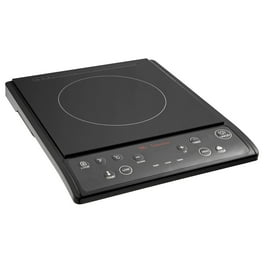
Struggling to fire up your Wolf Induction Cooktop for the first time? You’re not alone.
Many new owners find themselves puzzled by the sleek, modern design that lacks traditional knobs and buttons. But don’t worry; this guide is here to help you every step of the way. Whether you’re eager to cook a quick meal or prepare a gourmet dinner, knowing how to efficiently turn on your cooktop is the first crucial step.
Imagine the satisfaction of mastering your kitchen’s newest technology, cooking with precision and ease. Ready to unlock the power of your Wolf Induction Cooktop? Let’s dive in and make sure you never second-guess your cooking setup again.

Credit: manuals.plus
Locate The Power Source
Locating the power source is the first step to turn on your Wolf induction cooktop. Without power, the cooktop will not work. Knowing where to find the power connection helps you check if everything is set correctly.
Most Wolf induction cooktops are hardwired or plugged into a dedicated outlet. Understanding the setup prevents confusion and saves time during installation or troubleshooting.
Check The Electrical Panel
Start by locating your home’s electrical panel. Look for a breaker labeled for the kitchen or cooktop. Make sure this breaker is switched on. If it is off, switch it back on to provide power.
Identify The Power Cord Or Wire
Look under the cooktop for a power cord or wire. Some models use a plug, others are wired directly. Ensure the cord is securely connected to the outlet or junction box.
Confirm The Outlet Location
If your cooktop uses a plug, find the wall outlet behind it or nearby. The outlet should match the plug type. Check that the outlet is working by plugging in another device.
Inspect For Safety Switches
Some Wolf cooktops have a safety switch or disconnect near the power source. Locate this switch and ensure it is turned on. This switch controls the main power to the cooktop.
Identify Control Panel Features
Understanding the control panel features is essential for operating your Wolf induction cooktop safely and efficiently. The control panel holds all the buttons and indicators you need to start cooking. It lets you control temperature, power, and other functions.
Familiarize yourself with the layout before turning on the cooktop. Knowing where each button and display is located helps prevent confusion during use. This section breaks down key features of the control panel to get you started quickly.
Power Button Location
The power button on a Wolf induction cooktop is usually found at the center or front edge of the control panel. It is often marked with a simple power symbol (a circle with a vertical line). Pressing this button turns the cooktop on or off.
The button is designed to be easy to find and press, even with wet hands. On some models, it may light up when the cooktop is active. This clear placement helps users start cooking without delay.
Display Indicators
The display indicators show important information like heat levels and timer settings. These are usually digital numbers or icons on a screen near the power button.
Common indicators include:
- Heat level numbers, indicating temperature settings
- Timer countdowns, showing remaining cooking time
- Lock symbols, indicating child lock activation
- Warning icons for overheating or errors
These indicators provide real-time feedback to help you adjust settings easily. Bright and clear displays ensure you always know the cooktop’s status.
Step-by-step Activation Process
The activation process of a Wolf Induction Cooktop is simple and user-friendly. This guide explains each action clearly. Follow these steps to start cooking quickly and safely.
Pressing The Power Button
Locate the power button on the cooktop’s control panel. It usually has a circle with a line symbol. Press it once to turn on the cooktop. The display will light up, showing the cooktop is active and ready.
Selecting The Cooking Zone
Identify the cooking zone you want to use. Each zone corresponds to a specific area on the cooktop surface. Touch the zone’s icon on the control panel. The selected zone will highlight or show a number on the display.
Adjusting Heat Settings
After selecting the cooking zone, set the heat level. Use the plus (+) and minus (–) buttons or slide your finger on the heat control bar. Choose a low number for simmering and a high number for boiling. Adjust as needed during cooking for best results.

Credit: www.abt.com
Safety Tips While Turning On
Safety matters when turning on your Wolf induction cooktop. Following simple safety tips helps prevent accidents and keeps your kitchen safe. Always handle the cooktop with care and attention to avoid hazards. Small steps make a big difference in safe cooking.
Avoiding Wet Hands
Never touch the cooktop controls with wet hands. Water and electricity do not mix well. Wet hands can cause electric shock or damage the cooktop. Always dry your hands completely before turning on the cooktop. Keep the cooktop surface dry to avoid slips or electrical issues.
Using Compatible Cookware
Use cookware designed for induction cooking only. The cooktop works with magnetic materials like cast iron or stainless steel. Using the wrong pots or pans can cause uneven heating or damage. Check if your cookware is induction-compatible before placing it on the cooktop. This ensures safety and efficient cooking every time.
Troubleshooting Common Issues
Troubleshooting your Wolf induction cooktop can save you time and avoid unnecessary service calls. Knowing how to handle common issues empowers you to keep your kitchen running smoothly. Let’s look at some typical problems and how you can quickly address them.
Cooktop Not Powering On
If your cooktop doesn’t turn on, the first thing to check is the power source. Make sure the cooktop is properly plugged in and the circuit breaker hasn’t tripped. You might be surprised how often a simple power reset fixes the problem.
Next, inspect the control panel for any signs of damage or moisture. Sometimes a minor spill can interfere with the touch controls, preventing the cooktop from activating.
If everything seems normal but the cooktop still won’t power on, try this:
- Turn off the circuit breaker for 30 seconds, then turn it back on.
- Ensure no cookware is on the surface, as some models require an empty surface to initialize.
- Check your user manual for any child lock or safety lock features that might be engaged.
Error Messages On Display
Seeing an error code can be frustrating, but it’s your cooktop’s way of telling you exactly what’s wrong. Each code corresponds to a specific issue, from overheating to sensor malfunctions.
Here’s how to handle error messages:
| Error Code | Possible Cause | What You Can Do |
|---|---|---|
| F1 | Overheating detected | Turn off the cooktop and let it cool for 15 minutes before restarting. |
| F2 | Sensor error | Clean the cooktop surface and restart. If persists, contact support. |
| F3 | Voltage issue | Check your home’s electrical supply or have an electrician inspect it. |
Have you noticed any patterns when these errors show up? Maybe they happen after heavy use or when certain pots are on the stove. Observing these details can help you prevent future problems.

Credit: big-georges.com
Frequently Asked Questions
How Do I Turn On A Wolf Induction Cooktop?
To turn on your Wolf induction cooktop, press the power button once. Then select the desired cooking zone and adjust the heat level using the control panel. Ensure your cookware is induction-compatible for the cooktop to activate properly.
Why Won’t My Wolf Induction Cooktop Turn On?
If your Wolf induction cooktop won’t turn on, check if it’s properly plugged in and the circuit breaker is on. Also, confirm you’re using induction-compatible cookware. If issues persist, consult the user manual or contact Wolf customer support for assistance.
How Do I Activate Specific Cooking Zones On Wolf Cooktop?
Press the power button to turn on the cooktop. Then touch the cooking zone icon you want to use. Adjust the heat level by sliding your finger or pressing plus/minus buttons on the control panel for precise temperature control.
Can I Use Any Cookware On A Wolf Induction Cooktop?
No, you must use induction-compatible cookware with a magnetic bottom. Stainless steel or cast iron pots work best. If a magnet sticks to the base, it will work on the Wolf induction cooktop, ensuring efficient heat transfer.
Conclusion
Turning on your Wolf induction cooktop is simple and quick. Just follow the steps carefully to avoid mistakes. Always make sure the cooktop is clean and dry before use. Choose the right burner and adjust the heat to your need.
Safety is important, so keep an eye on your cooking. Now, you can enjoy cooking with confidence and ease. Practice a few times, and it will feel natural. Your Wolf cooktop will help make meal times smooth and enjoyable.