Is your LG air conditioner not cooling as well as before? The secret to keeping it running smoothly might be simpler than you think—cleaning your air conditioner filter.
When your filter gets clogged, your AC works harder, uses more energy, and doesn’t cool your space efficiently. But don’t worry; cleaning it is easier than you imagine. In this guide, you’ll discover step-by-step how to clean your LG air conditioner filter quickly and effectively.
By the end, you’ll be able to improve your AC’s performance, save on energy bills, and breathe fresher air. Ready to get started? Let’s dive in!
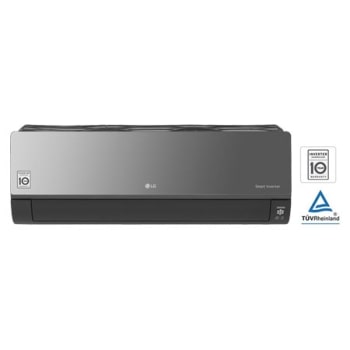
Credit: www.lg.com
Preparing To Clean The Filter
Gather a soft brush, mild soap, and a clean cloth. You will also need a vacuum cleaner with a brush attachment. Keep a bowl of warm water ready for washing the filter. Use gloves if you want to protect your hands.
Make sure the air conditioner is turned off. Unplug the unit from the power source. This step is important for your safetybefore starting any cleaning.
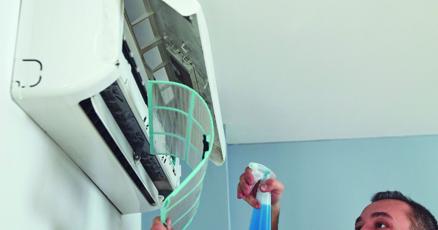
The filter is usually behind the front panel of the air conditioner. Open the panel carefully by pulling it outward. You may find the filter inside, held by clips or a frame. Check your LG air conditioner’s manual for the exact location.
Removing The Filter
Open the front panel gently to avoid damage. Find the small tabs on both sides.
Press the tabs and pull the panel forward slowly. It should open easily.
Hold the filter with both hands. Slide it out carefully to avoid dust falling.
Check the filter for dirt or dust buildup. Clean it regularly for better air flow.
Cleaning The Filter
Using a vacuum cleaner can remove dust and dirt from the filter quickly. Gently run the vacuum over the filter surface. Avoid pressing too hard to prevent damage.
Washing the filter with mild soap and water helps clear stubborn dirt. Use a soft brush or cloth to clean it gently. Rinse thoroughly with clean water to remove soap.
Drying the filter properly is very important. Shake off excess water and place the filter in a dry, shaded area. Avoid direct sunlight or heat to prevent warping or damage. Wait until completely dry before reinstalling.
Credit: www.kpcnews.com
Reinstalling The Filter
Carefully place the clean filter back into its slot. Make sure it fits snugly and aligns with the edges. Avoid forcing the filter to prevent damage.
Once the filter is secure, gently close the front panel. Press along the edges to ensure it locks properly. A tight seal keeps the air conditioner working well.
- Check that the filter is fully seated.
- Close the panel without gaps.
- Listen for a click to confirm closure.
- Do not rush the process.
Maintaining Your Air Conditioner
Cleaning your LG air conditioner filter keeps the unit working well. It also helps the air stay fresh and healthy. Regular cleaning stops dust and dirt from blocking airflow.
Recommended cleaning frequencydepends on use and environment. In dusty places, clean the filter every 2 weeks. For less dust, clean it every month. Check the filter more often if you use the AC daily.
Signs the filter needs cleaninginclude:
- Airflow feels weak or less cool.
- Dust visible on the filter surface.
- Bad or musty smells from the AC unit.
- Increased energy bills without reason.
Cleaning the filter on time keeps the AC fresh and saves energy.

Credit: www.reddit.com
Frequently Asked Questions
How Often Should I Clean My Lg Air Conditioner Filter?
You should clean your LG air conditioner filter every two weeks. Regular cleaning ensures optimal performance and efficiency. Dust and debris can accumulate quickly, reducing airflow and cooling effectiveness. Always refer to your user manual for specific maintenance guidelines related to your model.
What Tools Do I Need To Clean The Filter?
You need a vacuum cleaner, mild detergent, and a soft brush. These tools help remove dust and dirt effectively. A vacuum cleaner can suck up loose debris, while the brush and detergent help with stubborn grime. Always ensure the filter is completely dry before reinserting it.
Can I Wash The Lg Air Conditioner Filter With Water?
Yes, you can wash the filter with water. Use lukewarm water and mild detergent for better results. Rinse thoroughly to remove all soap residues. Allow the filter to air dry completely before placing it back in the unit. This prevents mold and mildew growth.
What Happens If I Don’t Clean The Filter?
Neglecting filter cleaning can lead to reduced cooling efficiency. It can also increase energy consumption and strain the unit. Over time, this may cause mechanical issues and increase repair costs. Clean filters ensure better air quality and prolong the lifespan of your air conditioner.
Conclusion
Cleaning your LG air conditioner filter keeps your AC working well. It helps the air stay fresh and cool. Regular cleaning stops dust and dirt from building up. You save money by avoiding repair costs. Taking just a few minutes every month makes a big difference.
Clean filters also help your home feel healthier. Simple steps can keep your AC in top shape. Keep your filter clean and enjoy cool, fresh air all year.