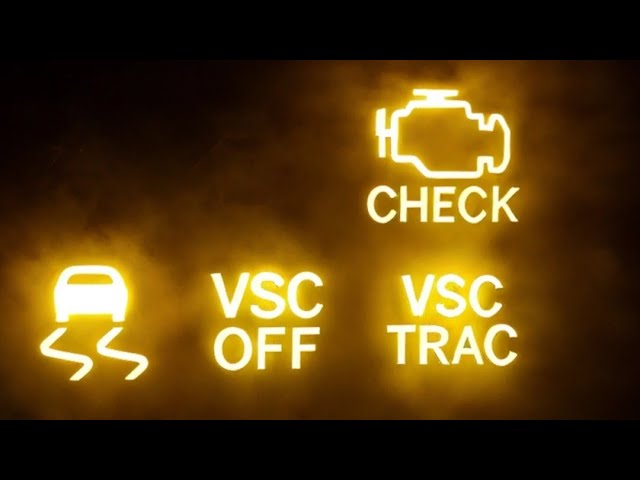
Is your Toyota Highlander’s check engine light glowing on your dashboard? It can be frustrating and even a bit worrying when that little warning pops up.
But don’t panic. You don’t always need to rush to the mechanic or spend a fortune. You’ll discover simple, step-by-step ways to reset your check engine light quickly and safely. By the end, you’ll know exactly what to do to get your Highlander back on the road with confidence.
Keep reading—you’re just moments away from taking control of your car’s health.
Causes Of Check Engine Light
The check engine light in a Toyota Highlander signals an issue with the vehicle’s systems. This light can appear for many reasons, ranging from minor problems to serious faults. Understanding what causes the light helps you decide the next steps. Ignoring the light may lead to bigger repairs and higher costs.
Sometimes, the cause is simple and easy to fix. Other times, it requires professional diagnosis. Knowing the common triggers and when to seek help keeps your Highlander running smoothly.
Common Issues Triggering The Light
- Loose or damaged gas cap causing fuel system leaks
- Faulty oxygen sensor affecting engine performance
- Malfunctioning mass airflow sensor reducing fuel efficiency
- Problems with spark plugs or ignition coils causing misfires
- Issues with the catalytic converter leading to emissions problems
- Vacuum leaks disrupting air-fuel mixture
- Low engine oil or coolant levels triggering sensor alerts
When To Seek Professional Help
- The light flashes, indicating a severe engine misfire
- Engine performance drops sharply or you hear strange noises
- Repeated check engine light after resetting it yourself
- Warning light stays on for an extended period without change
- Difficulty starting the vehicle or poor fuel economy
- Dashboard shows other warning signs alongside the check engine light

Credit: www.youtube.com
Tools Needed For Reset
Before you reset the check engine light on your Toyota Highlander, it’s important to gather the right tools. Having the proper equipment not only makes the process smoother but also ensures you don’t cause any unintended damage. Let’s look at what you’ll need to get started.
Basic Equipment
Sometimes, the simplest tools are enough to reset your check engine light. You’ll need:
- Car Owner’s Manual:This guide often includes specific instructions for your Highlander’s model and year.
- Basic Hand Tools:A screwdriver or socket set might help if you need to access the battery or fuse box.
- Battery Terminal Wrench:Useful if you decide to disconnect the battery as a reset method.
Have you ever tried disconnecting your battery to reset the light? It’s simple but can erase other settings like your radio presets or clock. Knowing this upfront can save you frustration later.
Using An Obd-ii Scanner
An OBD-II scanner is the most reliable and professional way to reset the check engine light. These devices read the error codes your Highlander’s computer generates and allow you to clear them safely.
- Basic OBD-II Scanner:Affordable models connect directly to your vehicle’s diagnostic port and display error codes.
- Bluetooth or Wi-Fi Scanners:These connect to your smartphone or tablet, offering more detailed insights through apps.
Investing in an OBD-II scanner might seem like a hassle, but it can save you multiple trips to the mechanic. Plus, it gives you the power to understand what’s really going on under the hood before deciding to reset the light.
Reset Methods Without Tools
Resetting the check engine light on your Toyota Highlander without any special tools is possible and often simpler than you might think. These methods rely on your vehicle’s built-in systems and can save you a trip to the mechanic or an auto parts store. Let’s look at two straightforward techniques that you can try at home, using just your knowledge and a little patience.
Battery Disconnect Technique
This technique involves disconnecting the car’s battery to clear the check engine light. It works because unplugging the battery resets the vehicle’s computer system, erasing error codes temporarily.
- First, make sure your Highlander is turned off and parked safely.
- Locate the negative battery terminal—usually marked with a minus (-) sign.
- Use a wrench to loosen the nut and disconnect the negative cable.
- Leave the battery disconnected for about 15 to 30 minutes.
- Reconnect the cable and tighten the nut securely.
- Start your vehicle and check if the check engine light has turned off.
Keep in mind, disconnecting the battery may also reset your radio presets and clock. But have you noticed how often clearing the light this way actually fixes minor glitches? It’s a quick fix that works more often than you’d expect.
Drive Cycle Reset
This method uses your Highlander’s normal driving to reset the check engine light. The car’s computer runs self-tests during specific driving conditions, and passing these tests can turn off the light automatically.
- Start with a cold engine, meaning your car has been parked for several hours.
- Drive your vehicle at various speeds, including steady highway driving at 55-60 mph for about 10 to 15 minutes.
- Include some stop-and-go city driving and acceleration to different speeds.
- Avoid turning off the engine during this drive cycle if possible.
- After completing the cycle, the check engine light may turn off if the issue is resolved.
This approach requires patience, but it’s a natural way to clear minor issues without any tools. Have you ever noticed your check engine light disappearing after a long drive? That’s your Highlander’s computer confirming everything is running smoothly again.
Reset Using Obd-ii Scanner
Resetting the check engine light on a Toyota Highlander is simple with an OBD-II scanner. This tool reads the vehicle’s diagnostic codes. It helps you find out why the light is on and clear it once the issue is fixed. Using this scanner saves time and avoids unnecessary trips to the mechanic.
Connecting The Scanner
Locate the OBD-II port under the dashboard on the driver’s side. It is usually near the steering column. Plug the scanner’s connector into this port firmly. Turn the ignition key to the “On” position without starting the engine. The scanner will power up and communicate with your vehicle’s computer.
Reading And Clearing Codes
Follow the scanner’s menu to select the “Read Codes” option. The device will show any error codes stored in the car’s system. Write down these codes or take a picture for reference. After addressing the problem causing the codes, choose the “Clear Codes” or “Erase Codes” option. This will turn off the check engine light. Turn off the ignition and unplug the scanner. Start your Highlander to confirm the light stays off.
Preventing Future Check Engine Lights
Preventing future check engine lights on your Toyota Highlander helps save time and money. Regular care keeps the engine running smoothly. Early detection of issues avoids costly repairs. A few simple habits improve your vehicle’s health and reduce warning signals.
Regular Maintenance Tips
- Change engine oil and filter on time.
- Replace air filters regularly to ensure clean airflow.
- Check and maintain proper tire pressure.
- Inspect spark plugs and replace them if worn.
- Keep fuel system clean with recommended additives.
- Use manufacturer-recommended fluids and parts.
- Schedule routine inspections with a certified mechanic.
Monitoring Vehicle Performance
- Listen for unusual sounds or vibrations.
- Watch for changes in fuel efficiency.
- Notice any rough idling or stalling.
- Keep an eye on dashboard warning lights.
- Check for smoke or strange smells from the engine.
- Record any irregular behavior for mechanic review.

Credit: www.oreillyauto.com
Credit: www.youtube.com
Frequently Asked Questions
How Do I Reset The Check Engine Light On A Toyota Highlander?
To reset the check engine light, use an OBD-II scanner to clear codes. Alternatively, disconnect the battery for 15 minutes. This resets the car’s computer and turns off the light if issues are fixed.
Can I Reset The Check Engine Light Without A Scanner?
Yes, disconnect the battery’s negative terminal for about 15 minutes. This clears the car’s memory, resetting the check engine light. Make sure the problem is resolved first to avoid the light returning.
What Causes The Check Engine Light To Stay On?
Common causes include faulty oxygen sensors, loose gas caps, or engine misfires. Addressing these issues promptly prevents damage and keeps your Toyota Highlander running smoothly.
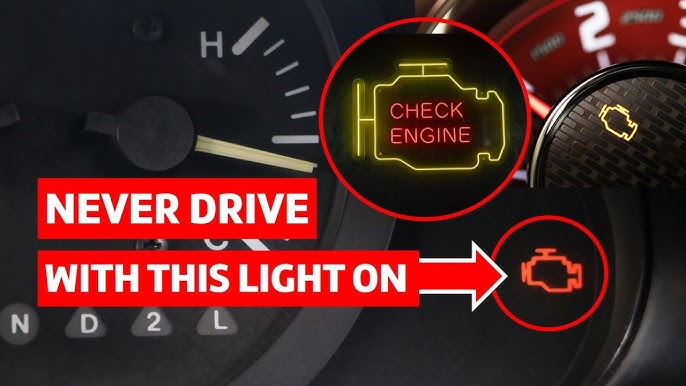
Is It Safe To Drive With The Check Engine Light On?
Driving is possible but not recommended if the light is steady. If it’s flashing, stop immediately and seek repairs to avoid engine damage.
Conclusion
Resetting the check engine light on your Toyota Highlander is simple. Follow the clear steps carefully. Always check for issues before resetting the light. This helps keep your car safe and running well. Regular maintenance prevents many engine problems. Stay calm and be patient during the reset.
This way, you avoid unnecessary visits to the mechanic. Keep your Toyota Highlander in good shape. A small effort saves time and money. Now, you know how to reset the light easily.