If you own a BMW, you might have faced the frustrating issue of the EWS system blocking your car from starting. Knowing how to reset the EWS on your BMW can save you time, money, and stress.
You’ll discover simple, step-by-step instructions to get your EWS back in working order quickly. Whether you’re dealing with a key problem or system error, this guide is designed to help you regain control and get back on the road without hassle.
Keep reading to learn exactly what you need to do.

Credit: www.obdexpress.co.uk
What Is Ews In Bmw
The EWS system in BMW cars is a key security feature. It stands for Electronic Immobilizer System. This system prevents the engine from starting without the correct key. It helps protect the vehicle from theft.
The EWS works by communicating between the car’s key and the engine control unit. When the key is inserted, a chip sends a unique code. The car’s computer checks this code. If the code matches, the engine starts. If not, the engine stays locked.
This system adds an extra layer of safety. It ensures only authorized keys can start the car. Understanding EWS is important before trying to reset it.
How Ews Protects Your Bmw
- Prevents unauthorized engine start
- Uses coded keys with special chips
- Communicates with car’s computer system
- Disables engine if code is wrong
Components Of The Ews System
- Transponder key with a chip
- Immobilizer control unit
- Engine control module (ECM)
- Communication wires and antennas
Why Resetting Ews Might Be Needed
- Lost or damaged key
- Replacing the immobilizer unit
- After repairs on the car’s electrical system
- When buying a second-hand BMW

Credit: www.youtube.com
Why Reset Ews
Resetting the EWS on a BMW helps fix starting problems and security issues. It clears errors in the car’s electronic system. This process ensures smooth engine operation and restores proper key recognition.
When you’re a proud BMW owner, ensuring your car runs smoothly is a top priority. One key component in your BMW is the EWS, or Electronic Immobilizer System, which plays a crucial role in preventing theft by ensuring only the correct key can start the engine. But why might you need to reset this system? Understanding the reasons can save you time, stress, and even money down the line.Preventing Unauthorized Access
Resetting the EWS can be a necessary step to enhance security. If you’ve lost your keys or suspect they might be in the wrong hands, a reset ensures that only new keys are recognized. This gives you peace of mind, knowing your vehicle is protected against unauthorized access.Resolving Technical Glitches
Technical issues can arise, causing communication errors between the key and the EWS. These glitches might prevent your car from starting, leaving you stranded. A simple reset often resolves these issues, restoring the seamless operation you expect from your BMW.When Replacing Or Reprogramming Keys
If you’re getting a new key or reprogramming an existing one, resetting the EWS is a critical step. This ensures that your vehicle recognizes the new key, allowing it to start without issues. Skipping this step could lead to frustrating delays and further complications.After Battery Replacement
Replacing your car battery can sometimes disrupt the EWS system. If your car fails to recognize the key post-battery change, a reset might be necessary. This simple action can save you from unnecessary trips to the mechanic and get you back on the road swiftly.Improving Vehicle Performance
Believe it or not, resetting the EWS can sometimes improve overall vehicle performance. A system that’s functioning optimally ensures smooth operations and reduces the likelihood of malfunctions. It’s a small step that can contribute significantly to your car’s longevity. Have you ever had to reset your EWS? What was your experience like? Share your story and tips with fellow BMW enthusiasts in the comments!Tools Needed For Ews Reset
Resetting the EWS (Electronic Immobilizer System) on your BMW requires the right set of tools to ensure the process goes smoothly. Without proper equipment, you risk damaging your vehicle’s electronic systems or facing unnecessary delays. Having everything ready not only saves time but also boosts your confidence during the reset.
Let’s look at the essential tools you’ll need to get your BMW’s EWS reset done efficiently.
Obd-ii Diagnostic Scanner
An OBD-II scanner is your primary tool for communicating with your BMW’s onboard computer. It allows you to access error codes and perform the EWS reset directly through the car’s diagnostic port.
Not all scanners support BMW-specific protocols, so choose one compatible with BMW models. Investing in a scanner with EWS reset functionality can save you multiple trips to a mechanic.
Bmw Programming Software
Specialized software like BMW INPA, ISTA, or E-Sys is crucial for advanced programming tasks, including EWS resets. These programs provide the interface needed to rewrite the immobilizer system and synchronize keys.
You can find these programs online, often requiring a laptop or tablet to run. Make sure you download the latest version and follow any installation instructions carefully.
Compatible Interface Cable
The interface cable connects your diagnostic scanner or laptop to the car’s OBD-II port. For BMWs, cables like K+DCAN or ENET are commonly used depending on your model and software.
Using the right cable ensures stable communication between your device and the car’s system, which is vital during the reset process.
Spare Key Or Blank Key
Having a spare or blank key on hand is essential if you’re reprogramming or adding a new key during the EWS reset. Sometimes, the reset process involves syncing keys to the immobilizer system.
Without a spare key, you might not be able to complete the reset, leaving your car immobilized. Always check your vehicle’s key compatibility before starting.
Basic Hand Tools
Don’t overlook simple tools like screwdrivers and trim removal tools. You may need to access the OBD-II port or immobilizer components located behind panels in the cabin.
Being prepared with these tools prevents damage to your car’s interior and keeps the process hassle-free.
Have you ever started a car repair only to realize you lacked a crucial tool? Preparing your toolkit ahead of time makes the difference between frustration and success. What tools do you already have, and which will you need to pick up before resetting your BMW’s EWS?

Credit: www.youtube.com
Preparing Your Bmw For Reset
Before you reset the EWS (Electronic Immobilizer System) on your BMW, getting your vehicle ready is crucial. This preparation ensures the reset process goes smoothly and prevents any unexpected issues. Taking the time to properly prepare can save you frustration and costly trips to the mechanic.
Check Your Bmw’s Battery Health
A weak or dying battery can interrupt the reset process. Make sure your battery is fully charged and in good condition. If you’ve noticed dim lights or slow engine cranking recently, consider replacing or recharging the battery first.
Gather Necessary Tools And Equipment
Having the right tools at hand speeds up the reset. You’ll typically need a diagnostic scanner compatible with BMW’s EWS system and your car’s key fob. Don’t start until you have these ready to avoid unnecessary delays.
Park Your Bmw In A Safe, Well-lit Area
Resetting the EWS requires focus and precision. Choose a quiet, safe spot with good lighting to avoid distractions. This helps you work efficiently and reduces the risk of mistakes during the process.
Turn Off All Electrical Components
Before resetting, switch off all electronics like the radio, headlights, and air conditioning. This reduces power draw and minimizes interference. It also helps ensure the reset commands are properly received by the vehicle’s system.
Ensure You Have All Bmw Keys Available
Having all your car keys is important because the EWS reset process often involves programming each key. Missing keys can cause complications or require you to visit a dealer later. Double-check that you have every key before starting.
Step-by-step Ews Reset Process
Resetting the EWS (Electronic Immobilizer System) on your BMW might seem daunting, but breaking it down makes the process straightforward. Each stage requires care and precision to ensure your car’s security features function properly. Let’s walk through the essential steps to reset your EWS effectively.
Accessing The Ews System
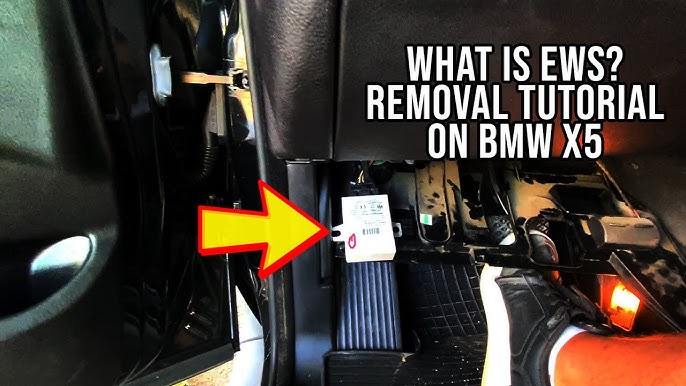
Start by locating the EWS module, usually found under the dashboard or near the steering column. You’ll need to remove any panels carefully to avoid damage. Accessing this system is crucial because it allows you to interface directly with the immobilizer’s control unit.
Have you checked your BMW’s service manual? It often shows exact locations and tips on panel removal, saving you time and frustration.
Using Diagnostic Equipment
Next, connect a compatible diagnostic tool to your BMW’s OBD-II port. These devices communicate with the EWS module, allowing you to read error codes and initiate reset commands.
Make sure your diagnostic tool supports BMW’s specific protocols. Some popular options include BMW INPA, ISTA, or third-party scanners designed for European cars.
Resetting The Ews Module
With the diagnostic equipment connected, navigate to the EWS module within the software. Select the option to reset or reprogram the immobilizer system. This step clears previous key data and immobilizer errors.
Patience is key here; the reset process might take a few minutes. Interrupting it can cause further issues, so keep your car’s battery charged or connect a power source.
Synchronizing The Key And Ews
Once reset, you need to synchronize your car keys with the EWS system. Insert the key into the ignition and follow the diagnostic tool’s prompts to pair it.
Not all keys will sync automatically. If your key is worn or damaged, synchronization might fail, meaning you’ll need a replacement key programmed by a professional.
Finalizing The Reset
After synchronization, turn off the ignition and disconnect the diagnostic tool. Test the system by starting the car with each key you’ve programmed.
Does the engine start smoothly without error messages? If yes, your EWS reset is complete. If not, recheck each step or consult a BMW specialist to avoid security lockouts.
Common Issues During Reset
Resetting the EWS (Electronic Immobilizer System) on a BMW can sometimes bring unexpected challenges. Knowing the common issues helps prepare for a smoother reset process. These problems often arise due to technical faults or user errors.
Understanding these issues saves time and prevents frustration. It also ensures the vehicle’s security system remains intact after the reset.
Communication Errors Between Key And Ews
One frequent issue is poor communication between the car key and the EWS module. The key may not sync correctly, causing the reset to fail. This problem often happens when the key’s battery is low or damaged.
Incorrect Programming Procedure
Following wrong steps during programming can block the reset. Skipping a step or pressing the wrong button interrupts the process. This mistake requires restarting the reset from the beginning.
Faulty Ews Module
A damaged or defective EWS module often prevents a successful reset. Signs include error messages or the engine not starting. Diagnosing the module with a scanner helps confirm this issue.
Battery Voltage Issues
Low battery voltage in the vehicle can cause reset failure. The EWS system needs stable power during programming. Make sure the car battery is fully charged before starting the reset.
Immobilizer Lockout
After several failed attempts, the EWS system may lock itself. This lockout stops further reset tries for a set period. Waiting or using specialized tools is necessary to clear the lock.
Tips To Avoid Ews Problems
Keeping your BMW’s EWS (Electronic Immobilizer System) running smoothly means fewer headaches and unexpected breakdowns. You can avoid many EWS problems by paying attention to small details that often get overlooked. These tips will help you maintain your car’s security system and save time and money on repairs.
Keep Your Key Fob Battery Fresh
A weak battery in your key fob can cause communication issues with the EWS system. Replace the battery regularly, especially if you notice the key’s range shrinking or intermittent unlocking problems. Have you ever experienced your car not recognizing the key? That’s often a sign the battery needs changing.
Avoid Using Duplicate Or Unofficial Keys
Using aftermarket or poorly programmed keys can confuse your EWS system. Always get keys made by authorized dealers to ensure they sync properly with your BMW’s immobilizer. Think about whether saving a few bucks on a duplicate key is worth risking an EWS failure.
Protect Your Car’s Electrical System
Voltage spikes or faulty wiring can disrupt the EWS’s communication with the engine control unit. Regularly check your battery and alternator health to keep your electrical system stable. Simple maintenance can prevent complex EWS errors that leave you stranded.
Be Careful During Battery Replacement
Disconnecting your BMW’s battery without following the right procedure can reset or damage the EWS system. Use a memory saver tool or follow the manufacturer’s steps to avoid triggering immobilizer faults. Have you ever lost your radio presets or had the car refuse to start after a battery change? That’s why this step matters.
Keep Ews Software Updated
BMW periodically releases updates to improve EWS performance and fix bugs. Visit your dealer or use BMW diagnostic tools to ensure your system runs on the latest software. Staying updated helps you avoid bugs that could cause immobilizer malfunctions.
Frequently Asked Questions
What Is Ews In A Bmw And Why Reset It?
EWS stands for Electronic Immobilizer System in BMWs. Resetting it resolves key recognition issues and prevents engine start problems. It enhances security by syncing the car’s system with authorized keys, ensuring only valid keys can start the vehicle.
When Should I Reset The Ews On My Bmw?
Reset your BMW’s EWS when the car doesn’t recognize the key or fails to start. It’s also necessary after replacing the EWS module, ECU, or lost keys. Resetting restores proper communication between the immobilizer and ignition system.
Can I Reset Ews On Bmw Without Special Tools?
Some BMW models allow EWS reset using the key and ignition sequence, but most require diagnostic tools like BMW Scanner or ISTA. Professional tools ensure accurate resetting and avoid damage. DIY methods risk errors, so use caution or consult a specialist.
How Long Does It Take To Reset Bmw Ews System?
Resetting the BMW EWS typically takes 10 to 30 minutes with proper diagnostic equipment. Time varies based on model and tool used. Quick resets ensure minimal downtime and restore vehicle security and functionality efficiently.
Conclusion
Resetting the EWS on your BMW can solve many key issues quickly. Follow the steps carefully to avoid any mistakes. This process helps your car recognize the key and start properly. Keep patience and work step-by-step for the best results.
Regular maintenance of your BMW ensures smooth performance. Now you have the basic knowledge to reset the EWS safely. Always consult your car manual if unsure. Taking control of your vehicle’s system saves time and money. Simple actions can prevent bigger problems later on.